

创建数据库
创建一个数据库,名称为SpringDataMongoDBRepository。这个数据库有一个集合。产品集合。
/* Create SpringDataMongoDBRepository database */
use SpringDataMongoDBRepository

/* Create Product collection */
db.createCollection('product');

/* Dumping data for `product` collection */
db.getCollection('product').insert({
	"name" : "Mobile 1",
    "price" : 45.0,
    "quantity" : 4.0,
    "status" : true,
    "date" : ISODate("2016-10-20T00:00:00.000Z"),
    "categoryId" : ObjectId("5a30de130867edfa45711668"),
    "brand" : {
        "_id" : new ObjectId(),
        "name" : "brand 1"
    },
    "colors" : [
        "red",
        "green",
        "blue"
    ]
});

db.getCollection('product').insert({
	"name" : "Mobile 2",
    "price" : 12.0,
    "quantity" : 7.0,
    "status" : true,
    "date" : ISODate("2017-11-14T00:00:00.000Z"),
    "categoryId" : ObjectId("5a30de130867edfa45711668"),
    "brand" : {
        "_id" : new ObjectId(),
        "name" : "brand 2"
    },
    "colors" : [
        "yellow",
        "green"
    ]
});

db.getCollection('product').insert({
	"name" : "Mobile 3",
    "price" : 28.0,
    "quantity" : 8.0,
    "status" : true,
    "date" : ISODate("2017-11-20T00:00:00.000Z"),
    "categoryId" : ObjectId("5a30de130867edfa45711668"),
    "brand" : {
        "_id" : new ObjectId(),
        "name" : "brand 3"
    },
    "colors" : [
        "black",
        "blue"
    ]
});

db.getCollection('product').insert({
	"name" : "Laptop 1",
    "price" : 39.0,
    "quantity" : 12.0,
    "status" : false,
    "date" : ISODate("2017-12-26T00:00:00.000Z"),
    "categoryId" : ObjectId("5a30de130867edfa45711669"),
    "brand" : {
        "_id" : new ObjectId(),
        "name" : "brand 1"
    },
    "colors" : [
        "blue"
    ]
});

db.getCollection('product').insert({
	"name" : "Laptop 2",
    "price" : 86.0,
    "quantity" : 23.0,
    "status" : true,
    "date" : ISODate("2017-03-11T00:00:00.000Z"),
    "categoryId" : ObjectId("5a30de130867edfa45711669"),
    "brand" : {
        "_id" : new ObjectId(),
        "name" : "brand 1"
    },
    "colors" : [
        "blue",
        "yellow"
    ]
});

db.getCollection('product').insert({
	"name" : "Tivi 1",
    "price" : 22.0,
    "quantity" : 7.0,
    "status" : true,
    "date" : ISODate("2017-06-26T00:00:00.000Z"),
    "categoryId" : ObjectId("5a30de130867edfa4571166a"),
    "brand" : {
        "_id" : new ObjectId(),
        "name" : "brand 1"
    },
    "colors" : [
        "blue",
        "white",
        "black"
    ]
});

db.getCollection('product').insert({
	"name" : "Tivi 2",
    "price" : 86.0,
    "quantity" : 23.0,
    "status" : false,
    "date" : ISODate("2017-09-24T00:00:00.000Z"),
    "categoryId" : ObjectId("5a30de130867edfa4571166a"),
    "brand" : {
        "_id" : new ObjectId(),
        "name" : "brand 3"
    },
    "colors" : [
        "red",
        "green"
    ]
});
创建Spring Boot项目
在Spring工具套件中,创建一个Spring Boot项目
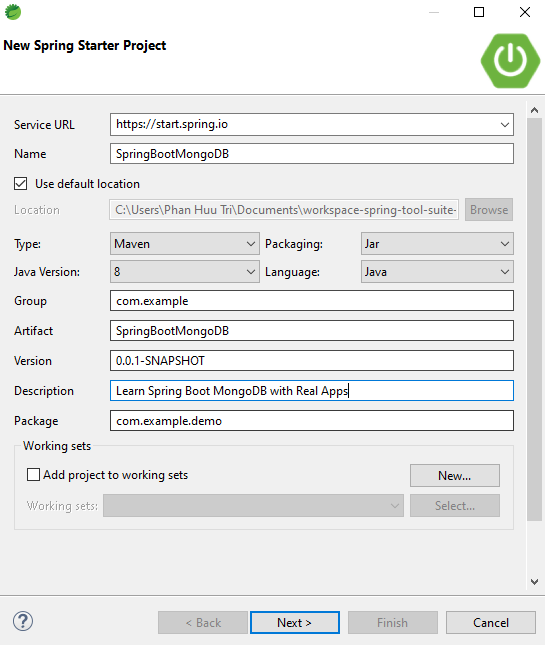
输入项目信息。
- 名称:SpringBootMongoDB
- 组:com.example.demo
- 工件:SpringBootMongoDB
- 描述:通过真实的应用程序学习Spring Boot MongoDB
- 包:com.example.demo
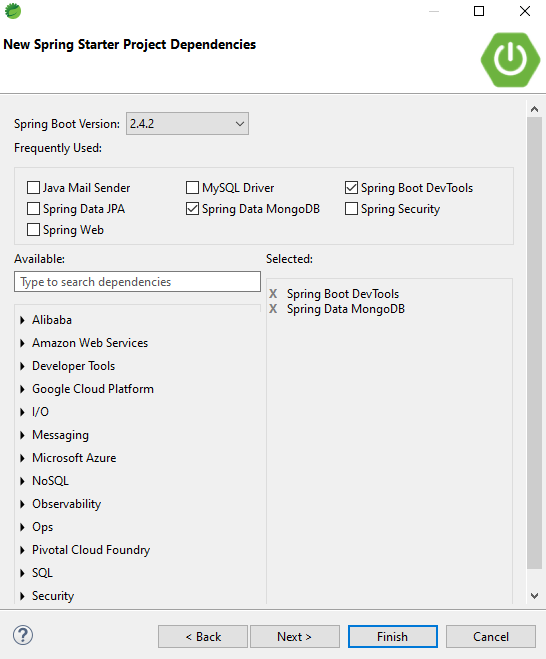
选择要使用的技术和库。
- Spring Data MongoDB
- Spring Boot Devtools
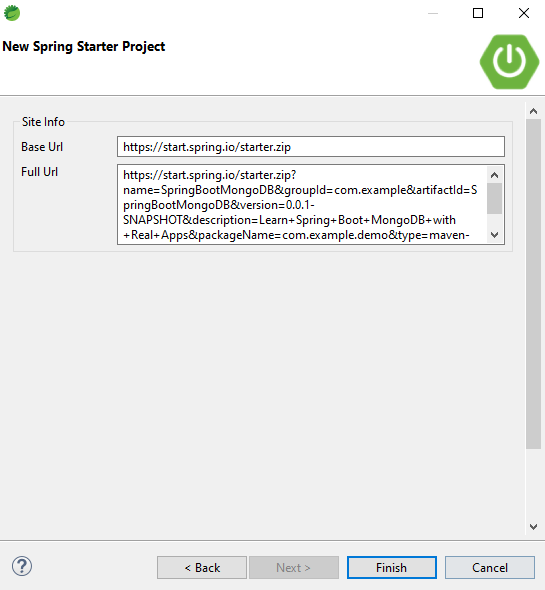
点击 "下一步"按钮,显示项目的信息
点击 "完成"按钮,完成创建Spring Boot项目
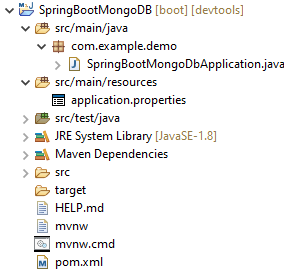
配置pom.xml
<?xml version="1.0" encoding="UTF-8"?>
<project xmlns="http://maven.apache.org/POM/4.0.0" xmlns:xsi="http://www.w3.org/2001/XMLSchema-instance"
	xsi:schemaLocation="http://maven.apache.org/POM/4.0.0 https://maven.apache.org/xsd/maven-4.0.0.xsd">
	<modelVersion>4.0.0</modelVersion>
	<parent>
		<groupId>org.springframework.boot</groupId>
		<artifactId>spring-boot-starter-parent</artifactId>
		<version>2.4.2</version>
		<relativePath/> <!-- lookup parent from repository -->
	</parent>
	<groupId>com.example</groupId>
	<artifactId>SpringBootMongoDB</artifactId>
	<version>0.0.1-SNAPSHOT</version>
	<name>SpringBootMongoDB</name>
	<description>Learn Spring Boot MongoDB with Real Apps</description>
	<properties>
		<java.version>1.8</java.version>
	</properties>
	<dependencies>

		<dependency>
			<groupId>org.springframework.boot</groupId>
			<artifactId>spring-boot-starter-data-mongodb</artifactId>
		</dependency>

		<dependency>
			<groupId>org.springframework.boot</groupId>
			<artifactId>spring-boot-devtools</artifactId>
			<scope>runtime</scope>
			<optional>true</optional>
		</dependency>

		<dependency>
			<groupId>org.springframework.boot</groupId>
			<artifactId>spring-boot-starter-test</artifactId>
			<scope>test</scope>
		</dependency>

	</dependencies>

	<build>
		<plugins>
			<plugin>
				<groupId>org.springframework.boot</groupId>
				<artifactId>spring-boot-maven-plugin</artifactId>
			</plugin>
		</plugins>
	</build>

</project>
数据库配置
打开src/main/resources文件夹中的application.properties文件,添加连接到数据库的配置,如下所示。
spring.data.mongodb.database=SpringDataMongoDBRepository
spring.data.mongodb.port=27017
spring.data.mongodb.host=localhost
实体类
创建名为com.example.demo.entities的新包。在这个包中,创建新的Java类,如下所示。
品牌类
在com.example.demo.entities包中,创建名为Brand.java的新类,如下所示。
package com.example.demo.entities;

public class Brand {

	private String id;
	private String name;

	public String getId() {
		return id;
	}

	public void setId(String id) {
		this.id = id;
	}

	public String getName() {
		return name;
	}

	public void setName(String name) {
		this.name = name;
	}

	public Brand(String id, String name) {
		this.id = id;
		this.name = name;
	}

	public Brand() {
	}

}
产品类
在com.example.demo.entities包中,创建名为Product.java的新类,如下所示。
package com.example.demo.entities;

import java.util.Date;
import java.util.List;
import org.springframework.data.annotation.Id;
import org.springframework.data.mongodb.core.mapping.Document;

@Document(collection = "product")
public class Product {

	@Id
	private String id;
	private String name;
	private double price;
	private int quantity;
	private boolean status;
	private Date date;
	private String categoryId;
	private Brand brand;
	private List<String> colors;

	public String getId() {
		return id;
	}

	public void setId(String id) {
		this.id = id;
	}

	public String getName() {
		return name;
	}

	public void setName(String name) {
		this.name = name;
	}

	public double getPrice() {
		return price;
	}

	public void setPrice(double price) {
		this.price = price;
	}

	public int getQuantity() {
		return quantity;
	}

	public void setQuantity(int quantity) {
		this.quantity = quantity;
	}

	public boolean isStatus() {
		return status;
	}

	public void setStatus(boolean status) {
		this.status = status;
	}

	public Date getDate() {
		return date;
	}

	public void setDate(Date date) {
		this.date = date;
	}

	public String getCategoryId() {
		return categoryId;
	}

	public void setCategoryId(String categoryId) {
		this.categoryId = categoryId;
	}

	public Brand getBrand() {
		return brand;
	}

	public void setBrand(Brand brand) {
		this.brand = brand;
	}

	public List<String> getColors() {
		return colors;
	}

	public void setColors(List<String> colors) {
		this.colors = colors;
	}

}
产品库接口
创建名为com.example.demo.repositories的新包。在这个包中,创建名为ProductRepository.java的新接口,实现Spring框架的CrudRepository接口,如下所示。
package com.example.demo.repositories;

import java.util.List;

import org.springframework.data.mongodb.repository.Query;
import org.springframework.data.repository.CrudRepository;
import org.springframework.stereotype.Repository;

import com.example.demo.entities.Product;

@Repository("productRepository")
public interface ProductRepository extends CrudRepository<Product, String> {

	@Query("{name: {$regex: ?0, $options: i}}")
	public List<Product> like(String like);

}
产品服务接口
创建名为com.example.demo.services的新包。在这个包中创建名为ProductService.java的新接口,如下所示。
package com.example.demo.services;

import java.util.List;

import com.example.demo.entities.Product;

public interface ProductService {

	public List<Product> like(String like);

}
ProductServiceImpl类
在com.example.demo.services包中,创建名为ProductServiceImpl.java的新的java类,通过ProductService接口实现。
package com.example.demo.services;

import java.util.List;

import org.springframework.beans.factory.annotation.Autowired;
import org.springframework.stereotype.Service;

import com.example.demo.entities.Product;
import com.example.demo.repositories.ProductRepository;

@Service("productService")
public class ProductServiceImpl implements ProductService {

	@Autowired
	private ProductRepository productRepository;

	@Override
	public List<Product> like(String like) {
		return productRepository.like(like);
	}

}
配置类
创建名为com.example.demo.configuration的新包,创建名为MongoDBConfigurations.java的新Java类,如下所示。
package com.example.demo.configurations;

import org.springframework.beans.factory.annotation.Autowired;
import org.springframework.context.annotation.Bean;
import org.springframework.context.annotation.ComponentScan;
import org.springframework.context.annotation.Configuration;
import org.springframework.context.annotation.PropertySource;
import org.springframework.data.mongodb.MongoDatabaseFactory;
import org.springframework.data.mongodb.core.convert.DbRefResolver;
import org.springframework.data.mongodb.core.convert.DefaultDbRefResolver;
import org.springframework.data.mongodb.core.convert.DefaultMongoTypeMapper;
import org.springframework.data.mongodb.core.convert.MappingMongoConverter;
import org.springframework.data.mongodb.core.mapping.MongoMappingContext;
import org.springframework.data.mongodb.repository.config.EnableMongoRepositories;
import org.springframework.transaction.annotation.EnableTransactionManagement;

import com.example.demo.services.ProductService;
import com.example.demo.services.ProductServiceImpl;

@Configuration
@EnableTransactionManagement
@EnableMongoRepositories(basePackages = { "com.example.demo.repositories" })
@ComponentScan("com.example.demo")
@PropertySource("classpath:application.properties")
public class MongoDBConfigurations {

	@Autowired
	private MongoDatabaseFactory mongoDatabaseFactory;

	@Autowired
	private MongoMappingContext mongoMappingContext;

	@Bean
	public MappingMongoConverter mappingMongoConverter() {
		DbRefResolver dbRefResolver = new DefaultDbRefResolver(mongoDatabaseFactory);
		MappingMongoConverter converter = new MappingMongoConverter(dbRefResolver, mongoMappingContext);
		converter.setTypeMapper(new DefaultMongoTypeMapper(null));
		return converter;
	}

	@Bean
	public ProductService productService() {
		return new ProductServiceImpl();
	}

}
运行应用程序
创建名为com.example.demo.demo的新包,创建名为Demo.java的新Java类,如下所示。
package com.example.demo.main;

import java.text.SimpleDateFormat;

import org.springframework.context.annotation.AnnotationConfigApplicationContext;
import org.springframework.context.support.AbstractApplicationContext;

import com.example.demo.configurations.MongoDBConfigurations;
import com.example.demo.entities.Product;
import com.example.demo.services.ProductService;

public class Demo {

	public static void main(String[] args) {
		try {
			AbstractApplicationContext context = new AnnotationConfigApplicationContext(MongoDBConfigurations.class);
			ProductService productService = context.getBean(ProductService.class);

			SimpleDateFormat formatter = new SimpleDateFormat("MM/dd/yyyy HH:mm:ss");

			System.out.println("Find Name with Start With: ti");
			for (Product product : productService.like("^ti") {
				System.out.println("Id: " + product.getId());
				System.out.println("Name: " + product.getName());
				System.out.println("Price: " + product.getPrice());
				System.out.println("Quantity: " + product.getQuantity());
				System.out.println("Date: " + formatter.format(product.getDate()));
				System.out.println("Status: " + product.isStatus());
				System.out.println("Brand Info");
				System.out.println("\tBrand Id: " + product.getBrand().getId());
				System.out.println("\tBrand Name: " + product.getBrand().getName());
				System.out.println("Colors:");
				for (String color : product.getColors()) {
					System.out.println("\t" + color);
				}
				System.out.println("================================");
			}

			System.out.println("Find Name with End With: bile 1");
			for (Product product : productService.like("bile 1$") {
				System.out.println("Id: " + product.getId());
				System.out.println("Name: " + product.getName());
				System.out.println("Price: " + product.getPrice());
				System.out.println("Quantity: " + product.getQuantity());
				System.out.println("Date: " + formatter.format(product.getDate()));
				System.out.println("Status: " + product.isStatus());
				System.out.println("Brand Info");
				System.out.println("\tBrand Id: " + product.getBrand().getId());
				System.out.println("\tBrand Name: " + product.getBrand().getName());
				System.out.println("Colors:");
				for (String color : product.getColors()) {
					System.out.println("\t" + color);
				}
				System.out.println("================================");
			}

			System.out.println("Find Name Contains: top");
			for (Product product : productService.like("top") {
				System.out.println("Id: " + product.getId());
				System.out.println("Name: " + product.getName());
				System.out.println("Price: " + product.getPrice());
				System.out.println("Quantity: " + product.getQuantity());
				System.out.println("Date: " + formatter.format(product.getDate()));
				System.out.println("Status: " + product.isStatus());
				System.out.println("Brand Info");
				System.out.println("\tBrand Id: " + product.getBrand().getId());
				System.out.println("\tBrand Name: " + product.getBrand().getName());
				System.out.println("Colors:");
				for (String color : product.getColors()) {
					System.out.println("\t" + color);
				}
				System.out.println("================================");
			}

			context.close();
		} catch (Exception e) {
			System.err.println(e.getMessage());
		}
	}

}
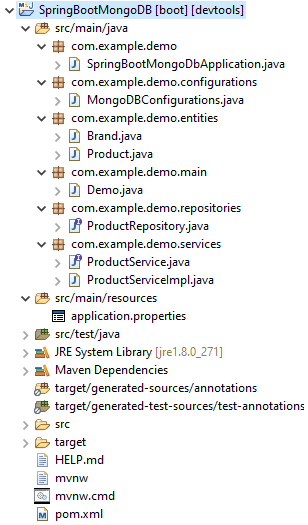
项目结构
输出
Id: 5a586149cfad614dc07d93b7
Name: Laptop 1
Price: 39.0
Quantity: 12
Date: 12/26/2017 07:00:00
Status: false
Brand Info
	Brand Id: 5a586149cfad614dc07d93b6
	Brand Name: brand 1
Colors:
	blue
================================
Id: 5a586149cfad614dc07d93b9
Name: Laptop 2
Price: 86.0
Quantity: 23
Date: 03/11/2017 07:00:00
Status: true
Brand Info
	Brand Id: 5a586149cfad614dc07d93b8
	Brand Name: brand 1
Colors:
	blue
	yellow
================================
