使用react-file-viewer插件预览
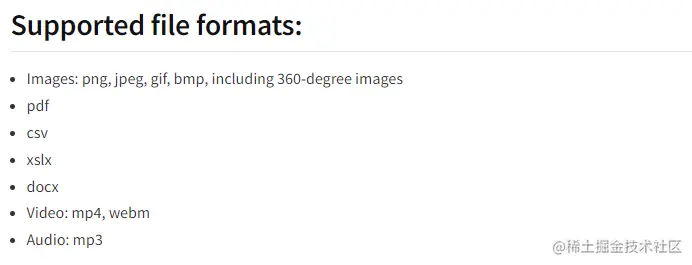
支持格式
转载_保存代码方便后续使用
@/components/FileViewer/index.js
    import React, { useEffect, useState } from 'react'
    import NewFileViewer from 'react-file-viewer'
    import "./index.less"

    export default function FileViewer (props){
        const filePath = props.file
        const [type, setType] = useState('')
        useEffect(() => {
            const type = filePath.split('.')[filePath.split('.').length - 1]
            setType(type)
        }, [filePath])

        const getError = (val) => {
            console.log('err=', val)
        }

        return (
            <div className='file-view'>
            {type ? (
                <NewFileViewer
                    fileType={type}
                    filePath={filePath}
                    errorComponent={getError}
                    onError={err => console.log(err)}
                />
            ) : (
                <div className='file-view-warn'>暂无文件预览</div>
            )}
            </div>
        )
    }
@/components/FileViewer/index.less
    .file-view{
     width: 100%;
     height: 100%;
     .file-view-warn{
         padding-top: 40px;
         font-size: 14px;
         color: #666;
         text-align: center;
     }
     .pdf-canvas{
        text-align: center;
     }
    }
测试地址
    图片测试地址:https://seopic.699pic.com/photo/40007/3915.jpg_wh1200.jpg
    音频测试地址:http://music.163.com/song/media/outer/url?id=447925558.mp3
    视频测试地址:http://clips.vorwaerts-gmbh.de/big_buck_bunny.mp4
    暂时未项目实战,其他格式在线地址未找到验证