- 新建项目文件夹,执行
npm init -y安装vuepress
mkdir vue-press-demo
npm install vuepress --save-dev
npm install vuepress -D
- 新建docs文件夹,创建
config.js文件,对项目进行配置
module.exports {
title: '项目名称',
description: '项目描述',
markdown: {
lineNumbers: true,
extractHeader: ['h2', 'h3', 'h4']
},
configureWebpack: {
resolve: {
alias: {
'@': '/docs',
'@images': '/docs/.vuepress/public/images'
}
}
},
head: [
['link', { rel: 'icon', href: '/icons/favicon.ico' }],
],
themeConfig: {
sidebarDepth: 3,
nav: [
{ text: '首页' , link: '/'},
{
text: '前端',
items: [
{ text: '文本1', link: '/components1/' },
{ text: '文本2', link: '/components2/' },
]
}
],
sidebar: {
"/components1/": [
"/components1/"
],
"/components2/": [
"/components/",
{
title: '前端',
children: [
"/components2/html",
"/components2/css",
]
}
]
}
},
plugins: [
[
"one-click-copy",
{
copySelector: ['div[class*="language-"] pre', 'div[class*="aside-code"] aside'],
copyMessage: "复制成功",
duration: 1000
}
],
[
"vuepress-plugin-zooming",
{
selector: ".theme-default-content img:not(.no-zoom)",
options: {
bgColor: "rgba(0,0,0,0.6)"
}
}
]
]
}
- 根目录下新建
README.md文件,该文件为项目的首页
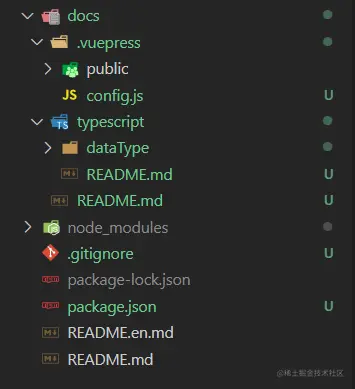
- 创立项目架构
code
docs
.vuepress
dist
public
images
icons
config.js
components
design
README.md
node_modules
.gitignore
package.json
- 修改
package.json,增加以下代码
"scripts": {
  "dev": "vuepress dev docs --temp .temp",
  "build": "vuepress build docs",
  "test": "echo \"Error: no test specified\" && exit 1"
},
- 接下来,开始记录你的Markdown文件吧