一、基于element Table 封装,引用属性方法等一样使用
二、mh-table组件代码结构图
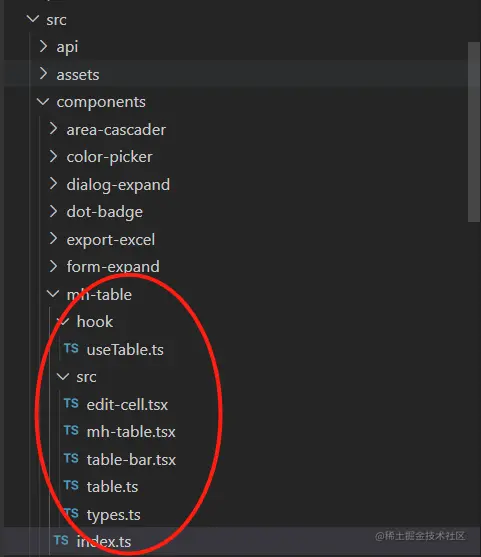
1、mh-table目录下src新建edit-cell.tsx
import { defineComponent, ref, PropType, unref, nextTick, ExtractPropTypes } from 'vue'
import { useRenderIcon } from '/@/components/ReIcon/src/hooks'

const props = {
  type: {
    type: String as PropType<'text' | 'number'>,
    default: 'text',
  },
  modelValue: [String, Number],
  // type 为 number 时生效
  precision: {
    type: Number,
    default: 0,
  },
}

const EditCell = defineComponent({
  name: 'EditCell',
  props,
  emits: ['save', 'update:modelValue'],
  setup(props, { emit, slots }) {
    const inputRef = ref()
    const editing = ref(false)

    const inputValue = ref()

    const onEdit = () => {
      inputValue.value = props.modelValue
      editing.value = true
      nextTick(() => {
        inputRef.value?.focus()
      })
    }

    const onSave = () => {
      editing.value = false
      emit('save', unref(inputValue))
    }

    const onInput = (e) => {
      inputValue.value = e
      emit('update:modelValue', e)
    }

    return () => {
      const textRender = () => (
        <el-space>
          <span class="leading-[24px]">{props.modelValue}</span>
          {slots?.default?.()}
          <el-button type="primary" icon={useRenderIcon('ep:edit-pen')} link onClick={onEdit} />
        </el-space>
      )

      const inputNumberRender = () => (
        <el-space>
          <el-input-number
            ref={inputRef}
            model-value={unref(inputValue)}
            precision={props.precision}
            controls={false}
            onChange={onInput}
            onBlur={onSave}
            size="small"
          />
          {slots.default?.()}
          <el-button type="primary" icon={useRenderIcon('ep:finished')} link onClick={onSave} />
        </el-space>
      )

      const inputRender = () => (
        <el-space>
          <el-input
            ref={inputRef}
            model-value={unref(inputValue)}
            onInput={onInput}
            onBlur={onSave}
            size="small"
          />
          {slots.default?.()}
          <el-button type="primary" icon={useRenderIcon('ep:finished')} link onClick={onSave} />
        </el-space>
      )

      const editRender = props.type === 'number' ? inputNumberRender : inputRender

      return unref(editing) ? editRender() : textRender()
    }
  },
})

export default EditCell
export type EditCellProps = ExtractPropTypes<typeof props>
export type EditCellInstance = InstanceType<typeof EditCell>
2、mh-table目录下src新建mh-table.tsx
import { unref, defineComponent } from 'vue'
import TableBar from './table-bar'
import { mhTableProps } from './table'
import PureTable from '@pureadmin/table'
import { useTable as usePureTable } from '../hook/useTable'
import { SearchForm } from '/@/components/form-expand'
import { warn, ref, onMounted } from 'vue'
const MhTable = defineComponent({
name: 'MhTable',
props: mhTableProps,
setup(props, { slots, attrs, expose }) {
const {
loading,
tableRef,
tableData,
pagination,
getTableList,
onRefresh,
onCurrentChange,
onSizeChange,
search,
getElTableRef,
} = usePureTable(props, props.immediate)
const elTableRef = ref()
const exec = (fn: string, ...args) => {
const elTableFn = elTableRef.value[fn]
if (!elTableFn) {
const url = 'https://element-plus.gitee.io/zh-CN/component/table.html'
warn(`el-table 不存在方法 ${fn},请查阅文档:${url}`)
return
}
return elTableFn(...args)
}
onMounted(() => {
elTableRef.value = getElTableRef()
})
expose({
refresh: getTableList,
search,
rows: tableData,
exec,
})
return () => {
const {
title,
columns,
onRefresh: propOnRefresh,
extraParams,
size,
...propTableProps
} = props
const formSlots = {
default: slots.search,
buttons: slots['search-buttons'],
}
const formRender = () => {
if (slots['search-buttons'] && !slots.search) {
warn(`slot search-buttons 必须在 slot search 存在时候才生效`)
return null
}
return !slots.search ? null : (
<SearchForm
class="mb-md"
loading={unref(loading)}
model={extraParams}
onSearch={search}
v-slots={formSlots}
/>
)
}
const tableProps = {
...propTableProps,
...attrs,
border: true,
align: 'center',
showOverflowTooltip: false,
tableLayout: 'auto',
headerCellStyle: {
background: 'var(--el-table-row-hover-bg-color)',
color: 'var(--el-text-color-primary)',
},
columns,
pagination,
data: unref(tableData),
onSizeChange,
onCurrentChange,
}
const tableSlots = { empty: () => <el-empty description="暂无数据" /> }
const slotsArr = unref(slots)
const keys = Object.keys(slotsArr)
const exclude = ['bar-buttons', 'search', 'search-buttons', 'toolbar']
for (const fn of keys) {
if (!exclude.includes(fn)) tableSlots[fn] = slotsArr[fn]
}
const tableRender = ({ size, checkList }) => {
return (
<PureTable
{...tableProps}
ref={tableRef}
size={size}
checkList={checkList}
paginationSmall={size === 'small' ? true : false}
v-slots={tableSlots}
/>
)
}
const barProps = {
title,
columns,
loading: unref(loading),
size,
onRefresh() {
onRefresh()
propOnRefresh?.()
},
}
const barSlots = {
default: tableRender,
buttons: slots['bar-buttons'],
toolbar: slots['toolbar'],
}
return (
<>
{formRender()}
<TableBar {...barProps} v-slots={barSlots} />
</>
)
}
},
})
export default MhTable
export type MhTableInstance = InstanceType<typeof MhTable> & {
refresh: () => Promise<any>
search: () => Promise<any>
rows: Record<string, any>
exec: (fn: string, ...args) => any
}
3、mh-table目录下src新建table-bar.tsx
import { defineComponent, ref, computed, PropType, toRaw, type ExtractPropTypes } from 'vue'
import { useEpThemeStoreHook } from '/@/store/modules/epTheme'
import { IconifyIconOffline } from '../../ReIcon'
import type { TableColumns } from './types'

export const loadingSvg = `
  <path class="path" d="
    M 30 15
    L 28 17
    M 25.61 25.61
    A 15 15, 0, 0, 1, 15 30
    A 15 15, 0, 1, 1, 27.99 7.5
    L 15 15
  "
    style="stroke-width: 4px; fill: rgba(0, 0, 0, 0)"
  />
`

const props = {
  // 头部最左边的标题
  title: {
    type: String,
    default: '',
  },
  // 表格列表
  columns: {
    type: Array as PropType<TableColumns[]>,
    default: () => {
      return []
    },
  },
  // 是否显示加载动画,默认false 不加载
  loading: {
    type: Boolean,
    default: false,
  },
  size: {
    type: String,
    default: 'default',
  },
}

export default defineComponent({
  name: 'TableBar',
  props,
  emits: ['refresh'],
  setup(props, { emit, slots, attrs }) {
    const buttonRef = ref()
    const checkList = ref([])
    const size = ref(props.size)
    const canHideColums = toRaw(props.columns).filter((v) => v.hide)

    const getDropdownItemStyle = computed(() => {
      return (s: string) => {
        return {
          background: s === size.value ? useEpThemeStoreHook().epThemeColor : '',
          color: s === size.value ? '#fff' : 'var(--el-text-color-primary)',
        }
      }
    })

    const dropdown = {
      dropdown: () => (
        <el-dropdown-menu class="translation">
          <el-dropdown-item
            style={getDropdownItemStyle.value('large')}
            onClick={() => (size.value = 'large')}
          >
            松散
          </el-dropdown-item>
          <el-dropdown-item
            style={getDropdownItemStyle.value('default')}
            onClick={() => (size.value = 'default')}
          >
            默认
          </el-dropdown-item>
          <el-dropdown-item
            style={getDropdownItemStyle.value('small')}
            onClick={() => (size.value = 'small')}
          >
            紧凑
          </el-dropdown-item>
        </el-dropdown-menu>
      ),
    }

    const reference = {
      reference: () => (
        <IconifyIconOffline
          class="cursor-pointer"
          icon="ep:setting"
          width="16"
          color="text_color_regular"
          onMouseover={(e: { currentTarget: any }) => (buttonRef.value = e.currentTarget)}
        />
      ),
    }

    const buttonsRender = () => {
      return slots.buttons ? (
        <>
          <div class="flex">{slots.buttons()}</div>
          {props.title ? <el-divider direction="vertical" /> : null}
        </>
      ) : null
    }

    const tableTitleRender = () => {
      if (props.title) return <p class="font-bold truncate">{props.title}</p>
      else return slots.buttons ? buttonsRender() : <div />
    }

    const toolbarRender = () => {
      return slots.toolbar ? (
        <div class="pb-md">{slots.toolbar()}</div>
      ) : (
        <div class="toolbar flex-bc pt-md pb-md">
          {tableTitleRender()}
          <div class="flex items-center justify-around">
            {props.title ? buttonsRender() : null}
            <el-tooltip effect="dark" content="刷新" placement="top">
              <IconifyIconOffline
                class="cursor-pointer"
                icon="ep:refresh-right"
                width="16"
                color="text_color_regular"
                onClick={() => emit('refresh')}
              />
            </el-tooltip>
            <el-divider direction="vertical" />

            <el-tooltip effect="dark" content="密度" placement="top">
              <el-dropdown v-slots={dropdown} trigger="click">
                <IconifyIconOffline
                  class="cursor-pointer"
                  icon="density"
                  width="16"
                  color="text_color_regular"
                />
              </el-dropdown>
            </el-tooltip>

            {!canHideColums.length ? null : (
              <>
                <el-divider direction="vertical" />
                <el-popover v-slots={reference} width="200" trigger="click">
                  <el-checkbox-group v-model={checkList.value}>
                    {canHideColums.map((item) => {
                      return (
                        <div>
                          <el-checkbox
                            label={item.prop}
                            key={item.prop}
                            checked={!item.hideDefault}
                          >
                            {item.label}
                          </el-checkbox>
                        </div>
                      )
                    })}
                  </el-checkbox-group>
                </el-popover>
                <el-tooltip
                  popper-options={{
                    modifiers: [
                      {
                        name: 'computeStyles',
                        options: {
                          adaptive: false,
                          enabled: false,
                        },
                      },
                    ],
                  }}
                  placement="top"
                  virtual-ref={buttonRef.value}
                  virtual-triggering
                  trigger="hover"
                  content="列设置"
                />
              </>
            )}
          </div>
        </div>
      )
    }

    return () => (
      <>
        <div
          {...attrs}
          class="table-bar px-md pb-md bg-bg_color mh-card-border"
          v-loading={props.loading}
          element-loading-svg={loadingSvg}
          element-loading-svg-view-box="-10, -10, 50, 50"
        >
          {toolbarRender()}
          {slots.default({ size: size.value, checkList: checkList.value })}
        </div>
      </>
    )
  },
})

export type TableBarProps = ExtractPropTypes<typeof props>
4、mh-table目录下src新建table.ts
import type { ExtractPropTypes } from 'vue'
import TableBar from './table-bar'
import PureTable from '@pureadmin/table'
export const mhTableProps = {
...TableBar.props,
...PureTable.props,
pagination: {
type: [Object, Boolean],
default: true,
},
columns: {
type: Array,
defualt() {
return []
},
},
query: Function,
extraParams: {
type: Object,
default() {
return {}
},
},
onSizeChange: Function,
onCurrentChange: Function,
onRefresh: Function,
immediate: {
type: Boolean,
default: true,
},
}
export type MhTableProps = ExtractPropTypes<typeof mhTableProps>
5、mh-table目录下src新建types.ts
import type { TableColumns as PureTableColumns } from '@pureadmin/table'
export interface TableColumns extends PureTableColumns {
  hideDefault?: boolean
}

export type { MhTableInstance } from './mh-table'
export type { MhTableProps } from './table'
export type { TableBarProps } from './table-bar'
6、新建index.ts
import MhTable from './src/mh-table'
import EditCell from './src/edit-cell'
export default MhTable
export * from './src/types'
export { EditCell }
7、hook目录下新建useTable.ts
import { reactive, ref, unref, toRaw } from 'vue'
import { type PaginationProps } from '@pureadmin/table'
import { type MhTableProps } from '/@/components/mh-table'
import { isBoolean } from '@pureadmin/utils'
import { filterEmpty } from '/@/utils/utils'

export const useTable = (props: MhTableProps, immediate = true) => {
  const tableRef = ref()
  const loading = ref(false)
  const tableData = ref([])
  const defaultPagination = {
    total: 0,
    pageSize: 10,
    currentPage: 1,
    background: true,
  }
  const propPaginationRaw = toRaw(unref(props.pagination))
  const pagination = isBoolean(propPaginationRaw)
    ? propPaginationRaw
      ? reactive<PaginationProps>(defaultPagination)
      : null
    : reactive<PaginationProps>(Object.assign(defaultPagination, propPaginationRaw))

  const getTableList = () => {
    if (loading.value) return
    loading.value = true
    const params = toRaw(props.extraParams)
    if (pagination) {
      params.num = pagination.currentPage
      params.size = pagination.pageSize
    }
    return props
      .query(filterEmpty(params))
      .then((res) => {
        if (pagination) pagination.total = res?.total || 0
        tableData.value = res?.list || []
      })
      .finally(() => {
        loading.value = false
      })
  }

  const search = () => {
    if (pagination) pagination.currentPage = 1
    getTableList()
  }

  const onSizeChange = (value) => {
    getTableList()
    props.onSizeChange?.(value)
  }

  const onCurrentChange = (value) => {
    getTableList()
    props.onCurrentChange?.(value)
  }

  const onRefresh = () => {
    getTableList()
    props.onRefresh?.()
  }

  immediate && getTableList()

  return {
    loading,
    tableData,
    pagination,
    tableRef,
    getTableList,
    search,
    onSizeChange,
    onCurrentChange,
    onRefresh,
    getElTableRef: () => tableRef.value?.getTableRef(),
  }
}
三、remainingSumInfoHtml页面
2、columns.tsx处理tabble数据
import { ref } from 'vue'
export function useColumns() {
const columns = ref([
{
label: '序号',
type: 'index',
width: 80,
},
{
label: '手机',
prop: 'phone',
},
{
label: '订单号',
prop: 'orderNo',
},
{
label: '备注',
prop: 'reason',
},
{
label: '交易金额',
prop: 'money',
},
{
label: '余额',
prop: 'usableMoney',
},
{
label: '变更时间',
prop: 'gmtModified',
width: 180,
// formatter: ({ gmtCreate }) => dayjs(gmtCreate).format('YYYY-MM-DD HH:mm:ss'),
},
])
return {
columns,
}
}
2、index.vue引入引用mh-table组件
<script setup lang="ts">
import { reactive, ref } from 'vue'
import { useColumns } from './columns'
import type { MhTableInstance } from '/@/components/mh-table'
import { remainingSumInfo } from '/@/api/membership'
import dayjs from 'dayjs'
defineOptions({
name: 'remainingSumInfoHtml',
})
const tableRef = ref<MhTableInstance>()
const searchForm = reactive({
orderNo: undefined,
phone: undefined,
startTime: dayjs(new Date()).format('YYYY-MM-DD HH:mm:ss'),
endTime: undefined,
})
const { columns } = useColumns()
const listApi = (params) => remainingSumInfo(params).then(({ data }) => data)
</script>
<template>
<div class="main">
<MhTable ref="tableRef" :columns="columns" :query="listApi" :extraParams="searchForm">
<template #search>
<el-form-item label="" prop="startTime">
<el-date-picker
v-model="searchForm.startTime"
type="datetime"
placeholder="起始时间"
format="YYYY-MM-DD HH:mm:ss"
value-format="YYYY-MM-DD HH:mm:ss"
/>
</el-form-item>
<el-form-item label="" prop="endTime">
<el-date-picker
v-model="searchForm.endTime"
type="datetime"
placeholder="截至时间"
format="YYYY-MM-DD HH:mm:ss"
value-format="YYYY-MM-DD HH:mm:ss"
/>
</el-form-item>
<el-form-item label="" prop="phone">
<el-input v-model="searchForm.phone" placeholder="手机号" clearable />
</el-form-item>
<el-form-item label="" prop="orderNo">
<el-input v-model="searchForm.orderNo" placeholder="订单号" clearable />
</el-form-item>
</template>
</MhTable>
</div>
</template>
<style lang="scss" scoped>
.color-primary {
color: var(--el-color-primary);
}
</style>
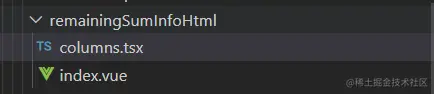
3、remainingSumInfoHtml页面目录图片
4、remainingSumInfoHtml页面效果图