

测试软件我们这样做有很多原因,下面是我的两个理由:
- 加快我的工作流程,使我能够更快地开发软件
- 帮助我确保在进行修改时不会破坏现有的代码
说到这里,我有几个问题要问你(这些是twitter上的民意调查):
这篇文章的目的是让你们每个人都能对最后一个问题回答 "是"。这样你就对JavaScript中的测试有了一个基本的了解,这将有助于你写出更好的测试。
所以,我们要做的是利用这个简单的math.js 模块,为它所暴露的两个函数编写测试。
const sum = (a, b) => a + b
const subtract = (a, b) => a - b

module.exports = {sum, subtract}
步骤1
这是我能想到的最基本的测试形式:
// basic-test.js
const actual = true
const expected = false
if (actual !== expected) {
  throw new Error(`${actual} is not ${expected}`)
}
你可以通过运行node basic-test.js 来运行这个测试代码 !这就是一个测试!🎉
**测试是当某件事的实际结果与预期输出不一致时抛出错误的代码。**当你处理那些依赖于某些状态的代码时,它可能会变得更加复杂(比如在你触发浏览器事件之前,一个组件需要被渲染到文档中,或者数据库中需要有用户)。然而,测试像我们的math.js 模块中的 "纯函数 "是相对容易的(这些函数对于给定的输入总是返回相同的输出,并且不改变它们周围世界的状态)。
**说actual !== expected 的部分被称为 "断言"。**它是一种在代码中说一件事应该是某个值或通过某个......呃......测试的方式 :)它可以是一个断言,即actual 匹配一个重码,是一个具有一定长度的数组,或任何数量的东西。关键是,如果我们的断言失败了,那么我们就抛出一个错误。
因此,这里是我们的math.js函数的最基本测试:
// 1.js
const {sum, subtract} = require('./math')

let result, expected

result = sum(3, 7)
expected = 10
if (result !== expected) {
  throw new Error(`${result} is not equal to ${expected}`)
}

result = subtract(7, 3)
expected = 4
if (result !== expected) {
  throw new Error(`${result} is not equal to ${expected}`)
}
就这样吧!与node 一起运行,该命令将无错误退出。现在,让我们通过将+ 改为- 来打破sum 函数,并再次运行它,我们将看到。
$ node 1.js
/Users/kdodds/Desktop/js-test-example/1.js:8
  throw new Error(`${result} is not equal to ${expected}`)
  ^

Error: -4 is not equal to 10
    at Object.<anonymous> (/Users/kdodds/Desktop/js-test-example/1.js:8:9)
    at Module._compile (module.js:635:30)
    at Object.Module._extensions..js (module.js:646:10)
    at Module.load (module.js:554:32)
    at tryModuleLoad (module.js:497:12)
    at Function.Module._load (module.js:489:3)
    at Function.Module.runMain (module.js:676:10)
    at startup (bootstrap_node.js:187:16)
    at bootstrap_node.js:608:3
酷!我们已经从我们的基本测试中受益了!我们不能在不破坏我们的自动测试的情况下破坏sum函数!很好!
测试框架(或断言库)最重要的部分之一是他们的错误信息有多大帮助。通常,当测试失败时,你首先看到的是错误信息。如果你不能从错误信息中找出根本的问题,那么你就必须花几分钟的时间看一下代码,以了解出错的原因。错误信息的质量很大程度上取决于你对你所使用的框架所提供的断言的理解和使用程度。
第二步
你知道吗,Node实际上有一个assert 模块来做类似我们上面的断言 🤔?让我们重构我们的测试,以使用该模块!
// 2.js
const assert = require('assert')
const {sum, subtract} = require('./math')

let result, expected

result = sum(3, 7)
expected = 10
assert.strictEqual(result, expected)

result = subtract(7, 3)
expected = 4
assert.strictEqual(result, expected)
很好!这仍然是一个测试模块。这在功能上等同于我们之前的内容。唯一的区别是错误信息。
$ node 2.js
assert.js:42
  throw new errors.AssertionError({
  ^

AssertionError [ERR_ASSERTION]: -4 === 10
    at Object.<anonymous> (/Users/kdodds/Desktop/js-test-example/2.js:8:8)
    at Module._compile (module.js:635:30)
    at Object.Module._extensions..js (module.js:646:10)
    at Module.load (module.js:554:32)
    at tryModuleLoad (module.js:497:12)
    at Function.Module._load (module.js:489:3)
    at Function.Module.runMain (module.js:676:10)
    at startup (bootstrap_node.js:187:16)
    at bootstrap_node.js:608:3
你会注意到抛出的错误信息中不再有我们自己的代码,这很遗憾......😦但让我们继续下去。
第三步
让我们继续写我们自己的简单测试 "框架 "和断言库。我们将从断言库开始。因此,我们将创建一个库,称为expect ,而不是Node内置的assert 模块。下面是我们的重构测试,有了这个变化。
// 3.js
const {sum, subtract} = require('./math')

let result, expected

result = sum(3, 7)
expected = 10
expect(result).toBe(expected)

result = subtract(7, 3)
expected = 4
expect(result).toBe(expected)

function expect(actual) {
  return {
    toBe(expected) {
      if (actual !== expected) {
        throw new Error(`${actual} is not equal to ${expected}`)
      }
    },
  }
}
酷,所以现在我们可以在我们返回的那个对象上添加一堆断言(像toMatchRegex 或toHaveLength )。哦,这是现在的错误信息。
$ node 3.js
/Users/kdodds/Desktop/js-test-example/3.js:17
        throw new Error(`${actual} is not equal to ${expected}`)
        ^

Error: -4 is not equal to 10
    at Object.toBe (/Users/kdodds/Desktop/js-test-example/3.js:17:15)
    at Object.<anonymous> (/Users/kdodds/Desktop/js-test-example/3.js:7:16)
    at Module._compile (module.js:635:30)
    at Object.Module._extensions..js (module.js:646:10)
    at Module.load (module.js:554:32)
    at tryModuleLoad (module.js:497:12)
    at Function.Module._load (module.js:489:3)
    at Function.Module.runMain (module.js:676:10)
    at startup (bootstrap_node.js:187:16)
    at bootstrap_node.js:608:3
好的,事情看起来不错。
第四步
但现在问题来了 😖...如果我看到这个错误信息,我怎么知道是sum 这个函数出了问题?它可能是subtract 模块。另外,测试的源码没有很好地保持测试的隔离性(视觉上或其他方面)。
因此,让我们写一个辅助函数来使其发挥作用。
// 4.js
const {sum, subtract} = require('./math')

test('sum adds numbers', () => {
  const result = sum(3, 7)
  const expected = 10
  expect(result).toBe(expected)
})

test('subtract subtracts numbers', () => {
  const result = subtract(7, 3)
  const expected = 4
  expect(result).toBe(expected)
})

function test(title, callback) {
  try {
    callback()
    console.log(`✓ ${title}`)
  } catch (error) {
    console.error(`✕ ${title}`)
    console.error(error)
  }
}

function expect(actual) {
  return {
    toBe(expected) {
      if (actual !== expected) {
        throw new Error(`${actual} is not equal to ${expected}`)
      }
    },
  }
}
现在我们可以把所有与给定测试相关的东西放在我们的 "测试 "回调函数中,我们可以给该测试一个名字。然后,我们使用test ,不仅给出一个更有帮助的错误信息,而且还运行文件中的所有测试(不会在第一个错误时跳出)!这是现在的输出。
$ node 4.js
✕ sum adds numbers
Error: -4 is not equal to 10
    at Object.toBe (/Users/kdodds/Desktop/js-test-example/4.js:29:15)
    at test (/Users/kdodds/Desktop/js-test-example/4.js:6:18)
    at test (/Users/kdodds/Desktop/js-test-example/4.js:17:5)
    at Object.<anonymous> (/Users/kdodds/Desktop/js-test-example/4.js:3:1)
    at Module._compile (module.js:635:30)
    at Object.Module._extensions..js (module.js:646:10)
    at Module.load (module.js:554:32)
    at tryModuleLoad (module.js:497:12)
    at Function.Module._load (module.js:489:3)
    at Function.Module.runMain (module.js:676:10)
✓ subtract subtracts numbers
很好!现在我们看到了错误本身*,也*看到了测试的标题,这样我们就知道要去修复哪一个了。
第五步
所以我们现在需要做的是写一个CLI工具,搜索我们所有的测试文件并运行它们!这一点一开始很简单。这一点起初很简单,但我们可以在上面添加很多东西。😅
在这一点上,我们正在建立一个测试框架和测试运行器。幸运的是,现在已经有很多这样的框架了。我已经试过很多了,它们都很好。也就是说,没有什么比Jest🃏能更好地满足我的用例了。它是一个了不起的工具(在这里了解更多关于Jest的信息)。
因此,与其建立我们自己的框架,不如直接将我们的测试文件切换到Jest上工作。恰好,它已经这样做了我们所要做的就是删除我们自己的test 和expect 的实现,因为Jest在我们的测试中把这些对象作为全局对象。所以,现在看起来是这样的。
// 5.js
const {sum, subtract} = require('./math')

test('sum adds numbers', () => {
  const result = sum(3, 7)
  const expected = 10
  expect(result).toBe(expected)
})

test('subtract subtracts numbers', () => {
  const result = subtract(7, 3)
  const expected = 4
  expect(result).toBe(expected)
})
当我们用Jest运行这个文件时,输出的结果是这样的。
$ jest
 FAIL  ./5.js
  ✕ sum adds numbers (5ms)
  ✓ subtract subtracts numbers (1ms)

● sum adds numbers

expect(received).toBe(expected)

    Expected value to be (using Object.is):
      10
    Received:
      -4

      4 |   const result = sum(3, 7)
      5 |   const expected = 10
    > 6 |   expect(result).toBe(expected)
      7 | })
      8 |
      9 | test('subtract subtracts numbers', () => {

      at Object.<anonymous>.test (5.js:6:18)

Test Suites: 1 failed, 1 total
Tests:       1 failed, 1 passed, 2 total
Snapshots:   0 total
Time:        0.6s, estimated 1s
Ran all test suites.
从文字上看不出来,但这个输出是彩色的。这是一张输出的图片。
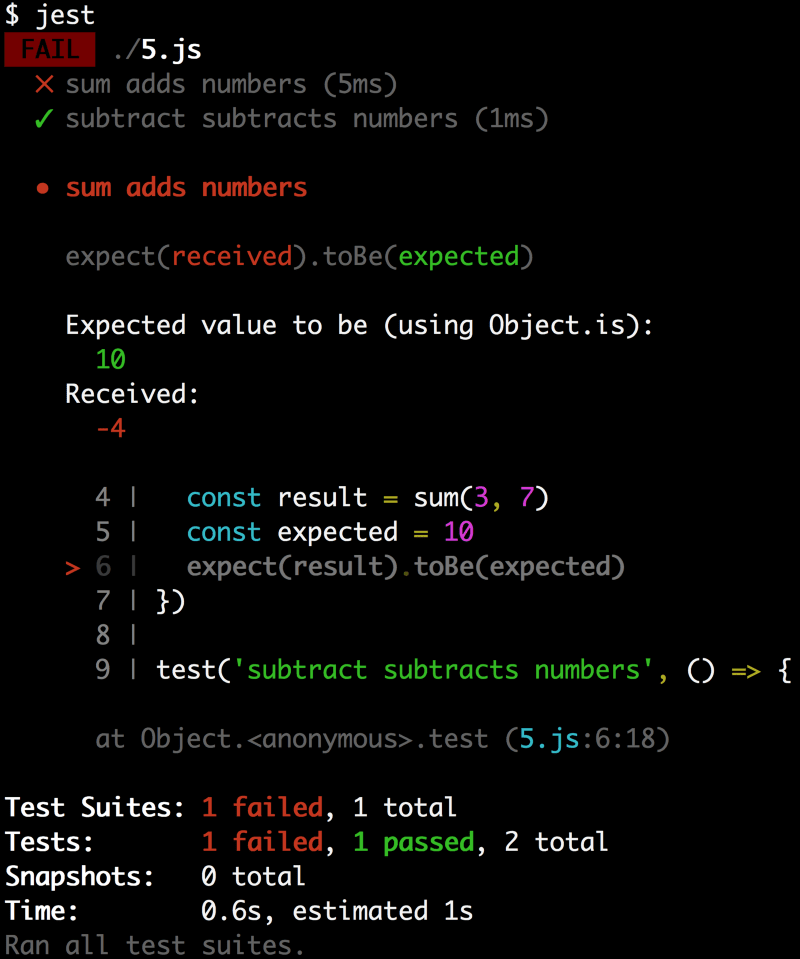
它有颜色编码,这对识别相关部分很有帮助 😀它还显示了抛出错误的代码!现在这就是一个有用的错误信息
结论
那么,什么是JavaScript测试?它是一些简单的代码,它设置了一些状态,执行了一些动作,并对新的状态进行断言。我们没有谈及常见的框架辅助函数,如beforeEach 或describe,还有很多我们可以添加的断言,如toMatchObject 或者。toContain但希望这能让你对JavaScript测试的基本概念有一个概念。
我希望这对你有帮助!祝您好运!👍
