

这篇博文的灵感来自于看到React的测试,看起来像这样:
const utils = render()

test('test 1', () => {
  // use utils here
})

test('test 2', () => {
  // use utils here too
})
所以我想谈谈测试隔离的重要性,并指导你用更好的方式来写你的测试,以提高测试的可靠性,简化代码,并增加你的测试和提供的信心。
让我们以这个简单的组件为例:
import React, {useRef} from 'react'

function Counter(props) {
  const initialProps = useRef(props).current
  const {initialCount = 0, maxClicks = 3} = props

  const [count, setCount] = React.useState(initialCount)
  const tooMany = count >= maxClicks

  const handleReset = () => setCount(initialProps.initialCount)
  const handleClick = () => setCount(currentCount => currentCount + 1)

  return (


        Count: {count}

      {tooMany ? reset : null}

  )
}

export {Counter}
这里是该组件的渲染版本:

让我们从一个测试套件开始,就像这篇文章的灵感一样;
// gives us the toHaveTextContent/toHaveAttribute matchers
import '@testing-library/jest-dom/extend-expect'
import {render} from '@testing-library/react'
import userEvent from '@testing-library/user-event'
import * as React from 'react'

import {Counter} from '../counter'

const {getByText} = render()
const counterButton = getByText(/^count/i)

test('the counter is initialized to the initialCount', () => {
  expect(counterButton).toHaveTextContent('3')
})

test('when clicked, the counter increments the click', () => {
  userEvent.click(counterButton)
  expect(counterButton).toHaveTextContent('4')
})

test(`the counter button is disabled when it's hit the maxClicks`, () => {
  userEvent.click(counterButton)
  expect(counterButton).toHaveAttribute('disabled')
})

test(`the counter button does not increment the count when clicked when it's hit the maxClicks`, () => {
  expect(counterButton).toHaveTextContent('4')
})

test(`the reset button has been rendered and resets the count when it's hit the maxClicks`, () => {
  userEvent.click(getByText(/reset/i))
  expect(counterButton).toHaveTextContent('3')
})
首先,截至@testing-library/react@9.0.0,这种风格的测试甚至不会正常工作,但让我们想象它可以。
这些测试给我们提供了100%的组件覆盖率,并且准确地验证了他们说要验证的东西。问题是,它们共享了易变的状态。他们共享的易变态是什么?就是这个组件!一个测试点击了计数器按钮,其他的测试依靠这个事实来通过。如果我们删除(或.skip )名为 "当点击时,计数器增加点击 "的测试,它将破坏所有的后续测试。
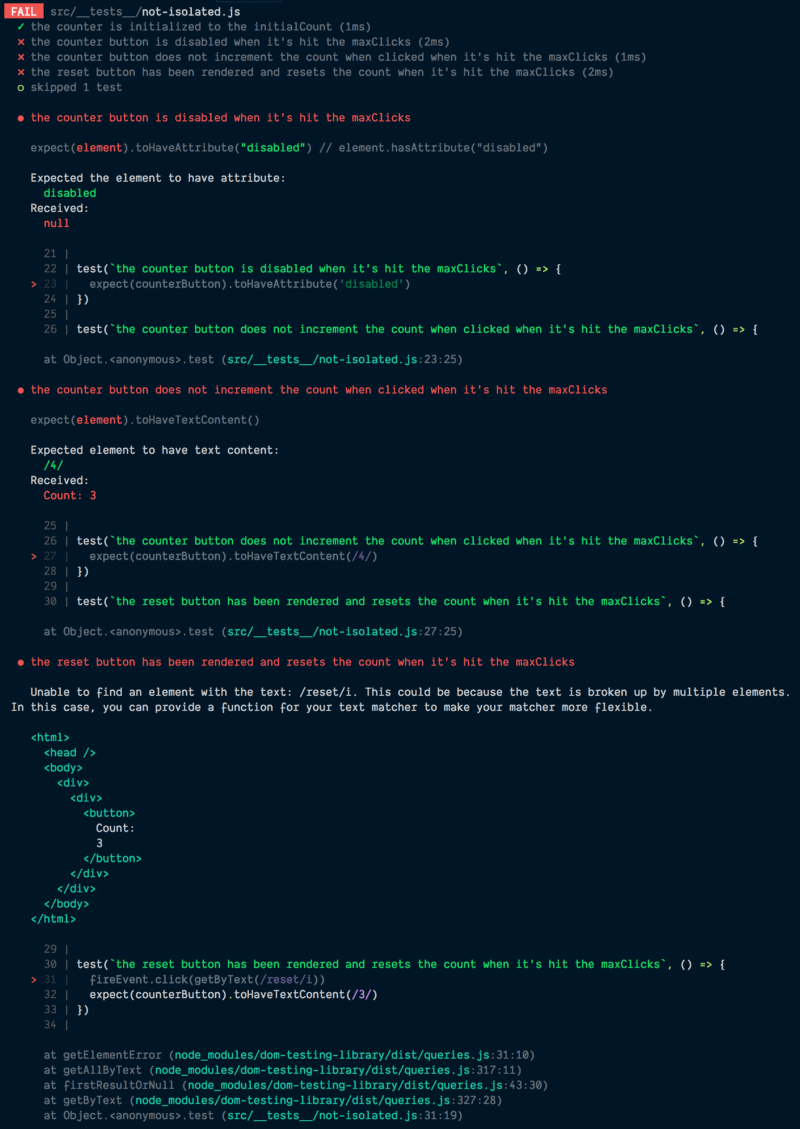
这是一个问题,因为它意味着我们不能可靠地重构这些测试,或者为了调试的目的在与其他测试隔离的情况下运行一个测试,因为我们不知道哪些测试会影响其他测试的功能。当有人来对一个测试进行修改时,其他的测试就会突然中断,这真的很让人困惑。
因此,让我们试试别的东西,看看它是如何改变的。
import '@testing-library/jest-dom/extend-expect'
import {render} from '@testing-library/react'
import userEvent from '@testing-library/user-event'
import * as React from 'react'

import {Counter} from '../counter'

let getByText, counterButton

beforeEach(() => {
  const utils = render()
  getByText = utils.getByText
  counterButton = utils.getByText(/^count/i)
})

test('the counter is initialized to the initialCount', () => {
  expect(counterButton).toHaveTextContent('3')
})

test('when clicked, the counter increments the click', () => {
  userEvent.click(counterButton)
  expect(counterButton).toHaveTextContent('4')
})

test(`the counter button is disabled when it's hit the maxClicks`, () => {
  userEvent.click(counterButton)
  expect(counterButton).toHaveAttribute('disabled')
})

test(`the counter button does not increment the count when clicked when it's hit the maxClicks`, () => {
  userEvent.click(counterButton)
  userEvent.click(counterButton)
  expect(counterButton).toHaveTextContent('4')
})

test(`the reset button has been rendered and resets the count when it's hit the maxClicks`, () => {
  userEvent.click(counterButton)
  userEvent.click(getByText(/reset/i))
  expect(counterButton).toHaveTextContent('3')
})
有了这个,每个测试都是完全与其他测试隔离的。我们可以删除或跳过任何测试,其余的测试继续通过。这里最大的根本区别是,每个测试都有自己的计数实例来工作,并且在每次测试后都会卸载它(这要感谢React测试库自动发生)。这大大减少了我们的测试的复杂性,只需稍作改动。
人们经常说反对这种方法的一点是,它比以前的方法慢。我不完全确定如何回应这个问题......比如,慢了多少?比如几毫秒?在这种情况下,那又怎样?几秒钟?那么你的组件也许应该被优化,因为这实在是太糟糕了。我知道这随着时间的推移会增加,但由于这种方法增加了信心并提高了可维护性,我很乐意多等几秒钟来渲染东西。此外,由于有Jest中伟大的观察模式支持,你不应该经常运行整个测试基础。
因此,我实际上仍然对我们上面的测试不是很满意。我不太喜欢beforeEach 和在测试之间共享变量。我觉得它们会导致测试更加难以理解。让我们再试一次。
import '@testing-library/jest-dom/extend-expect'
import {render} from '@testing-library/react'
import userEvent from '@testing-library/user-event'
import * as React from 'react'

import {Counter} from '../counter'

function renderCounter(props) {
  const utils = render()
  const counterButton = utils.getByText(/^count/i)
  return {...utils, counterButton}
}

test('the counter is initialized to the initialCount', () => {
  const {counterButton} = renderCounter()
  expect(counterButton).toHaveTextContent('3')
})

test('when clicked, the counter increments the click', () => {
  const {counterButton} = renderCounter()
  userEvent.click(counterButton)
  expect(counterButton).toHaveTextContent('4')
})

test(`the counter button is disabled when it's hit the maxClicks`, () => {
  const {counterButton} = renderCounter({
    maxClicks: 4,
    initialCount: 4,
  })
  expect(counterButton).toHaveAttribute('disabled')
})

test(`the counter button does not increment the count when clicked when it's hit the maxClicks`, () => {
  const {counterButton} = renderCounter({
    maxClicks: 4,
    initialCount: 4,
  })
  userEvent.click(counterButton)
  expect(counterButton).toHaveTextContent('4')
})

test(`the reset button has been rendered and resets the count when it's hit the maxClicks`, () => {
  const {getByText, counterButton} = renderCounter()
  userEvent.click(counterButton)
  userEvent.click(getByText(/reset/i))
  expect(counterButton).toHaveTextContent('3')
})
这里我们增加了一些模板,但现在每个测试不仅在技术上是孤立的,而且在视觉上也是。你可以看一个测试,看到它到底做了什么,而不必担心测试中发生了什么钩子。这是一个很大的胜利,因为你能够重构、删除或添加到测试中。
我喜欢我们现在所拥有的,但我认为在我对事情真正感到满意之前,我们还需要更进一步。我们已经按功能划分了我们的测试,但我们真正想要相信的是我们的组件所满足的用例。它允许点击,直到达到maxClicks,然后要求重置。这就是我们试图验证和获得信心的地方。当我测试时,我对用例比具体功能更感兴趣。那么,如果我们更关注用例而不是单个功能,这些测试会是什么样子呢?
import '@testing-library/jest-dom/extend-expect'
import {render} from '@testing-library/react'
import userEvent from '@testing-library/user-event'
import * as React from 'react'

import {Counter} from '../counter'

test('allows clicks until the maxClicks is reached, then requires a reset', () => {
  const {getByText} = render()
  const counterButton = getByText(/^count/i)

  // the counter is initialized to the initialCount
  expect(counterButton).toHaveTextContent('3')

  // when clicked, the counter increments the click
  userEvent.click(counterButton)
  expect(counterButton).toHaveTextContent('4')

  // the counter button is disabled when it's hit the maxClicks
  expect(counterButton).toHaveAttribute('disabled')
  // the counter button no longer increments the count when clicked.
  userEvent.click(counterButton)
  expect(counterButton).toHaveTextContent('4')

  // the reset button has been rendered and is clickable
  userEvent.click(getByText(/reset/i))

  // the counter is reset to the initialCount
  expect(counterButton).toHaveTextContent('3')

  // the counter can be clicked and increment the count again
  userEvent.click(counterButton)
  expect(counterButton).toHaveTextContent('4')
})
我真的很喜欢这样的测试。它帮助我避免考虑功能,而更多地关注我想用这个组件完成什么。它也是比其他测试更好的组件文档。
在过去,我们不会这样做(在一个测试中拥有多个断言)的原因是很难分辨测试的哪个部分出现了问题。但现在我们有了更好的错误输出,而且真的很容易识别测试的哪一部分被破坏。比如说。
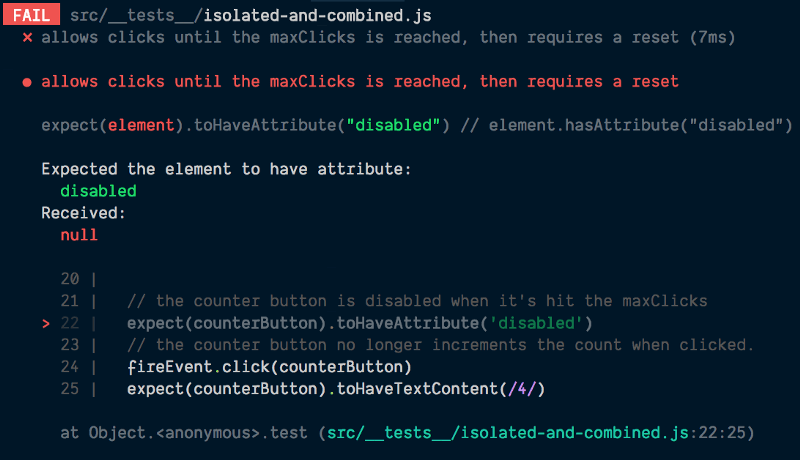
代码框架是特别有帮助的。它不仅显示了行号,还显示了失败的断言周围的代码,这些代码显示了我们的注释和其他代码,真正帮助我们了解错误信息的来龙去脉,甚至我们以前的测试也没有给我们提供这些信息。
我应该提到的是,这并不是说你不应该为一个组件分开测试案例!有很多原因你想让它成为一个独立的测试案例。有很多理由你想这样做,而且大多数时候你会这样做。只要多关注用例而不是功能,一般来说,你会用它来覆盖你所关心的大部分代码。然后你可以有一些额外的测试来处理边缘情况。
我希望这对你有帮助!你可以在这里找到这个例子的代码。尽量使你的测试相互隔离,并专注于用例而不是功能,你会有一个更好的测试时间!祝您好运!
