

0.起源:Rails doctrine™
在BootrAils,Cypress已经被集成、配置,并有一些测试来覆盖和记录应用程序。我们发现这个工具非常有趣,因为它与Rails哲学的一个精确点相匹配。
有价值的集成系统
这意味着,尽管是一个MVC框架,但视图、控制器和模型之间的边界更少,界限更模糊。这可能对任何Rails的新手来说都是一种伤害。
在一天结束的时候,即使各层没有完全分开,你也会有更高的生产力。
问题:鉴于单元测试要求在隔离的情况下进行测试,当各层没有完全隔离时,你如何测试任何东西?
幸运的是,有些测试实际上是在一起测试各层。
- 集成测试
- 系统测试
- 端到端测试
所有这些类型的测试都是从外部检查行为。
1.从上到下测试Rails应用程序:不那么容易
在Cypress之前,用Rails测试整个堆栈并不是那么令人满意。我们所说的 "整个堆栈 "是指通过用户界面测试整个运行中的服务器、数据库、控制器等,就像一个普通用户会做的那样。你不得不把多个驱动程序、gem和lib粘在一起,最后你得到的是一个不太稳定的测试屏幕套件。Selenium用户知道在这个领域实现伟大的工作是多么复杂。
不幸的是,"最简单的Rails + RSpec + Capybara测试 "仍然不是特别简单
-Jason Swett,使用RSpec和Capybara的 "hello world"。
2.进入Cypress
Cypress有一个特点,就是不关心底层的测试屏幕。如果你在前端使用jQuery、Hotwire、AlpineJS或React,这都不重要。
Cypress在开发者中带来了很多积极性,在BootrAils我们特别喜欢它。其他人也是如此。
我们在工作中从Capybara转到了Cypress,我将永远不会再回去了。
-在Reddit上发现的。
这并不是说Capybara已经死了,而是Cypress的体验更好。
-也是在Reddit上发现的。
Cypress取代了对Capybara的需求。
3.Cypress和Rails,一场不可思议的婚礼
现在有一个非常好的消息:将Cypress集成到Rails中是非常简单的,因为已经有一个宝石可以实现。
4.教程,从头开始
让我们安装一个新的Rails应用程序,并测试这个美丽的宝石。
首先,我们要检查我们的安全带。
$> ruby -v
ruby 3.0.0p0 // you need at least version 3 here
$> bundle -v
Bundler version 2.2.11
$> npm -v
8.3.0 // you need at least version 7.1 here
$> yarn -v
1.22.10
$> psql --version
psql (PostgreSQL) 13.1 // let's use a production-ready database locally
然后,我们创建一个裸露的Rails应用程序。
mkdir rails-with-cypress && cd rails-with-cypress
echo "source 'https://rubygems.org'" > Gemfile
echo "gem 'rails', '7.0.0'" >> Gemfile
bundle install
bundle exec rails new . --force --css=bootstrap -d=postgresql
bundle update

# Create a default controller
echo "class HomeController < ApplicationController" > app/controllers/home_controller.rb
echo "end" >> app/controllers/home_controller.rb

# Create another controller (the one that should not be reached without proper authentication)
echo "class OtherController < ApplicationController" > app/controllers/other_controller.rb
echo "end" >> app/controllers/other_controller.rb

# Create routes
echo "Rails.application.routes.draw do" > config/routes.rb
echo ' get "home/index"' >> config/routes.rb
echo ' get "other/index"' >> config/routes.rb
echo ' root to: "home#index"' >> config/routes.rb
echo 'end' >> config/routes.rb

# Create a default view
mkdir app/views/home
echo '<h1>This is home</h1>' > app/views/home/index.html.erb
echo '<div><%= link_to "go to other page", other_index_path %></div>' >> app/views/home/index.html.erb

# Create another view (will be also protected by authentication)
mkdir app/views/other
echo '<h1>This is another page</h1>' > app/views/other/index.html.erb
echo '<div><%= link_to "go to home page", root_path %></div>' >> app/views/other/index.html.erb


# Create database and schema.rb
bin/rails db:create
bin/rails db:migrate
很好!快速检查一切是否正常运行,至少在本地是这样的,启动.NET。
./bin/dev
从一个页面导航到另一个页面。这是我们应用程序的主要功能(哇!)。我们不希望每次在生产中推送新功能时都要手动测试它,所以让我们正确地自动测试它。
5.为Rails安装Cypress gem
首先,你将需要Cypress本身。运行:
yarn add --dev cypress
将此添加到你的Gemfile中。
group :development, :test do
  gem "cypress-rails"
end
然后运行。
bundle install
# verbose logs...
# ...
# ...
Using rails 7.0.0
Fetching cypress-rails 0.5.3
Using turbo-rails 7.1.1
Installing cypress-rails 0.5.3
Bundle complete! 18 Gemfile dependencies, 69 gems now installed.
Use `bundle info [gemname]` to see where a bundled gem is installed.
很好!Cypress已经安装完毕。
现在运行。
bin/rails cypress:init
好的!只有cypress.json文件被创建。
{
  "screenshotsFolder": "tmp/cypress_screenshots",
  "videosFolder": "tmp/cypress_videos",
  "trashAssetsBeforeRuns": false
}
以上是cypress-rails的默认选项,你可以在这里找到所有可用的选项。
6.创建文件
正如你可能已经注意到的,到目前为止,你既没有测试也没有目录结构。Cypress足够聪明,在你第一次运行它时就提供了所需的一切。运行
bin/rails cypress:open
等待几秒钟,然后Cypress的IDE应该出现,像这样。
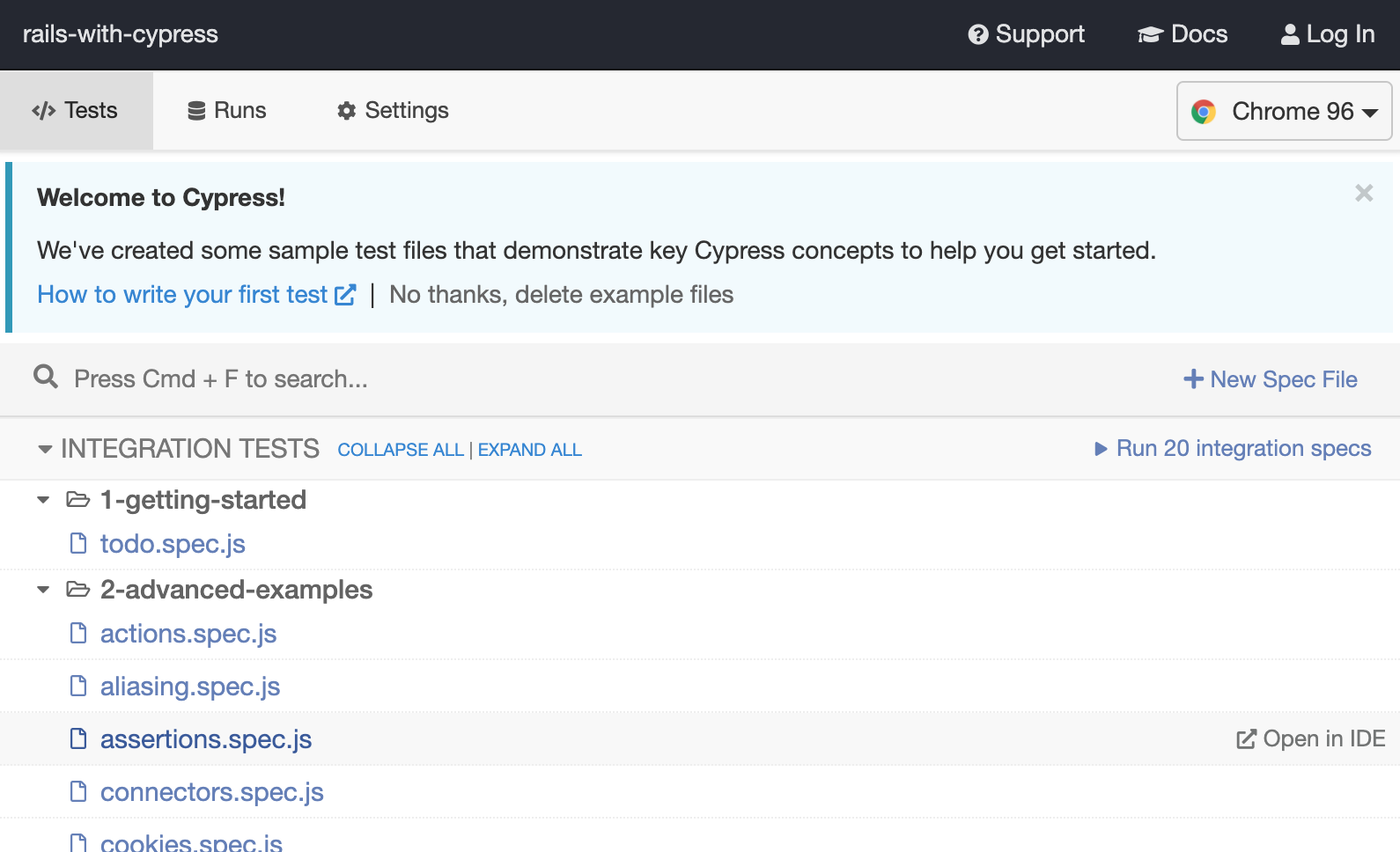
赛普拉斯第一次启动
Cypress建议你保留或删除现有的测试。我们建议你保留它们,它们作为一种参考是非常有用的。
一旦保留,将它们剪切/粘贴到其他地方(在你的工作区的另一个地方),这样它们就不会在本教程中产生太大的噪音(一般来说,在你自己的项目中也是如此)。
这是创建的目录结构,位于你的Rails项目的根部。
root
+-- cypress
  +--fixtures
  +--example.json
  +--integration
  +--plugins
  +--index.js
  +--support
  +--commands.js
  +--index.js
integration 文件夹是你实际编写测试的地方:所有以*.spec.js 结尾的文件将在 Cypress IDE 中运行。
fixtures 文件夹是你为你的测试定义通用参考数据的地方,support 和plugins 文件夹允许你扩展 Cypress 的功能。
7.我们自己的测试
正如你可能已经注意到的,集成文件夹不是空的。把所有的内容复制/粘贴到其他地方--里面的例子真的很有用,所以保留它们作为以后的参考。然后完全清空integration 文件夹中的内容。
然后写下以下测试。
// inside cypress/integration/home.spec.js
describe('Testing Home page', () => {

  beforeEach(() => {
    cy.visit('/')
  })

  it('Display a title by default', () => {
    cy.get('h1').should('contain', 'This is home')
  })

  it('Allows to navigate from home page, to another', () => {
    cy.get('a[href*="other/index"]').click()
    cy.location().should((location) => {
      expect(location.pathname).to.eq('/other/index')
    })
  })

})
然后在你的终端运行:
bin/rails cypress:open
并在IDE中点击home.spec.js

cypress demo
很好!Cypress提供了一个很好的IDE,提供了很好的调试选项。
回到你的终端,停止Cypress(Ctrl+C)并运行
bin/rails cypress:run
在其他冗长的日志中,你应该看到 。
Testing Home page
✓ Display a title by default (542ms)
✓ Allows to navigate from home page, to another (210ms)
2 passing (776ms)
很好!我们的Cypress套件可以在CI上运行,实际上没有必要为每个场景提供一个IDE。
8.一句话提醒
在BootrAils,我们发现它对两种情况极为有用。
- 你的应用程序的 "幸福之路":你不希望你的应用程序的主要功能在每次发布时都出现问题。最健康的测试方式是当所有东西从A到Z都粘在一起时。
- 在角落里,JavaScript和Rails控制器需要紧密合作。只有通过这种测试,才能正确地进行测试。
然而,不要试图用Cypress来达到每个用例。通过这种测试,上下文更难达到;此外,这些测试比基于Ruby的普通单元测试要慢。
除了这些警告之外,我们发现端到端测试终于是一股清风了,这要感谢Cypress。

