husky和comminlint
- commitlint:用于检查提交说明
- husky:git hooks 工具
开始
commitlint
- 安装相关依赖
npm install @commitlint/config-conventional@12.1.4 @commitlint/cli@12.1.4 -D
- 根目录下新增
commitlint.config.js文件,并添加配置
module.exports = {
extends: ['@commitlint/config-conventional'],
rules: {
'type-enum': [
2,
'always',
[
'feat',
'fix',
'docs',
'style',
'refactor',
'perf',
'test',
'chore',
'revert',
'build'
]
],
'subject-case': [0]
}
}
husky
- 安装依赖
npm install husky@7.0.1 -D
- 启动 hooks,生成 .husky 文件夹
npx husky install
- 在
package.json中生成 prepare 指令
npm set-script prepare "husky install"
- 执行 prepare 指令
npm run prepare
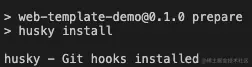
- 执行成功,提示
- 添加 commitlint 的 hook 到 husky 中,并指令在 commit-msg 的 hooks 下执行 npx --no-install commitlint --edit "$1" 指令
npx husky add .husky/commit-msg 'npx --no-install commitlint --edit "$1"'
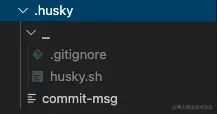
- 此时 .husky 文件结构如下