效果图
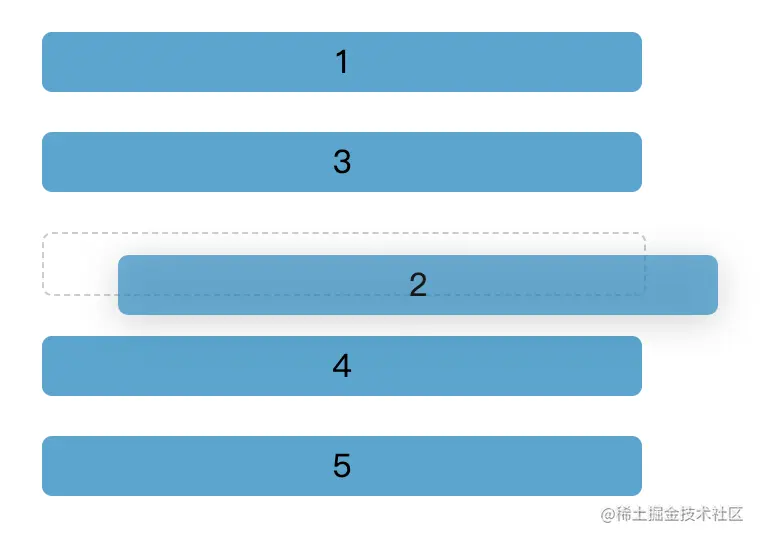
话不多说直接上代码
<!DOCTYPE html>
<html lang="en">
<head>
  <meta charset="UTF-8">
  <meta http-equiv="X-UA-Compatible" content="IE=edge">
  <meta name="viewport" content="width=device-width, initial-scale=1.0">
  <title>Document</title>
</head>
<style>
  .list-item {
    width: 300px;
    height: 30px;
    margin: 20px;
    text-align: center;
    line-height: 30px;
    border-radius: 5px;
    background: rgba(32, 138, 191, 0.776);
  }
  .list-item.moving {
    background: transparent;
    color: transparent;
    border: 1px dashed #ccc;
  }
</style>
<body>
  <div class="list">
    <div draggable="true" class="list-item">1</div>
    <div draggable="true" class="list-item">2</div>
    <div draggable="true" class="list-item">3</div>
    <div draggable="true" class="list-item">4</div>
    <div draggable="true" class="list-item">5</div>
  </div>
  <script>
    const list = document.querySelector('.list');
    let node
    list.ondragstart = function (e) {
      setTimeout(() => {
        e.target.classList.add('moving');
      })
      node = e.target;
      e.dataTransfer.effectAllowed = 'move';
    }
    list.ondragover = function (e) {
      e.preventDefault();
    }
    list.ondragenter = function (e) {
      e.preventDefault();
      if (e.target == list || e.target == node) {
        return
      }
      const children = Array.from(list.children)
      const nodeIndex = children.indexOf(node)
      const targetIndex = children.indexOf(e.target)
      if (nodeIndex < targetIndex) {
        // 从上往下拖动
        list.insertBefore(node, e.target.nextElementSibling)
      } else {
        // 从下往上拖动
        list.insertBefore(node, e.target)
      }
    }
    list.ondragend = (e) => {
      e.target.classList.remove('moving');
    }
  </script>
</body>
</html>