

1.webpack-bundle-analyze 打包后会生成一个浏览器链接查看各模块的打包时长。
2.开发环境打开tree shaking,生产环境默认开启
module.exports = {
  // ...
  mode: 'development',
  optimization: {
    usedExports: true,
  }
};
package.json配置 副作用 true代表所有文件都具有副作用不会进行treeShaking sideEffects: false 同时要注意在loader中配置sideEffects为true,否则用import引入的样式就会被忽略打包
module.exports = {
  // ...
    module: {
    rules: [
      {
        test: /\.css$/i,
        use: ["style-loader", "css-loader"],
        sideEffects: true
      }
    ]
  },
};
3.解构的基本用法
解构的别名解构,可在解构时更改变量名称
const fullName = {
    firstName: "Quintion",
    lastName: "Tang",
};
const { firstName: trueName, lastName } = fullName; // 解构语法
console.log(trueName); // Quintion
console.log(lastName); // Tang
4.条件渲染中的v-for item in 可以替换为item of 更接近迭代器语法
5.在vue中原生的标签只能在特定情况下使用,比如table 下tr,如果使用自定义组件可以采用is语法进行渲染
<tr is="vue:child"><tr>
4.vue2使用composition-api
npm install @vue/composition-api
main.js中引入注册
import VueCompositionApi from '@vue/composition-api'

Vue.use(VueCompositionApi)
目前可以使用setUp选项式语法,如需使用setUp语法需要安装打包插件
npm install unplugin-vue2-script-setup
vue.config.js配置
const ScriptSetup = require('unplugin-vue2-script-setup/webpack').default

module.exports = { configureWebpack: (config)=>{ config.plugins.push(ScriptSetup({})); }, }
5.vue封装下拉pop框时处理点击其他地方关闭pop框,由于自己写的div没有blur方法需手动处理
给顶层父级加点击事件
<div @click = "visible = false">
    ...
    // 通过vue的事件阻止冒泡和默认事件,点击pop框中的内容不会触发关闭
    <div @click.prevent.stop v-model="visible">pop框</div>
</div>
6.vue3组件中方法未被template调用导致未打组件实例中导致父组件调用时出错
经测试vue3中定义属性和方法一样,只要没被template中引用(即使在onMounted中调用)就不会在vue组件实例中出现,此时父组件通过ref直接调子组件方法会报错。采用手动挂载的方式解决
<script setup>
import { ref, onMounted, reactive, getCurrentInstance } from '@vue/composition-api';
const { proxy } = getCurrentInstance()
onMounted(() => {
     //将clearSelection方法手动挂载到组件实例中,父组件才能调到
    proxy.clearSelection = clearSelection
})
const props = defineProps({
    data: {
        type: Array,
        default: () => []
    },
    height: {
        type: Number,
        default: 300
    },
    type: {
        type: String,
        default: ''
    }
})
const emit = defineEmits(['handlerSelect'])
const handlerSelect = (row) => {
    emit('handlerSelect', row, props.type)
}
const singTable = ref(null)
const clearSelection = () => {
    singTable.value.setCurrentRow(null)
}
</script>
<template>
    <div>
        <el-table ref="singTable" :data="props.data" highlight-current-row :height="props.height"
            class="modify-vue-table-css" :show-header="false">
            <el-table-column prop="name">
                <template slot-scope="scope">
                    <div class="project-side-column">
                        <el-button type="text" class="project-side-button" @click="handlerSelect(scope.row)">
                            <svg-icon iconClass="project" />
                            <span class="margin8">{{ scope.row.label }}</span></el-button>
                    </div>
                </template>
            </el-table-column>
        </el-table>
    </div>
</template>
<style lang="scss" scoped>
}
</style>
7.vuex的基础语法
const project = {
  state: {
    projectStatus: "测试"
  },
  getters: {
    projectStatus: (state) => state.projectStatus // 获取name
  },
  mutations: {
    setStatus: (state, projectStatus) => {
      state.projectStatus = projectStatus;
    }
  }
};
export default project;
8嵌套解构
9.上下拖拽
<div style="display:flex;">
    <div class="wrapper" style="height:wrapperHeight"></div>
    <div class="lane"></div>
    <div class="footer"></div>
</div>
.wrapper{

}
.footerLine {
    width: 100%;
    height: 6px;
    background: #eee;
    cursor: move;
}
.footer{
    flex:1;
}
监听鼠标按下,获取开始拖动的clientY,监听鼠标移动事件鼠标移动的clientY - y就是偏移量,初始高度+偏移量即为拖动后的高度,

 document.getElementsByClassName('lane')[0].addEventListener('mousedown', e => {
          let y = e.clientY;
          // 需要拖动的dom
          const box = document.getElementsByClassName('wrapper')
          let oBoxW = box[0].offsetHeight;
          document.onmousemove = e => {
            this.wrapperHeight = oBoxW + e.clientY - y + 'px'
          }
      document.onmouseup = () => [document.onmousemove, document.onmouseup] = [null, null]
      e.preventDefault && e.preventDefault()
})
10.左右拖拽(推荐 可推导纵向拖拽)
<div class="wrapper">
    <div class="main" ></div>
    <div class="lane"></div>
    <div class="right" :style="{width:sideWidth}" ></div>
</div>
data(){
    return {
        sideWidth:400px;
    }
}

mounted () {
    this.handlerDrag()
},
methods:{
 handlerDrag () {
      const dragLineDom = document.querySelectorAll('.line')[0]
      dragLineDom.addEventListener('mousedown', this.moveFn)
 },
 moveFn (e) {
  let x = e.clientX  //开始拖拽的初始位置
  const box = document.getElementsByClassName('side')
  let oBoxW = box[0].offsetWidth
  document.onmousemove = e => (this.sideWidth = oBoxW + x - e.clientX + 'px')
  document.onmouseup = () => [document.onmousemove, document.onmouseup] = [null, null]
  e.preventDefault && e.preventDefault()
 },
},

.wrapper{
    display:flex;
    .main{
        flex:1;
        overflow:hidden
    }
   .line {
     width: 8px;
     cursor: e-resize; //可拖拽
   }
   .side{
       width: 400px;
   }
}
11.el-table-expand 和el-table-fixed同时使用时 展开的内容不能完全展示
/deep/ .el-table__body-wrapper {
  .el-table__expanded-cell {
    z-index: 100;
    padding: 0;
  }
}
/deep/ .el-table__fixed,
/deep/.el-table__fixed-right {
  .el-table__expanded-cell {
    visibility: hidden;
    padding: 0;
  }
}
.expand {
  width: calc(100vw - 100px);
  padding: 20px;
  background: #fff; //盖住fixed产生的阴影
}
12.封装get请求时的参数序列化,数组对象格式
import qs from "qs"

config.paramsSerializer = (params) => qs.stringify(params, { indices: false })

const params = {name:1,name:2}
www.baidu.com?name=1&name=2
13 自定义滚动小球 loading
 <div class="loading-icon">
        <div></div>
        <div></div>
        <div></div>
</div>

.loading-icon {
  display: inline-block;
  position: relative;
  width: 120px;
  height: 30px;
  & div {
    position: absolute;
    top: 5px;
    width: 10px;
    height: 10px;
    border-radius: 50%;
    background: black;
    animation-timing-function: cubic-bezier(0, 1, 1, 0);
  }
  & div:nth-child(1) {
    left: 12px;
    animation: animation1 0.6s infinite;
  }
  & div:nth-child(2) {
    left: 12px;
    animation: animation2 0.6s infinite;
  }
  & div:nth-child(3) {
    left: 46px;
    animation: animation2 0.6s infinite;
  }
}
@keyframes animation1 {
  0% {
    transform: scale(0);
  }
  100% {
    transform: scale(1);
  }
}
@keyframes animation2 {
  0% {
    transform: translate(0, 0);
  }
  100% {
    transform: translate(36px, 0);
  }
}
14 滚动到底部
this.$refs['logContent'].scrollTop = this.$refs['logContent'].scrollHeight
15.vue3 ts 类型标注
// 组件实例 formrules 校验
import type { FormInstance, FormRules } from 'element-plus'
const formDesignRef = ref<InstanceType<typeof FormInstance>>()
const rules = reactive<typeof FormRules>({
  type_name: [{ required: true, message: '请输入审批类型名称', trigger: 'blur', }],
  desc_text: [{ required: true, message: '请输入审批类型说明', trigger: 'blur', }],
  display_form_str: [{ required: true, message: '请选择表单所需字段', trigger: 'change', }],
  approval_form_str: [{ required: true, message: '请选择审批所需字段', trigger: 'change', }],
})
const props = defineProps<{
  modelValue: WorkForm
  isDisabled: boolean
}>()
const emit = defineEmits<{
  (e: 'update:modelValue', val: WorkForm): void
}>()
16.vscode解析md 文件。插件Markdown All in One
快捷键control + shift + v
17. 文件上传获取文件本身
let reader = new FileReader()
      reader.readAsText(file.raw, 'UTF-8')//读取,转换字符编码
      reader.onload = function (e) {
        let val = e.target.result//获取数据
        let rtulist = val.split("\r\n")
        console.log('rtulist:>> ', rtulist)
  }
18.el-tree自定义展开收缩图标,icon-class 自定义图标
<el-tree :data="data" icon-class="icon-tree" :props="defaultProps">
        <span slot-scope="{ node }" style="font-size:14px">

          <!-- <img src="../assets/logo.png" style="width: 16px; height: 16px" /> -->
          {{ node.label }}
        </span>
  </el-tree>


   /deep/ .tree-wrapper {
    border: 1px solid #eee;
    margin-top: 10px;
    height: calc(100% - 40px);
    padding: 10px;
    .el-tree-node__expand-icon {
      position: absolute;
      right: 6px;
      // display: none;
    }
    .el-tree-node__content:hover {
      .el-tree-node__expand-icon {
        display: block;
      }
    }

    .icon-tree {
      background: url('../../../assets/images/arrow-right.png');
      background-size: 100% 100%;
      &::before {
        content: '';
      }
    }
    .expanded {
      background: url('../../../assets/images/arrow-down.png');
      background-size: 100% 100%;
      transform: none;
    }
    .is-leaf {
      background-image: none;
      background-size: 100% 100%;
    }
  }
19.插槽
// dialog子组件
    <el-dialog v-bind="$attrs" v-model="visible">
    <template #header="scope">
      <slot name="header" v-bind="scope"></slot>
    </template>
    <slot></slot>
    <template #footer>
      <span class="dialog-footer" v-if="!hideFooter">
        <el-button @click="visible = false">{{ cancelText }}</el-button>
        <el-button type="primary" @click="submit">
          {{ confirmText }}
        </el-button>
      </span>
    </template>
  </el-dialog>
  // 父组件
 <LbDialog v-model="state.sceneSettingVisible" hideFooter>
      <template #header="{ close, titleId, titleClass }">
        <div class="visible-header">
             父组件设置title
        </div>
      </template>
    </LbDialog>
20.设计类网站
uxchi.notion.site/881b4c0179a…
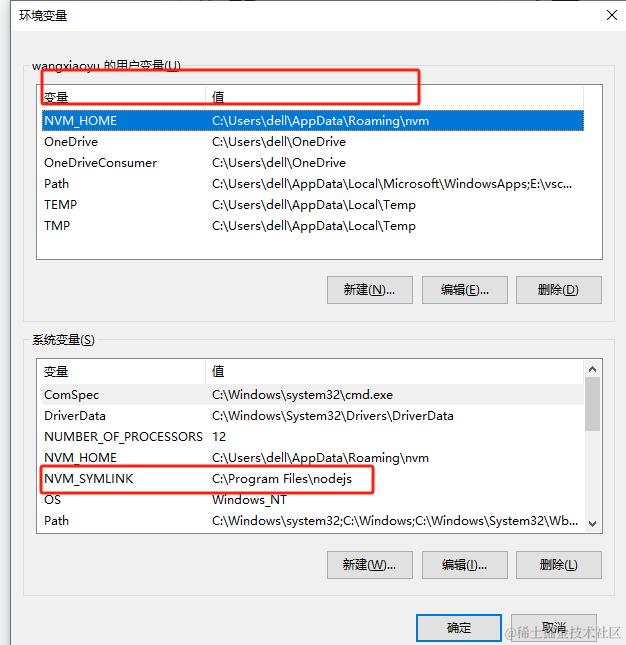
21 nvm切换高node版本时npm报错
Cannot find module ‘@npmcli/config‘
旧的node环境变量没删干净导致环境变量重复,删掉用户变量中的nvm_SYMLINK然后卸载重新安装即可
nvm uninstall 18.18.2
npm install 18.18.2
npm use 18.18.2
npm -v   此时npm命令不报错了
22 渲染vue code 代码
<!--
 * @Description  : 解析vue字符串
 * @Author       : wxy
 * @Date         : 2023-04-23 15:44:10
 * @LastEditTime : 2024-02-20 09:49:16
 * @LastEditors  : wxy
 * @FilePath     : \luban-front1\src\components\Notification\src\dynamicAnalyzeVueStr.vue
-->
<template>
  <div ref="analyzeBoxRef">
  </div>
</template>
<script>
import Vue from 'vue'
import { v4 as uuidv4 } from 'uuid'
import router from '@/router'
export default {
  name: 'dynamicAnalyzeVueStr',
  props: {
    code: {
      type: String,
      default: ''
    }
  },
  watch: {
    code: {
      handler (val) {
        console.log('val :>> ', val)
        this.renderCode(val)

      },
      immediate: true
    }
  },
  data () {
    return {
    }
  },
  mounted () {

  },
  computed: {

  },
  methods: {
    /**
     * @description: 渲染code str
     * @author: wxy
     * @param {*} val
     * @return {*}
     */
    async renderCode (val) {
      const { script, template, style: css } = await this.splitCode(val)
      if (template && script) {
        const extendObj = new Function(script)()
        extendObj.template = template
        const analyzeFormConstructor = Vue.extend(extendObj)
        const instance = new analyzeFormConstructor()
        instance.router = router
        instance.$mount()
        this.$refs.analyzeBoxRef.appendChild(instance.$el)
        if (css) {
          const style = document.createElement('style')
          // style.type = 'text/css';
          style.id = uuidv4()
          style.innerHTML = css
          document.getElementsByTagName('head')[0].appendChild(style)
        }
      }
    },
    /**
     * @description: 识别字符串中的 script标签和template标签
     * @author: wxy
     * @param {*} val
     * @return {*}
     */
    splitCode (val) {
      return new Promise((resolve) => {
        const script = this.getSource(val, 'script').replace(/export default/, 'return ')
        const style = this.getSource(val, 'style')
        const template = this.getSource(val, 'template')
        resolve({ script, style, template })
      })
    },
    /**
     * @description:  用正则获取对应代码字符串
     * @author: wxy
     * @param {*} source
     * @param {*} type
     * @return {*}
     */
    getSource (source, type) {
      const regex = new RegExp(`<${type}[^>]*>`)
      let tag = source.match(regex)
      if (!tag) {
        return ''
      } else {
        tag = tag[0]
      }
      return source.slice(source.indexOf(tag) + tag.length, source.lastIndexOf(`</${type}>`))
    }
  },
}
</script>
<style lang='scss' scoped></style>
23低代码设计平台
vue.misboot.com:8088/build/260AC…
24.webpack分片加载
 chainWebpack(config) {
    config.plugins.delete('preload') // TODO: need test
    config.plugins.delete('prefetch') // TODO: need test

    // set svg-sprite-loader
    config.module
      .rule('svg')
      .exclude.add(resolve('src/assets/icons'))
      .end()
    // //分析大小代码
    // config
    //   .plugin('webpack-bundle-analyzer')
    //   .use(require('webpack-bundle-analyzer').BundleAnalyzerPlugin)
    config.module
      .rule('icons')
      .test(/\.svg$/)
      .include.add(resolve('src/assets/icons'))
      .end()
      .use('svg-sprite-loader')
      .loader('svg-sprite-loader')
      .options({
        symbolId: 'icon-[name]'
      })
      .end()
    config
      .when(process.env.NODE_ENV !== 'development',
        config => {
          config
            .plugin('ScriptExtHtmlWebpackPlugin')
            .after('html')
            .use('script-ext-html-webpack-plugin', [{
              // `runtime` must same as runtimeChunk name. default is `runtime`
              inline: /runtime\..*\.js$/
            }])
            .end()
          config
            .optimization.splitChunks({
            chunks: 'all',
            maxInitialRequests: Infinity,
            minSize: 0,
            cacheGroups: {
              vendor: {
                test: /[\\/]node_modules[\\/]/,
                name(module) {
                  const packageName = module.context.match(/[\\/]node_modules[\\/](.*?)([\\/]|$)/)[1];
                  return path.join('lib', packageName.replace('@', ''));
                },
                enforce: true,
              },
              src: {
                test: /[\\/]src[\\/](views|components)[\\/](.*)([\\/]|$)/,
                name(module) {
                  let str = module.resource;
                  if (!module.resource) {
                    // 进来的都是css
                    const newStr = `${module.context}.js`;
                    const cssDir = path.basename(newStr, '.js');
                    str = path.join(module.context, `${cssDir}.style.js`);
                  }
                  const match = str.match(/[\\/]src[\\/](views|components)[\\/](.*)([\\/]|$)/);
                  const dir = match[1];
                  const fileName = match[2];
                  return path.join(dir, path.dirname(fileName), path.basename(fileName, path.extname(fileName)));
                },
                enforce: true,
              }
            }
          })
          config.optimization.runtimeChunk('single'),
            {
              from: path.resolve(__dirname, './public/robots.txt'), //防爬虫文件
              to: './', //到根目录下
            }
        }
      )
  }
25 结合24 配置生产环境懒加载
export const loadView = (view) => {
  if (process.env.NODE_ENV === "development") {
     return (resolve) => require([`@/views/${view}`], resolve)
  } else {
    // 使用 import 实现生产环境的路由懒加载
     return () => import(`@/views/${view}`)
  }
}
26 引入第三方组件库的类型声明
declare module "@kcb/luban-subapp-ui"
declare module "@kcb/luban-subapp-framework"

declare module '*.vue' {
 import { ComponentOptions } from 'vue'
  const componentOptions: ComponentOptions
  export default componen
}


// tsconfig.json 中 "include":["src/**/*.ts","src/**/*.d.ts","env.d.ts"]

