

在《使用React的应用程序状态管理》中,我谈到了如何使用本地状态和React Context的混合,可以帮助你在任何React应用程序中很好地管理状态。我展示了一些例子,我想指出关于这些例子的一些事情,以及你如何有效地创建React上下文消费者,这样你就可以避免一些问题,并改善开发人员的经验和你为你的应用程序和/或库创建的上下文对象的可维护性。
请阅读《React的应用状态管理》,并遵循以下建议:你不应该用上下文来解决每一个出现在你桌上的状态共享问题。但当你确实需要使用上下文时,希望这篇博文能帮助你知道如何有效地使用。另外,请记住,上下文不一定是整个应用程序的全局,但可以应用于你的树的一部分,你可以(而且可能应该)在你的应用程序中拥有多个逻辑上分离的上下文。
首先,让我们在src/count-context.js 创建一个文件,我们将在那里创建我们的上下文。
import * as React from 'react'

const CountContext = React.createContext()
首先,我没有为CountContext 的初始值。如果我想要一个初始值,我会调用React.createContext({count: 0}) 。但我没有包括一个默认值,这是故意的。defaultValue 只在这样的情况下有用。
function CountDisplay() {
  const {count} = React.useContext(CountContext)
  return <div>{count}</div>
}

ReactDOM.render(<CountDisplay />, document.getElementById('⚛️'))
因为我们的CountContext 没有默认值,所以在我们对useContext 的返回值进行重构的时候,我们会在高亮的一行得到一个错误。这是因为我们的默认值是undefined ,而你不能解构undefined 。
我们都不喜欢运行时错误,所以你的第一反应可能是添加一个默认值来避免运行时错误。然而,如果上下文没有一个实际的值,那么它有什么用呢?如果它只是使用提供的默认值,那么它就不能真正起到什么作用。在你的应用程序中创建和使用上下文的99%的时间里,你希望你的上下文消费者(那些使用useContext )是在一个能够提供有用的值的提供者中呈现。
在某些情况下,默认值是有用的,但在大多数情况下,它们不是必要的或有用的。
React文档建议,提供默认值 "有助于在不包装组件的情况下单独测试组件"。虽然它确实允许你这样做,但我不同意它比用必要的上下文来包装你的组件更好。请记住,每当你在测试中做一些你在应用中没有做的事情时,你就减少了测试能给你的信心。有理由这样做,但这不是其中之一。
如果你使用TypeScript,不提供默认值会让使用React.useContext ,但我下面会告诉你如何完全避免这个问题。继续阅读!
自定义提供者组件
好的,让我们继续。为了使这个上下文模块变得有用*,*我们需要使用提供者,并公开一个提供值的组件。我们的组件将被这样使用:
function App() {
  return (
    <CountProvider>
      <CountDisplay />
      <Counter />
    </CountProvider>
  )
}

ReactDOM.render(<App />, document.getElementById('⚛️'))
所以让我们做一个可以这样使用的组件:
import * as React from 'react'

const CountContext = React.createContext()

function countReducer(state, action) {
  switch (action.type) {
    case 'increment': {
      return {count: state.count + 1}
    }
    case 'decrement': {
      return {count: state.count - 1}
    }
    default: {
      throw new Error(`Unhandled action type: ${action.type}`)
    }
  }
}

function CountProvider({children}) {
  const [state, dispatch] = React.useReducer(countReducer, {count: 0})
  // NOTE: you *might* need to memoize this value
  // Learn more in http://kcd.im/optimize-context
  const value = {state, dispatch}
  return <CountContext.Provider value={value}>{children}</CountContext.Provider>
}

export {CountProvider}
这是一个被设计好的例子,我故意过度设计,以向你展示一个更真实的场景是什么样的。**这并不意味着每次都要这么复杂!如果你想使用。**如果适合你的情况,请随意使用useState 。此外,一些提供者会像这样简短,而另一些则会涉及许多钩子。
自定义消费者钩子
我在野外看到的大多数上下文使用的API都是这样的:
import * as React from 'react'
import {SomethingContext} from 'some-context-package'

function YourComponent() {
  const something = React.useContext(SomethingContext)
}
但我认为这错过了提供更好的用户体验的机会。 相反,我认为它应该是这样的:
import * as React from 'react'
import {useSomething} from 'some-context-package'

function YourComponent() {
  const something = useSomething()
}
这样做的好处是,你可以做一些事情,我现在会在实现中告诉你:
import * as React from 'react'

const CountContext = React.createContext()

function countReducer(state, action) {
  switch (action.type) {
    case 'increment': {
      return {count: state.count + 1}
    }
    case 'decrement': {
      return {count: state.count - 1}
    }
    default: {
      throw new Error(`Unhandled action type: ${action.type}`)
    }
  }
}

function CountProvider({children}) {
  const [state, dispatch] = React.useReducer(countReducer, {count: 0})
  // NOTE: you *might* need to memoize this value
  // Learn more in http://kcd.im/optimize-context
  const value = {state, dispatch}
  return <CountContext.Provider value={value}>{children}</CountContext.Provider>
}

function useCount() {
  const context = React.useContext(CountContext)
  if (context === undefined) {
    throw new Error('useCount must be used within a CountProvider')
  }
  return context
}

export {CountProvider, useCount}
首先,useCount 自定义钩子使用React.useContext ,从最近的CountProvider 中获取所提供的上下文值。然而,如果没有值,那么我们就会抛出一个有用的错误信息,表明该钩子不是在一个功能组件内被调用的,该组件是在CountProvider 。这肯定是一个错误,所以提供错误信息是有价值的。#FailFast
自定义消费者组件
如果你完全能够使用钩子,那就跳过这一节。然而,如果你需要支持React< 16.8.0,或者你认为Context需要被类组件消费,那么这里是你如何用基于render-prop的API为Context消费者做类似的事情。
function CountConsumer({children}) {
  return (
    <CountContext.Consumer>
      {context => {
        if (context === undefined) {
          throw new Error('CountConsumer must be used within a CountProvider')
        }
        return children(context)
      }}
    </CountContext.Consumer>
  )
}
而这里是类组件如何使用它。
class CounterThing extends React.Component {
  render() {
    return (
      <CountConsumer>
        {({state, dispatch}) => (
          <div>
            <div>{state.count}</div>
            <button onClick={() => dispatch({type: 'decrement'})}>
              Decrement
            </button>
            <button onClick={() => dispatch({type: 'increment'})}>
              Increment
            </button>
          </div>
        )}
      </CountConsumer>
    )
  }
}
在我们有钩子之前,我就是这样做的,而且效果不错。如果你能使用钩子的话,我不建议你去做这个。钩子要好得多。
TypeScript
我承诺我会告诉你如何避免在使用TypeScript时跳过defaultValue的问题。你猜怎么着?按照我的建议做,你就可以默认避免这个问题了!实际上,这根本就不是一个问题。看看吧。
import * as React from 'react'

type Action = {type: 'increment'} | {type: 'decrement'}
type Dispatch = (action: Action) => void
type State = {count: number}
type CountProviderProps = {children: React.ReactNode}

const CountStateContext = React.createContext<
  {state: State; dispatch: Dispatch} | undefined
>(undefined)

function countReducer(state: State, action: Action) {
  switch (action.type) {
    case 'increment': {
      return {count: state.count + 1}
    }
    default: {
      throw new Error(`Unhandled action type: ${action.type}`)
    }
  }
}

function CountProvider({children}: CountProviderProps) {
  const [state, dispatch] = React.useReducer(countReducer, {count: 0})
  // NOTE: you *might* need to memoize this value
  // Learn more in http://kcd.im/optimize-context
  const value = {state, dispatch}
  return (
    <CountStateContext.Provider value={value}>
      {children}
    </CountStateContext.Provider>
  )
}

function useCount() {
  const context = React.useContext(CountStateContext)
  if (context === undefined) {
    throw new Error('useCount must be used within a CountProvider')
  }
  return context
}

export {CountProvider, useCount}
有了这个,任何人都可以使用useCount ,而不需要做任何未定义的检查,因为我们正在为他们做这件事!
如何处理调度type 的错误?
在这一点上,你们这些重构者正在大叫。"嘿,动作创造者在哪里?"如果你想实现动作创造者,我没意见,但我从来不喜欢动作创造者。而且,如果你使用TypeScript,并将你的动作很好地类型化,那么你应该不需要它们。你可以得到自动完成和内联类型的错误!
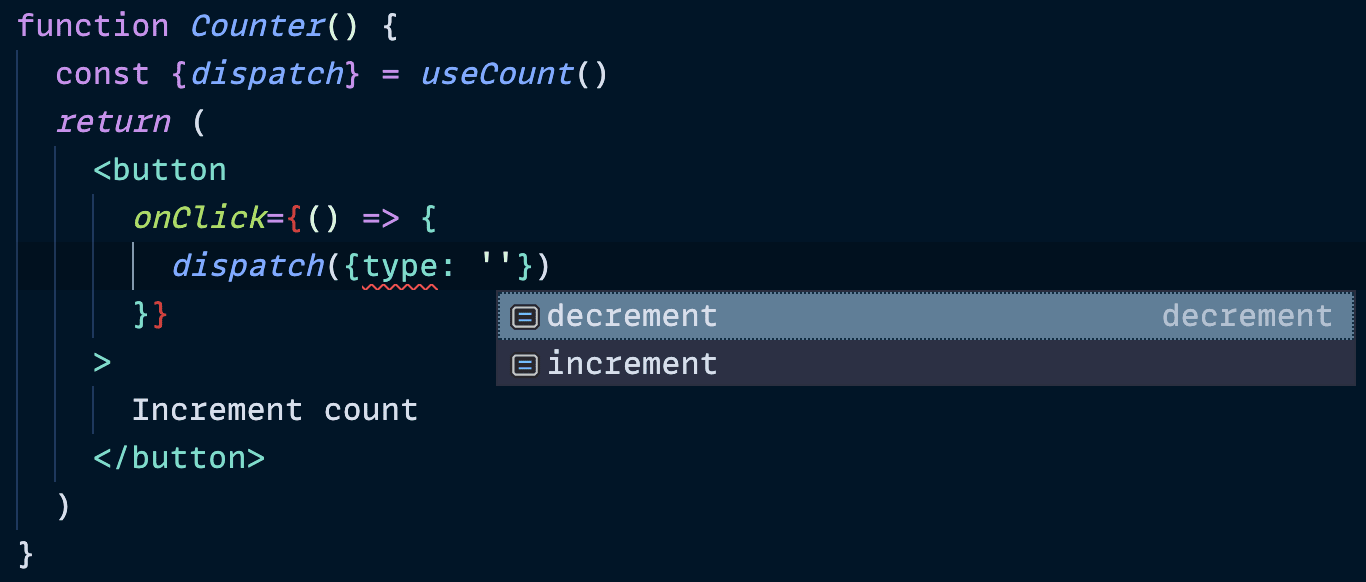
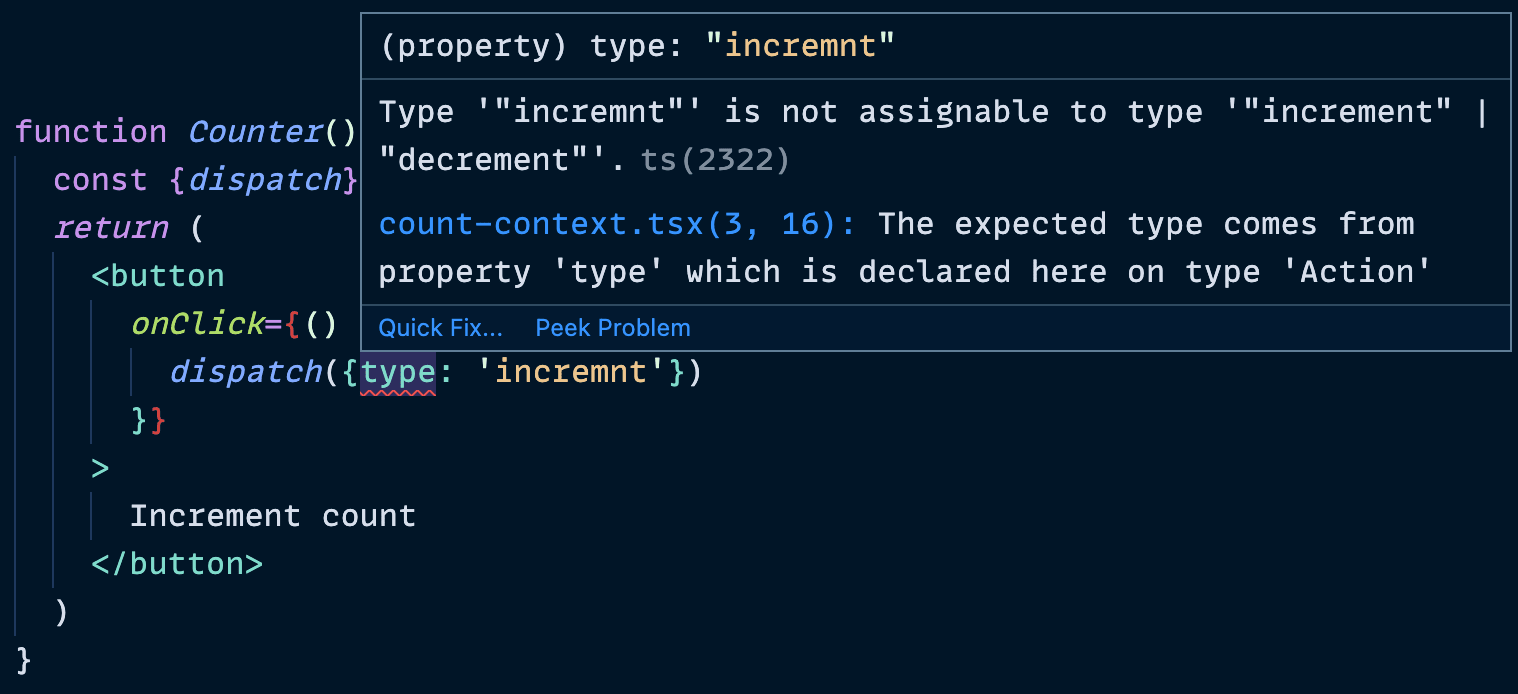
我非常喜欢用这种方式传递dispatch ,作为一个副作用,dispatch 在创建它的组件的生命周期内是稳定的,所以你不需要担心把它传递到useEffect 的依赖列表中(它是否被包含没有区别)。
如果你没有输入你的JavaScript(如果你没有的话,你也许应该考虑一下),那么我们对漏掉的动作类型所抛出的错误是一个故障保护。另外,继续阅读下一节,因为这也可以帮助你。
那异步行动呢?
这是个好问题。如果你有一个情况,你需要做一些异步请求,并且你需要在这个请求过程中调度多个东西,会发生什么?当然,你可以在调用的组件上做,但为每一个需要做这样的事情的组件手动连接所有的东西,这将是非常烦人的。
我的建议是,你在你的上下文模块中制作一个辅助函数,接受dispatch ,以及你需要的任何其他数据,并让这个辅助函数负责处理所有这些。下面是我的高级React模式研讨会上的一个例子。
async function updateUser(dispatch, user, updates) {
  dispatch({type: 'start update', updates})
  try {
    const updatedUser = await userClient.updateUser(user, updates)
    dispatch({type: 'finish update', updatedUser})
  } catch (error) {
    dispatch({type: 'fail update', error})
  }
}

export {UserProvider, useUser, updateUser}
然后你可以像这样使用它。
import {useUser, updateUser} from './user-context'

function UserSettings() {
  const [{user, status, error}, userDispatch] = useUser()

  function handleSubmit(event) {
    event.preventDefault()
    updateUser(userDispatch, user, formState)
  }

  // more code...
}
我对这个模式非常满意,如果你想让我在你的公司教这个,请告诉我(或者把你自己加入到我下次举办的研讨会的等待名单中)!我想你会很高兴的。
结语
这就是最终版本的代码。
import * as React from 'react'

const CountContext = React.createContext()

function countReducer(state, action) {
  switch (action.type) {
    case 'increment': {
      return {count: state.count + 1}
    }
    case 'decrement': {
      return {count: state.count - 1}
    }
    default: {
      throw new Error(`Unhandled action type: ${action.type}`)
    }
  }
}

function CountProvider({children}) {
  const [state, dispatch] = React.useReducer(countReducer, {count: 0})
  // NOTE: you *might* need to memoize this value
  // Learn more in http://kcd.im/optimize-context
  const value = {state, dispatch}
  return <CountContext.Provider value={value}>{children}</CountContext.Provider>
}

function useCount() {
  const context = React.useContext(CountContext)
  if (context === undefined) {
    throw new Error('useCount must be used within a CountProvider')
  }
  return context
}

export {CountProvider, useCount}
请注意,我没有导出CountContext 。这是故意的。我只公开了一种提供上下文值的方式和一种消费它的方式。这使我能够确保人们以应有的方式使用上下文值,并使我能够为我的消费者提供有用的工具。
我希望这对你来说是有用的请记住:
- 你不应该用上下文来解决你桌上的每一个状态共享问题。
- 上下文不一定是整个应用程序的全局,但可以应用于你的树的某一部分。
- 你可以(而且可能应该)在你的应用程序中拥有多个逻辑上分离的上下文。
祝您好运!
