import Vue from 'vue'
import Vuex from 'vuex'
Vue.use(Vuex)
import router from '../router'
import createPersistedState from 'vuex-persistedstate';
const findEndPath = (item) => {
if (item.child && item.child.length > 0) {
return findEndPath(item.child[0])
} else {
return item.path
}
}
const setMenusByLvl = (item, obj) => {
item.active = true
if (item.child && item.child.length > 0) {
item.child.forEach(item => item.active = false)
obj[item.lvl + 1] = item.child
setMenusByLvl(item.child[0], obj)
} else {
[1, 2, 3, 4, 5, 6, 7, 8].forEach(i => {
obj[Number(item.lvl) + i] = []
})
}
return obj
}
const store = new Vuex.Store({
plugins: [createPersistedState({
paths: ["menuTrees", "activeLvlMenus"]
})],
state: {
menuTrees: [
{
id: "1", pid: null, name: "/导航1", path: "/daohang1", lvl: 1, child: [
{
lvl: 2,
id: "1-1", pid: "1", name: "/导航1-1", path: "/daohang1-1", child: [
{
id: "1-1-3", pid: "1-1", name: "/导航1-1-3", path: "/daohang1-1-3", lvl: 3, child: [
{ id: "1-1-3-1", pid: "1-1-3", name: "/导航1-1-3-1", path: "/daohang1-1-3-1", lvl: 4, child: [] },
{ id: "1-1-3-2", pid: "1-1-3", name: "/导航1-1-3-2", path: "/daohang1-1-3-2", lvl: 4, child: [] },
]
},
{ id: "1-1-1", pid: "1-1", name: "/导航1-1-1", path: "/daohang1-1-1", lvl: 3, child: [] },
{ id: "1-1-2", pid: "1-1", name: "/导航1-1-2", path: "/daohang1-1-2", lvl: 3, child: [] },
]
},
{
lvl: 2,
id: "1-2", pid: "1", name: "/导航1-2", path: "/daohang1-2", child: [
{ id: "1-2-1", pid: "1-2", lvl: 3, name: "/导航1-2-1", path: "/daohang1-2-1", child: [] },
{ id: "1-2-2", pid: "1-2", lvl: 3, name: "/导航1-2-2", path: "/daohang1-2-2", child: [] },
]
},
]
},
{
lvl: 1,
id: "2", pid: null, name: "/导航2", path: "/daohang2", child: [
{
id: "2-1", pid: "2", lvl: 2, name: "/导航2-1", path: "/daohang2-1", child: [
{ id: "2-1-1", pid: "2-1", lvl: 3, name: "/导航2-1-1", path: "/daohang2-1-1", child: [] },
{ id: "2-1-2", pid: "2-1", lvl: 3, name: "/导航2-1-2", path: "/daohang2-1-2", child: [] },
]
},
{
id: "2-2", pid: "2", lvl: 2, name: "/导航2-2", path: "/daohang2-2", child: [
]
},
]
}
],
activeLvlMenus: {},
},
mutations: {
setActiveLvlMenus (state, { lvl, children, path, id }) {
const selfMenus = state.activeLvlMenus[lvl - 1]
if (selfMenus && selfMenus.length > 0) {
selfMenus.forEach(item => {
item.active = false
if (item.id === id) {
item.active = true
}
})
}
state.activeLvlMenus = { ...state.activeLvlMenus, [lvl]: children }
if (!children || children.length === 0) {
router.push(path)
return
}
children.forEach(item => item.active = false)
setMenusByLvl(children[0], state.activeLvlMenus)
router.push(findEndPath(children[0]))
},
},
actions: {
},
getters: {
getMenusByLvl: (state, getters) => (lvl) => {
return state.activeLvlMenus[lvl]
}
}
})
export default store
<template>
  <div>
    <p>app</p>
    <SideBar />
    <NavBar />
    <router-view></router-view>
  </div>
</template>
<template>
<div>
<h1>navbar</h1>
<el-menu default-active="2" class="el-menu-vertical-demo" @select="handleSelect">
<el-menu-item :index="item.path" v-for="item in menus" :key="item.id" :class="{'active':item.active}">
<span slot="title">{{item.name}}</span>
</el-menu-item>
</el-menu>
</div>
</template>
<script>
import { mapState, mapGetters, mapMutations, mapActions } from 'vuex'
export default {
components: {
},
props: {
},
data () {
return {
}
},
computed: {
menus () {
return this.$store.getters.getMenusByLvl('2')
}
},
created () {
},
mounted () {
},
watch: {
},
methods: {
...mapMutations(['setActiveLvlMenus',]),
handleSelect (index) {
const currentItem = this.menus.find(item => item.path === index)
const children = currentItem?.child
const id = currentItem?.id
this.setActiveLvlMenus({ lvl: "3", children, path: index, id })
}
},
};
</script>
<style scoped>
.el-menu-vertical-demo {
width: 250px;
}
.el-menu-item.active {
color: yellowgreen;
}
</style>
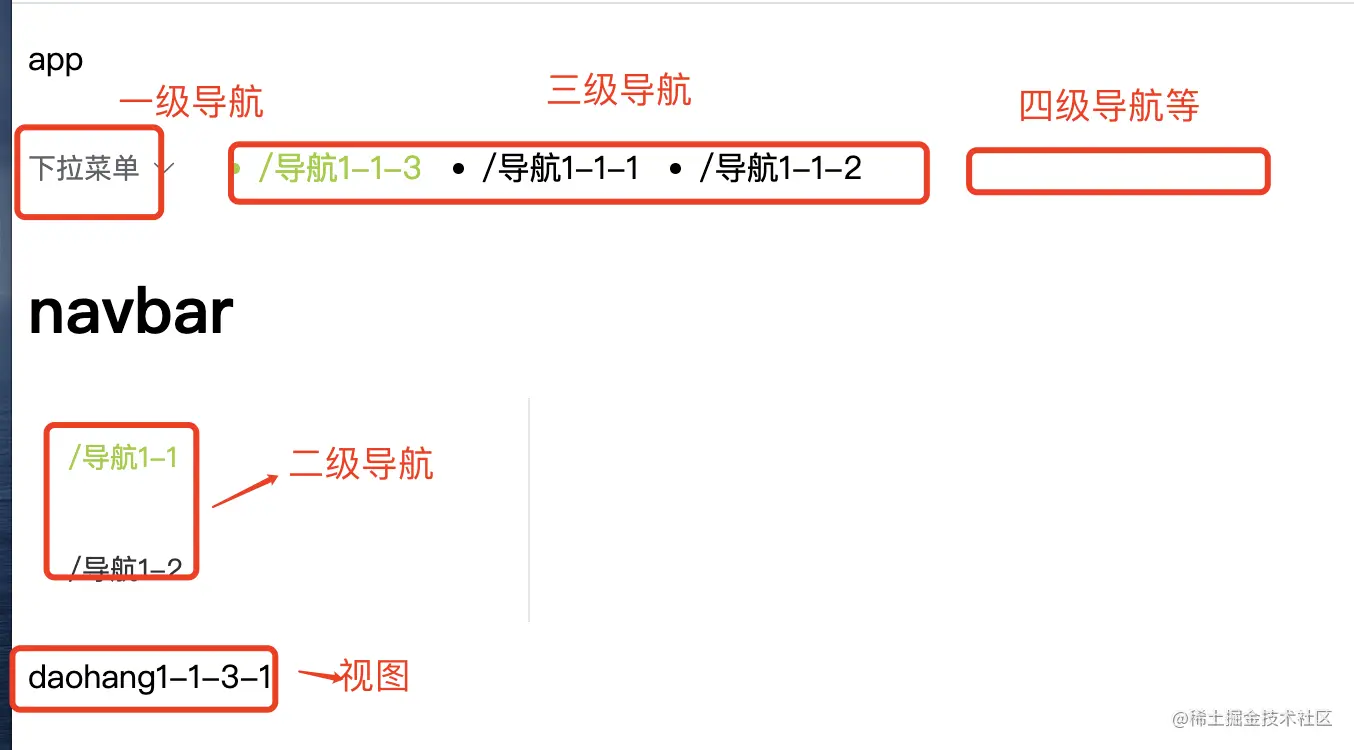
- SideBar 放置
一级菜单 三级菜单 四级菜单等
<template>
<div>
<h1>sidebar</h1>
<div class="yiji">
<el-dropdown @command="handleCommand">
<span class="el-dropdown-link">
下拉菜单<i class="el-icon-arrow-down el-icon--right"></i>
</span>
<el-dropdown-menu slot="dropdown">
<el-dropdown-item :command="item" v-for="item in menuTrees" :key="item.id">{{item.name}}</el-dropdown-item>
</el-dropdown-menu>
</el-dropdown>
</div>
<ul v-if="menus && menus.length > 0">
<li v-for="item in menus" :key="item.id" :class="{'active':item.active}" @click="handleClick(item)">{{item.name}} </li>
</ul>
</div>
</template>
<script>
import { mapState, mapGetters, mapMutations, mapActions } from 'vuex'
export default {
components: {
},
props: {
},
data () {
return {
}
},
computed: {
...mapState(['menuTrees']),
menus () {
return this.$store.getters.getMenusByLvl('3')
}
},
created () {
},
mounted () {
},
watch: {
},
methods: {
...mapMutations(['setActiveLvlMenus',]),
handleCommand (item) {
this.setActiveLvlMenus({ lvl: "2", children: item.child, path: item.path, id: item.id })
},
handleClick (item) {
this.setActiveLvlMenus({ lvl: "4", children: item.child, path: item.path, id: item.id })
}
},
};
</script>
<style scoped>
li.active {
color: yellowgreen;
}
</style>