关联验证
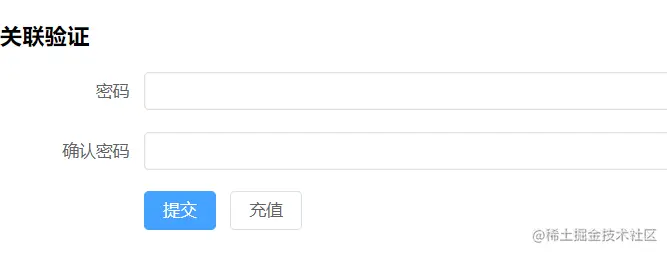
<script setup lang="ts">
import { reactive, ref } from 'vue'
import { type FormInstance, ElMessage } from 'element-plus'
const ruleForm = reactive({
pass: '',
checkPass: '',
})
const ruleFormRef = ref<FormInstance>()
const validatePass = (rule: any, value: any, callback: any) => {
if (value === '') {
callback(new Error('请输入密码'))
} else {
if (ruleForm.checkPass !== '') {
if (!ruleFormRef.value) return
ruleFormRef.value.validateField('checkPass', () => null)
}
callback()
}
}
const validatePass2 = (rule: any, value: any, callback: any) => {
if (value === '') {
callback(new Error('请输入确认密码'))
} else if (value !== ruleForm.pass) {
callback(new Error('两次密码不一致'))
} else {
callback()
}
}
const rules = reactive({
pass: [{ validator: validatePass, trigger: 'blur' }],
checkPass: [{ validator: validatePass2, trigger: 'blur' }],
})
const submitForm = (formEl: FormInstance | undefined) => {
if (!formEl) return
formEl.validate(valid => {
if (valid) {
console.log('submit!')
} else {
console.log('error submit!')
return false
}
})
}
const resetForm = (formEl: FormInstance | undefined) => {
if (!formEl) return
formEl.resetFields()
}
</script>
<template>
<div>
<h3>关联验证</h3>
<el-form
ref="ruleFormRef"
:model="ruleForm"
status-icon
:rules="rules"
label-width="120px"
class="demo-ruleForm"
>
<el-form-item label="密码" prop="pass">
<el-input v-model="ruleForm.pass" type="password" autocomplete="off" />
</el-form-item>
<el-form-item label="确认密码" prop="checkPass">
<el-input
v-model="ruleForm.checkPass"
type="password"
autocomplete="off"
/>
</el-form-item>
<el-form-item>
<el-button type="primary" @click="submitForm(ruleFormRef)">
提交
</el-button>
<el-button @click="resetForm(ruleFormRef)">充值</el-button>
</el-form-item>
</el-form>
</div>
</template>
<style lang="scss" scoped></style>
异步验证

<script setup lang="ts">
import { reactive, ref } from 'vue'
import { type FormInstance, type MessageHandler, ElMessage } from 'element-plus'
const ruleForm = reactive({
account: '',
})
const ruleFormRef = ref<FormInstance>()
let messageInstance: MessageHandler | null
const validateAccount = (rule: any, value: any, callback: any) => {
if (value === '') {
callback(new Error('请输入账号'))
} else {
if (!messageInstance) {
messageInstance = ElMessage({
message: '验证中.',
duration: 0,
})
}
setTimeout(() => {
if (value === '111') {
callback(new Error('账号已存在'))
} else {
callback()
}
if (messageInstance) {
messageInstance.close()
messageInstance = null
}
}, 1000)
}
}
const rules = reactive({
account: [{ validator: validateAccount, trigger: 'blur' }],
})
const submitForm = (formEl: FormInstance | undefined) => {
if (!formEl) return
formEl.validate(valid => {
if (valid) {
console.log('submit!')
} else {
console.log('error submit!')
return false
}
})
}
const resetForm = (formEl: FormInstance | undefined) => {
if (!formEl) return
formEl.resetFields()
}
</script>
<template>
<div>
<h3>异步验证</h3>
<el-form
ref="ruleFormRef"
:model="ruleForm"
status-icon
:rules="rules"
label-width="120px"
class="demo-ruleForm"
>
<el-form-item label="账号" prop="account">
<el-input
v-model="ruleForm.account"
type="account"
autocomplete="off"
/>
</el-form-item>
<el-form-item>
<el-button type="primary" @click="submitForm(ruleFormRef)">
提交
</el-button>
<el-button @click="resetForm(ruleFormRef)">充值</el-button>
</el-form-item>
</el-form>
</div>
</template>
<style lang="scss" scoped></style>
自定义表单项验证
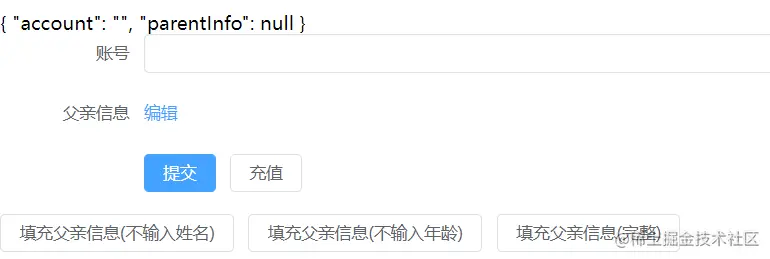
<script setup lang="ts">
import { reactive, ref } from 'vue'
import { type FormInstance, type MessageHandler, ElMessage } from 'element-plus'
interface UserParentInfo {
name: string
age: number | null
}
interface UserInfo {
account: string
parentInfo: UserParentInfo | null
}
const ruleForm = reactive<UserInfo>({
account: '',
parentInfo: null,
})
const ruleFormRef = ref<FormInstance>()
let messageInstance: MessageHandler | null
const validateParentInfo = (
rule: any,
value: UserParentInfo | null,
callback: any
) => {
if (value === null) {
callback(new Error('请输入父亲信息'))
} else {
if (value.name === '') {
callback(new Error('请输入父亲姓名'))
} else if (value.age === null) {
callback(new Error('请输入父亲年龄'))
}
}
callback()
}
const validateAccount = (rule: any, value: any, callback: any) => {
if (value === '') {
callback(new Error('请输入账号'))
} else {
if (!messageInstance) {
messageInstance = ElMessage({
message: '验证中.',
duration: 0,
})
}
setTimeout(() => {
if (value === '111') {
callback(new Error('账号已存在'))
} else {
callback()
}
if (messageInstance) {
messageInstance.close()
messageInstance = null
}
}, 1000)
}
}
const rules = reactive({
account: [{ validator: validateAccount, trigger: 'blur' }],
parentInfo: [{ validator: validateParentInfo, trigger: 'change' }],
})
const submitForm = (formEl: FormInstance | undefined) => {
if (!formEl) return
formEl.validate(valid => {
if (valid) {
console.log('submit!')
} else {
console.log('error submit!')
return false
}
})
}
const resetForm = (formEl: FormInstance | undefined) => {
if (!formEl) return
formEl.resetFields()
}
function onFitParentData(type: number) {
switch (type) {
case 1: {
ruleForm.parentInfo = { name: '', age: 10 }
break
}
case 2: {
ruleForm.parentInfo = { name: '张三', age: null }
break
}
case 3: {
ruleForm.parentInfo = { name: '张三', age: 10 }
break
}
}
ruleFormRef.value?.validateField('parentInfo')
}
</script>
<template>
<div>
<h3>自定义表单项验证</h3>
{{ ruleForm }}
<el-form
ref="ruleFormRef"
:model="ruleForm"
status-icon
:rules="rules"
label-width="120px"
class="demo-ruleForm"
>
<el-form-item label="账号" prop="account">
<el-input
v-model="ruleForm.account"
type="account"
autocomplete="off"
/>
</el-form-item>
<el-form-item label="父亲信息" prop="parentInfo">
<el-link type="primary">编辑</el-link>
</el-form-item>
<el-form-item>
<el-button type="primary" @click="submitForm(ruleFormRef)">
提交
</el-button>
<el-button @click="resetForm(ruleFormRef)">充值</el-button>
</el-form-item>
</el-form>
<el-button @click="onFitParentData(1)">填充父亲信息(不输入姓名)</el-button>
<el-button @click="onFitParentData(2)">填充父亲信息(不输入年龄)</el-button>
<el-button @click="onFitParentData(3)">填充父亲信息(完整)</el-button>
</div>
</template>
<style lang="scss" scoped></style>
将后端的错误信息设置到表单(类似标记有误)
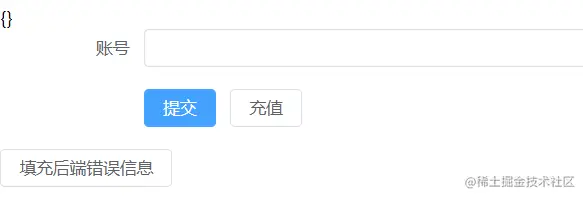
<script setup lang="ts">
import { nextTick, reactive, ref } from 'vue'
import { type FormInstance, type MessageHandler, ElMessage } from 'element-plus'
const ruleForm = reactive({
account: '',
})
const ruleFormRef = ref<FormInstance>()
let messageInstance: MessageHandler | null
const validateAccount = (rule: any, value: any, callback: any) => {
if (!messageInstance) {
messageInstance = ElMessage({
message: '验证中.',
duration: 0,
})
}
setTimeout(() => {
if (value === '111') {
callback(new Error('账号已存在'))
} else {
callback()
}
if (messageInstance) {
messageInstance.close()
messageInstance = null
}
}, 1000)
}
const submitForm = (formEl: FormInstance | undefined) => {
if (!formEl) return
formEl.validate(valid => {
if (valid) {
console.log('submit!')
} else {
console.log('error submit!')
return false
}
})
}
const resetForm = (formEl: FormInstance | undefined) => {
if (!formEl) return
formEl.resetFields()
}
const backendAccountError = reactive<Record<string, string>>({})
function onSetBackendErrorMsg() {
backendAccountError.account = ''
nextTick(() => {
backendAccountError.account = '后端给出的错误信息'
})
}
const originalFormData: Record<string, string> = {
account: '333',
}
function hasBackendErrorCanotSameValueValidatorBuilder(field: string) {
return (rule: any, value: any, callback: any) => {
if (backendAccountError[field]) {
if (value === originalFormData[field]) {
callback(new Error(backendAccountError[field]))
}
}
callback()
}
}
const rules = reactive({
account: [
{ validator: validateAccount, trigger: 'blur' },
{
validator: hasBackendErrorCanotSameValueValidatorBuilder('account'),
trigger: 'blur',
},
],
})
</script>
<template>
<div>
<h3>将后端的错误信息设置到表单</h3>
{{ backendAccountError }}
<el-form
ref="ruleFormRef"
:model="ruleForm"
status-icon
:rules="rules"
label-width="120px"
class="demo-ruleForm"
>
<el-form-item
label="账号"
prop="account"
:error="backendAccountError.account"
>
<el-input
v-model="ruleForm.account"
type="account"
autocomplete="off"
/>
</el-form-item>
<el-form-item>
<el-button type="primary" @click="submitForm(ruleFormRef)">
提交
</el-button>
<el-button @click="resetForm(ruleFormRef)">充值</el-button>
</el-form-item>
</el-form>
<el-button @click="onSetBackendErrorMsg">填充后端错误信息</el-button>
</div>
</template>
<style lang="scss" scoped></style>
表格行验证

<script setup lang="ts">
import { reactive, ref } from 'vue'
import { type FormInstance, type FormItemRule } from 'element-plus'
interface TableRowData {
date: string
name: string
address: string
editable: boolean
}
const tableData = ref<TableRowData[]>([
{
date: '2016-05-03',
name: 'Tom',
address: 'No. 189, Grove St, Los Angeles',
editable: false,
},
{
date: '2016-05-02',
name: '',
address: 'No. 189, Grove St, Los Angeles',
editable: false,
},
{
date: '',
name: '',
address: 'No. 189, Grove St, Los Angeles',
editable: false,
},
{
date: '2016-05-01',
name: 'Tom',
address: 'No. 189, Grove St, Los Angeles',
editable: false,
},
])
const dynamicValidateForm = reactive({
tableData: tableData.value,
})
const formRef = ref<FormInstance>()
function onSave(rowData: TableRowData, idx: number) {
console.log('onSave')
formRef.value?.validateField(
[`tableData.${idx}.name`, `tableData.${idx}.date`],
(isValid: boolean) => {
if (isValid) {
rowData.editable = false
}
}
)
}
function onCancel(rowData: TableRowData) {
rowData.editable = false
}
function onEdit(rowData: TableRowData) {
rowData.editable = true
}
const rules: FormItemRule[] = [
{ required: true, trigger: 'change', message: '该项必填' },
]
</script>
<template>
<div>
<h3>表格行验证</h3>
<el-form ref="formRef" :model="dynamicValidateForm" class="demo-dynamic">
<el-table :data="tableData" style="width: 100%">
<el-table-column prop="date" label="Date" width="180">
<template #default="scope">
<el-form-item
v-if="scope.row.editable"
:prop="`tableData.${scope.$index}.date`"
:rules="rules"
>
<el-input v-model="scope.row.date"></el-input>
</el-form-item>
<span v-else>{{ scope.row.date }}</span>
</template>
</el-table-column>
<el-table-column prop="name" label="Name" width="180">
<template #default="scope">
<el-form-item
v-if="scope.row.editable"
:prop="`tableData.${scope.$index}.name`"
:rules="rules"
>
<el-input v-model="scope.row.name"></el-input>
</el-form-item>
<span v-else>{{ scope.row.name }}</span>
</template>
</el-table-column>
<el-table-column prop="address" label="Address" />
<el-table-column fixed="right" label="Operations" width="120">
<template #default="scope">
<template v-if="scope.row.editable">
<el-button
link
type="primary"
size="small"
@click="onSave(scope.row, scope.$index)"
>
保存
</el-button>
<el-button
link
type="primary"
size="small"
@click="onCancel(scope.row)"
>
取消
</el-button>
</template>
<el-button
v-else
link
type="primary"
size="small"
@click="onEdit(scope.row)"
>编辑</el-button
>
</template>
</el-table-column>
</el-table>
</el-form>
</div>
</template>
<style lang="scss" scoped></style>



