    <template>
	<view class="">
            <button @click="getBgImgCanvas1">绘制</button>
            <button @click="saveImage">保存</button>
            <canvas
               style="width: 484rpx; height: 860rpx;"
               canvas-id="firstCanvas" id="firstCanvas">
            </canvas>
            <image class="iamge" v-for="(item, index) in imageList" :src="item.image"></image>
            <image :src="saveImg"></image>
	</view>
</template>
data(){
    return {
    // 图片如果有层级关系问题  必须先把最底层的东西排在最前面
      imageList: [{
           type: 'image',
           // 背景图必须在一开始绘制
           image: 'https://images.pinduoduo.com/mrk/2020-05-31/f272d8eb-25c4-4142-aa8f-11987a4ddfbc.png',
           x: 0,
           y: 0,
           width: 484,
           height: 860
      }, {
           type: 'textcenter',
           textColor:'#333333',
           font: "bold 16px PingFangSC-Medium, PingFang SC",
           textAlign: "center",
           textBaseline: "middle",
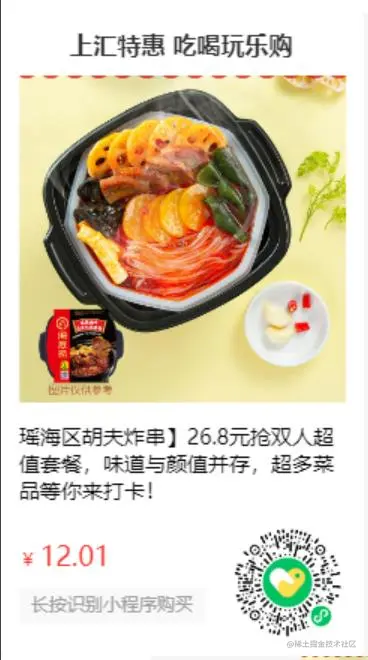
           fillText: '上汇特惠 吃喝玩乐购',
           x: 85,
           y: 28,
           width: 310,
           height: 45
      }, {
           type:'image',
           image:'http://image.huikejie.com/group1/M00/03/B2/rB_yo2N0jeuALcGrAAXdKc64jLk147.jpg',
           x: 24,
           y: 87,
           width: 436,
           height: 436
      }, {
           type: 'text',
           fontSize: 14, //字体大小
           word: '瑶海区胡夫炸串】26.8元抢双人超值套餐,味道与颜值并存,超多菜品等你来打卡!', //需要处理的文字
           maxWidth: 436, //一行文字最大宽度
           x: 24, //文字在x轴要显示的位置
           y: 543, //文字在y轴要显示的位置
           maxLine: 3, //文字最多显示的行数
           fweight: 900
      }, {
           type: 'rect',
           fillStyle: '#f9f9f9',
           x: 24,
           y: 771,
           width: 248,
           height: 48,
           renderText:{
              textColor:'#A0A0A0',
              font: "12px PingFangSC-Medium, PingFang SC",
              textAlign: "center",
              textBaseline: "middle",
              fillText: '长按识别小程序购买',
              x: 24,
              y: 771,
              width: 248,
              height: 48
           }
      }, {
           type: 'image',
           image: 'https://commimg.pddpic.com/wxcodeurl/29f06b00-2aa1-44e1-afc4-4f74eddd3bb7.png',
           x: 308,
           y: 688,
           width: 148,
           height: 148
      }],
      canvasText:[
           {
              type: 'text',
              textColor:'#FD342A',
              fontSize: 12, //字体大小
              word: '¥', //需要处理的文字
              maxWidth: 50, //一行文字最大宽度
              x: 24, //文字在x轴要显示的位置
              y: 705, //文字在y轴要显示的位置
              maxLine: 1, //文字最多显示的行数
              fweight: 900,
           },
           {
              type: 'text',
              textColor:'#FD342A',
              fontSize: 18, //字体大小
              word: '12.01', //需要处理的文字
              maxWidth: 300, //一行文字最大宽度
              x: 24, //文字在x轴要显示的位置
              y: 705, //文字在y轴要显示的位置
              maxLine: 1, //文字最多显示的行数
              fweight: 900,
           }
      ],
      ctxCanvas: null,
      saveImg: ''
    }
},
// px 转换成rpx
px2upx(value){
return Number(value/(uni.upx2px(100)/100).toFixed(2))
},
// 特殊的方法 文字在同一行获取 后面的文字的坐标 X 值 = 前文字的X值 + 前文字的宽度
specialRender(ctx,arr){
for (let i = 0
// 保存当前画笔的数据
ctx.save()
if(i == 0){
arr[i].x = arr[i].x
arr[i].left = arr[i].x + this.px2upx(ctx.measureText(arr[i].word).width) + 2
}else {
//加2的间距 单位是px 后面会调用uni.upx2px进行单位转换
arr[i].x = arr[i-1].left
arr[i].left = arr[i-1].left + this.px2upx(ctx.measureText(arr[i].word).width) + 2
}
//
this.dealWords({ctx:ctx,...arr[i] })
// 恢复画笔的数据
ctx.restore()
}
},
// 指定位置绘制文字 只设置了居中 和left绘制方式
renderTextCenter(opt) {
console.log(opt)
opt.ctx.beginPath()
opt.ctx.fillStyle =opt.textColor || "#000000"
opt.ctx.textBaseline =opt.textBaseline || "top"
opt.ctx.textAlign =opt.textAlign || "bottom"
opt.ctx.font =opt.font || "bold 16px serif"
// opt.ctx.strokeStyle = "#A0A0A0"
let renderX = 0,renderY = 0
if(opt.textAlign=='center'){
console.log(opt.textAlign)
// 居中要找到中心点
renderX = uni.upx2px(opt.x + Number((opt.width/2).toFixed(1)))
renderY = uni.upx2px(opt.y + Number((opt.height/2).toFixed(1)))
}else {
renderX = uni.upx2px(opt.x + Number(0))
renderY = uni.upx2px(opt.y + Number(0))
}
opt.ctx.fillText(opt.fillText, renderX, renderY)
// opt.ctx.stroke()
},
//处理文字多出省略号显示 借鉴别人的 没有再去抽离整合了 时间有限
dealWords(options) {
console.log(options)
options.ctx.font = `${options.fweight || 'bold' } ${options.fontSize || '14'}px PingFangSC-Medium, PingFang SC`
if(options.textColor){
options.ctx.fillStyle = options.textColor
}
options.textColor && (options.ctx.fillStyle = options.textColor )
// options.ctx.setFontSize(28)
var allRow = Math.ceil(options.ctx.measureText(options.word).width / uni.upx2px(options
.maxWidth))
var count = allRow >= options.maxLine ? options.maxLine : allRow
var endPos = 0
for (var j = 0
var nowStr = options.word.slice(endPos)
var rowWid = 0
if (options.ctx.measureText(nowStr).width > uni.upx2px(options.maxWidth)) { //如果当前的字符串宽度大于最大宽度,然后开始截取
for (var m = 0
rowWid += options.ctx.measureText(nowStr[m]).width
if (rowWid > uni.upx2px(options.maxWidth)) {
if (j === options.maxLine - 1) { //如果是最后一行
options.ctx.fillText(nowStr.slice(0, m - 1) + '...',uni.upx2px(options.x), uni.upx2px(options.y) + (j + 1) *18)
} else {
options.ctx.fillText(nowStr.slice(0,m),uni.upx2px(options.x),uni.upx2px(options.y) +(j + 1) * 18)
}
endPos += m
break
}
}
} else { //如果当前的字符串宽度小于最大宽度就直接输出
options.ctx.fillText(nowStr.slice(0), uni.upx2px(options.x), uni.upx2px(options.y) + (j + 1) * 18)
}
}
},
async renderImageFn(options, index) {
// 绘制图片 为保证图片完整绘制 必须等待图片下载完成
const that = this
let renderImg0 = await uni.downloadFile({
url: options.item.image,
})
// 可以自行加异常处理
that.ctxCanvas.drawImage(renderImg0[1].tempFilePath, uni.upx2px(options.item.x), uni.upx2px(options.item.y), uni.upx2px(options.item.width), uni.upx2px(options.item.height))
return
},
async getBgImgCanvas1() {
// 开始绘制
try {
let that = this
for (let i = 0
// 保存画笔状态
this.ctxCanvas.save()
if (this.imageList[i].type == 'image') {
console.log('index', i)
await that.renderImageFn({
item: this.imageList[i]
}, i)
console.log('index1', i)
} else if (this.imageList[i].type == 'text') {
that.dealWords({
ctx: this.ctxCanvas,
...this.imageList[i]
})
} else if (this.imageList[i].type == 'rect') {
that.renderRect({
ctx: this.ctxCanvas,
...this.imageList[i]
})
} else if (this.imageList[i].type == "textcenter") {
that.renderTextCenter({
ctx: this.ctxCanvas,
...this.imageList[i]
})
}
// 恢复画笔状态
this.ctxCanvas.restore()
}
this.specialRender(this.ctxCanvas,this.canvasText)
this.ctxCanvas.draw(false, () => {
uni.canvasToTempFilePath({
canvasId: "firstCanvas",
success: res => {
this.saveImg = res.tempFilePath
},
fail: err => {
this.$queue.showToast("生成图片失败")
}
}, this)
})
} catch (e) {
//TODO handle the exception
console.log('绘制失败,rnm退钱', e)
}
}



