独立寒秋,湘江北去,橘子洲头。疫情来的太快就像龙卷风,已经是居家的第八天了,还没见解封的迹象。不知不觉这场疫情已经持续了三年之久,物是人非。有的人可能因此失业;有的人可能赚的钵满盆盈;有的人为了一日三餐,从早晨六点一直工作做的晚上十点;有的人轨迹遍布各种奢侈品店;有的人为了不给国家添麻烦被迫步行回家;也有的人会说出错过自己女儿成人礼的“遗憾”。众生百态,希望大家各自安好。不慕荣华,不耻贫穷。希望百姓安居乐业,希望国家自由富强,与君共勉。
一、温故知新
    public void start() {
        EventLoopGroup bossGroup = new NioEventLoopGroup();
        EventLoopGroup workGroup = new NioEventLoopGroup();
        ServerBootstrap server = new ServerBootstrap().group(bossGroup, workGroup)
        .channel(NioServerSocketChannel.class)
            .childHandler(new HeartBeatServerChannelInitializer());

        try {
            ChannelFuture future = server.bind(this.port).sync();
            // 阻塞主线程,一般来说最好在单独的线程中初始化NettyServer
            future.channel().closeFuture().sync();
        } catch (InterruptedException e) {
            e.printStackTrace();
        } finally {
            bossGroup.shutdownGracefully();
            workGroup.shutdownGracefully();
        }
    }

    public static void main(String[] args) {
        HeartBeatServer server = new HeartBeatServer(7788);
        server.start();
    }
又看到了这个熟悉的demo,今天主要想总结下netty的线程模型实现,以及读写事件的处理。不知不觉,这已经Netty源码系列的第六篇文章了,从最开始的ServerBootstrap流程分析,到channel源码解析,自己也对Netty从开始的一知半解,到现在的“多知半解”,说实话,我也是看完了channel的源码,以及又看了另外一个课程,才把前六篇文章的内容“融汇贯通”,今天其实就是对前文的梳理汇总,希望大家看完能有收获。
这里重提下Netty Reactor线程模式,主要分为以下是三种:Reactor单线程模型、Reactor多线程模型、主从Reactor多线程模型,Netty对于以上线程模型支持也很方便
- 单线程模型
EventLoopGroup eventGroup = new NioEventLoopGroup(1);
ServerBootstrap serverBootstrap = new ServerBootstrap(); serverBootstrap.group(eventGroup);
- 非主从多线程模式
EventLoopGroup eventGroup = new NioEventLoopGroup();
ServerBootstrap serverBootstrap = new ServerBootstrap();
serverBootstrap.group(eventGroup);
- 主从模型
EventLoopGroup bossGroup = new NioEventLoopGroup();
EventLoopGroup workerGroup = new NioEventLoopGroup();
ServerBootstrap serverBootstrap = new ServerBootstrap();
serverBootstrap.group(bossGroup, workerGroup);
可以看到Netty对于不同的Reactor模型,切换起来很简单。下面将为大家重点介绍下主从模型里的“主”和“从”线程的指责以及工作流程源码。
二、主从线程模型解读
2.1. 流程图
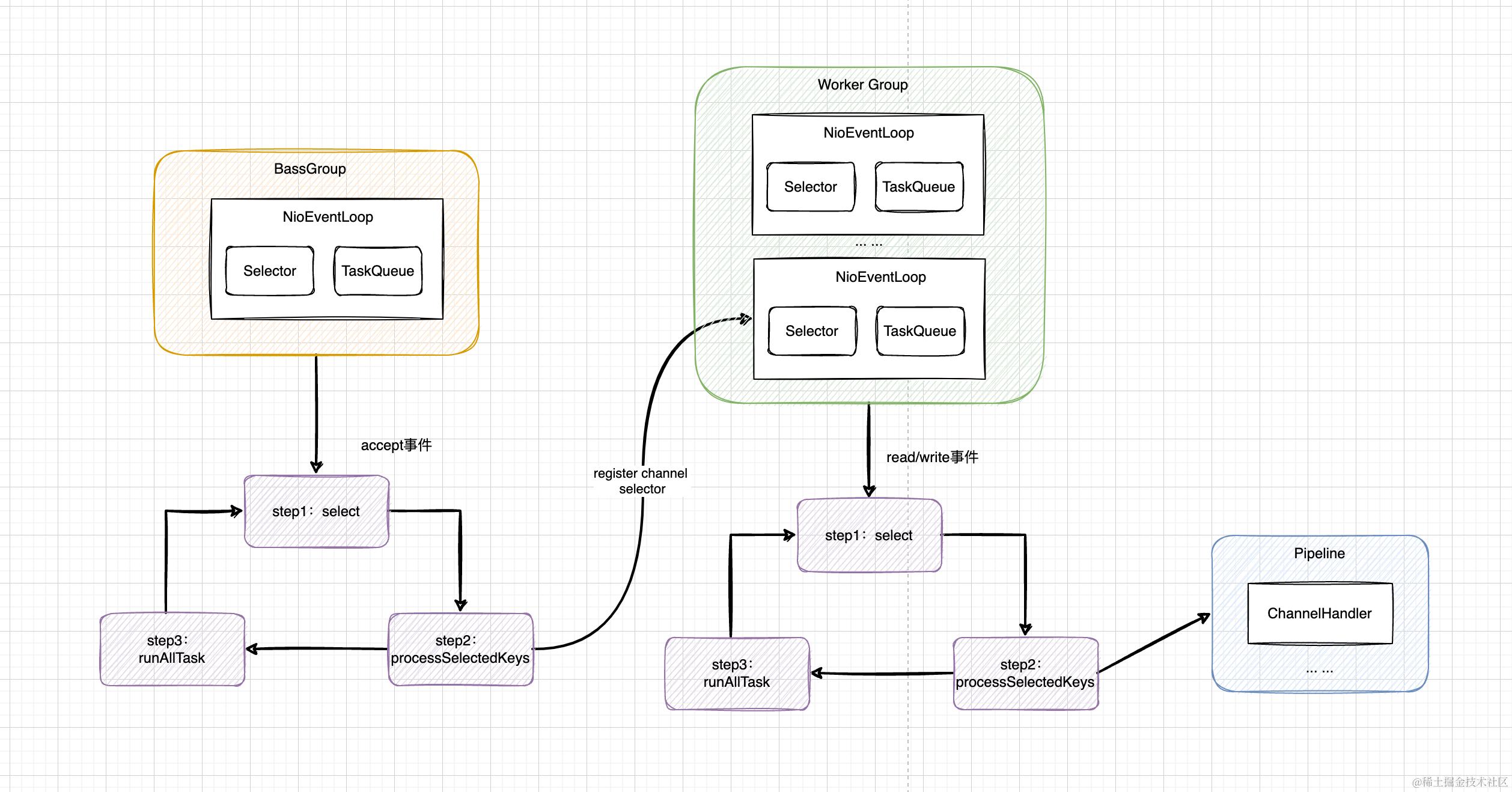 老规矩,有图当然先看图了,上图就是Netty的主从线程模型汇总(我真是太爱这个图了,原图来自csdn,为了加深印象,自己又画了一次)
2.2. 主线程职责
想必大家都听说过,Netty的主线程,一般只设置1个,但是你清楚为什么不设置多个呢?看完这part,你就会知道答案了。首先从入口开始分析,初始化的时候,会调用new ServerBootstrap().group(bossGroup, workGroup)方法,传递boss线程和work线程。查看源码实现如下:
    public ServerBootstrap group(EventLoopGroup parentGroup, EventLoopGroup childGroup) {
        // 调用父类构造函数,初始化父类线程
        super.group(parentGroup);
        if (this.childGroup != null) {
            throw new IllegalStateException("childGroup set already");
        }
        // 这里存储子线程,小tips:netty内部都是通过ObjectUtil.checkNotNull来判空
        // 如果后续想贡献源码,可以注意下规范
        this.childGroup = ObjectUtil.checkNotNull(childGroup, "childGroup");
        return this;
    }
继续追踪父类实现如下:
    public B group(EventLoopGroup group) {
        ObjectUtil.checkNotNull(group, "group");
        if (this.group != null) {
            throw new IllegalStateException("group set already");
        }
        // 赋值给了this.group属性
        this.group = group;
        return self();
    }
继续追踪父类AbstractBootstrap.group属性的调用链,可以发现在AbstractBootstrapConfig-group方法中调用了该属性,查看AbstractBootstrapConfig调用链,则发现了一个熟悉的方法调用initAndRegister
    final ChannelFuture initAndRegister() {
        Channel channel = null;
        try {
            channel = channelFactory.newChannel();
            init(channel);
        } catch (Throwable t) {
           ... ...
        }
        // config().group()最终调用的就是bossGroup
        ChannelFuture regFuture = config().group().register(channel);
        if (regFuture.cause() != null) {
            if (channel.isRegistered()) {
                channel.close();
            } else {
                channel.unsafe().closeForcibly();
            }
        }
        return regFuture;
    }
看到这,如果看过前文分析ServerBootstrap-bind源码的同学应该会有印象,initAndRegister是在serverBoot.bind的时候调用的,也就是说,如果一个Netty客户端只有一个端口的情况下,bind方法肯定只执行一次,那么对应底层的initAndRegister方法当然也就执行一次,这里config().group().register()方法也就只执行一次,所以这种情况下,bossWorkerGroup设置一个线程就够用了,设置多了当然也可以,只不过会存在资源浪费。
这里的channel还记得是什么类型吗?当然是NioServerSocketChannel,用来处理op_accept事件。 这里的register方法最终调用的是AbstractChannel.AbstractUnsafe-register方法,由于当前channel是NioServerSocketChannel,因此最终调用的是AbstractNioChannel.AbstractNioUnsafe-doRegister方法,核心代码如下:
    @Override
    protected void doRegister() throws Exception {
        boolean selected = false;
        for (;;) {
             selectionKey = javaChannel().register(eventLoop().unwrappedSelector(), 0, this);
             return;
        }
    }
此方法上篇文章也分析过了,javaChannel().register()方法表示把ch对象注册到NioEventLoop的selecotr上,注册成功后返回selectionKey,为其设置感兴趣的事件,也就是op_accept事件,当监听的对应的事件触发后,相应的NioEventLoop线程就可以执行后续的逻辑了,即创建NioSocketChannel。
2.3. 子线程职责
上面分析也介绍了,主线程主要用来处理accept事件,当客户端的accept事件发到服务端后,当前要进行链接的初始化了,子线程其实就是用来执行I/O的读写和链接操作。
还记得前文分析NioEventLoop时提到过的processSelectedKey方法吗?核心源码如下:
            if ((readyOps & (SelectionKey.OP_READ | SelectionKey.OP_ACCEPT)) != 0 || readyOps == 0) {
                unsafe.read();
            }
此处就是Netty用来处理accept事件和read事件入口,不同的事件对应不同的read实现,当前如果是accpet事件,则对应AbstractNioMessageChannel.NioMessageUnsafe-read方法;当前如果是read事件,对应着AbstractNioByteChannel.NioByteUnsafe-read方法。
AbstractNioMessageChannel.NioMessageUnsafe-read方法内部首先调用doReadMessages抽象方法创建socket链接,最终由NioServerSocketChannel来实现该方法,源码如下:
    @Override
    protected int doReadMessages(List<Object> buf) throws Exception {
        SocketChannel ch = SocketUtils.accept(javaChannel());
        try {
            if (ch != null) {
                // 创建 NioSocketChannel
                buf.add(new NioSocketChannel(this, ch));
                return 1;
            }
        } catch (Throwable t) {
        }
        return 0;
    }
read方法执行完doReadMessages方法后,会把channel添加到buf里,然后执行pipeline.fireChannelRead(readBuf.get(i)),把对应的事件传递出去,最终由ServerBootstrapAcceptor来处理完成链接的初始化,核心源码如下:
 此处的childGroup就是初始化server boot时候指定的子线程,这里会把NioSocketChannel注册给子线程,后面op_write、op_read事件则都由最终绑定的NioEventLoop线程来处理。
三、读写事件处理
3.1. op_read事件处理
前文分析子线程流程的时候提到过,NioEventLoop的processSelectedKey用来处理nio的各种事件,当前如果是NioServerSocketChannel发过来的请求,则对应这read或者write事件,查看AbstractNioByteChannel-read源码如下:
        public final void read() {
            final ChannelConfig config = config();
            if (shouldBreakReadReady(config)) {
                clearReadPending();
                return;
            }
            final ChannelPipeline pipeline = pipeline();
            // 读数据当然涉及到内存的分配,这里就是Netty内存分配的入口
            // 后面分析Netty内存管理的时候,就从这开始啦,大家有个印象就行
            final ByteBufAllocator allocator = config.getAllocator();
            // 自适应内存分配器
            final RecvByteBufAllocator.Handle allocHandle = recvBufAllocHandle();
            allocHandle.reset(config);

            ByteBuf byteBuf = null;
            boolean close = false;
            try {
                do {
                    // 这里会动态调整每次申请的内存的大小,也就是guess()
                    byteBuf = allocHandle.allocate(allocator);
                    // doReadBytes用来读取数据
                    allocHandle.lastBytesRead(doReadBytes(byteBuf));
                    if (allocHandle.lastBytesRead() <= 0) {
                        // nothing was read. release the buffer.
                        byteBuf.release();
                        byteBuf = null;
                        close = allocHandle.lastBytesRead() < 0;
                        if (close) {
                            // There is nothing left to read as we received an EOF.
                            readPending = false;
                        }
                        break;
                    }

                    allocHandle.incMessagesRead(1);
                    readPending = false;
                    // 将读到的数据传递出去,这里因为读取的是byte数据,因此每读取一次,都要把数据传递出去
                    // 后续的数据可以经过各种编解码,可以方便的解决拆包粘包问题
                    pipeline.fireChannelRead(byteBuf);
                    byteBuf = null;
                } while (allocHandle.continueReading());

                // 会记录本次一共读了多少数据,计算下次分配内存的大小
                allocHandle.readComplete();
                // 通知数据读取完成
                pipeline.fireChannelReadComplete();

                if (close) {
                    closeOnRead(pipeline);
                }
            } catch (Throwable t) {
                handleReadException(pipeline, byteBuf, t, close, allocHandle);
            } finally {
                // See https://github.com/netty/netty/issues/2254
                if (!readPending && !config.isAutoRead()) {
                    removeReadOp();
                }
            }
        }
    }
以上就是处理read事件的源码,简单总结下核心流程
- 首先获取Netty的内存分配器,以及处理内存分配的handler,这里的handler其实是可以在io.netty.channel.DefaultChannelCofig中设置的,默认采用自适用策略
- 通过内存分配器读取对应的byte数据流,每获取一次,就通过pipeline.fireChannelRead(byteBuf)方法将读取的到数据传递出去,以便数据可以经过一系列的handler,进行编码码以及拆包装包处理。
- 每次都要判断是否可以继续读取
- 读取完毕则通过pipeline.fireChannelReadComplete()方法将消息传递出去
3.2. op_write事件处理
对于write事件解析,可以从我们平常写数据的操作,context.write或者context.channel.write入手分析,也可以从NioEventLoop里直接分析,代码如下
            if ((readyOps & SelectionKey.OP_WRITE) != 0) {
                // Call forceFlush which will also take care of clear the OP_WRITE once there is nothing left to write
               unsafe.forceFlush();
            }
可以看到这里调用的还是unsafe的相关实现,debug发现,这里实际调用的是NioSocketChannel. doWrite方法,源码如下:
 protected void doWrite(ChannelOutboundBuffer in) throws Exception {
        SocketChannel ch = javaChannel();
        //有数据要写,且能写入,这最多尝试16次
        int writeSpinCount = config().getWriteSpinCount();
        do {
            if (in.isEmpty()) {
                // All written so clear OP_WRITE
                //数据都写完了,不用也不需要写16次
                clearOpWrite();
                // Directly return here so incompleteWrite(...) is not called.
                return;
            }

            // Ensure the pending writes are made of ByteBufs only.
            int maxBytesPerGatheringWrite = ((NioSocketChannelConfig) config).getMaxBytesPerGatheringWrite();
            //最多返回1024个数据,总的size尽量不超过maxBytesPerGatheringWrite
            ByteBuffer[] nioBuffers = in.nioBuffers(1024, maxBytesPerGatheringWrite);
            int nioBufferCnt = in.nioBufferCount();
            switch (nioBufferCnt) {
                case 0:
                    writeSpinCount -= doWrite0(in);
                    break;
                case 1: {
                    ByteBuffer buffer = nioBuffers[0];
                    int attemptedBytes = buffer.remaining();
                    final int localWrittenBytes = ch.write(buffer);
                    if (localWrittenBytes <= 0) {
                        incompleteWrite(true);
                        return;
                    }
                    adjustMaxBytesPerGatheringWrite(attemptedBytes, localWrittenBytes, maxBytesPerGatheringWrite);
                    //从ChannelOutboundBuffer中移除已经写出的数据
                    in.removeBytes(localWrittenBytes);
                    --writeSpinCount;
                    break;
                }
                default: {
                    long attemptedBytes = in.nioBufferSize();
                    final long localWrittenBytes = ch.write(nioBuffers, 0, nioBufferCnt);
                    if (localWrittenBytes <= 0) {
                        //缓存区满了,写不进去了,注册写事件。
                        incompleteWrite(true);
                        return;
                    }
                    adjustMaxBytesPerGatheringWrite((int) attemptedBytes, (int) localWrittenBytes,
                            maxBytesPerGatheringWrite);
                    in.removeBytes(localWrittenBytes);
                    --writeSpinCount;
                    break;
                }
            }
        } while (writeSpinCount > 0);

        //写了16次数据,还是没有写完,直接schedule一个新的flush task出来。而不是注册写事件。
        incompleteWrite(writeSpinCount < 0);
    }
write的核心逻辑如上,主要是根据写入的buf数量不同,选择不同的case实现,把数据写入jdk的nio buf中。 这里提个注意点,通过context往下写数据的时候,会进行水位线的判断,代码如下:
    private void incrementPendingOutboundBytes(long size, boolean invokeLater) {
        if (size == 0) {
            return;
        }

        long newWriteBufferSize = TOTAL_PENDING_SIZE_UPDATER.addAndGet(this, size);
        if (newWriteBufferSize > channel.config().getWriteBufferHighWaterMark()) {
            setUnwritable(invokeLater);
        }
    }
当前如果待发送的数据size高于水位线,会把channel设置成不可写。笔者最近上线的一个项目,压测的过程中发现,当服务端瞬间下发消息量较大时候(大概10w+/s),偶尔会触发这个判断,项目中针对channel不可写事件触发时,会主动断开和sdk的链接,这种情况对于笔者的项目其实是不太可接受的。因此暂时通过调整高水位线上限的方式解决了,当前这个解决方式会有一些问题,可能会造成推送的延迟。后续会进行多链接改造,sdk和服务端建立多条链接,通过流量均分,也能很好的解决这个问题。
public class OutboundHandler extends ChannelOutboundHandlerAdapter {
    @Override
    public void write(ChannelHandlerContext ctx, Object msg, ChannelPromise promise) throws Exception {
        if (!ctx.channel().isActive() || this.closing) {
            ReferenceCountUtil.release(msg);
            safeFail(promise, () -> new RuntimeException("this channel not active"));
            return;
        }
        if (!ctx.channel().isWritable()) {
            ... ...
            ctx.close();
            return;
        }
        ctx.write(msg, promise);
    }

}
四、小节
本篇文章对Netty的主从线程模型指责,以及相关源码做了次总结,也算是对这个系列文章的前五篇一起做了下总结。 也为大家分析了Netty对于读写事件的处理流程。
文章断断续续写了半个月,一是这段时间确实有点忙,二是总结类的文章确实不好写,需要自己理解的很透彻,才能整理好思路写成文章,实话实说,我也是看到另外一个课程,才对Netty线程模型职责,以及读写流程有了自己的理解,这里强烈推荐下极客时间的Netty课程,我是先对着书看了一遍Netty整理源码,后来又通过写博客梳理流程,慢慢的加深自己的理解,最后通过这门课才把自己的Netty知识体系构建完整,强烈推荐给大家。
最后,大家如果觉得本篇文章还不错的话,可以先点赞收藏防迷路哦。