

Setting Up the ChunkDownloader Plugin
The ChunkDownloader patching system is a built-in plugin for Unreal Engine that provides patching functionality. This guide will walk you through setting up the plugin so that you can use it in your game's code.
Required Setup
To use ChunkDownloader, you must be working with a C++ project. If you are using a Blueprint project, you can create a new C++ class to convert it into a C++ project.
Steps
-
Open your Project Settings, navigate to Project > Packaging, then make sure that Use Pak File and Generate Chunks are both enabled.
-
Open the Plugins window and enable the Chunk Downloader plugin. Restart the editor for your changes to take effect.
-
In Visual Studio, open your project's
Build.csfile and add ChunkDownloader to your ModuleRules as private dependency module names.PrivateDependencyModuleNames.AddRange(
new string[] { "ChunkDownloader" } -
Save your changes to these files.
-
Right-click on your .uproject file and click Generate Project Files.
-
Return to your project's solution in Visual Studio, then build the project.
Final Result
Now that ChunkDownloader is available to use in your project, you can proceed with implementing them in your game's code to download and mount .pak files.
Hosting a Manifest and Assets for ChunkDownloader
The ChunkDownloader patching solution for Unreal Engine requires you to distribute .pak files to a web server, and you must also build a manifest file. This is a text file containing a list of all of the files the user expects to download as well as the expected file size for each one.
When the patching process starts, the manifest is the first thing that ChunkDownloader will download to the user's device, and it uses this information to request and download each of the .pak files one-by-one. The expected file size enables the system to recognize how much progress is made for each file.
1. Required Setup
This guide uses the project from Preparing Assets for Chunking. It is a blank project that uses the Paragon assets for Boris, Crunch, and Khaimera. Follow the steps for that guide to download the assets and set up Primary Asset Labels for each of them, then cook the .pak files containing their chunked data. However, as long as you have assets divided into .pak files, you can follow the steps in the next section.
2. Building the Manifest File
To create a manifest file, follow these steps:
-
Create a folder called PatchingDemoKey inside the base directory for your project. In our example it is called PatchingDemo/PatchingDemoKey.
-
Create a new file called BuildManifest-Windows.txt and open it in a text editor.
-
Add a new line with a
$NUM_ENTRIESfield and set its value equal to the number of pak files you are tracking. In our case, it will be 3.BuildManifest-Windows.txt
$NUM_ENTRIES = 3 -
Add a new line with a
$BUILD_IDfield and set its value to PatchingDemoKey.BuildManifest-Windows.txt
$BUILD_ID = PatchingDemoKey -
Add entries for each of your .pak files with the following information:
-
The .pak filename.
-
The .pak's file size in bytes. To find this, right-click your .pak file and view its properties.
Make sure to use the file size for the .pak file, not the size on disk.
-
The .pak version. You can set this to any string.
-
The .pak number. This should match the chunk index values you used for your primary asset labels.
-
The .pak file path, relative to where the manifest file will be located.
Each field must be on the same line, separated by tabs, otherwise they will not be parsed correctly. For example, our line for pakchunk1001 reads as follows:
BuildManifest-Windows.txt
pakchunk1001-WindowsNoEditor.pak 922604157 ver 1001 /Windows/pakchunk1001-WindowsNoEditor.pak -
-
Copy the .pak files from
/WindowsNoEditor/PatchingDemo/Content/Paks/into the PatchingDemoKey folder alongside the manifest, inside a subfolder called Windows.
You will need to repeat this process whenever you package your project or want to change what files are available to users. The final manifest file for our example reads as follows:
BuildManifest-Windows.txt
$NUM_ENTRIES = 3
$BUILD_ID = PatchingDemoKey
pakchunk1001-WindowsNoEditor.pak    922604157   ver 1001    /Windows/pakchunk1001-WindowsNoEditor.pak
pakchunk1002-WindowsNoEditor.pak    2024330549  ver 1002    /Windows/pakchunk1002-WindowsNoEditor.pak
pakchunk1003-WindowsNoEditor.pak    1973336776  ver 1003    /Windows/pakchunk1003-WindowsNoEditor.pak
3. Hosting Files on a Local Test Server
Now that you have packaged your files, you need to host them on a server that your game can download them from, and you need to tell ChunkDownloader where to find the server. For demonstration purposes, we will set up a simple local web site.
-
In Windows Explorer, open the Start Menu, search for Turn Windows Features on or off, and open it.
-
Inside the Windows Features menu, enable Internet Information Services and click OK.
-
Open the Internet Information Services Manager (IIS Manager) , then enable Directory Browsing.
-
In the Connections menu on the left side of the window, unfold Sites and click Default Web Site.
-
In the Default Web Site Home menu, double-click MIME Types.
-
In the MIME Types menu, right-click and click Add.
-
In the Add MIME Type window, set the File Name extension to .pak, then set the MIME type to
application/octet-stream.This will ensure that IIS simply downloads the file when requested.
-
Navigate to the Default Web Site folder. By default this is
C:\inetpub\wwwroot. Create a folder called PatchingDemoCDN. -
Copy the PatchingDemoKey folder into PatchingDemoCDN.
-
Open your project's
DefaultGame.inifile, then add the following information to define the CDN Base URL:DefaultGame.ini
[/Script/Plugins.ChunkDownloader PatchingDemoLive]
+CdnBaseUrls=127.0.0.1/PatchingDemoCDN
This URL points ChunkDownloader to the website where the files are located. The PatchingDemoLive qualifier enables you to use different CDN deployment configurations depending on your target platform.
The URL we are using in this example only points to the local web site we set up in the earlier steps. If you are trying to connect to a server with a local area network or a remote CDN, you will require additional configuration and security.
Final Result
Now that you have your assets divided into .pak files and staged on a local web site, you can access them with your patching solution in Unreal Engine.
Implementing ChunkDownloader Ingame
ChunkDownloader is a patching solution for Unreal Engine. It downloads assets from a remote service and mounts them in memory for use in your games, enabling you to provide updates and assets with ease. This guide will show you how to implement ChunkDownloader in your own projects. By the end of this guide you will be able to:
- Enable the ChunkDownloader plugin and add it to your project's dependencies.
- Organize your content into chunks, package them in .pak files, and prepare a manifest file for downloads.
- Implement ChunkDownloader in your game's code to download remote .pak files.
- Access content from mounted .pak files safely.
1. Required Setup and Recommended Assets
Before proceeding any further, you should review the following guides and follow each of their steps:
- Setting Up the ChunkDownloader Plugin
- Preparing Assets for Chunking
- Hosting a Manifest and Assets for ChunkDownloader
These guides will show you how to add the ChunkDownloader plugin to your project, set up a chunking scheme for your assets, and distribute them to a local test server. To review, your example project should be called PatchingDemo, and it should be constructed as follows:
-
It is a C++ project based on a blank template.
-
The ChunkDownloader plugin is enabled in the Plugins menu.
-
Use Pak File and Generate Chunks are both enabled in Project Settings > Project > Packaging.
-
The Boris, Crunch, and Khaimera assets from Paragon are added to the project.
- You can download these from the Unreal Marketplace for free.
- You can use any assets you want, as long as they are separated into discrete folders.
-
Each of the three characters' folders has a Primary Asset Label applied to it with the following Chunk IDs:
Folder Chunk ID ParagonBoris 1001 ParagonCrunch 1002 ParagonKhaimera 1003 -
You have cooked your content and have .pak files for each of the above Chunk IDs.
-
There is a manifest file called
BuildManifest-Windows.txtcontaining the following information:BuildManifest-Windows.txt
$NUM_ENTRIES = 3
$BUILD_ID = PatchingDemoKey
pakchunk1001-WindowsNoEditor.pak    922604157   ver 1001    /Windows/pakchunk1001-WindowsNoEditor.pak
pakchunk1002-WindowsNoEditor.pak    2024330549  ver 1002    /Windows/pakchunk1002-WindowsNoEditor.pak
pakchunk1003-WindowsNoEditor.pak    1973336776  ver 1003    /Windows/pakchunk1003-WindowsNoEditor.pak
All of the fields for each chunk must be contained on the same line, and they must be separated by tabs, or they will not be parsed correctly.
-
The .pak files and the manifest file are distributed to a locally hosted web site. Refer to Hosting a Manifest and Assets for ChunkDownloader for instrcutions on how to set this up.
-
The
DefaultGame.inifile for your project has the CDN URL defined as follows:DefaultGame.ini
[/Script/Plugins.ChunkDownloader PatchingDemoLive]
+CdnBaseUrls=127.0.0.1/PatchingDemoCDN
2. Initializing and Shutting Down ChunkDownloader
ChunkDownloader is an implementation of the FPlatformChunkInstall interface, one of many interfaces that can interchangeably load different modules depending on what platform your game is running on. All modules need to be loaded and initialized before they can be used, and they also need to be shut down and cleaned up.
The simplest way to do this with ChunkDownloader is through a custom GameInstance class. Not only does GameInstance have appropriate initialization and shutdown functions you can tie into, it also will provide continuous access to ChunkDownloader while your game is running. The following steps will walk you through this implementation.
-
Create a New C++ Class using GameInstance as the base class. Name it PatchingDemoGameInstance.
Click image to enlarge.
-
Open
PatchingDemoGameInstance.hin your IDE. Under a public header, add the following function overrides:PatchingDemoGameInstance.h
public:
/** Overrides */
    virtual void Init() override;
    virtual void Shutdown() override;
The
Initfunction runs when your game starts up, making it an ideal place to initialize ChunkDownloader. Similarly, theShutdownfunction runs when your game stops, so you can use it to shut down the ChunkDownloader module. -
In PatchingDemoGameInstance.h, add the following variable declaration under a protected header:
PatchingDemoGameInstance.h
protected: //Tracks Whether or not our local manifest file is up to date with the one hosted on our website bool bIsDownloadManifestUpToDate; -
Open
PatchingDemoGameInstance.cpp. Add the following #includes at the top of the file under#include "PatchingDemoGameInstance.h":PatchingDemoGameInstance.cpp
#include "PatchingDemoGameInstance.h"

#include "ChunkDownloader.h"
#include "Misc/CoreDelegates.h"
#include "AssetRegistryModule.h"
This will give you access to ChunkDownloader, and some useful tools for managing assets and delegates.
-
Declare the following function in PatchingDemoGameInstance.h under a
protectedheader:PatchingDemoGameInstance.h
void OnManifestUpdateComplete(bool bSuccess); -
Create the following implementation for
OnManifestUpdateCompleteinPatchingDemoGameInstance.cpp:PatchingDemoGameInstance.cpp
void UPatchingDemoGameInstance::OnManifestUpdateComplete(bool bSuccess)
{
    bIsDownloadManifestUpToDate = bSuccess;
}
This function will be used as an asynch callback when the manifest update finishes.
-
Create the following implementation for the
Initfunction inPatchingDemoGameInstance.cpp:PatchingDemoGameInstance.cpp
void UPatchingDemoGameInstance::Init()
{
    Super::Init();

    const FString DeploymentName = "PatchingDemoLive";
    const FString ContentBuildId = "PatcherKey";

    // initialize the chunk downloader
    TSharedRef<FChunkDownloader> Downloader = FChunkDownloader::GetOrCreate();
    Downloader->Initialize("Windows", 8);

    // load the cached build ID
    Downloader->LoadCachedBuild(DeploymentName);

    // update the build manifest file
    TFunction<void(bool bSuccess)> UpdateCompleteCallback = [&](bool bSuccess){bIsDownloadManifestUpToDate = bSuccess; };
    Downloader->UpdateBuild(DeploymentName, ContentBuildId, UpdateCompleteCallback);
}
Let's summarize what this code does:
-
The function defines DeploymentName and ContentBuildID to match the values used in
DefaultGame.ini. These are currently fixed values for testing, but in a full build you would use an HTTP request to fetch theContentBuildID. The function uses the information in these variables to make a request to your web site for the manifest. -
The function calls
FChunkDownloader::GetOrCreateto set up ChunkDownloader and get a reference to it, then stores it in aTSharedRef. This is the preferred way to get references to this or similar platform interfaces. -
The function calls
FChunkDownloader::Initializeusing the desired platform name, in this case, Windows. This example gives it a value of 8 for TargetDownloadsInFlight, which sets the maximum number of downloads that ChunkDownloader will handle at once. -
The function calls
FChunkDownloader::LoadCachedBuildusing theDeploymentName. This will check if there are already downloaded files on disk, which enables ChunkDownloader to skip downloading them a second time if they are up to date with the newest manifest. -
The function calls
FChunkDownloader::UpdateBuildto download an updated version of the manifest file.- This is how the system supports update patches without requiring an entirely new executable.
UpdateBuildtakes theDeploymentNameandContentBuildIDalongside a callback that outputs whether or not the operation succeeded or failed.- It also uses
OnManifestUpdateCompleteto setbIsDownloadManifestUpToDateso that the GameInstance can globally recognize that this phase of patching is done.
Following these steps ensures that ChunkDownloader is initialized and ready to start downloading content, and informs other functions of the manifest's status.
-
-
Create the following function implementation for
UPatchingDemoGameInstance::Shutdown:PatchingDemoGameInstance.cpp
void UPatchingDemoGameInstance::Shutdown()
{
    Super::Shutdown();

    // Shut down ChunkDownloader
    FChunkDownloader::Shutdown();
}
Calling FChunkDownloader::Shutdown will stop any downloads ChunkDownloader currently has in progress, then clean up and unload the module.

3. Downloading Pak Files
Now that you have appropriate initialization and shutdown functions for ChunkDownloader, you can expose its .pak downloading functionality.
-
In
PatchingDemoGameInstance.h, add the following function declaration forGetLoadingProgress:PatchingDemoGameInstance.h
UFUNCTION(BlueprintPure, Category = "Patching|Stats")
void GetLoadingProgress(int32& FilesDownloaded, int32& TotalFilesToDownload, float& DownloadPercent, int32& ChunksMounted, int32& TotalChunksToMount, float& MountPercent) const;
-
In
PatchingDemoGameInstance.cpp, create the following implementation for theGetLoadingProgressfunction:PatchingDemoGameInstance.cpp
void UPatchingDemoGameInstance::GetLoadingProgress(int32& BytesDownloaded, int32& TotalBytesToDownload, float& DownloadPercent, int32& ChunksMounted, int32& TotalChunksToMount, float& MountPercent) const { //Get a reference to ChunkDownloader TSharedRef<FChunkDownloader> Downloader = FChunkDownloader::GetChecked(); //Get the loading stats struct FChunkDownloader::FStats LoadingStats = Downloader->GetLoadingStats(); //Get the bytes downloaded and bytes to download BytesDownloaded = LoadingStats.BytesDownloaded; TotalBytesToDownload = LoadingStats.TotalBytesToDownload; //Get the number of chunks mounted and chunks to download ChunksMounted = LoadingStats.ChunksMounted; TotalChunksToMount = LoadingStats.TotalChunksToMount; //Calculate the download and mount percent using the above stats DownloadPercent = (float)BytesDownloaded / (float)TotalBytesToDownload; MountPercent = (float)ChunksMounted / (float)TotalChunksToMount; } -
In
PatchingDemoGameInstance.h, below your #includes, add the following dynamic multicast delegate:PatchingDemoGameInstance.h
DECLARE_DYNAMIC_MULTICAST_DELEGATE_OneParam(FPatchCompleteDelegate, bool, Succeeded);This delegate outputs a boolean that will tell you whether or not a patch download operation succeeded. Delegates are commonly used to respond to asynchronous operations like downloading or installing files.
-
In your
UPatchingDemoGameInstanceclass, add the following delegate declaration under apublicheader:PatchingDemoGameInstance.h
/** Delegates */

/** Fired when the patching process succeeds or fails */
UPROPERTY(BlueprintAssignable, Category="Patching");
FPatchCompleteDelegate OnPatchComplete;
These give you a place to hook into with Blueprint when a patching operation is finished.
-
Under a protected header, add the following declaration for
ChunkDownloadList:PatchingDemoGameInstance.h
/** List of Chunk IDs to try and download */
UPROPERTY(EditDefaultsOnly, Category="Patching")
TArray<int32> ChunkDownloadList;
You will use this list to hold all the Chunk IDs that you want to download later. In a development setting, you would initialize this with a list of assets as-needed, but for testing purposes, you will simply expose the defaults so we can fill them in using the Blueprint editor.
-
Under a
publicheader, add the following declaration forPatchGame:PatchingDemoGameInstance.h
/** Starts the game patching process. Returns false if the patching manifest is not up to date. */
UFUNCTION(BlueprintCallable, Category = "Patching")
bool PatchGame();
This function provides a Blueprint-exposed way to start the patching process. It returns a boolean indicating whether or not it succeeded or failed. This is a typical pattern in download management and other kinds of asynchronous tasks.
-
Under a protected header, add the following function declarations:
PatchingDemoGameInstance.h
/** Called when the chunk download process finishes */
void OnDownloadComplete(bool bSuccess);

/** Called whenever ChunkDownloader's loading mode is finished*/
void OnLoadingModeComplete(bool bSuccess);

/** Called when ChunkDownloader finishes mounting chunks */
void OnMountComplete(bool bSuccess);
You will use these to respond to async callbacks in the download process.
-
In
PatchingDemoGameInstance.cpp, add the following implementations forOnDownloadCompleteandOnLoadingModeBegin:PatchingDemoGameInstance.cpp
void UPGameInstance::OnLoadingModeComplete(bool bSuccess)
{
    OnDownloadComplete(bSuccess);
}

void OnMountComplete(bool bSuccess)
{
    OnPatchComplete.Broadcast(bSuccess);
}
OnLoadingModeComplete will pass through to OnDownloadComplete, which will proceed to mount chunks in a later step. OnMountComplete will indicate that all chunks have finished mounting, and the content is ready to use.
-
In
PatchingDemoGameInstance.cpp, add the following implementation forPatchGame:PatchingDemoGameInstance.cpp
bool UPGameInstance::PatchGame()
{
    // make sure the download manifest is up to date
    if (bIsDownloadManifestUpToDate)
    {
        // get the chunk downloader
        TSharedRef<FChunkDownloader> Downloader = FChunkDownloader::GetChecked();

        // report current chunk status
        for (int32 ChunkID : ChunkDownloadList)
        {
            int32 ChunkStatus = static_cast<int32>(Downloader->GetChunkStatus(ChunkID));
            UE_LOG(LogTemp, Display, TEXT("Chunk %i status: %i"), ChunkID, ChunkStatus);
        }

        TFunction<void (bool bSuccess)> DownloadCompleteCallback = [&](bool bSuccess){OnDownloadComplete(bSuccess);};
        Downloader->DownloadChunks(ChunkDownloadList, DownloadCompleteCallback, 1);

        // start loading mode
        TFunction<void (bool bSuccess)> LoadingModeCompleteCallback = [&](bool bSuccess){OnLoadingModeComplete(bSuccess);};
        Downloader->BeginLoadingMode(LoadingModeCompleteCallback);
        return true;
    }

    // we couldn't contact the server to validate our manifest, so we can't patch
    UE_LOG(LogTemp, Display, TEXT("Manifest Update Failed. Can't patch the game"));

    return false;

}
This function goes through the following steps:
-
First, it checks if the manifest is currently up to date. If you have not initialized ChunkDownloader and successfully gotten a fresh copy of the manifest,
bIsDownloadManifestUpToDatewill be false, and this function will return false, indicating a failure to start patching. -
Next, if the patching process can continue, the function gets a reference to ChunkDownloader. It then iterates through the download list and checks the status of each chunk.
-
Two callbacks are defined:
- The
DownloadCompleteCallbackwill be called when each individual chunk finishes downloading, and it will output a message when each of them successfully downloads or fails to download. - The
LoadingModeCompleteCallbackwill fire when all chunks have been downloaded.
- The
-
The function calls
FChunkDownloader::DownloadChunksto begin downloading desired chunks, which are listed inChunkDownloadList. This list must be filled with the chunk IDs you want before calling this function. It also passes theDownloadCompleteCallback. -
The function calls
FChunkDownloader::BeginLoadingModewith the callback you defined earlier.- Loading Mode will tell ChunkDownloader to start monitoring its download status.
- While chunks can download passively in the background without calling Loading Mode, using it will output download stats, enabling you to create a UI that can track download progress for the user.
- You can also use the callback function to run specific functionality when an entire batch of chunks is downloaded.
-
-
In
PatchingDemoGameInstance.cpp, add the following implementation forOnDownloadComplete:PatchingDemoGameInstance.cpp
void UPatchingDemoGameInstance::OnDownloadComplete(bool bSuccess)
{
if (bSuccess)
    {
        UE_LOG(LogTemp, Display, TEXT("Download complete"));

        // get the chunk downloader
        TSharedRef<FChunkDownloader> Downloader = FChunkDownloader::GetChecked();

        FJsonSerializableArrayInt DownloadedChunks;

        for (int32 ChunkID : ChunkDownloadList)
        {
            DownloadedChunks.Add(ChunkID);
        }

        //Mount the chunks
        TFunction<void(bool bSuccess)> MountCompleteCallback = [&](bool bSuccess){OnMountComplete(bSuccess);};
        Downloader->MountChunks(DownloadedChunks, MountCompleteCallback);

        OnPatchComplete.Broadcast(true);

    }
    else
    {

        UE_LOG(LogTemp, Display, TEXT("Load process failed"));

        // call the delegate
        OnPatchComplete.Broadcast(false);
    }
}
This is another complex function, so we will break down what it is doing. This runs when your .pak files have been successfully downloaded to a user's device.
- First, it gets a reference to ChunkDownloader.
- Next, the function sets up a Json array and fills it with information from
ChunkDownloadList. This will be used to make your request. - The function uses
MountCompleteCallbackto output whether or not the patch was successfully applied. - The function calls
ChunkDownloader::MountChunksusing the Json list andMountCompleteCallbackto start mounting the downloaded chunks. - If the download was successful, the function activates the
OnPatchCompletedelegate with a value of true. If it wasn't successful, it activates with a value offalse.UE_LOGoutputs error messages according to the point of failure.
4. Setting Up a Patching Game Mode
To initiate the patching process, you can make a level and game mode specifically to call PatchGame and output patching stats to the screen.
-
In Unreal Editor, create a new Blueprints folder in the Content Browser. Then, create a New Blueprint using PatchingDemoGameInstance as the base class.
Click image to enlarge.
Name the new Blueprint class CDGameInstance.
Click image to enlarge.
You will use this Blueprint as a more accessible way to edit settings and track the chunk download process.
-
Create a new Game Mode Blueprint called PatchingGameMode.
-
Create a Maps folder, then create two new levels called PatchingDemoEntry and PatchingDemoTest. The Entry level should be based on an empty map, and the Test level should be based on the Default map.
Click image to enlarge.
-
In the World Settings for PatchingDemoEntry, set the GameMode Override to PatchingGameMode.
Click image to enlarge.
-
Open your Project Settings and navigate to Project > Maps & Modes. Set the following parameters:
Click image to enlarge.
ID Parameter Value 1 Game Instance Class CDGameInstance 2 Editor Startup Map PatchingDemoTest 3 Game Default Map PatchingDemoEntry -
Open CDGameInstance in the Blueprint editor. In the Defaults panel, add three entries to the Chunk Download List. Give them values of 1001, 1002, and 1003. These are our Chunk IDs from our three .pak files.
-
Open PatchingGameMode in the Blueprint Editor and navigate to the EventGraph.
-
Create a Get Game Instance node, then cast it to CDGameInstance.
-
Click and drag from As CDGameInstance, then click Promote to Variable to create a reference to our game instance. Call the new variable Current Game Instance.
-
Click and drag from the output pin of Set Current Game Instance, then create a call to Patch Game.
-
Click and drag from the Return Value of Patch Game, then click Promote to Variable to create a boolean in which to store its value. Call the new variable Is Patching In Progress.
Click image to enlarge.
-
Create a Get Current Game Instance node, then click and drag from its output pin and create a call to Get Patch Status.
-
Click and drag from the Return Value pin of Get Patch Status, then create a Break PatchStats node.
-
Click and drag from the Tick event and create a new Branch node. Attach Is Patching In Progress to its Condition input.
-
Click and drag from the True pin on your Branch node, then create a Print String node. Use BuildString (float) to output the Download Percent from the Break PatchStats node. Repeat this step for Mount Percent as well.
Click image to enlarge.
-
From the Print String node, create a Branch node, then create an AND node and connect it to the Condition pin.
-
Create a Greater Than or Equal To node to check if Download Percent is 1.0 or higher, then do the same thing for Mount Percent. Connect both of these to the AND node. If both of these conditions are true, use Open Level to open your PatchingGameTest level.
Click image to enlarge.


Now when your game runs, it will open the Entry map, run ChunkDownloader, and output the progress on downloading and mounting the chunks in your Chunk Download list. When the download finishes, it will then transition to your test map.
If you try to run this using Play In Editor, the download will not start. You need to test ChunkDownloader with packaged builds.
5. Displaying the Downloaded Content
To display our character meshes, you will need to get references to them. This will require Soft Object References as you need to verify that your assets are loaded before you use them. This section will walk you through a simple example of how to spawn actors and fill their skeletal meshes from soft references.
-
Open the PatchingDemoTest level, then open the Level Blueprint.
-
Create a new variable called Meshes.
- For its Variable Type, choose Skeletal Mesh.
- Hover over the entry in the types list and select Soft Object Reference. This will change the color of the variable from blue to soft green.
Click image to enlarge.
Soft Object References are a type of smart pointer that can safely reference ambiguous assets. We can use this to check if our mesh assets are loaded and available before using them.
-
Click the icon next to the variable type of Meshes to change it to an Array. Compile your Blueprint to apply the change.
Click image to enlarge.
-
In the Default Value for Meshes, add three entries and select the skeletal meshes for Boris, Crunch, and Khaimera.
Click image to enlarge.
-
In the EventGraph for the level, click and drag from the BeginPlay event, then create a For Each Loop and connect it to your Meshes array.
-
Click and drag from the Array Element pin on your For Each Loop, then create an Is Valid Soft Object Reference node. Create a Branch from the Loop Body and connect it to the Return Value.
-
Create a Spawn Actor From Class node and connect it to the True pin for the Branch node. Choose Skeletal Mesh Actor for the Class.
-
Click and drag from the Array Index in the For Each Loop and create an Integer x Float node. Set the float value to 192.0.
-
Click and drag from the return value of the Integer x Float node to create a Vector x Float node, and give the Vector a value of (1.0, 0.0, 0.0) .
- This will make a coordinate 192 units away from the origin for each time we go through the For Each loop. This will give each of our meshes some space when we spawn them.
-
Use the vector from the previous step as the Location in a Make Transform node, then connect the Return Value to the Spawn Transform input of the Spawn Actor node.
-
Click and drag from the Return Value of the Spawn Actor node, then get a reference to its Skeletal Mesh Component. Use that to call Set Skeletal Mesh.
-
Click and drag from the Array Element node, then create a Resolve Soft Object Reference node. Connect the output of this node to the New Mesh input pin for Set Skeletal Mesh.
Click image to enlarge.
-
Move the Player Start inside the level to (-450, 0.0, 112.0) .
Click image to enlarge.
-
Save your progress and compile your Blueprints.


When the level loads, the skeletal meshes for each of your characters will spawn. If the soft object reference does not work, then the chunks for each character are not yet mounted, their assets will not be available, and they will not spawn.
When you refer to assets contained inside .pak files, you should always use Soft Object References instead of standard, hard references. If you use a hard reference, it will break your chunking scheme.
6. Testing Your Game
Finally, you need to test your project in a standalone build. Pak mounting does not work in PIE mode, so this is a necessary step to test your patching functionality.
- Package your project.
- Copy the .pak files and manifest to corresponding folders on your IIS test website.
- Make sure the IIS process and website are both running.
- Run your packaged executable.
End Result
You should see a black screen with the patching output in the upper-left side of the screen, then, when both the patching and mounting status reach 100%, your game should load into the default map and display Boris, Crunch, and Khaimera. If something goes wrong with the patching or mounting process, none of them will appear.
—————————————————————————————————————————
方式一
PatchingDemoGameInstance
// Fill out your copyright notice in the Description page of Project Settings.

#pragma once
// Fill out your copyright notice in the Description page of Project Settings.

#pragma once

#include "CoreMinimal.h"
#include "Engine/GameInstance.h"
#include "PatchingDemoGameInstance.generated.h"

/**

*

*/

DECLARE_DYNAMIC_MULTICAST_DELEGATE_OneParam(FPatchCompleteDelegate, bool, Succeeded);

UCLASS()

class CESHIDABAO_API UPatchingDemoGameInstance : public UGameInstance

{

	GENERATED_BODY()

public:

	/** Overrides */

	virtual void Init() override;

	virtual void Shutdown() override;

	/**委托*/

    /**补丁过程成功或失败时触发*/
	UPROPERTY(BlueprintAssignable, Category = "Patching");
	FPatchCompleteDelegate OnPatchComplete;

	/** Starts the game patching process. Returns false if the patching manifest is not up to date. */

    /**启动游戏补丁过程。如果补丁清单不是最新的,则返回false。*/
	UFUNCTION(BlueprintCallable, Category = "Patching")
		bool PatchGame();

	UFUNCTION(BlueprintPure, Category = "Patching|Stats")

		void GetLoadingProgress(int32& FilesDownloaded, int32& TotalFilesToDownload, float& DownloadPercent, int32& ChunksMounted, int32& TotalChunksToMount, float& MountPercent) const;

	UPROPERTY(BlueprintReadWrite, EditAnywhere, Category = "Patching");
	FString buildidAAA = "PatchingDemoKey";

protected:

	//Tracks Whether or not our local manifest file is up to date with the one hosted on our website

	bool bIsDownloadManifestUpToDate;

	void OnManifestUpdateComplete(bool bSuccess);

	/**要尝试和下载的文件块ID列表*/
	UPROPERTY(EditDefaultsOnly, Category = "Patching")
	TArray<int32> ChunkDownloadList;

	/** Called when the chunk download process finishes */

    /**文件块下载过程完成时调用*/
	void OnDownloadComplete(bool bSuccess);

	/**ChunkDownloader加载模式完成时调用*/
	void OnLoadingModeComplete(bool bSuccess);

	/**ChunkDownloader完成挂载文件块时调用*/
	void OnMountComplete(bool bSuccess);

};
PatchingDemoGameInstance.cpp
// Fill out your copyright notice in the Description page of Project Settings.
#include "PatchingDemoGameInstance.h"
#include "ChunkDownloader.h"
#include "Misc/CoreDelegates.h"
#include "AssetRegistryModule.h"

void UPatchingDemoGameInstance::Init()
{
	Super::Init();

	const FString DeploymentName = "PatchingDemoKey";  // 这里需要与defaultgame.ini文件保持一致
	const FString ContentBuildId = buildidAAA;        // 与ContentBuildId 文件夹中文件一致

	//初始化文件块下载器
	TSharedRef<FChunkDownloader> Downloader = FChunkDownloader::GetOrCreate();
	Downloader->Initialize("Windows", 8);

	//加载缓存的版本ID
	Downloader->LoadCachedBuild(DeploymentName);

	//更新版本清单文件
	TFunction<void(bool bSuccess)> UpdateCompleteCallback = [&](bool bSuccess) {bIsDownloadManifestUpToDate = true; };
	Downloader->UpdateBuild(DeploymentName, ContentBuildId, UpdateCompleteCallback);
}

void UPatchingDemoGameInstance::Shutdown()

{

	Super::Shutdown();

	// Shut down ChunkDownloader

	FChunkDownloader::Shutdown();

}

void UPatchingDemoGameInstance::OnManifestUpdateComplete(bool bSuccess)

{

	bIsDownloadManifestUpToDate = bSuccess;

}

void UPatchingDemoGameInstance::GetLoadingProgress(int32& BytesDownloaded, int32& TotalBytesToDownload, float& DownloadPercent, int32& ChunksMounted, int32& TotalChunksToMount, float& MountPercent) const
{
	//获取ChunkDownloader的引用
	TSharedRef<FChunkDownloader> Downloader = FChunkDownloader::GetChecked();

	//获取加载统计结构体
	FChunkDownloader::FStats LoadingStats = Downloader->GetLoadingStats();

	//获取已下载和要下载的的字节
	BytesDownloaded = LoadingStats.BytesDownloaded;
	TotalBytesToDownload = LoadingStats.TotalBytesToDownload;

	//获取已挂载文件块数和要下载的文件块数
	ChunksMounted = LoadingStats.ChunksMounted;
	TotalChunksToMount = LoadingStats.TotalChunksToMount;

	//使用以上统计信息计算下载和挂载百分比
	DownloadPercent = (float)BytesDownloaded / (float)TotalBytesToDownload;
	MountPercent = (float)ChunksMounted / (float)TotalChunksToMount;
}

void UPatchingDemoGameInstance::OnLoadingModeComplete(bool bSuccess)

{

	OnDownloadComplete(bSuccess);

}

void UPatchingDemoGameInstance::OnMountComplete(bool bSuccess)

{

	OnPatchComplete.Broadcast(bSuccess);

}

bool UPatchingDemoGameInstance::PatchGame()
{
	//确保下载清单是最新的
	if (bIsDownloadManifestUpToDate)
	{
		//获取文件块下载器
		TSharedRef<FChunkDownloader> Downloader = FChunkDownloader::GetChecked();

		//报告当前文件块状态
		for (int32 ChunkID : ChunkDownloadList)
		{
			int32 ChunkStatus = static_cast<int32>(Downloader->GetChunkStatus(ChunkID));
			UE_LOG(LogTemp, Display, TEXT("Chunk %i status: %i"), ChunkID, ChunkStatus);
		}

		TFunction<void(bool bSuccess)> DownloadCompleteCallback = [&](bool bSuccess) {OnDownloadComplete(bSuccess); };
		Downloader->DownloadChunks(ChunkDownloadList, DownloadCompleteCallback, 1);

		//启动加载模式
		TFunction<void(bool bSuccess)> LoadingModeCompleteCallback = [&](bool bSuccess) {OnLoadingModeComplete(bSuccess); };
		Downloader->BeginLoadingMode(LoadingModeCompleteCallback);
		return true;
	}//我们无法联系服务器验证清单,因此我们无法补丁
	UE_LOG(LogTemp, Display, TEXT("Manifest Update Failed.Can't patch the game"));

	return false;

}

void UPatchingDemoGameInstance::OnDownloadComplete(bool bSuccess)

{

	if (bSuccess)
	{
		UE_LOG(LogTemp, Display, TEXT("Download complete"));

		//获取文件块下载器
		TSharedRef<FChunkDownloader> Downloader = FChunkDownloader::GetChecked();

		FJsonSerializableArrayInt DownloadedChunks;

		for (int32 ChunkID : ChunkDownloadList)
		{
			DownloadedChunks.Add(ChunkID);
		}

		//挂载文件块
		TFunction<void(bool bSuccess)> MountCompleteCallback = [&](bool bSuccess) {OnMountComplete(bSuccess); };
		Downloader->MountChunks(DownloadedChunks, MountCompleteCallback);

		OnPatchComplete.Broadcast(true);

	}
	else
	{

		UE_LOG(LogTemp, Display, TEXT("Load process failed"));

		//调用委托
		OnPatchComplete.Broadcast(false);
	}

}
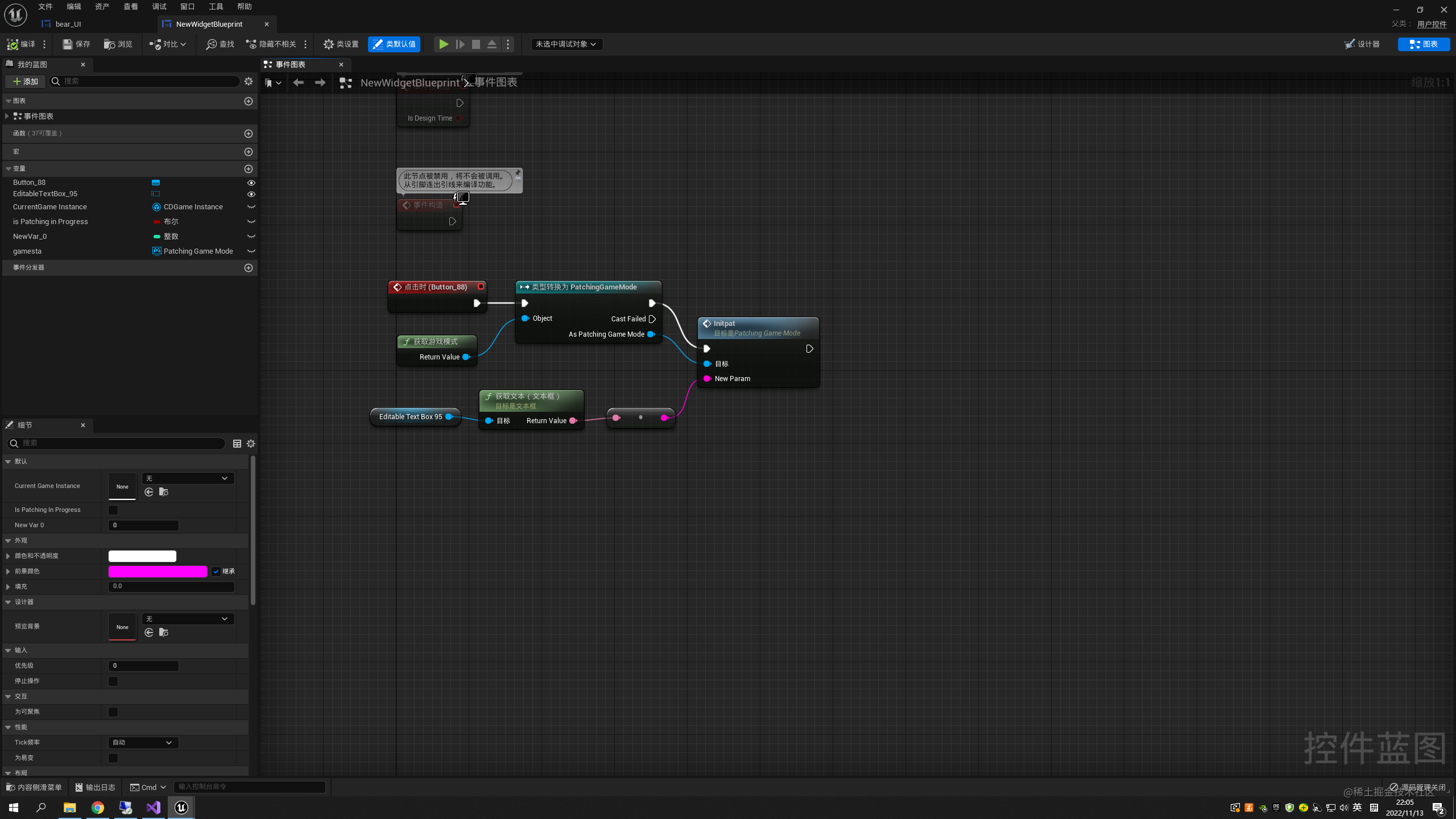
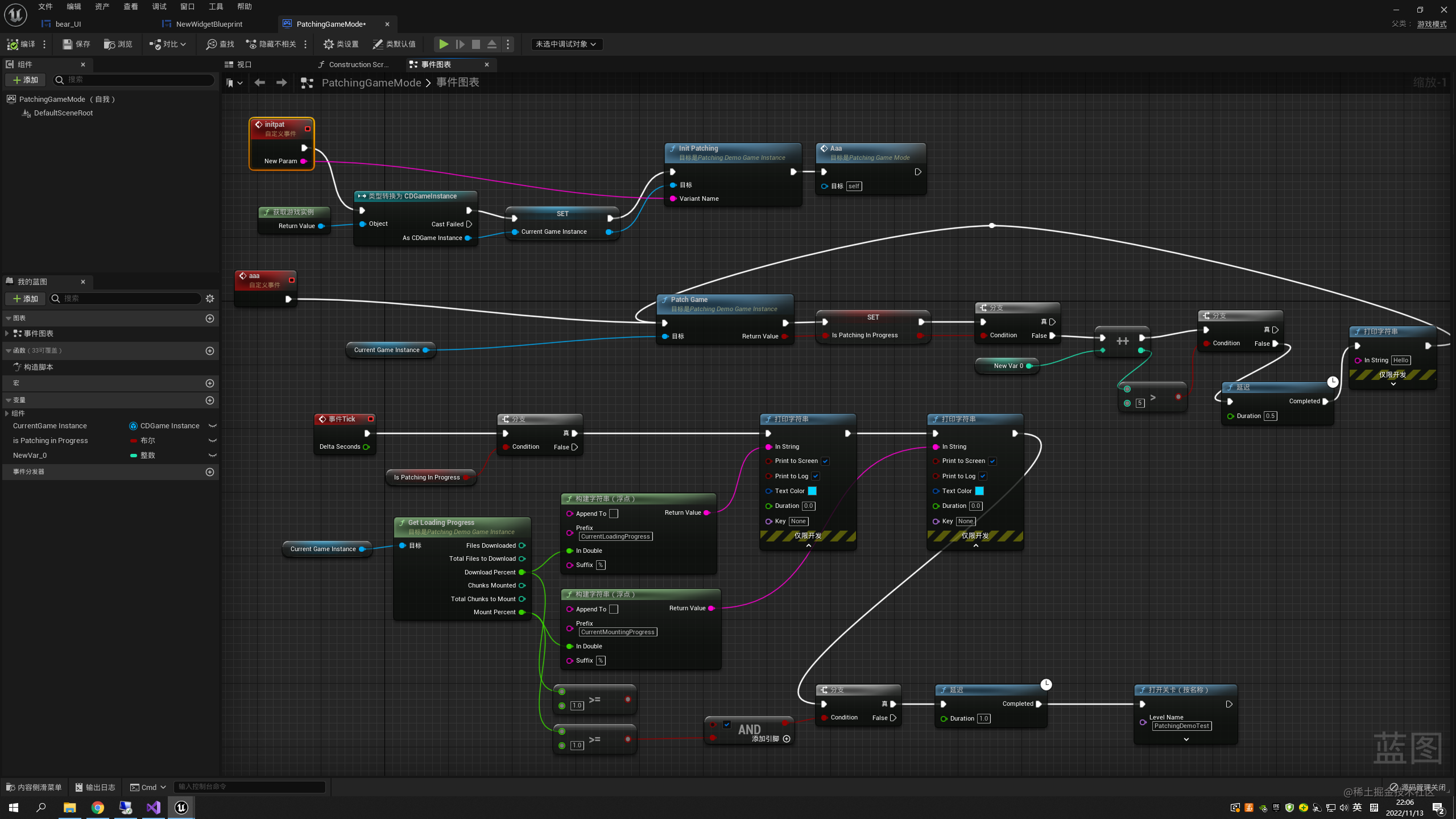
基于方式一 实现ui界面选择版本更新
PatchingDemoGameInstance.h
// Fill out your copyright notice in the Description page of Project Settings.

#pragma once
// Fill out your copyright notice in the Description page of Project Settings.

#pragma once

#include "CoreMinimal.h"
#include "Engine/GameInstance.h"
#include "PatchingDemoGameInstance.generated.h"

/**

*

*/

DECLARE_DYNAMIC_MULTICAST_DELEGATE_OneParam(FPatchCompleteDelegate, bool, Succeeded);

UCLASS()

class CESHIDABAO_API UPatchingDemoGameInstance : public UGameInstance

{

	GENERATED_BODY()

public:

	/** Overrides */

	virtual void Init() override;

	virtual void Shutdown() override;

	/**委托*/

    /**补丁过程成功或失败时触发*/
	UPROPERTY(BlueprintAssignable, Category = "Patching");
	FPatchCompleteDelegate OnPatchComplete;

	/** Starts the game patching process. Returns false if the patching manifest is not up to date. */

    /**启动游戏补丁过程。如果补丁清单不是最新的,则返回false。*/
	UFUNCTION(BlueprintCallable, Category = "Patching")
		bool PatchGame();

	UFUNCTION(BlueprintPure, Category = "Patching|Stats")

		void GetLoadingProgress(int32& FilesDownloaded, int32& TotalFilesToDownload, float& DownloadPercent, int32& ChunksMounted, int32& TotalChunksToMount, float& MountPercent) const;

	UPROPERTY(BlueprintReadWrite, EditAnywhere, Category = "Patching");
	FString buildidAAA;

	/** Initializes the patching system with the passed deployment name */
	UFUNCTION(BlueprintCallable, Category = "Patching")
		void InitPatching(const FString& VariantName);

protected:

	//Tracks Whether or not our local manifest file is up to date with the one hosted on our website

	bool bIsDownloadManifestUpToDate;

	void OnManifestUpdateComplete(bool bSuccess);

	/**要尝试和下载的文件块ID列表*/
	UPROPERTY(EditDefaultsOnly, Category = "Patching")
	TArray<int32> ChunkDownloadList;

	/** Called when the chunk download process finishes */

    /**文件块下载过程完成时调用*/
	void OnDownloadComplete(bool bSuccess);

	/**ChunkDownloader加载模式完成时调用*/
	void OnLoadingModeComplete(bool bSuccess);

	/**ChunkDownloader完成挂载文件块时调用*/
	void OnMountComplete(bool bSuccess);

};
PatchingDemoGameInstance.cpp
// Fill out your copyright notice in the Description page of Project Settings.
#include "PatchingDemoGameInstance.h"
#include "ChunkDownloader.h"
#include "Misc/CoreDelegates.h"
#include "AssetRegistryModule.h"
void UPatchingDemoGameInstance::Init()
{
Super::Init();
}
void UPatchingDemoGameInstance::InitPatching(const FString& VariantName)
{
const FString DeploymentName = "PatchingDemoKey"; // 这里需要与defaultgame.ini文件保持一致
const FString ContentBuildId = VariantName; // 与ContentBuildId 文件夹中文件一致
//初始化文件块下载器
TSharedRef<FChunkDownloader> Downloader = FChunkDownloader::GetOrCreate();
Downloader->Initialize("Windows", 8);
//加载缓存的版本ID
Downloader->LoadCachedBuild(DeploymentName);
//更新版本清单文件
TFunction<void(bool bSuccess)> UpdateCompleteCallback = [&](bool bSuccess) {bIsDownloadManifestUpToDate = true; };
Downloader->UpdateBuild(DeploymentName, ContentBuildId, UpdateCompleteCallback);
}
void UPatchingDemoGameInstance::Shutdown()
{
Super::Shutdown();
// Shut down ChunkDownloader
FChunkDownloader::Shutdown();
}
void UPatchingDemoGameInstance::OnManifestUpdateComplete(bool bSuccess)
{
bIsDownloadManifestUpToDate = bSuccess;
}
void UPatchingDemoGameInstance::GetLoadingProgress(int32& BytesDownloaded, int32& TotalBytesToDownload, float& DownloadPercent, int32& ChunksMounted, int32& TotalChunksToMount, float& MountPercent) const
{
//获取ChunkDownloader的引用
TSharedRef<FChunkDownloader> Downloader = FChunkDownloader::GetChecked();
//获取加载统计结构体
FChunkDownloader::FStats LoadingStats = Downloader->GetLoadingStats();
//获取已下载和要下载的的字节
BytesDownloaded = LoadingStats.BytesDownloaded;
TotalBytesToDownload = LoadingStats.TotalBytesToDownload;
//获取已挂载文件块数和要下载的文件块数
ChunksMounted = LoadingStats.ChunksMounted;
TotalChunksToMount = LoadingStats.TotalChunksToMount;
//使用以上统计信息计算下载和挂载百分比
DownloadPercent = (float)BytesDownloaded / (float)TotalBytesToDownload;
MountPercent = (float)ChunksMounted / (float)TotalChunksToMount;
}
void UPatchingDemoGameInstance::OnLoadingModeComplete(bool bSuccess)
{
OnDownloadComplete(bSuccess);
}
void UPatchingDemoGameInstance::OnMountComplete(bool bSuccess)
{
OnPatchComplete.Broadcast(bSuccess);
}
bool UPatchingDemoGameInstance::PatchGame()
{
//确保下载清单是最新的
if (bIsDownloadManifestUpToDate)
{
//获取文件块下载器
TSharedRef<FChunkDownloader> Downloader = FChunkDownloader::GetChecked();
//报告当前文件块状态
for (int32 ChunkID : ChunkDownloadList)
{
int32 ChunkStatus = static_cast<int32>(Downloader->GetChunkStatus(ChunkID));
UE_LOG(LogTemp, Display, TEXT("Chunk %i status: %i"), ChunkID, ChunkStatus);
}
TFunction<void(bool bSuccess)> DownloadCompleteCallback = [&](bool bSuccess) {OnDownloadComplete(bSuccess); };
Downloader->DownloadChunks(ChunkDownloadList, DownloadCompleteCallback, 1);
//启动加载模式
TFunction<void(bool bSuccess)> LoadingModeCompleteCallback = [&](bool bSuccess) {OnLoadingModeComplete(bSuccess); };
Downloader->BeginLoadingMode(LoadingModeCompleteCallback);
return true;
}//我们无法联系服务器验证清单,因此我们无法补丁
UE_LOG(LogTemp, Display, TEXT("Manifest Update Failed.Can't patch the game"));
return false;
}
void UPatchingDemoGameInstance::OnDownloadComplete(bool bSuccess)
{
if (bSuccess)
{
UE_LOG(LogTemp, Display, TEXT("Download complete"));
//获取文件块下载器
TSharedRef<FChunkDownloader> Downloader = FChunkDownloader::GetChecked();
FJsonSerializableArrayInt DownloadedChunks;
for (int32 ChunkID : ChunkDownloadList)
{
DownloadedChunks.Add(ChunkID);
}
//挂载文件块
TFunction<void(bool bSuccess)> MountCompleteCallback = [&](bool bSuccess) {OnMountComplete(bSuccess); };
Downloader->MountChunks(DownloadedChunks, MountCompleteCallback);
OnPatchComplete.Broadcast(true);
}
else
{
UE_LOG(LogTemp, Display, TEXT("Load process failed"));
//调用委托
OnPatchComplete.Broadcast(false);
}
}
方式二
PatchingDemoGameInstance.h
// Fill out your copyright notice in the Description page of Project Settings.

#pragma once

#include "CoreMinimal.h"
#include "Engine/GameInstance.h"
#include "PatchingDemoGameInstance.generated.h"

/**
 *
 */
 /**
 *
 */
DECLARE_DYNAMIC_MULTICAST_DELEGATE_OneParam(FPatchCompleteDelegate, bool, Succeeded);
DECLARE_DYNAMIC_MULTICAST_DELEGATE_OneParam(FManifestCompleteDelegate, bool, Succeeded);

UCLASS()
class AAAA_API UPatchingDemoGameInstance : public UGameInstance
{
	GENERATED_BODY()
public:
	/** Delegates */

	/** Fired when the patching process succeeds or fails */
	UPROPERTY(BlueprintAssignable, Category = "Patching");
	FPatchCompleteDelegate OnPatchComplete;
	UPROPERTY(BlueprintAssignable, Category = "Patching");
	FManifestCompleteDelegate OnManifestComplete;

	/** List of Chunk IDs to try and download */
	UPROPERTY(EditDefaultsOnly, Category = "Patching")
		TArray<int32> ChunkDownloadList;
	/** Starts the game patching process. Returns false if the patching manifest is not up to date. */
	UFUNCTION(BlueprintCallable, Category = "Patching")
		bool PatchGame();

	/** Called when the chunk download process finishes */
	void OnDownloadComplete(bool bSuccess);

	/** Called whenever ChunkDownloader's loading mode is finished*/
	void OnLoadingModeComplete(bool bSuccess);

	/** Called when ChunkDownloader finishes mounting chunks */
	void OnMountComplete(bool bSuccess);

	UFUNCTION(BlueprintPure, Category = "Patching|Stats")
		void GetLoadingProgress(int32& FilesDownloaded, int32& TotalFilesToDownload, float& DownloadPercent, int32& ChunksMounted, int32& TotalChunksToMount, float& MountPercent) const;

	/** Overrides */
	virtual void Init() override;
	virtual void Shutdown() override;

	UPROPERTY(BlueprintReadWrite,EditAnywhere,Category = "Patching");
	FString buildidAAA="PatchingDemoKey";
protected:
	//Tracks Whether or not our local manifest file is up to date with the one hosted on our website
	bool bIsDownloadManifestUpToDate;

	void OnManifestUpdateComplete(bool bSuccess);

};
PatchingDemoGameInstance.cpp
// Fill out your copyright notice in the Description page of Project Settings.


#include "PatchingDemoGameInstance.h"
#include "ChunkDownloader.h"
#include "Misc/CoreDelegates.h"
#include "AssetRegistryModule.h"

void UPatchingDemoGameInstance::Init()
{
	Super::Init();

	const FString DeploymentName = "PatchingDemoKey";
	//const FString ContentBuildId = "PatchingDemoKey";
	const FString ContentBuildId = buildidAAA;

	// initialize the chunk downloader
	TSharedRef<FChunkDownloader> Downloader = FChunkDownloader::GetOrCreate();
	// TODO 安卓下载方式
	// Downloader->Initialize("Android", 8);
	Downloader->Initialize("Windows", 8);

	// load the cached build ID
	Downloader->LoadCachedBuild(DeploymentName);
	//这里官方的写法(和蓝图)是有问题的,此写法导致manifest文件未下载下来的时候已经gamemode的GamePlay早已开始了,导致bIsDownloadManifestUpToDate获取到后永远都是false
	// update the build manifest file
	// TFunction<void(bool bSuccess)> UpdateCompleteCallback = [&](bool bSuccess){bIsDownloadManifestUpToDate = bSuccess;};
	TFunction<void(bool bSuccess)> UpdateCompleteCallback = [&](bool bSuccess) {OnManifestUpdateComplete(bSuccess); };
	Downloader->UpdateBuild(DeploymentName, ContentBuildId, UpdateCompleteCallback);
}
void UPatchingDemoGameInstance::Shutdown()
{
	Super::Shutdown();

	// Shut down ChunkDownloader
	FChunkDownloader::Shutdown();
}
void UPatchingDemoGameInstance::OnManifestUpdateComplete(bool bSuccess)
{
	bIsDownloadManifestUpToDate = bSuccess;
	if (bIsDownloadManifestUpToDate)
	{
		PatchGame();
	}
	OnManifestComplete.Broadcast(bSuccess);
}

void UPatchingDemoGameInstance::GetLoadingProgress(int32& BytesDownloaded, int32& TotalBytesToDownload, float& DownloadPercent, int32& ChunksMounted, int32& TotalChunksToMount, float& MountPercent) const
{
	//Get a reference to ChunkDownloader
	TSharedRef<FChunkDownloader> Downloader = FChunkDownloader::GetChecked();

	//Get the loading stats struct
	FChunkDownloader::FStats LoadingStats = Downloader->GetLoadingStats();

	//Get the bytes downloaded and bytes to download
	BytesDownloaded = LoadingStats.BytesDownloaded;
	TotalBytesToDownload = LoadingStats.TotalBytesToDownload;

	//Get the number of chunks mounted and chunks to download
	ChunksMounted = LoadingStats.ChunksMounted;
	TotalChunksToMount = LoadingStats.TotalChunksToMount;

	//Calculate the download and mount percent using the above stats
	DownloadPercent = (float)BytesDownloaded / (float)TotalBytesToDownload;
	MountPercent = (float)ChunksMounted / (float)TotalChunksToMount;
}
void UPatchingDemoGameInstance::OnLoadingModeComplete(bool bSuccess)
{
	OnDownloadComplete(bSuccess);
}

void UPatchingDemoGameInstance::OnMountComplete(bool bSuccess)
{
	OnPatchComplete.Broadcast(bSuccess);
}
bool UPatchingDemoGameInstance::PatchGame()
{
	// make sure the download manifest is up to date
	if (bIsDownloadManifestUpToDate)
	{
		// get the chunk downloader
		TSharedRef<FChunkDownloader> Downloader = FChunkDownloader::GetChecked();

		// report current chunk status
		for (int32 ChunkID : ChunkDownloadList)
		{
			int32 ChunkStatus = static_cast<int32>(Downloader->GetChunkStatus(ChunkID));
			UE_LOG(LogTemp, Display, TEXT("Chunk %i status: %i"), ChunkID, ChunkStatus);
		}

		TFunction<void(bool bSuccess)> DownloadCompleteCallback = [&](bool bSuccess) {OnDownloadComplete(bSuccess); };
		Downloader->DownloadChunks(ChunkDownloadList, DownloadCompleteCallback, 1);

		// start loading mode
		TFunction<void(bool bSuccess)> LoadingModeCompleteCallback = [&](bool bSuccess) {OnLoadingModeComplete(bSuccess); };
		Downloader->BeginLoadingMode(LoadingModeCompleteCallback);
		return true;
	}

	// we couldn't contact the server to validate our manifest, so we can't patch
	UE_LOG(LogTemp, Display, TEXT("Manifest Update Failed. Can't patch the game"));

	return false;

}
void UPatchingDemoGameInstance::OnDownloadComplete(bool bSuccess)
{
	if (bSuccess)
	{
		UE_LOG(LogTemp, Display, TEXT("Download complete"));

		// get the chunk downloader
		TSharedRef<FChunkDownloader> Downloader = FChunkDownloader::GetChecked();

		FJsonSerializableArrayInt DownloadedChunks;

		for (int32 ChunkID : ChunkDownloadList)
		{
			DownloadedChunks.Add(ChunkID);
		}

		//Mount the chunks
		TFunction<void(bool bSuccess)> MountCompleteCallback = [&](bool bSuccess) {OnMountComplete(bSuccess); };
		Downloader->MountChunks(DownloadedChunks, MountCompleteCallback);

		OnPatchComplete.Broadcast(true);

	}
	else
	{

		UE_LOG(LogTemp, Display, TEXT("Load process failed"));

		// call the delegate
		OnPatchComplete.Broadcast(false);
	}
}
config
[/Script/Plugins.ChunkDownloader PatchingDemoKey]
+CdnBaseUrls=121.5.164.49/PatchingDemoCDN
方式二参考
zhuanlan.zhihu.com/p/401132377
一. 环境准备
- Chunk Downloader插件启用
- 修改build引入模块
PrivateDependencyModuleNames.AddRange( new string[] { "ChunkDownloader" })
- 右键点击你的 .uproject 文件,然后点击 生成项目文件(Generate Project Files)
- 返回到你在 Visual Studio 中的项目解决方案,然后 构建(build) 项目
- 打开你的项目的 DefaultGame.ini 文件,然后添加以下信息以定义 CDN基本URL(CDN Base URL):
DefaultGame.ini
[/Script/Plugins.ChunkDownloader PatchingDemoLive]
+CdnBaseUrls=127.0.0.1/PatchingDemoCDN
此URL将ChunkDownloader指向文件所在的网站。PatchingDemoLive 限定符让你可以根据目标平台来使用不同的CDN部署配置。
二. 简单案例
- PatchingDemoGameInstance.h
// Fill out your copyright notice in the Description page of Project Settings.

#pragma once

#include "CoreMinimal.h"
#include "Engine/GameInstance.h"
#include "PatchingDemoGameInstance.generated.h"

/**
*
*/
DECLARE_DYNAMIC_MULTICAST_DELEGATE_OneParam(FPatchCompleteDelegate, bool, Succeeded);
DECLARE_DYNAMIC_MULTICAST_DELEGATE_OneParam(FManifestCompleteDelegate, bool,Succeeded);
UCLASS()
class DLCTEST_API UPatchingDemoGameInstance : public UGameInstance
{
	GENERATED_BODY()
	public:
	/** Delegates */

	/** Fired when the patching process succeeds or fails */
	UPROPERTY(BlueprintAssignable, Category="Patching");
	FPatchCompleteDelegate OnPatchComplete;
	UPROPERTY(BlueprintAssignable, Category="Patching");
	FManifestCompleteDelegate OnManifestComplete;

	/** List of Chunk IDs to try and download */
	UPROPERTY(EditDefaultsOnly, Category="Patching")
	TArray<int32> ChunkDownloadList;
	/** Starts the game patching process. Returns false if the patching manifest is not up to date. */
	UFUNCTION(BlueprintCallable, Category = "Patching")
	bool PatchGame();

	/** Called when the chunk download process finishes */
	void OnDownloadComplete(bool bSuccess);

	/** Called whenever ChunkDownloader's loading mode is finished*/
	void OnLoadingModeComplete(bool bSuccess);

	/** Called when ChunkDownloader finishes mounting chunks */
	void OnMountComplete(bool bSuccess);

	UFUNCTION(BlueprintPure, Category = "Patching|Stats")
	void GetLoadingProgress(int32& FilesDownloaded, int32& TotalFilesToDownload, float& DownloadPercent, int32& ChunksMounted, int32& TotalChunksToMount, float& MountPercent) const;

	/** Overrides */
	virtual void Init() override;
	virtual void Shutdown() override;
	protected:
	//Tracks Whether or not our local manifest file is up to date with the one hosted on our website
	bool bIsDownloadManifestUpToDate;

	void OnManifestUpdateComplete(bool bSuccess);
};
- PatchingDemoGameInstance.cpp
// Fill out your copyright notice in the Description page of Project Settings.
#include "Game/PatchingDemoGameInstance.h"
#include "ChunkDownloader.h"
#include "Misc/CoreDelegates.h"
#include "AssetRegistryModule.h"

void UPatchingDemoGameInstance::Init()
{
	Super::Init();

	const FString DeploymentName = "PatchingDemoLive";
	const FString ContentBuildId = "PatcherKey";

	// initialize the chunk downloader
	TSharedRef<FChunkDownloader> Downloader = FChunkDownloader::GetOrCreate();
	// TODO 安卓下载方式
	// Downloader->Initialize("Android", 8);
	Downloader->Initialize("Windows", 8);

	// load the cached build ID
	Downloader->LoadCachedBuild(DeploymentName);
	//这里官方的写法(和蓝图)是有问题的,此写法导致manifest文件未下载下来的时候已经gamemode的GamePlay早已开始了,导致bIsDownloadManifestUpToDate获取到后永远都是false
	// update the build manifest file
	// TFunction<void(bool bSuccess)> UpdateCompleteCallback = [&](bool bSuccess){bIsDownloadManifestUpToDate = bSuccess;};
	TFunction<void(bool bSuccess)> UpdateCompleteCallback = [&](bool bSuccess){OnManifestUpdateComplete(bSuccess);};
	Downloader->UpdateBuild(DeploymentName, ContentBuildId, UpdateCompleteCallback);
}
void UPatchingDemoGameInstance::Shutdown()
{
	Super::Shutdown();

	// Shut down ChunkDownloader
	FChunkDownloader::Shutdown();
}
void UPatchingDemoGameInstance::OnManifestUpdateComplete(bool bSuccess)
{
	bIsDownloadManifestUpToDate = bSuccess;
	if (bIsDownloadManifestUpToDate)
	{
		PatchGame();
	}
	OnManifestComplete.Broadcast(bSuccess);
}

void UPatchingDemoGameInstance::GetLoadingProgress(int32& BytesDownloaded, int32& TotalBytesToDownload, float& DownloadPercent, int32& ChunksMounted, int32& TotalChunksToMount, float& MountPercent) const
{
	//Get a reference to ChunkDownloader
	TSharedRef<FChunkDownloader> Downloader = FChunkDownloader::GetChecked();

	//Get the loading stats struct
	FChunkDownloader::FStats LoadingStats = Downloader->GetLoadingStats();

	//Get the bytes downloaded and bytes to download
	BytesDownloaded = LoadingStats.BytesDownloaded;
	TotalBytesToDownload = LoadingStats.TotalBytesToDownload;

	//Get the number of chunks mounted and chunks to download
	ChunksMounted = LoadingStats.ChunksMounted;
	TotalChunksToMount = LoadingStats.TotalChunksToMount;

	//Calculate the download and mount percent using the above stats
	DownloadPercent = (float)BytesDownloaded / (float)TotalBytesToDownload;
	MountPercent = (float)ChunksMounted / (float)TotalChunksToMount;
}
void UPatchingDemoGameInstance::OnLoadingModeComplete(bool bSuccess)
{
	OnDownloadComplete(bSuccess);
}

void UPatchingDemoGameInstance::OnMountComplete(bool bSuccess)
{
	OnPatchComplete.Broadcast(bSuccess);
}
bool UPatchingDemoGameInstance::PatchGame()
{
	// make sure the download manifest is up to date
	if (bIsDownloadManifestUpToDate)
	{
		// get the chunk downloader
		TSharedRef<FChunkDownloader> Downloader = FChunkDownloader::GetChecked();

		// report current chunk status
		for (int32 ChunkID : ChunkDownloadList)
		{
			int32 ChunkStatus = static_cast<int32>(Downloader->GetChunkStatus(ChunkID));
			UE_LOG(LogTemp, Display, TEXT("Chunk %i status: %i"), ChunkID, ChunkStatus);
		}

		TFunction<void (bool bSuccess)> DownloadCompleteCallback = [&](bool bSuccess){OnDownloadComplete(bSuccess);};
		Downloader->DownloadChunks(ChunkDownloadList, DownloadCompleteCallback, 1);

		// start loading mode
		TFunction<void (bool bSuccess)> LoadingModeCompleteCallback = [&](bool bSuccess){OnLoadingModeComplete(bSuccess);};
		Downloader->BeginLoadingMode(LoadingModeCompleteCallback);
		return true;
	}

	// we couldn't contact the server to validate our manifest, so we can't patch
	UE_LOG(LogTemp, Display, TEXT("Manifest Update Failed. Can't patch the game"));

	return false;

}
void UPatchingDemoGameInstance::OnDownloadComplete(bool bSuccess)
{
	if (bSuccess)
	{
		UE_LOG(LogTemp, Display, TEXT("Download complete"));

		// get the chunk downloader
		TSharedRef<FChunkDownloader> Downloader = FChunkDownloader::GetChecked();

		FJsonSerializableArrayInt DownloadedChunks;

		for (int32 ChunkID : ChunkDownloadList)
		{
			DownloadedChunks.Add(ChunkID);
		}

		//Mount the chunks
		TFunction<void(bool bSuccess)> MountCompleteCallback = [&](bool bSuccess){OnMountComplete(bSuccess);};
		Downloader->MountChunks(DownloadedChunks, MountCompleteCallback);

		OnPatchComplete.Broadcast(true);

	}
	else
	{

		UE_LOG(LogTemp, Display, TEXT("Load process failed"));

		// call the delegate
		OnPatchComplete.Broadcast(false);
	}
}
- 创建继承至PatchingDemoGameInstance名为CDGameInstance的GameInstance
- 创建名为PatchingGameMode的GameModel
- 项目设置
- 修改默认地图GameModel
三. 文件/打包准备/资源分块(注意文件/类的引用不要跨文件夹否则可能会破坏分包)
- 默认情况下,项目在烘焙或包装期间不会生成文件块。要设置项目进行分块,请打开 项目设置(Project Settings),然后导航至 项目(Project)> 打包(Packaging),然后确保 使用Pak文件(Use Pak File) 和 生成文件块(Generate Chunks) 均已启用。
- 在需要整体打包的文件夹中创建Data Asset
- 选择 主要资产标签(Primary Asset Label) 作为新数据资产的基类。
- 将新的主要资产标签命名。
- 打开修改内容。
| 文件块ID(Chunk ID) | 对于每个文件夹,这应该是唯一值。 |
|---|---|
| 优先级(Priority) | 该值应大于0。这里我们全部设置为 1。 |
| 烘焙规则(Cook Rule) | 设置为 始终烘焙(Always Cook)。 |
| 标记我的目录中的资产(Label Assets in My Directory) | 设置为 启用(Enabled)。 |
- 其他包相同操作
四. 打包设置与打包
- 打包设置
如果一切设置正确,则在UE完成打包后,你将在构建目录中的/WindowsNoEditor/PatchingDemo/Content/Paks下看到.pak文件。UE将用指定的文件块ID为每个文件命名,每个文件将包含我们每个文件夹的资产。
你也可以点击窗口(Window)> 资产审核(Asset Audit),在资产审核(Asset Audit)窗口中查看你的文件块。你可以在烘焙和分块中找到有关资产审核的更多信息。
五. 分包部署(本地部署)
- 在Windows资源管理器中,打开 开始菜单(Start Menu),搜索 打开或关闭Windows功能(Turn Windows Features on or off),将其打开。
- 在 Windows功能(Windows Features) 菜单中,启用 Internet Information Services,然后点击 确定(OK)。
- 打开 Internet Information Services管理器(IIS管理器)(Internet Information Services Manager (IIS Manager)),然后启用 目录浏览(Directory Browsing)。
- 在窗口左侧的 连接(Connections) 菜单中,展开 网站(Sites) 并点击 默认网站(Default Web Site)。
- 在 默认网站主页(Default Web Site Home) 菜单中,双击 MIME类型(MIME Types)。
- 在 MIME类型(MIME Types) 菜单中,点击右键 然后点击 添加(Add)。
-
在 添加MIME类型(Add MIME Type) 窗口中,将 文件扩展名(File Name extension) 设置为 .pak,然后将 MIME类型(MIME type) 设置为
application/octet-stream
- 导航至 默认网站(Default Web Site) 文件夹。默认为C:\inetpub\wwwroot。创建名为 PatchingDemoCDN 的文件夹,在PatchingDemoCDN里继续创建PatcherKey文件夹,在创建BuildManifest-Windows.txt文件,Windows文件夹,将打包后的pak放入Windows中。
*BuildManifest-Windows.txt文件(包行中隔开是使用的TAB键的制表符,复制可能不管用,复制可能不管,复制可能不管,非常重要,官方并未做说明,否则报错,因为源码中就是那样解析的)
$NUM_ENTRIES = 2
$BUILD_ID = PatcherKey
pakchunk1001-WindowsNoEditor.pak	5715044	ver	1001	/Windows/pakchunk1001-WindowsNoEditor.pak
pakchunk1002-WindowsNoEditor.pak	5712736	ver	1002	/Windows/pakchunk1002-WindowsNoEditor.pak
| $BUILD_ID = PatcherKey | BUILD_ID |
|---|---|
| pakchunk1001-WindowsNoEditor.pak | 包名,可以自定义修改,需要保持一直 |
| 571504 | 文件大小,点击文件属性可以查看 |
| ver | DLC/补丁版本号 |
| 1001 | chunkid |
| $NUM_ENTRIES = 2 | pak数量 |
- 删掉打包后原本存在的pak文件,运行打包后的exe即可下载DLC进入新地图了

