

作者:Vincy。最后修改于2022年9月15日。
YouTube几乎是托管视频的第一大平台。它允许用户发布和分享视频,更像是一个社交网络。
有时需要下载YouTube视频。在下载视频之前,你必须通读YouTube的条款和条件,并根据给出的权限行事。例如,你可能希望通过下载来对即将被替换或删除的旧视频进行备份。
这个快速的例子提供了一个用PHP编写的YouTube视频下载器脚本。它有一个在PHP变量中定义的视频URL。它还建立了一个密钥,通过API访问YouTube视频元。
配置密钥并存储视频URL,使用该脚本获得视频下载器链接。
快速示例
<?php
$apiKey = "API_KEY";
$videoUrl = "YOUTUBE_VIDEO_URL";
preg_match('%(?:youtube(?:-nocookie)?\.com/(?:[^/]+/.+/|(?:v|e(?:mbed)?)/|.*[?&]v=)|youtu\.be/)([^"&?/ ]{11})%i', $videoUrl, $match);
$youtubeVideoId = $match[1];
$videoMeta = json_decode(getYoutubeVideoMeta($youtubeVideoId, $apiKey));
$videoTitle = $videoMeta->videoDetails->title;
$videoFormats = $videoMeta->streamingData->formats;
foreach ($videoFormats as $videoFormat) {
    $url = $videoFormat->url;
    if ($videoFormat->mimeType)
        $mimeType = explode(";", explode("/", $videoFormat->mimeType)[1])[0];
    else
        $mimeType = "mp4";
    ?>
<a
    href="video-downloader.php?link=<?php echo urlencode($url)?>&title=<?php echo urlencode($videoTitle)?>&type=<?php echo $mimeType; ?>">
    Download Video</a>
<?php
}

function getYoutubeVideoMeta($videoId, $key)
{
    $ch = curl_init();
    $curlUrl = 'https://www.youtube.com/youtubei/v1/player?key=' . $key;
    curl_setopt($ch, CURLOPT_URL, $curlUrl);
    curl_setopt($ch, CURLOPT_ENCODING, 'gzip, deflate');
    curl_setopt($ch, CURLOPT_RETURNTRANSFER, 1);
    curl_setopt($ch, CURLOPT_POST, 1);
    $curlOptions = '{"context": {"client": {"hl": "en","clientName": "WEB",
        "clientVersion": "2.20210721.00.00","clientFormFactor": "UNKNOWN_FORM_FACTOR","clientScreen": "WATCH",
        "mainAppWebInfo": {"graftUrl": "/watch?v=' . $videoId . '",}},"user": {"lockedSafetyMode": false},
        "request": {"useSsl": true,"internalExperimentFlags": [],"consistencyTokenJars": []}},
        "videoId": "' . $videoId . '",  "playbackContext": {"contentPlaybackContext":
        {"vis": 0,"splay": false,"autoCaptionsDefaultOn": false,
        "autonavState": "STATE_NONE","html5Preference": "HTML5_PREF_WANTS","lactMilliseconds": "-1"}},
        "racyCheckOk": false,  "contentCheckOk": false}';
    curl_setopt($ch, CURLOPT_POSTFIELDS, $curlOptions);
    $headers = array();
    $headers[] = 'Content-Type: application/json';
    curl_setopt($ch, CURLOPT_HTTPHEADER, $headers);
    $curlResult = curl_exec($ch);
    if (curl_errno($ch)) {
        echo 'Error:' . curl_error($ch);
    }
    curl_close($ch);
    return $curlResult;
}
?>
这个例子的代码按以下流程工作,输出下载YouTube视频的链接。
- 从输入的URL中获取YouTube视频的唯一ID。
- 通过PHP cURL帖子请求YouTube API,访问视频元数据。
- 通过解析cURL响应获得视频标题、各种格式的数据数组和MIME类型。
- 将视频链接、标题和MIME类型传递给视频下载器脚本。
- 通过设置PHP头文件 Content-type,应用PHP*readfile()*来下载视频文件。
下面的视频下载脚本是通过点击浏览器中的 "下载视频 "链接调用的。
它接收视频标题和扩展名以定义输出视频文件名。它还会得到视频链接,从中读取要下载到浏览器的视频。
该脚本在PHP中设置内容头,以输出YouTube视频文件。
video-downloader.php
<?php
// this PHP script reads and downloads the video from YouTube
$downloadURL = urldecode($_GET['link']);
$downloadFileName = urldecode($_GET['title']) . '.' . urldecode($_GET['type']);
if (! empty($downloadURL) && substr($downloadURL, 0, 8) === 'https://') {
    header("Cache-Control: public");
    header("Content-Description: File Transfer");
    header("Content-Disposition: attachment;filename=\"$downloadFileName\"");
    header("Content-Transfer-Encoding: binary");
    readfile($downloadURL);
}
?>
通过表单收集YouTube视频URL并处理视频下载器脚本
在快速的例子中,它有一个样本,将YouTube视频URL硬编码到一个PHP变量。
但是,下面的代码将允许用户输入视频URL而不是硬编码。
一个HTML表单将发布输入的视频URL,以处理对YouTube API的PHP cURL请求。
在发布视频URL后,PHP的流程与快速示例相同。但是,不同的是,它显示更多的链接来下载所有适应格式的视频。
index.php
<form method="post" action="">
    <h1>PHP YouTube Video Downloader Script</h1>
    <div class="row">
        <input type="text" class="inline-block" name="youtube-video-url">
        <button type="submit" name="submit" id="submit">Download Video</button>
    </div>
</form>
<?php
if (isset($_POST['youtube-video-url'])) {
    $videoUrl = $_POST['youtube-video-url'];
    ?>
<p>
    URL: <a href="<?php echo $videoUrl;?>"><?php echo $videoUrl;?></a>
</p>
<?php
}
if (isset($_POST['submit'])) {
    preg_match('%(?:youtube(?:-nocookie)?\.com/(?:[^/]+/.+/|(?:v|e(?:mbed)?)/|.*[?&]v=)|youtu\.be/)([^"&?/ ]{11})%i', $videoUrl, $match);
    $youtubeVideoId = $match[1];
    require './youtube-video-meta.php';
    $videoMeta = json_decode(getYoutubeVideoMeta($youtubeVideoId, $key));
    $videoThumbnails = $videoMeta->videoDetails->thumbnail->thumbnails;
    $thumbnail = end($videoThumbnails)->url;
    ?>
<p>
    <img src="<?php echo $thumbnail; ?>">
</p>
<?php $videoTitle = $videoMeta->videoDetails->title; ?>
<h2>Video title: <?php echo $videoTitle; ?></h2>
<?php
    $shortDescription = $videoMeta->videoDetails->shortDescription;
    ?>
<p><?php echo str_split($shortDescription, 100)[0];?></p>
<?php
    $videoFormats = $videoMeta->streamingData->formats;
    if (! empty($videoFormats)) {
        if (@$videoFormats[0]->url == "") {
            ?>
<p>
    <strong>This YouTube video cannot be downloaded by the downloader!</strong><?php
            $signature = "https://example.com?" . $videoFormats[0]->signatureCipher;
            parse_str(parse_url($signature, PHP_URL_QUERY), $parse_signature);
            $url = $parse_signature['url'] . "&sig=" . $parse_signature['s'];
            ?>
        </p>
<?php
            die();
        }
        ?>
<h3>With Video & Sound</h3>
<table class="striped">
    <tr>
        <th>Video URL</th>
        <th>Type</th>
        <th>Quality</th>
        <th>Download Video</th>
    </tr>
                    <?php
        foreach ($videoFormats as $videoFormat) {
            if (@$videoFormat->url == "") {
                $signature = "https://example.com?" . $videoFormat->signatureCipher;
                parse_str(parse_url($signature, PHP_URL_QUERY), $parse_signature);
                $url = $parse_signature['url'] . "&sig=" . $parse_signature['s'];
            } else {
                $url = $videoFormat->url;
            }
            ?>
            <tr>
        <td><a href="<?php echo $url; ?>">View Video</a></td>
        <td><?php if($videoFormat->mimeType) echo explode(";",explode("/",$videoFormat->mimeType)[1])[0]; else echo "Unknown";?></td>
        <td><?php if($videoFormat->qualityLabel) echo $videoFormat->qualityLabel; else echo "Unknown"; ?></td>
        <td><a
            href="video-downloader.php?link=<?php echo urlencode($url)?>&title=<?php echo urlencode($videoTitle)?>&type=<?php if($videoFormat->mimeType) echo explode(";",explode("/",$videoFormat->mimeType)[1])[0]; else echo "mp4";?>">
                Download Video</a></td>
    </tr>
                    <?php } ?>
                </table>
<?php
        // if you wish to provide formats based on different formats
        // then keep the below two lines
        $adaptiveFormats = $videoMeta->streamingData->adaptiveFormats;
        include 'adaptive-formats.php';
        ?>
    <?php
    }
}
?>
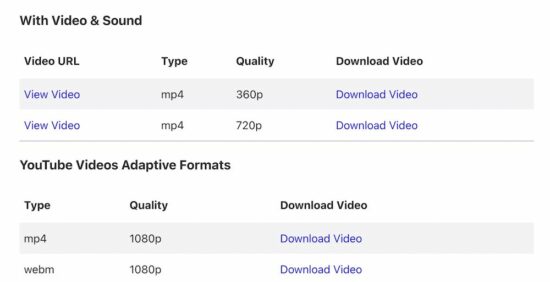
这个程序一旦得到视频下载器的响应,将输出以下内容。

获取视频元数据的PHP cURL脚本
用于访问YouTube端点以读取文件元数据的PHP cURL脚本已在快速示例中看到。
上面的代码片段有一个PHP require_once语句,用于拥有cURL post handler。
youtube-video-meta.php文件有这个处理程序来读取视频文件元。它接收视频的唯一ID和用于PHP cURL解析的密钥。
在最近发布的一篇文章中,我们已经收集了文件元,并上传到Google Drive。
以自适应格式显示YouTube视频下载者
登陆页面显示另一个下载表,以获得可用的自适应格式的视频文件。
PHP脚本访问Youtube视频元对象的adaptiveFormats属性来显示这些下载。
adaptive-formats.php
<h3>YouTube Videos Adaptive Formats</h3>
<table class="striped">
    <tr>
        <th>Type</th>
        <th>Quality</th>
        <th>Download Video</th>
    </tr>
            <?php
            foreach ($adaptiveFormats as $videoFormat) {
                try {
                    $url = $videoFormat->url;
                } catch (Exception $e) {
                    $signature = $videoFormat->signatureCipher;
                    parse_str(parse_url($signature, PHP_URL_QUERY), $parse_signature);
                    $url = $parse_signature['url'];
                }
                ?>
                <tr>
        <td><?php if(@$videoFormat->mimeType) echo explode(";",explode("/",$videoFormat->mimeType)[1])[0]; else echo "Unknown";?></td>
        <td><?php if(@$videoFormat->qualityLabel) echo $videoFormat->qualityLabel; else echo "Unknown"; ?></td>
        <td><a
            href="video-downloader.php?link=<?php print urlencode($url)?>&title=<?php print urlencode($videoTitle)?>&type=<?php if($videoFormat->mimeType) echo explode(";",explode("/",$videoFormat->mimeType)[1])[0]; else echo "mp4";?>">Download
                Video</a></td>
    </tr>
            <?php }?>
</table>
