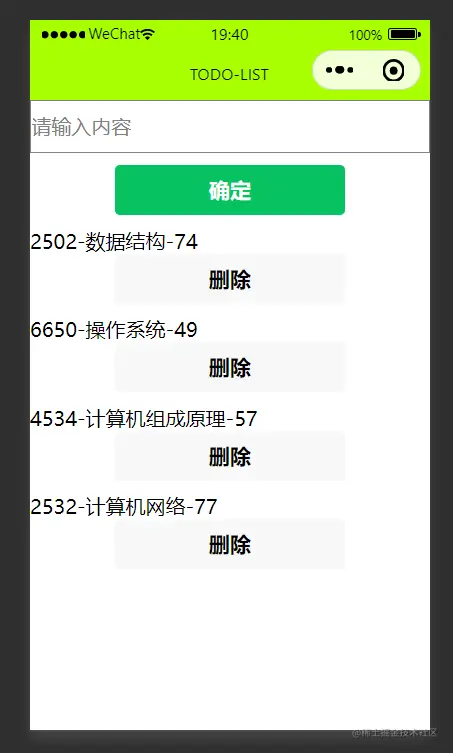
TODO-LIST应用
bind:input="onInputValue" 绑定输入内容
<input type="text" class="m-input" bind:input="onInputValue" value="{{inputValue}}" placeholder="请输入内容"/>
bind:tap="onConfirm" 绑定点击事件
<button type="primary" bind:tap="onConfirm">确定</button>
显示内容
<view>
    <view wx:for="{{list}}" wx:key="index" class="v-view">
    {{item.id}}-{{item.name}}-{{item.price}}
        // 绑定删除事件
        <button bind:tap="onDelete" data-pricce="{{item.price}}" data-id="{{item.id}}">删除</button>
    </view>
</view>
逻辑
列表数据
 data:{
    inputValue:'',//输入框内容
    list:[
        // {id:1001,name:'数据结构',price:20},
        // {id:1002,name:'计算机组成原理',price:40},
        // {id:1003,name:'计算机网络',price:60},
        // {id:1004,name:'操作系统',price:80}
    ]//列表数据
},
绑定输入框事件
onInputValue(e){
let inputValue = e.detail.value
this.setData({inputValue})
},
确定事件,获取输入框内容添加显示到列表界面
onConfirm(){
let name = this.data.inputValue
let id = Math.floor(Math.random()*(9999-1000)+1000)
let price = Math.floor(Math.random()*100)
let product = {id,name,price}
let list = this.data.list
list.push(product)
this.setData({list,inputValue:''})
},
删除事件
1获取id
2通过id找商品在数组里的索引号
3splice(index,1) slice(start,end)
在原数组上操作    根据索引号返回新数组
代码片段
onDelete(e){
let id = e.target.dataset.id
let list = this.data.list
let index = list.findIndex(item=>item.id == id)
list.splice(index,1)
this.setData({list})
}
结果如图