

"好吧!让我们来看看这个Rails 6的好处",我想:
- 克隆rails/rails--简单
- 看看最新的提交--这是了解最新情况的好方法
bundle install:-(
错误1:安装libxml-ruby 3.10 gem失败
Installing libxml-ruby 3.1.0 with native extensions
Gem::Ext::BuildError: ERROR: Failed to build gem native extension.

    current directory: /Users/sdball/.rbenv/versions/2.6.5/lib/ruby/gems/2.6.0/gems/libxml-ruby-3.1.0/ext/libxml
/Users/sdball/.rbenv/versions/2.6.5/bin/ruby -I /Users/sdball/.rbenv/versions/2.6.5/lib/ruby/2.6.0 -r
./siteconf20191130-15096-mz0ci9.rb extconf.rb
/Users/sdball/.rbenv/versions/2.6.5/bin/ruby: warning: shebang line ending with \r may cause problems
checking for libxml/xmlversion.h in
/opt/include/libxml2,/opt/local/include/libxml2,/usr/local/include/libxml2,/usr/include/libxml2... no
*** extconf.rb failed ***
Could not create Makefile due to some reason, probably lack of necessary
libraries and/or headers.  Check the mkmf.log file for more details.  You may
need configuration options.

Provided configuration options:
    --with-opt-dir
    --without-opt-dir
    --with-opt-include
    --without-opt-include=${opt-dir}/include
    --with-opt-lib
    --without-opt-lib=${opt-dir}/lib
    --with-make-prog
    --without-make-prog
    --srcdir=.
    --curdir
    --ruby=/Users/sdball/.rbenv/versions/2.6.5/bin/$(RUBY_BASE_NAME)
    --with-xml2-config
    --without-xml2-config
    --with-xml2-dir
    --without-xml2-dir
    --with-xml2-include
    --without-xml2-include=${xml2-dir}/include
    --with-xml2-lib
    --without-xml2-lib=${xml2-dir}/lib
 extconf failure: need libxml2.

    Install the library or try one of the following options to extconf.rb:

      --with-xml2-config=/path/to/xml2-config
      --with-xml2-dir=/path/to/libxml2
      --with-xml2-lib=/path/to/libxml2/lib
      --with-xml2-include=/path/to/libxml2/include


To see why this extension failed to compile, please check the mkmf.log which can be found here:

  /Users/sdball/.rbenv/versions/2.6.5/lib/ruby/gems/2.6.0/extensions/x86_64-darwin-18/2.6.0/libxml-ruby-3.1.0/mkmf.log

extconf failed, exit code 1

Gem files will remain installed in /Users/sdball/.rbenv/versions/2.6.5/lib/ruby/gems/2.6.0/gems/libxml-ruby-3.1.0 for inspection.
Results logged to
/Users/sdball/.rbenv/versions/2.6.5/lib/ruby/gems/2.6.0/extensions/x86_64-darwin-18/2.6.0/libxml-ruby-3.1.0/gem_make.out

An error occurred while installing libxml-ruby (3.1.0), and Bundler cannot continue.
Make sure that `gem install libxml-ruby -v '3.1.0' --source 'https://rubygems.org/'` succeeds before bundling.

In Gemfile:
  libxml-ruby
好吧,这不算太奇怪。一定是有什么libxml库需要我先安装,以便rubygem有它需要的文件。然后检查一下。extconf failure: need libxml2
所以让我们来解决这个问题吧!
$ brew install libxml2
==> Downloading https://homebrew.bintray.com/bottles/libxml2-2.9.10.mojave.bottle.tar.gz
==> Downloading from https://akamai.bintray.com/47/472ed1a73a91c49fd9f39bd8cc4a7472b09c691659b3b9305c9da42ed35e1475?__gda__=exp=15
######################################################################## 100.0%
==> Pouring libxml2-2.9.10.mojave.bottle.tar.gz
==> Caveats
libxml2 is keg-only, which means it was not symlinked into /usr/local,
because macOS already provides this software and installing another version in
parallel can cause all kinds of trouble.

If you need to have libxml2 first in your PATH run:
  echo 'export PATH="/usr/local/opt/libxml2/bin:$PATH"' >> ~/.zshrc

For compilers to find libxml2 you may need to set:
  export LDFLAGS="-L/usr/local/opt/libxml2/lib"
  export CPPFLAGS="-I/usr/local/opt/libxml2/include"

For pkg-config to find libxml2 you may need to set:
  export PKG_CONFIG_PATH="/usr/local/opt/libxml2/lib/pkgconfig"

==> Summary
🍺  /usr/local/Cellar/libxml2/2.9.10: 280 files, 10.5MB
很好!
Fetching libxml-ruby 3.1.0
Installing libxml-ruby 3.1.0 with native extensions
Gem::Ext::BuildError: ERROR: Failed to build gem native extension.

    current directory: /Users/sdball/.rbenv/versions/2.6.5/lib/ruby/gems/2.6.0/gems/libxml-ruby-3.1.0/ext/libxml
/Users/sdball/.rbenv/versions/2.6.5/bin/ruby -I /Users/sdball/.rbenv/versions/2.6.5/lib/ruby/2.6.0 -r
./siteconf20191130-53906-d0hyry.rb extconf.rb
/Users/sdball/.rbenv/versions/2.6.5/bin/ruby: warning: shebang line ending with \r may cause problems
checking for libxml/xmlversion.h in
/opt/include/libxml2,/opt/local/include/libxml2,/usr/local/include/libxml2,/usr/include/libxml2... no
*** extconf.rb failed ***
Could not create Makefile due to some reason, probably lack of necessary
libraries and/or headers.  Check the mkmf.log file for more details.  You may
need configuration options.

Provided configuration options:
    --with-opt-dir
    --without-opt-dir
    --with-opt-include
    --without-opt-include=${opt-dir}/include
    --with-opt-lib
    --without-opt-lib=${opt-dir}/lib
    --with-make-prog
    --without-make-prog
    --srcdir=.
    --curdir
    --ruby=/Users/sdball/.rbenv/versions/2.6.5/bin/$(RUBY_BASE_NAME)
    --with-xml2-config
    --without-xml2-config
    --with-xml2-dir
    --without-xml2-dir
    --with-xml2-include
    --without-xml2-include=${xml2-dir}/include
    --with-xml2-lib
    --without-xml2-lib=${xml2-dir}/lib
 extconf failure: need libxml2.

    Install the library or try one of the following options to extconf.rb:

      --with-xml2-config=/path/to/xml2-config
      --with-xml2-dir=/path/to/libxml2
      --with-xml2-lib=/path/to/libxml2/lib
      --with-xml2-include=/path/to/libxml2/include


To see why this extension failed to compile, please check the mkmf.log which can be found here:

  /Users/sdball/.rbenv/versions/2.6.5/lib/ruby/gems/2.6.0/extensions/x86_64-darwin-18/2.6.0/libxml-ruby-3.1.0/mkmf.log

extconf failed, exit code 1

Gem files will remain installed in /Users/sdball/.rbenv/versions/2.6.5/lib/ruby/gems/2.6.0/gems/libxml-ruby-3.1.0 for inspection.
Results logged to
/Users/sdball/.rbenv/versions/2.6.5/lib/ruby/gems/2.6.0/extensions/x86_64-darwin-18/2.6.0/libxml-ruby-3.1.0/gem_make.out

An error occurred while installing libxml-ruby (3.1.0), and Bundler cannot continue.
Make sure that `gem install libxml-ruby -v '3.1.0' --source 'https://rubygems.org/'` succeeds before bundling.

In Gemfile:
  libxml-ruby
哦,得了吧。我想仅仅安装库是不够的。我实际上应该阅读那些自制的安装细节:
If you need to have libxml2 first in your PATH run:
  echo 'export PATH="/usr/local/opt/libxml2/bin:$PATH"' >> ~/.zshrc

For compilers to find libxml2 you may need to set:
  export LDFLAGS="-L/usr/local/opt/libxml2/lib"
  export CPPFLAGS="-I/usr/local/opt/libxml2/include"

For pkg-config to find libxml2 you may need to set:
  export PKG_CONFIG_PATH="/usr/local/opt/libxml2/lib/pkgconfig"
好的,很好。爽啊。我想我应该设置其中的一个标志:
$ gem install libxml-ruby -v '3.1.0' --source 'https://rubygems.org/' --with-xml-dir=/usr/local/opt/libxml2
ERROR:  While executing gem ... (OptionParser::InvalidOption)
    invalid option: --with-xml-dir=/usr/local/opt/libxml2
Uh hm.我说我应该设置其中的一个标志:
gem install libxml-ruby -v '3.1.0' --source 'https://rubygems.org/' --with-xml-dir "/usr/local/opt/libxml2"
ERROR:  While executing gem ... (OptionParser::InvalidOption)
    invalid option: --with-xml-dir
$ gem install libxml-ruby -v '3.1.0' --source 'https://rubygems.org/' --with-xml-dir /usr/local/opt/libxml2
ERROR:  While executing gem ... (OptionParser::InvalidOption)
    invalid option: --with-xml-dir
好的,快速浏览一下DuckDuckGo,是的,我们需要用-- 来分隔我们的选项,以表明我们在传递独立的选项:
$ gem install libxml-ruby -v '3.1.0' --source 'https://rubygems.org/' -- --with-xml-dir=/usr/local/opt/libxml2
Building native extensions with: '--with-xml-dir=/usr/local/opt/libxml2'
This could take a while...
ERROR:  Error installing libxml-ruby:
    ERROR: Failed to build gem native extension.

    current directory: /Users/sdball/.rbenv/versions/2.6.5/lib/ruby/gems/2.6.0/gems/libxml-ruby-3.1.0/ext/libxml
/Users/sdball/.rbenv/versions/2.6.5/bin/ruby -I /Users/sdball/.rbenv/versions/2.6.5/lib/ruby/2.6.0 -r ./siteconf20191130-58777-73jhsk.rb extconf.rb --with-xml-dir\=/usr/local/opt/libxml2
/Users/sdball/.rbenv/versions/2.6.5/bin/ruby: warning: shebang line ending with \r may cause problems
checking for libxml/xmlversion.h in /opt/include/libxml2,/opt/local/include/libxml2,/usr/local/include/libxml2,/usr/include/libxml2... no
*** extconf.rb failed ***
Could not create Makefile due to some reason, probably lack of necessary
libraries and/or headers.  Check the mkmf.log file for more details.  You may
need configuration options.
嗯,这不是我所希望的。
我尝试了各种路径和选项的组合,但都无济于事。
网络搜索并不能提供这种奇怪的安装选项声明的细节。是时候使用我的秘密武器了:GitHub代码搜索!
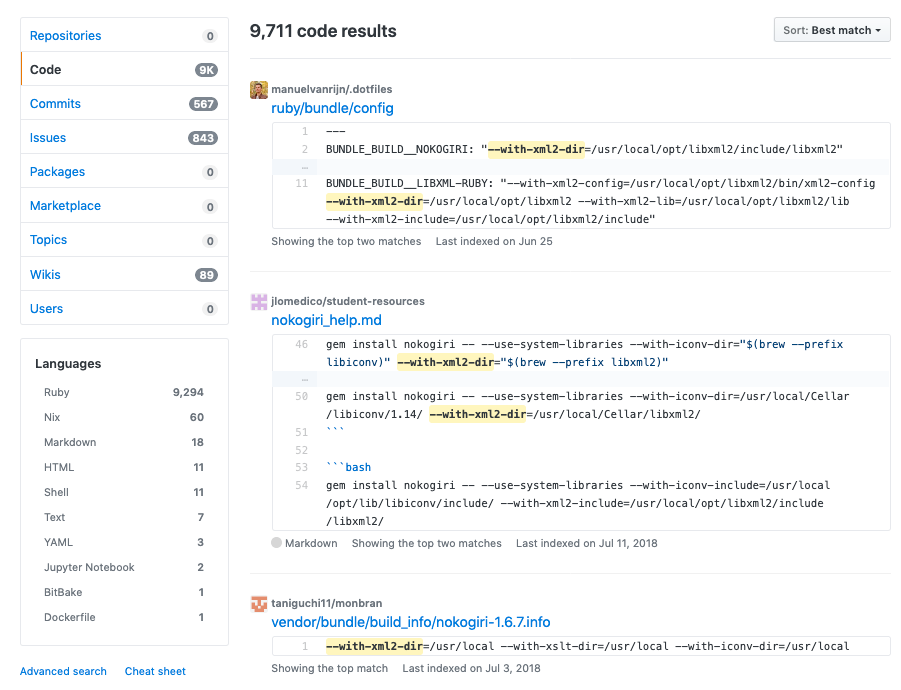 GitHub代码搜索结果为 -with-xml2-dir
有了!有了有人已经为我想出了一些神奇的声明!特别是manuelvanrijn,他的dotfiles repo组织得很好,含有我想要的声明的bundler配置。
---
BUNDLE_BUILD__NOKOGIRI: "--with-xml2-dir=/usr/local/opt/libxml2/include/libxml2"
BUNDLE_GEM__COC: "true"
BUNDLE_GEM__MIT: "true"
BUNDLE_GEM__TEST: "rspec"
BUNDLE_BUILD__EVENTMACHINE: "--with-cppflags=-I/usr/local/opt/openssl/include"
BUNDLE_JOBS: "11"
BUNDLE_IGNORE_MESSAGES__CAPISTRANO-HARROW: "true"
BUNDLE_IGNORE_MESSAGES__CAPISTRANO: "true"
BUNDLE_BUILD__MYSQL: "--with-mysql-config=/usr/local/Cellar/mysql@5.7/5.7.25/bin/mysql_config --with-ldflags=-L/usr/local/opt/openssl/lib --with-cppflags=-I/usr/local/opt/openssl/include"
BUNDLE_BUILD__LIBXML-RUBY: "--with-xml2-config=/usr/local/opt/libxml2/bin/xml2-config --with-xml2-dir=/usr/local/opt/libxml2 --with-xml2-lib=/usr/local/opt/libxml2/lib --with-xml2-include=/usr/local/opt/libxml2/include"
用.bundle/config ,试了一下第一种方法,哇!真是太神奇了。
$ cat .bundle/config
BUNDLE_BUILD__LIBXML-RUBY: "--with-xml2-config=/usr/local/opt/libxml2/bin/xml2-config --with-xml2-dir=/usr/local/opt/libxml2 --with-xml2-lib=/usr/local/opt/libxml2/lib --with-xml2-include=/usr/local/opt/libxml2/include"

$ gem install libxml-ruby -v '3.1.0' --source 'https://rubygems.org/' -- --with-xml2-config=/usr/local/opt/libxml2/bin/xml2-config --with-xml2-dir=/usr/local/opt/libxml2 --with-xml2-lib=/usr/local/opt/libxml2/lib --with-xml2-include=/usr/local/opt/libxml2/include
Building native extensions with: '--with-xml2-config=/usr/local/opt/libxml2/bin/xml2-config --with-xml2-dir=/usr/local/opt/libxml2 --with-xml2-lib=/usr/local/opt/libxml2/lib --with-xml2-include=/usr/local/opt/libxml2/include'
This could take a while...
Successfully installed libxml-ruby-3.1.0
错误2:安装mysql gem失败
An error occurred while installing mysql2 (0.5.2), and Bundler cannot continue.
Make sure that `gem install mysql2 -v '0.5.2' --source 'https://rubygems.org/'` succeeds before bundling.

In Gemfile:
  mysql2
所以我们可能又需要一些头文件来构建一个gem:
$ brew install mysql

$ gem install mysql2
Building native extensions. This could take a while...
ERROR:  Error installing mysql2:
    ERROR: Failed to build gem native extension.

    current directory: /Users/sdball/.rbenv/versions/2.6.5/lib/ruby/gems/2.6.0/gems/mysql2-0.5.3/ext/mysql2
/Users/sdball/.rbenv/versions/2.6.5/bin/ruby -I /Users/sdball/.rbenv/versions/2.6.5/lib/ruby/2.6.0 -r ./siteconf20191130-87797-zmrpf5.rb extconf.rb
checking for rb_absint_size()... yes
checking for rb_absint_singlebit_p()... yes
checking for rb_wait_for_single_fd()... yes
-----
Using mysql_config at /usr/local/bin/mysql_config
-----
checking for mysql.h... yes
checking for errmsg.h... yes
checking for SSL_MODE_DISABLED in mysql.h... yes
checking for SSL_MODE_PREFERRED in mysql.h... yes
checking for SSL_MODE_REQUIRED in mysql.h... yes
checking for SSL_MODE_VERIFY_CA in mysql.h... yes
checking for SSL_MODE_VERIFY_IDENTITY in mysql.h... yes
checking for MYSQL.net.vio in mysql.h... yes
checking for MYSQL.net.pvio in mysql.h... no
checking for MYSQL_ENABLE_CLEARTEXT_PLUGIN in mysql.h... yes
checking for SERVER_QUERY_NO_GOOD_INDEX_USED in mysql.h... yes
checking for SERVER_QUERY_NO_INDEX_USED in mysql.h... yes
checking for SERVER_QUERY_WAS_SLOW in mysql.h... yes
checking for MYSQL_OPTION_MULTI_STATEMENTS_ON in mysql.h... yes
checking for MYSQL_OPTION_MULTI_STATEMENTS_OFF in mysql.h... yes
checking for my_bool in mysql.h... no
-----
Don't know how to set rpath on your system, if MySQL libraries are not in path mysql2 may not load
-----
-----
Setting libpath to /usr/local/Cellar/mysql/8.0.18_1/lib
-----
creating Makefile

current directory: /Users/sdball/.rbenv/versions/2.6.5/lib/ruby/gems/2.6.0/gems/mysql2-0.5.3/ext/mysql2
make "DESTDIR=" clean

current directory: /Users/sdball/.rbenv/versions/2.6.5/lib/ruby/gems/2.6.0/gems/mysql2-0.5.3/ext/mysql2
make "DESTDIR="
compiling client.c
compiling infile.c
compiling mysql2_ext.c
compiling result.c
compiling statement.c
linking shared-object mysql2/mysql2.bundle
ld: library not found for -lssl
clang: error: linker command failed with exit code 1 (use -v to see invocation)
make: *** [mysql2.bundle] Error 1

make failed, exit code 2

Gem files will remain installed in /Users/sdball/.rbenv/versions/2.6.5/lib/ruby/gems/2.6.0/gems/mysql2-0.5.3 for inspection.
Results logged to /Users/sdball/.rbenv/versions/2.6.5/lib/ruby/gems/2.6.0/extensions/x86_64-darwin-18/2.6.0/mysql2-0.5.3/gem_make.out
是的,这不是SUPER大的问题!
幸运的是,Manuel是最好的,也有一个mysql声明,我可以试试:
BUNDLE_BUILD__MYSQL: "--with-mysql-config=/usr/local/Cellar/mysql@5.7/5.7.25/bin/mysql_config --with-ldflags=-L/usr/local/opt/openssl/lib --with-cppflags=-I/usr/local/opt/openssl/include"
但是没有,我们还是遇到了关键的错误:
ld: library not found for -lssl
让我们尝试一下建议的修复方法。MORE声明,以确保mysql2 gem拾取/usr/local/lib/openssl:
$ gem install mysql2 -v '0.5.2' -- --with-cflags=\"-I/usr/local/opt/openssl/include\" --with-ldflags=\"-L/usr/local/opt/openssl/lib\"
Building native extensions with: '--with-cflags="-I/usr/local/opt/openssl/include" --with-ldflags="-L/usr/local/opt/openssl/lib"'
This could take a while...
Successfully installed mysql2-0.5.2
Parsing documentation for mysql2-0.5.2
Installing ri documentation for mysql2-0.5.2
Done installing documentation for mysql2 after 0 seconds
1 gem installed
因此,让我们修复bundler配置。 (并且迟钝地意识到原来的配置是为mysql而不是mysql2。)
BUNDLE_BUILD__MYSQL2: "--with-cflags=\"-I/usr/local/opt/openssl/include\" --with-ldflags=\"-L/usr/local/opt/openssl/lib\""
但是,不!不管什么原因,我根本无法让捆绑器配置影响我的gem install mysql2 结果。
所以,好吧,好吧。我们可以gem安装,然后bundler会看到gem已经可用:
$ gem install mysql2 -v '0.5.2' -- --with-cflags=\"-I/usr/local/opt/openssl/include\" --with-ldflags=\"-L/usr/local/opt/openssl/lib\"
然后一个很长的bundle install ,然后:
Bundle complete! 67 Gemfile dependencies, 192 gems now installed.
Hooray!

