vuex的使用
vuex:vue的插件、增强了vue的性能
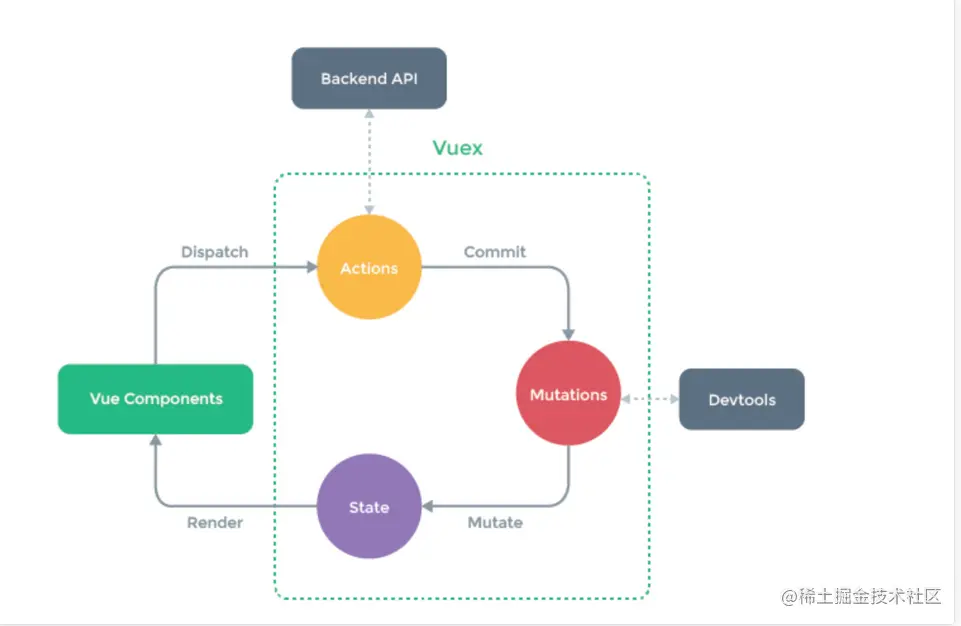
在vue中实现集中式状态(数据)管理的一个Vue插件,对于应用中多个组件共享状态进行集中式的管理(读写),也是一种组件间通信的方式,且适用于任意组件通信

Vuex的使用流程
	-state:存数据的地址
	-actions:中转站(传话服务员)
	-mutations:真正修改state数据的地方(厨师)
使用步骤:
	1.在state中定义变量
	2.在组件中通过this.$store.dispatch('action中定义的函数'),触发action中的函数执行
	3.在action中的函数,调用context.commit('mutation中定义的函数')
	4.在mutations中定义的函数实现真正的功能(修改state中定义的数据)
	5.页面中只要使用$store.state.变量,变量变化,页面就变化,实现了页面的通信
	6 注意:
        -在组件中可以直接调用commit触发【mutations中定义的函数】
        -在组件中可以直接修改state中定义变量
vue-router的使用
官方提供的用来实现SPA 的vue 插件:有了它以后,我们可以写很多页面组件,通过地址栏不同的路径显示不同的页面组件
https://router.vuejs.org/zh/index.html
基本使用
使用步骤:
1.新建router/index.js
const routers = [配置路由1, 配置路由2]
2.main.js 中使用
import router from './router'
new Vue({
...
router,
...
}).$mount('#app')
3.只需要写页面组件,配置路由即可
4.在app.vue中固定加入
<router-view>
</router-view>
5.在浏览自中访问const routers中配置的路由 就能看到对应的页面组件了
路由的跳转
使用步骤:
	-在html中使用
		<router-link :to="path">去登录</router-link>
		也可以用<a href='xxx'></a>  但不推荐
	-在js中使用
		this.$router.push('goods')
路由跳转携带参数
在请求地址中以?后面携带参数的形式: ?name=lqz&age=19
	-<router-link to="/login/?name=lqz&age=19">去登录</router-link>
    -组件中接受:this.$route.query.xxx

在请求地址中类似django路由分组的形式: /goods/1/
	-<router-link to="/login/lyf">去登录</router-link>
    -组件中接受:this.$route.params.xxx
路由嵌套
# 使用步骤:
1 router/index.js 相应的路由中
{
path: '/goods',
name: 'goods',
component: Goods,
children: [
{
path: 'list',
component: GoodList
},
{
path: 'detail',
component: GoodDetail
}
]
},
2 必须要在Goods组件中,写<router-view></router-view>
3 使用router-link标签跳转
4 只会变更Goods下<router-view>标签包裹的位置
路由守卫
# 对路由进行权限控制

# 前置路由守卫
router.beforeEach((to, from, next) => {
    console.log('前置路由守卫', to, from)

    if (to.name == 'shoppingcart') {
        let name = localStorage.getItem('name')
        if (name) {
            next()
        } else {
            alert('不好意思没有权限')
        }
    } else {
        next()
    }

})
# 后置路由守卫
router.afterEach((to,from)=>{
	console.log('后置路由守卫',to,from)
	document.title = to.name
})