CesiumEntities --笔记
一、Entity
1、实例对象Demo
const viewer = new Cesium.Viewer("cesiumContainer");

function computeCircle(radius) {
  const positions = [];
  for (let i = 0; i < 360; i++) {
    const radians = Cesium.Math.toRadians(i);
    positions.push(
      new Cesium.Cartesian2(
        radius * Math.cos(radians),
        radius * Math.sin(radians)
      )
    );
  }
  return positions;
}

function computeStar(arms, rOuter, rInner) {
  const angle = Math.PI / arms;
  const length = 2 * arms;
  const positions = new Array(length);
  for (let i = 0; i < length; i++) {
    const r = i % 2 === 0 ? rOuter : rInner;
    positions[i] = new Cesium.Cartesian2(
      Math.cos(i * angle) * r,
      Math.sin(i * angle) * r
    );
  }
  return positions;
}

const redTube = viewer.entities.add({
  name: "Red tube with rounded corners",
  polylineVolume: {
    positions: Cesium.Cartesian3.fromDegreesArray([
      -85.0,
      32.0,
      -85.0,
      36.0,
      -89.0,
      36.0,
    ]),
    shape: computeCircle(60000.0),
    material: Cesium.Color.RED,
  },
});

const greenBox = viewer.entities.add({
  name: "Green box with beveled corners and outline",
  polylineVolume: {
    positions: Cesium.Cartesian3.fromDegreesArrayHeights([
      -90.0,
      32.0,
      0.0,
      -90.0,
      36.0,
      100000.0,
      -94.0,
      36.0,
      0.0,
    ]),
    shape: [
      new Cesium.Cartesian2(-50000, -50000),
      new Cesium.Cartesian2(50000, -50000),
      new Cesium.Cartesian2(50000, 50000),
      new Cesium.Cartesian2(-50000, 50000),
    ],
    cornerType: Cesium.CornerType.BEVELED,
    material: Cesium.Color.GREEN.withAlpha(0.5),
    outline: true,
    outlineColor: Cesium.Color.BLACK,
  },
});

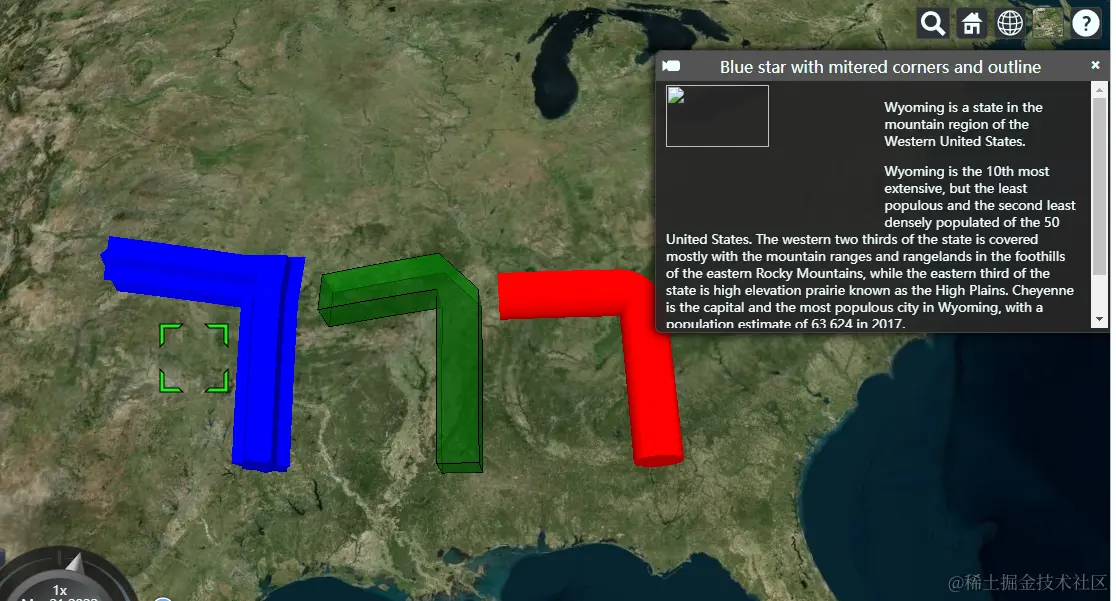
const blueStar = viewer.entities.add({
  name: "Blue star with mitered corners and outline",
  polylineVolume: {
    positions: Cesium.Cartesian3.fromDegreesArrayHeights([
      -95.0,
      32.0,
      0.0,
      -95.0,
      36.0,
      100000.0,
      -99.0,
      36.0,
      200000.0,
    ]),
    shape: computeStar(7, 70000, 50000),
    cornerType: Cesium.CornerType.MITERED,
    material: Cesium.Color.BLUE,
  },
});

viewer.zoomTo(viewer.entities);
2、Members
ellipse.material = '/docs/tutorials/creating-entities/images/cats.jpg';
polyline.material = new Cesium.PolylineGlowMaterialProperty({
glowPower : 0.2,
color : Cesium.Color.BLUE
});
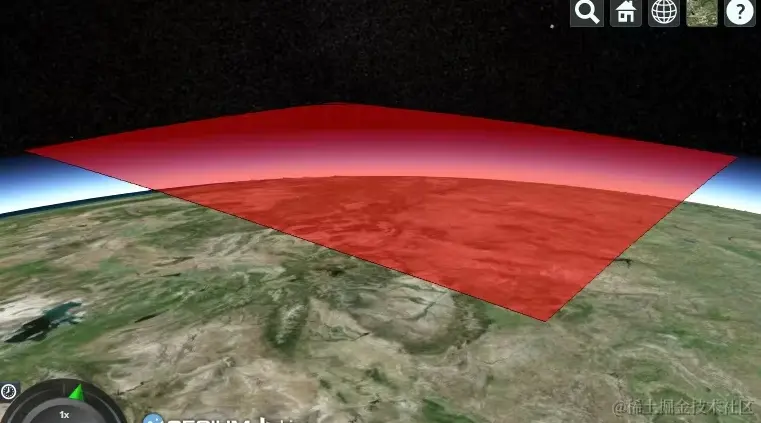
wyoming.polygon.height = 250000;
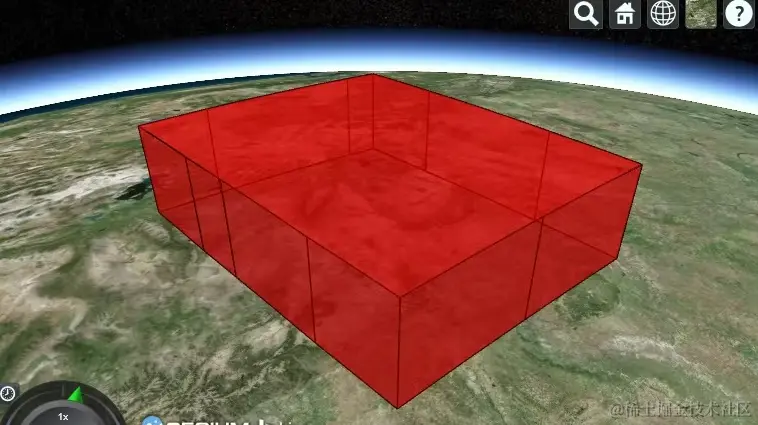
wyoming.polygon.height = 200000;
wyoming.polygon.extrudedHeight = 250000;
3、Methods
viewer.entities.add({
name: "Blue star with mitered corners and outline",
description:'\
<img\
width="50%"\
style="float:left; margin: 0 1em 1em 0;"\
src="/docs/tutorials/creating-entities/Flag_of_Wyoming.svg"/>\
<p>\
Wyoming is a state in the mountain region of the Western \
United States.\
</p>\
<p>\
Wyoming is the 10th most extensive, but the least populous \
and the second least densely populated of the 50 United \
States. The western two thirds of the state is covered mostly \
with the mountain ranges and rangelands in the foothills of \
the eastern Rocky Mountains, while the eastern third of the \
state is high elevation prairie known as the High Plains. \
Cheyenne is the capital and the most populous city in Wyoming, \
with a population estimate of 63,624 in 2017.\
</p>\
<p>\
Source: \
<a style="color: WHITE"\
target="_blank"\
href="http://en.wikipedia.org/wiki/Wyoming">Wikpedia</a>\
</p>',
polylineVolume: {
positions: Cesium.Cartesian3.fromDegreesArrayHeights([
-95.0,
32.0,
0.0,
-95.0,
36.0,
100000.0,
-99.0,
36.0,
200000.0,
]),
shape: computeStar(7, 70000, 50000),
cornerType: Cesium.CornerType.MITERED,
material: Cesium.Color.BLUE,
},
});
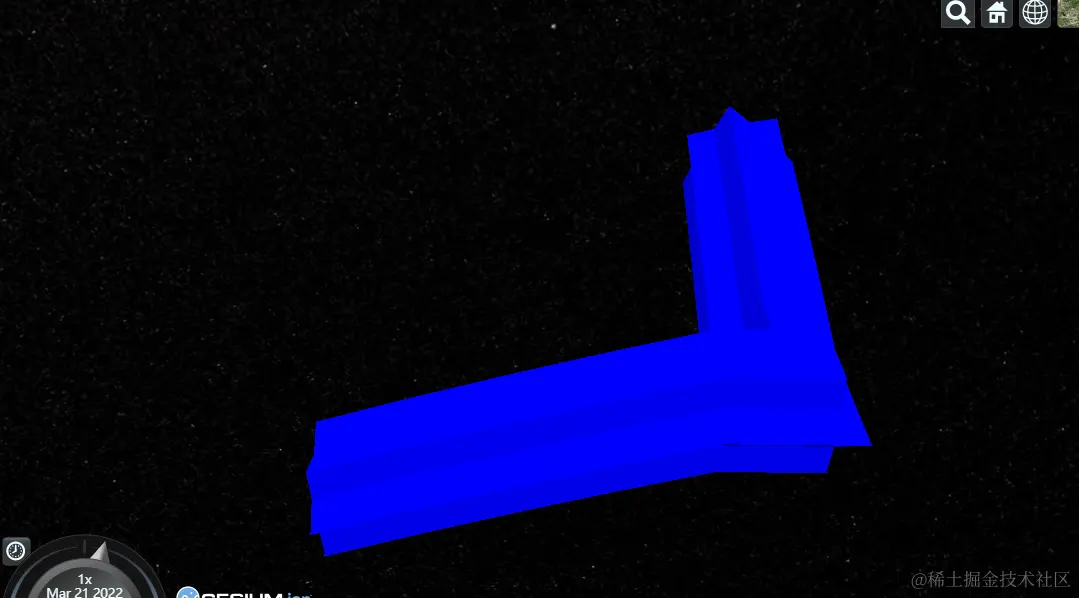
var heading = Cesium.Math.toRadians(90);
var pitch = Cesium.Math.toRadians(-30);
viewer.zoomTo(wyoming, new Cesium.HeadingPitchRange(heading, pitch));
viewer.flyTo(wyoming).then(function(result){
if (result) {
viewer.selectedEntity = wyoming;
}
});
wyoming.position = Cesium.Cartesian3.fromDegrees(-107.724, 42.68);
viewer.trackedEntity = wyoming;
viewer.entities.add({
id : 'uniqueId'
});
var entity = viewer.entities.getById('uniqueId');
var entity = viewer.entities.getOrCreateEntity('uniqueId');
var entity = new Entity({
id : 'uniqueId'
});
viewer.entities.add(entity);
function onChanged(collection, added, removed, changed){
var msg = 'Added ids';
for(var i = 0; i < added.length; i++) {
msg += '\n' + added[i].id;
}
console.log(msg);
}
viewer.entities.collectionChanged.addEventListener(onChanged);
二、Pick
function pickEntity(viewer, windowPosition) {
var picked = viewer.scene.pick(windowPosition);
if (defined(picked)) {
var id = Cesium.defaultValue(picked.id, picked.primitive.id);
if (id instanceof Cesium.Entity) {
return id;
}
}
return undefined;
};
function drillPickEntities(viewer, windowPosition) {
var i;
var entity;
var picked;
var pickedPrimitives = viewer.scene.drillPick(windowPosition);
var length = pickedPrimitives.length;
var result = [];
var hash = {};
for (i = 0; i < length; i++) {
picked = pickedPrimitives[i];
entity = Cesium.defaultValue(picked.id, picked.primitive.id);
if (entity instanceof Cesium.Entity &&
!Cesium.defined(hash[entity.id])) {
result.push(entity);
hash[entity.id] = true;
}
}
return result;
};
三、Points、billboards and labels
var viewer = new Cesium.Viewer('cesiumContainer');
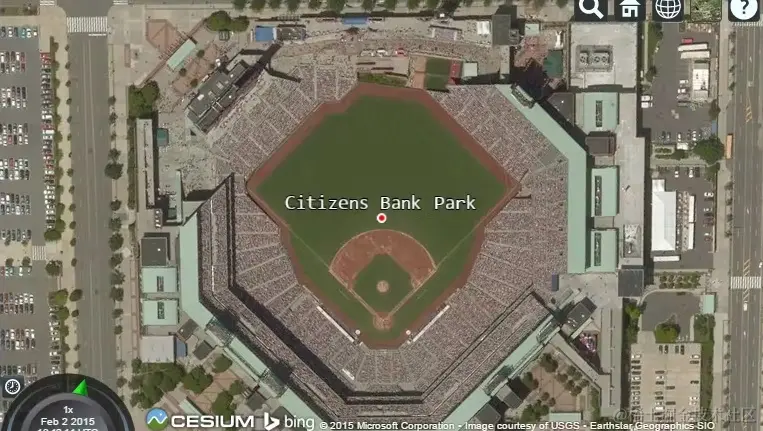
var citizensBankPark = viewer.entities.add({
name : 'Citizens Bank Park',
position : Cesium.Cartesian3.fromDegrees(-75.166493, 39.9060534),
point : {
pixelSize : 5,
color : Cesium.Color.RED,
outlineColor : Cesium.Color.WHITE,
outlineWidth : 2
},
label : {
text : 'Citizens Bank Park',
font : '14pt monospace',
style: Cesium.LabelStyle.FILL_AND_OUTLINE,
outlineWidth : 2,
verticalOrigin : Cesium.VerticalOrigin.BOTTOM,
pixelOffset : new Cesium.Cartesian2(0, -9)
}
});
viewer.zoomTo(viewer.entities);
var citizensBankPark = viewer.entities.add({
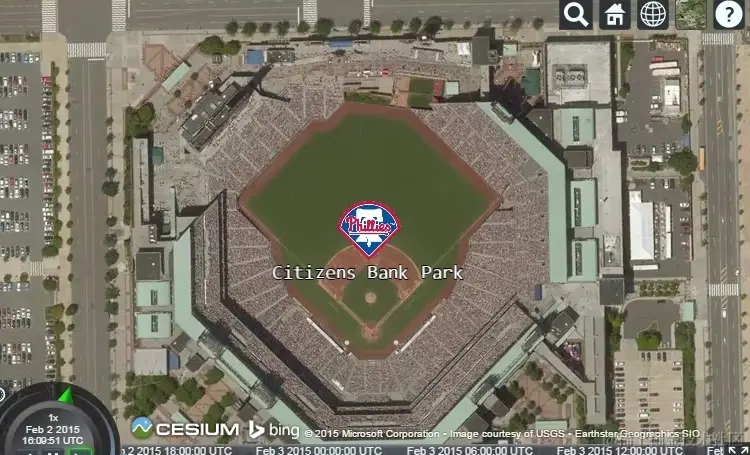
position : Cesium.Cartesian3.fromDegrees(-75.166493, 39.9060534),
billboard : {
image : '/docs/images/tutorials/creating-entities/Philadelphia_Phillies.png',
width : 64,
height : 64
},
label : {
text : 'Citizens Bank Park',
font : '14pt monospace',
style: Cesium.LabelStyle.FILL_AND_OUTLINE,
outlineWidth : 2,
verticalOrigin : Cesium.VerticalOrigin.TOP,
pixelOffset : new Cesium.Cartesian2(0, 32)
}
});
四、3Dmodels
var viewer = new Cesium.Viewer('cesiumContainer');
var entity = viewer.entities.add({
position : Cesium.Cartesian3.fromDegrees(-123.0744619, 44.0503706),
model : {
uri : '../../../../Apps/SampleData/models/GroundVehicle/GroundVehicle.glb'
}
});
viewer.trackedEntity = entity;
var viewer = new Cesium.Viewer('cesiumContainer');
var position = Cesium.Cartesian3.fromDegrees(-123.0744619, 44.0503706);
var heading = Cesium.Math.toRadians(45.0);
var pitch = Cesium.Math.toRadians(15.0);
var roll = Cesium.Math.toRadians(0.0);
var orientation = Cesium.Transforms.headingPitchRollQuaternion(position, new Cesium.HeadingPitchRoll(heading, pitch, roll));
var entity = viewer.entities.add({
position : position,
orientation : orientation,
model : {
uri : '../../../../Apps/SampleData/models/GroundVehicle/GroundVehicle.glb'
}
});
viewer.trackedEntity = entity;
const viewer = new Cesium.Viewer("cesiumContainer", {
infoBox: false,
selectionIndicator: false,
shouldAnimate: true,
terrainProvider: Cesium.createWorldTerrain(),
});
viewer.scene.globe.enableLighting = true;
viewer.scene.globe.depthTestAgainstTerrain = true;
Cesium.Math.setRandomNumberSeed(3);
const start = Cesium.JulianDate.fromDate(new Date(2015, 2, 25, 16));
const stop = Cesium.JulianDate.addSeconds(
start,
360,
new Cesium.JulianDate()
);
viewer.clock.startTime = start.clone();
viewer.clock.stopTime = stop.clone();
viewer.clock.currentTime = start.clone();
viewer.clock.clockRange = Cesium.ClockRange.LOOP_STOP;
viewer.clock.multiplier = 10;
viewer.timeline.zoomTo(start, stop);
function computeCirclularFlight(lon, lat, radius) {
const property = new Cesium.SampledPositionProperty();
for (let i = 0; i <= 360; i += 45) {
const radians = Cesium.Math.toRadians(i);
const time = Cesium.JulianDate.addSeconds(
start,
i,
new Cesium.JulianDate()
);
const position = Cesium.Cartesian3.fromDegrees(
lon + radius * 1.5 * Math.cos(radians),
lat + radius * Math.sin(radians),
Cesium.Math.nextRandomNumber() * 500 + 1750
);
property.addSample(time, position);
viewer.entities.add({
position: position,
point: {
pixelSize: 8,
color: Cesium.Color.TRANSPARENT,
outlineColor: Cesium.Color.YELLOW,
outlineWidth: 3,
},
});
}
return property;
}
const position = computeCirclularFlight(-112.110693, 36.0994841, 0.03);
const entity = viewer.entities.add({
availability: new Cesium.TimeIntervalCollection([
new Cesium.TimeInterval({
start: start,
stop: stop,
}),
]),
position: position,
orientation: new Cesium.VelocityOrientationProperty(position),
model: {
uri: "../SampleData/models/CesiumAir/Cesium_Air.glb",
minimumPixelSize: 64,
},
path: {
resolution: 1,
material: new Cesium.PolylineGlowMaterialProperty({
glowPower: 0.1,
color: Cesium.Color.YELLOW,
}),
width: 10,
},
});
Sandcastle.addDefaultToolbarButton("View Top Down", function () {
viewer.trackedEntity = undefined;
viewer.zoomTo(
viewer.entities,
new Cesium.HeadingPitchRange(0, Cesium.Math.toRadians(-90))
);
});
Sandcastle.addToolbarButton("View Side", function () {
viewer.trackedEntity = undefined;
viewer.zoomTo(
viewer.entities,
new Cesium.HeadingPitchRange(
Cesium.Math.toRadians(-90),
Cesium.Math.toRadians(-15),
7500
)
);
});
Sandcastle.addToolbarButton("View Aircraft", function () {
viewer.trackedEntity = entity;
});
Sandcastle.addToolbarMenu(
[
{
text: "Interpolation: Linear Approximation",
onselect: function () {
entity.position.setInterpolationOptions({
interpolationDegree: 1,
interpolationAlgorithm: Cesium.LinearApproximation,
});
},
},
{
text: "Interpolation: Lagrange Polynomial Approximation",
onselect: function () {
entity.position.setInterpolationOptions({
interpolationDegree: 5,
interpolationAlgorithm:
Cesium.LagrangePolynomialApproximation,
});
},
},
{
text: "Interpolation: Hermite Polynomial Approximation",
onselect: function () {
entity.position.setInterpolationOptions({
interpolationDegree: 2,
interpolationAlgorithm: Cesium.HermitePolynomialApproximation,
});
},
},
],
"interpolationMenu"
);