转:blog.wangqi.love/articles/Ja…
最近在看canal源码的时候发现其中server与client数据通信使用了Protobuf协议,从前听过这个协议但是没用过,趁这个机会学习一下。
Protobuf是Google开发的一种数据描述语言,类似于XML能够将结构化数据序列化,可用于数据存储、通信协议等方面。
它不依赖于语言和平台并且可扩展性极强。相比于json和xml,Protobuf的使用更简单,传输的数据更小,序列化反序列化的性能更高。
本文简单介绍一下Protobuf在java中的使用。
安装
首先安装Protobuf。对于Mac OS只需要使用brew命令安装:
| 1 | ```
brew install protobuf
| ---------- | ------------------------------ |
# 定义消息格式
和`json`和`xml`等协议不同,Protobuf在使用之前需要先定义一个`.proto`文件作为消息的格式。
`.proto`文件的格式参考:<https://blog.csdn.net/u011518120/article/details/54604615#ScalarValueTypes>
假设我们要定义一个评论的消息格式:
| ```
1 2 3 4 5 6 7 8 9 10 11 12 13 14 15 16 17 18
``` | ```
syntax = "proto3"; option java_package = "love.wangqi"; option java_outer_classname = "CommentProto"; message comment { string id = 1; string content = 2; string articleTitle = 3; string articleId = 4; string articleUrl = 5; string projectId = 6; string categoryId = 7; string commentUserId = 8; string commentUserName = 9; int32 likeCount = 10; int64 sortNumber = 11; }
``` |
| ----------------------------------------------------- | ----------------------------------------------------------------------------------------------------------------------------------------------------------------------------------------------------------------------------------------------------------------------------------------------------------------------------------------------------------------------------------------------------------------------------------------- |
# Java使用
定义完`.proto`消息描述文件之后,执行以下命令生成Java代码:
| ```
1
``` | ```
protoc -I=src/main/java/love/wangqi --java_out=src/main/java comment.proto
``` |
| ---------- | ----------------------------------------------------------------------------------- |
* `-I`:proto文件所在的目录
* `--java_out`:Java文件存放目录
* 最后是proto文件名称
执行完命令之后在`src/main/java`目录下会生成`CommentProto.java`类。
接下来我们就可以是用这个类了。
首先在pom文件中引入protobuf-java依赖:
| ```
1 2 3 4 5
``` | ```
<dependency> <groupId>com.google.protobuf</groupId> <artifactId>protobuf-java</artifactId> <version>3.7.0</version> </dependency>
``` |
| ------------------ | ------------------------------------------------------------------------------------------------------------------------------------------------------ |
之后我们就可以使用protobuf:
| ```
1 2 3 4 5 6 7 8 9 10 11 12 13 14 15 16 17 18 19 20 21 22 23 24 25 26 27
``` | ```
public static void main(String[] args) throws InvalidProtocolBufferException { // 构建Comment CommentProto.comment.Builder commentBuilder = CommentProto.comment.newBuilder(); commentBuilder.setId("1"); commentBuilder.setContent("评论内容"); commentBuilder.setArticleTitle("稿件标题"); commentBuilder.setArticleId("11"); commentBuilder.setArticleUrl("http://localhost"); commentBuilder.setProjectId("123"); commentBuilder.setCategoryId("456"); commentBuilder.setCommentUserId("789"); commentBuilder.setCommentUserName("zhangsan"); commentBuilder.setLikeCount(10); commentBuilder.setSortNumber(100000L); CommentProto.comment comment = commentBuilder.build(); System.out.println(comment); // 序列化,输出byte数组 byte[] bytes = comment.toByteArray(); System.out.println("序列化之后的数据大小:" + bytes.length); // 根据byte数组,反序列化 CommentProto.comment comment1 = CommentProto.comment.parseFrom(bytes); System.out.println("反序列化之后的数据:"); System.out.println(comment1); }
``` |
| -------------------------------------------------------------------------------- | ------------------------------------------------------------------------------------------------------------------------------------------------------------------------------------------------------------------------------------------------------------------------------------------------------------------------------------------------------------------------------------------------------------------------------------------------------------------------------------------------------------------------------------------------------------------------------------------------------------------------------------------------------------------------------------------------------------------------------------------------------------------------------------------------------------------------------------------------------------------------------------------------------------------------------------------------------------------------------------------------------------------------------------------------------------------------- |
# Protobuf与Json的性能对比
上面我们提高过,Protobuf相比于Json传输的数据更小,性能更高。下面我们来实验一下。
性能测试父类,通过多线程循环执行之后统计执行时间:
| ```
1 2 3 4 5 6 7 8 9 10 11 12 13 14 15 16 17 18 19 20 21 22 23 24 25 26 27 28 29 30 31 32 33 34 35 36 37 38
``` | ```
public class Performance { private int threadCount = 4; private int loopCount = 10000000; interface Action { void run() throws Exception; } public void test(Action action) { List<Thread> threadList = new ArrayList<>(); for (int i = 0; i < threadCount; i++) { threadList.add(new Thread(() -> { for (int i1 = 0; i1 < loopCount; i1++) { try { action.run(); } catch (Exception e) { e.printStackTrace(); } } })); } long start = System.currentTimeMillis(); for (Thread thread : threadList) { thread.start(); } for (Thread thread : threadList) { try { thread.join(); } catch (InterruptedException e) { e.printStackTrace(); } } long end = System.currentTimeMillis(); System.out.println("cost time " + (end - start) + "ms"); } }
``` |
| ----------------------------------------------------------------------------------------------------------------- | -------------------------------------------------------------------------------------------------------------------------------------------------------------------------------------------------------------------------------------------------------------------------------------------------------------------------------------------------------------------------------------------------------------------------------------------------------------------------------------------------------------------------------------------------------------------------------------------------------------------------------------------------------------------------------------------------------------------------------------------------------------------------------------------------------------------------------------------------------------------------------------------------------------------------------------------------------------------------------------------------------------------------------------------------------------------------------------------------------------------------------- |
ProtoBuf的性能测试代码:
| ```
1 2 3 4 5 6 7 8 9 10 11 12 13 14 15 16 17 18 19 20 21 22 23 24 25 26 27 28 29 30 31 32 33 34 35 36 37 38 39
``` | ```
public class ProtoPerformance extends Performance { CommentProto.comment.Builder commentBuilder; CommentProto.comment comment; public ProtoPerformance() { commentBuilder = CommentProto.comment.newBuilder(); commentBuilder.setId("1"); commentBuilder.setContent("评论内容"); commentBuilder.setArticleTitle("稿件标题"); commentBuilder.setArticleId("11"); commentBuilder.setArticleUrl("http://localhost"); commentBuilder.setProjectId("123"); commentBuilder.setCategoryId("456"); commentBuilder.setCommentUserId("789"); commentBuilder.setCommentUserName("zhangsan"); commentBuilder.setLikeCount(10); commentBuilder.setSortNumber(100000L); comment = commentBuilder.build(); } public void serialTest() { System.out.println("serial:"); test(() -> comment.toByteArray()); } public void deserialTest() { System.out.println("deserial:"); byte[] commentBytes = comment.toByteArray(); System.out.println("byte size: " + commentBytes.length); test(() -> { try { CommentProto.comment.parseFrom(commentBytes); } catch (InvalidProtocolBufferException e) { e.printStackTrace(); } }); } }
``` |
| -------------------------------------------------------------------------------------------------------------------- | -------------------------------------------------------------------------------------------------------------------------------------------------------------------------------------------------------------------------------------------------------------------------------------------------------------------------------------------------------------------------------------------------------------------------------------------------------------------------------------------------------------------------------------------------------------------------------------------------------------------------------------------------------------------------------------------------------------------------------------------------------------------------------------------------------------------------------------------------------------------------------------------------------------------------------------------------------------------------------------------------------------------------------------------------------------------------------------------------------------------------------------------------------------------------------------------------------------------------------------------------------------------------------------------------------------------------------------------------------------------------------------- |
Json的性能测试代码:
| ```
1 2 3 4 5 6 7 8 9 10 11 12 13 14 15 16 17 18 19 20 21 22 23 24 25 26 27 28 29 30 31 32
``` | ```
public class JsonPerformance extends Performance { ObjectMapper mapper = new ObjectMapper(); Comment comment; public JsonPerformance() { comment = new Comment(); comment.setId("1"); comment.setContent("评论内容"); comment.setArticleTitle("稿件标题"); comment.setArticleId("11"); comment.setArticleUrl("http://localhost"); comment.setProjectId("123"); comment.setCategoryId("456"); comment.setCommentUserId("789"); comment.setCommentUserName("zhangsan"); comment.setLikeCount(10); comment.setSortNumber(100000L); } public void serialTest() { System.out.println("serial:"); test(() -> mapper.writeValueAsString(comment)); } public void deserialTest() throws JsonProcessingException { System.out.println("deserial:"); String json = mapper.writeValueAsString(comment); byte[] bytes = json.getBytes(); System.out.println("byte size: " + bytes.length); test(() -> mapper.readValue(json, Comment.class)); } }
``` |
| ----------------------------------------------------------------------------------------------- | --------------------------------------------------------------------------------------------------------------------------------------------------------------------------------------------------------------------------------------------------------------------------------------------------------------------------------------------------------------------------------------------------------------------------------------------------------------------------------------------------------------------------------------------------------------------------------------------------------------------------------------------------------------------------------------------------------------------------------------------------------------------------------------------------------------------------------------------------------------------------------------------------------------------------------------------------------------------------------------------------------------------------------------------------------------------------------------------------------------------------------- |
接下来执行Json与Protobuf的性能对比:
| ```
1 2 3 4 5 6 7 8 9 10 11 12 13 14 15
``` | ```
public class Main { public static void main(String[] args) throws JsonProcessingException { System.out.println("====json performance===="); JsonPerformance jsonPerformance = new JsonPerformance(); jsonPerformance.serialTest(); jsonPerformance.deserialTest(); System.out.println(); System.out.println("====protobuf performance===="); ProtoPerformance protoPerformance = new ProtoPerformance(); protoPerformance.serialTest(); protoPerformance.deserialTest(); } }
``` |
| -------------------------------------------- | ----------------------------------------------------------------------------------------------------------------------------------------------------------------------------------------------------------------------------------------------------------------------------------------------------------------------------------------------------------------------------------------------------------------------------------------------------------------------------------------------------------------------------------------------------------------------- |
执行结果如下:
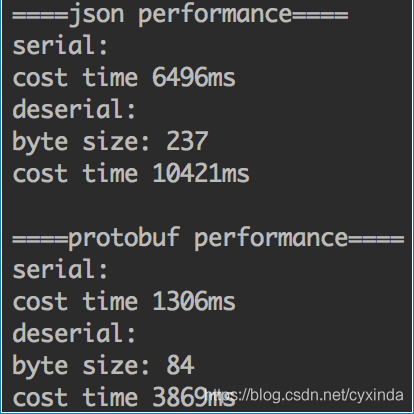
从结果中我们可以看到protobuf序列化之后生成的数据要大大小于Json生成的数据,而且无论是序列化还是反序列化的性能都优于Json。
> <https://www.jianshu.com/p/bb3ac7e5834e>\
> <https://juejin.im/post/5b2a2880f265da598451eff3>