

文档是任何技术项目的一个重要部分。好的文档告诉终端用户如何运行程序,如何使用它,或如何编译它。对于许多项目,纯文本文档是标准。毕竟,每个系统都可以显示纯文本文件。
然而,纯文本是有局限性的。纯文本文件缺乏格式化元素,如斜体字、粗体字和标题。为了增加这些元素,我们可以利用HTML。超文本标记语言(HTML)是所有网络浏览器中使用的标记语言。而且,只要稍加努力,你就可以用HTML来编写每个人都可以阅读的项目文档。
HTML使用一系列用角括号括起来的标签来控制文档的不同部分应该如何显示。这些标签定义了HTML文档中的元素,如文档标题、段落、斜体字、粗体字和其他类型的文字。几乎每个标签都有一对:一个开头标签,如
开始一个段落,和一个结束元素的结束标签,如
结束一个段落。使用这些标签时,请记住这个规则:如果你打开了一个标签,你就需要关闭它。不正确地关闭一个标签会导致网络浏览器不正确。有些标签在HTML文档中定义了一个块,而有些则是内联的。
开始一个空文档
首先,创建一个模板式的空HTML文档。每个HTML文档都应该提供一个文档类型声明。在HTML文件的第一行使用单个标签<!DOCTYPE html>来定义一个HTML文档。HTML标准还要求页面用两个块元素来包装文档文本:<html>来定义HTML文档,<body>来定义主体文本。虽然HTML不要求缩进每个新的代码块,但我还是把它加了进去,这样你就可以看到<body>实际上是在<html>块的 "里面"。
<!DOCTYPE html>
<html>
  <body>

  </body>
</html>
HTML文档在<body>之前还需要一个<head>块,提供关于页面的额外信息,称为元数据。唯一需要的元数据是文档的标题,由<title>元素定义。一个空的文档可能看起来像这样。
<!DOCTYPE html>
<html>
  <head>
    <title>Title of the document</title>
  </head>
  <body>

  </body>
</html>
添加文本
让我们练习一些HTML知识,把一个现有的纯文本 "自述 "文件改编成HTML。在这个例子中,我使用的是关于如何玩一个开源棋盘游戏的部分文档,名为 "Simple Senet"。
HOW TO PLAY SIMPLE SENET

The game will automatically "throw" the throwing sticks for you, and
display the results in the lower-right corner of the screen.

If the "throw" is zero, then you lose your turn.

When it's your turn, the game will automatically select your first
piece on the board. You may or may not be able to make a move with
this piece, so select your piece to move, and hit Space (or Enter) to
move it. You can select using several different methods:

-  Up/down/left/right to navigate to a specific square.

-  Plus (+) or minus (-) to navigate "left" and "right" on the
   board. Note that this will automatically follow the "backwards S"
   shape of the board.

-  Tab to select your next piece on the board.

To quit the game at any time, press Q (uppercase Q) or hit Esc, and
the game will prompt if you want to forfeit the game.

You win if you move all of your pieces off the board before your
opponent. It takes a combination of luck and strategy!
首先,将这个 "自述 "文本添加到你的空HTML文件中。一个HTML页面的主要内容是<body>,所以这就是你放置文本的地方。
<!DOCTYPE html>
<html>
  <head>
    <title>Title of the document</title>
  </head>
  <body>
    HOW TO PLAY SIMPLE SENET

    The game will automatically "throw" the throwing sticks for you, and
    display the results in the lower-right corner of the screen.

    If the "throw" is zero, then you lose your turn.

    When it's your turn, the game will automatically select your first
    piece on the board. You may or may not be able to make a move with
    this piece, so select your piece to move, and hit Space (or Enter) to
    move it. You can select using several different methods:

    - Up/down/left/right to navigate to a specific square.

    - Plus (+) or minus (-) to navigate "left" and "right" on the
      board. Note that this will automatically follow the "backwards S"
      shape of the board.

    - Tab to select your next piece on the board.

    To quit the game at any time, press Q (uppercase Q) or hit Esc, and
    the game will prompt if you want to forfeit the game.

    You win if you move all of your pieces off the board before your
    opponent. It takes a combination of luck and strategy!
  </body>
</html>
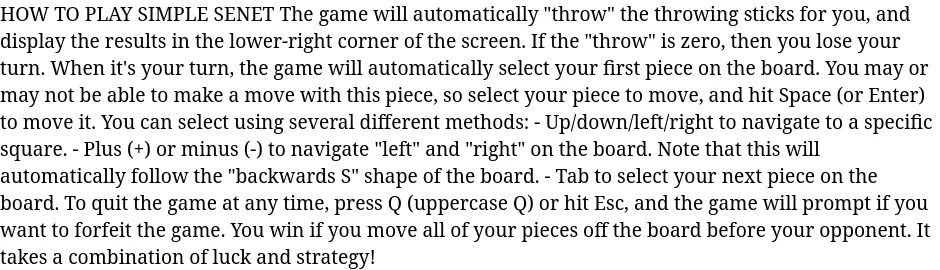
如果没有进一步的修改,当你在网络浏览器中查看这个HTML文件时,它看起来完全是错误的。这是因为HTML,像大多数标记系统一样,从输入文件中收集单词,并在输出中填充段落。因为你还没有添加其他标记,所以网络浏览器将文本显示为单一段落。
主体段落
你将这个自述文件更新为HTML的第一步是标记每一个段落,以便网络浏览器能够正确显示。定义一个段落的标签是<p>。虽然本文件中并非所有内容都是段落,但可以先用<p>和</p>标签来包装所有内容。
<!DOCTYPE html>
<html>
  <head>
    <title>Title of the document</title>
  </head>
  <body>
    <p>HOW TO PLAY SIMPLE SENET</p>

    <p>The game will automatically "throw" the throwing sticks for you, and
    display the results in the lower-right corner of the screen.</p>

    <p>If the "throw" is zero, then you lose your turn.</p>

    <p>When it's your turn, the game will automatically select your first
    piece on the board. You may or may not be able to make a move with
    this piece, so select your piece to move, and hit Space (or Enter) to
    move it. You can select using several different methods:</p>

    <p>- Up/down/left/right to navigate to a specific square.</p>

    <p>- Plus (+) or minus (-) to navigate "left" and "right" on the
         board. Note that this will automatically follow the "backwards S"
         shape of the board.</p>

    <p>- Tab to select your next piece on the board.</p>

    <p>To quit the game at any time, press Q (uppercase Q) or hit Esc, and
    the game will prompt if you want to forfeit the game.</p>

    <p>You win if you move all of your pieces off the board before your
    opponent. It takes a combination of luck and strategy!</p>
  </body>
</html>
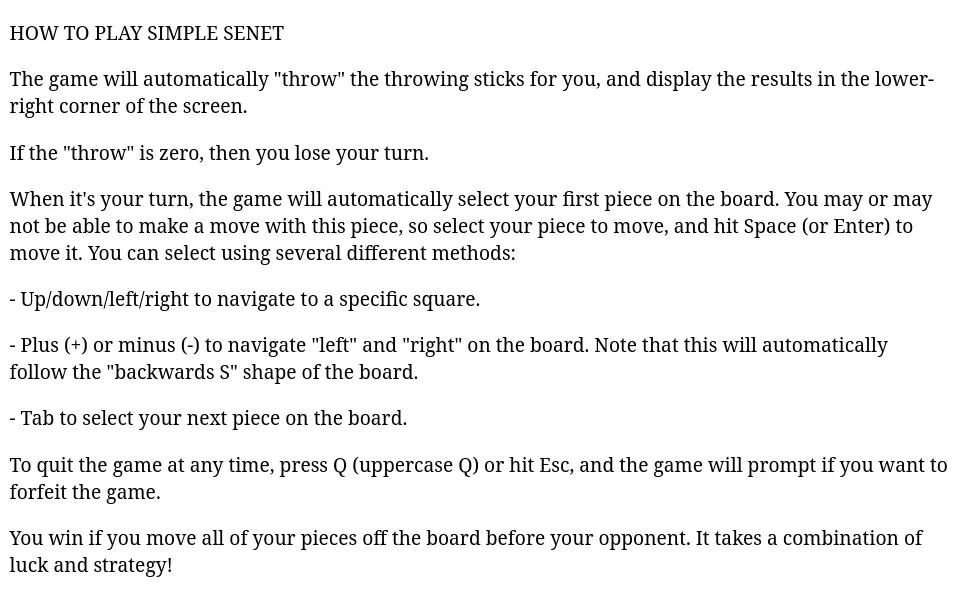
这使 Readme 看起来更像一个你想阅读的文件。当你在网络浏览器中查看新文件时,每个段落都在一个新行上开始,上下都有一些额外的空间。段落是块状元素的最常见的例子。
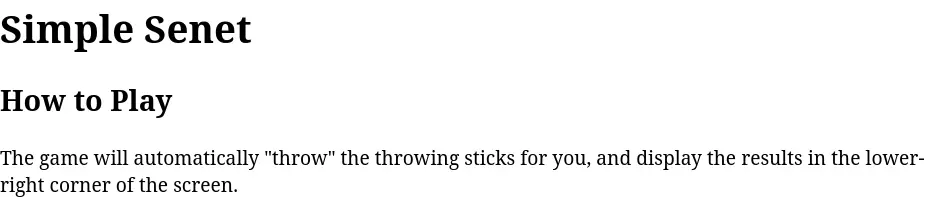
你的内容的第一行是你的文档的标题,所以你应该把它变成一个标题。HTML提供了六个级别的标题,从<h1>到<h6>。在大多数文档中,你可能用<h1>来定义文档的标题,用<h2>来定义主要的子章节。在你的样本Readme文档中做这个改动。用程序的名称("Simple Senet")作为主要部分的标题,用 "How to Play "作为文档的一个小节。
注意,在这个例子中,我还更新了文档元数据中的<title>,以使用与<h1>标题相同的标题。这实际上并没有改变浏览器对文档的显示方式,但这是一个很好的做法。
<!DOCTYPE html>
<html>
  <head>
    <title>Simple Senet</title>
  </head>
  <body>
    <h1>Simple Senet</h1>
    <h2>How to Play</h2>
    ...
  </body>
</html>
有序和无序的列表
你的文档中包括一个不同的导航棋盘游戏的方法的列表。因为这个文档一开始是纯文本文件,所以列表中的每一项都以连字符开始。但是你可以用HTML将这三段文字定义为列表项。
HTML支持两种列表:有序列表和无序列表。有序列表<ol>是一个编号的系列,你可以用它来定义一个步骤的顺序。一个无序列表<ul>定义了一个项目的列表,这些项目可能相关也可能不相关,但一般不按顺序进行。这两种列表都使用列表项<li>来表示列表内的条目。
更新Readme文档,使用有序列表而不是段落。这在一个编号的列表中展示了三个导航选项。
   <ol>
      <li>Up/down/left/right to navigate to a specific square.</li>

      <li>Plus (+) or minus (-) to navigate "left" and "right" on the
          board. Note that this will automatically follow the "backwards S"
          shape of the board.</li>

      <li>Tab to select your next piece on the board.</li>
    </ol>
这在一个编号的列表中展示了三个选项。

然而,这三个项目并不是真正的步骤序列,而是在简单塞内特游戏中移动选择的不同选项。因此,我们希望使用无序列表,而不是有序列表。这需要将文档中的<ol>更新为<ul>。
   <ul>
      <li>Up/down/left/right to navigate to a specific square.</li>

      <li>Plus (+) or minus (-) to navigate "left" and "right" on the
          board. Note that this will automatically follow the "backwards S"
          shape of the board.</li>

      <li>Tab to select your next piece on the board.</li>
    </ul>
无序列表对每个列表项使用子弹,因为这些条目不属于一个序列。

粗体和斜体
你可以通过应用黑体和斜体样式来突出文档中的某些信息。这些是技术写作中非常常见的文本样式。你可以用粗体来突出重要信息,或者用斜体来强调关键短语和新术语。
粗体标签最初被定义为<b>,但较新版本的HTML标准更喜欢用<strong>标签来表示强烈的重要性,如一套说明中的关键步骤。这两个标签都是有效的,但在语义上略有不同。 <b>现在意味着 "引起注意"。
同样,最初的HTML标准用<i>表示斜体文字。后来的HTML版本反而喜欢用<em>来给文本的部分内容带来强调。相反,<i>现在用于识别成语文本或技术术语。
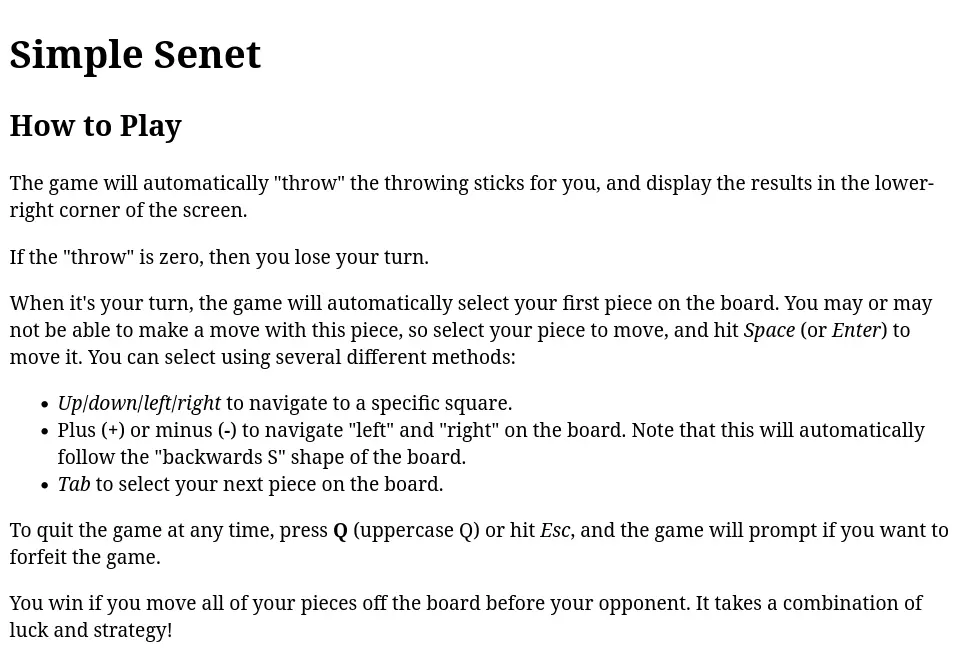
在这个例子中,用粗体字来标识单字母按键,用斜体字来表示键盘上的特殊按键,如Enter和Space。为了简单起见,在这里使用<b>和<i>标签(但你可以用<strong>和<em>标签代替,以获得同样的效果:)
<!DOCTYPE html>
<html>
  <head>
    <title>Simple Senet</title>
  </head>
  <body>
    <h1>Simple Senet</h1>
    <h2>How to Play</h2>

    <p>The game will automatically "throw" the throwing sticks for you, and
    display the results in the lower-right corner of the screen.</p>

    <p>If the "throw" is zero, then you lose your turn.</p>

    <p>When it's your turn, the game will automatically select your first
    piece on the board. You may or may not be able to make a move with
    this piece, so select your piece to move, and hit <i>Space</i> (or <i>Enter</i>) to
    move it. You can select using several different methods:</p>

    <ul>
      <li><i>Up</i>/<i>down</i>/<i>left</i>/<i>right</i> to navigate to a specific square.</li>

      <li>Plus (<b>+</b>) or minus (<b>-</b>) to navigate "left" and "right" on the
          board. Note that this will automatically follow the "backwards S"
          shape of the board.</li>

      <li><em>Tab</em> to select your next piece on the board.</li>
    </ul>

    <p>To quit the game at any time, press <b>Q</b> (uppercase Q) or hit <i>Esc</i>, and
    the game will prompt if you want to forfeit the game.</p>

    <p>You win if you move all of your pieces off the board before your
    opponent. It takes a combination of luck and strategy!</p>
  </body>
</html>
这些额外的样式有助于特殊项目在文本中脱颖而出。
编写文档的重点是让用户了解如何使用软件,所以每个开源项目都应该努力以易于阅读的方式编写文档。通过一些基本的HTML标签,你可以写出能更清楚地向用户展示信息的文档。
