

我有信心宣称,HTML是有史以来使用最广泛的标记语言。虽然存在其他标记语言,包括nroff和groff、LaTeX和Markdown,但没有其他标记语言能像超文本标记语言那样广泛使用。HTML是事实上的网络语言。该语言于1994年首次在网络浏览器中实施,并继续发展。然而,HTML的基本原理仍然是一样的。
如果你刚刚开始学习HTML,我想提供这个关于学习HTML的温和介绍。我把重点放在HTML的要点上,以建立对HTML工作原理的基本了解。你可以以此为起点,学习更多的HTML知识。
收集词语以填充段落
让我们从对HTML的基本理解开始,以及像网络浏览器这样的客户端应用程序如何显示HTML文档。在其核心部分,HTML收集文件中的单词并填入一个段落。这意味着,如果你不在HTML文件中添加说明(称为标记),而只是将其作为纯文本,那么网络浏览器就会将所有文本变成一个段落。
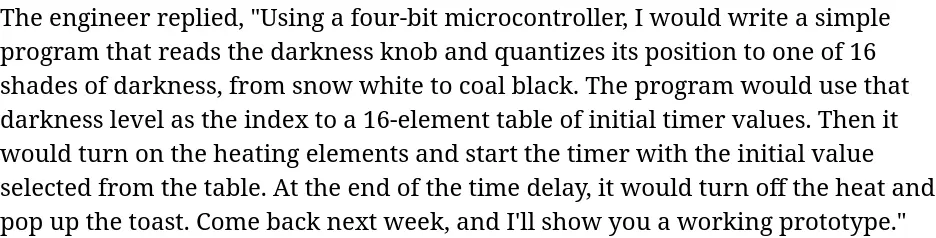
从这个样本文本开始,保存在一个名为index.html 的纯文本文件中。这是 "国王的烤面包机"故事中的一个段落,这是一个关于如何用微控制器制造烤面包机的网络寓言。
The engineer replied,

"Using a four-bit microcontroller, I would write a simple
program that reads the darkness knob and quantizes its
position to one of 16 shades of darkness, from snow white
to coal black.

The program would use that darkness level as the index to
a 16-element table of initial timer values.

Then it would turn on the heating elements and start the
timer with the initial value selected from the table.

At the end of the time delay, it would turn off the heat
and pop up the toast.

Come back next week, and I'll show you a working
prototype."
你可以把这个文件放在网络服务器上,像访问任何网站一样访问它,或者你可以把它保存在你的本地磁盘上,直接用网络浏览器打开它。你如何将文件放入网络浏览器并不重要。但你应该用.html 的扩展名来命名该文件,网络浏览器默认会将其识别为HTML文件。
在这个例子中,我把文件写在不同的行上。我还添加了一些空行,以证明HTML并不关心额外的空白。这个额外的空间可能有助于人类阅读HTML代码,但网络浏览器默认将其视为一个块。在网络浏览器上看,这个文件看起来像这样。
内联和块元素
HTML的核心是内联和块状元素的概念。你可以把块状元素看成是一直在填充一个矩形。内联元素只跟随内联文本。
基本的块状元素被称为分部,并使用<div> 标签。基本的内联元素是span,使用<span> 标签。大多数HTML标签都是某种块状元素或内联元素,所以只从这两种元素开始,有助于了解它们的工作原理。
在你的HTML文档中添加一些<div> 和<span> 标签,看看块元素和内联元素是什么样子的。
<div>
The engineer replied,

"Using a four-bit microcontroller, I would write a simple
program that reads the darkness knob and quantizes its
position to one of 16 shades of darkness, from snow white
to coal black.

<span>
The program would use that darkness level as the index to
a 16-element table of initial timer values.
</span>

Then it would turn on the heating elements and start the
timer with the initial value selected from the table.

At the end of the time delay, it would turn off the heat
and pop up the toast.

Come back next week, and I'll show you a working
prototype."
</div>
我在整个段落周围添加了一个<div> 块元素,而在一个句子周围添加了一个<span> 。注意,当我开始一个HTML元素,如<div> 或<span> ,我需要提供其相应的关闭标签,如</div> 和</span> 。大多数HTML元素都是这样形成的,有一个开头和结尾标签。
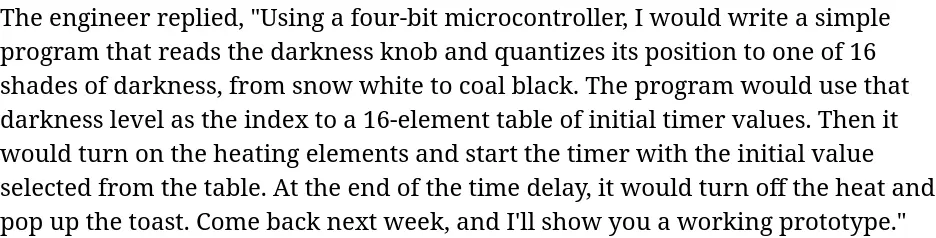
网络浏览器使用这些标签以某种方式显示HTML内容,但由于<div> 和<span> 本身并没有真正定义任何特殊的格式,所以你看不出有什么变化。你的样本段落看起来和以前一样。
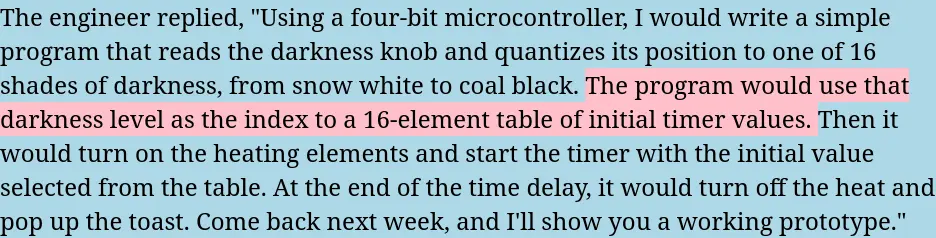
你可以在这些标签中加入直接的样式指令,这样你就可以看到块和内联元素的行为。为了使每个元素的边界突出,让我们为<div> 块使用浅蓝色的背景,为<span> 的背景使用粉红色。
<div style="background-color:lightblue">
The engineer replied,

"Using a four-bit microcontroller, I would write a simple
program that reads the darkness knob and quantizes its
position to one of 16 shades of darkness, from snow white
to coal black.

<span style="background-color:pink">
The program would use that darkness level as the index to
a 16-element table of initial timer values.
</span>

Then it would turn on the heating elements and start the
timer with the initial value selected from the table.

At the end of the time delay, it would turn off the heat
and pop up the toast.

Come back next week, and I'll show you a working
prototype."
</div>
通过这些改变,整个段落的背景是浅蓝色的。<div> 块元素是一个矩形,所以蓝色甚至填补了最后一句话结束后的空隙。同时,第二句话有一个粉红色的背景。这个高亮是在句子后面,因为<span> 是一个内联元素。
大多数HTML元素都是块状或内联的。唯一不同的是,这些其他元素带有一些默认样式,这取决于它们是什么。例如,<p> 是一个块状元素,在块的上方和下方有额外的空间。标题标签,<h1> 到<h6> ,也是块状元素,定义了不同的字体大小和文字样式,如斜体和粗体。<strong> 标签是一个内联元素,以粗体字显示文本。同样,<em> 也是一个内联元素,将文本设置为斜体样式。
完成一个HTML页面
一些HTML元素是必需的。虽然你所使用的HTML样本文件在任何网络浏览器上都能正确显示,但从技术上讲,它并不是一个正确的HTML页面。有几个元素你需要添加。
每个HTML文件都应该提供一个文档类型声明。在HTML文件的第一行使用单一标签<!DOCTYPE html> ,以定义一个HTML文档。HTML标准还希望你将文档文本包裹在两个块元素中:<html> 来定义整个页面,<body> 来定义文档主体。
<!DOCTYPE html>
<html>
<body>
<div style="background-color:lightblue">
The engineer replied,
...
</div>
</body>
</html>
HTML文档还需要在<body> 之前有一个<head> 块,提供关于页面的元信息。唯一需要的元信息是文档的标题,由<title> 元素定义。
<!DOCTYPE html>
<html>
<head>
<title>The King's Toaster</title>
</head>
<body>
<div style="background-color:lightblue">
The engineer replied,

"Using a four-bit microcontroller, I would write a simple
program that reads the darkness knob and quantizes its
position to one of 16 shades of darkness, from snow white
to coal black.

<span style="background-color:pink">
The program would use that darkness level as the index to
a 16-element table of initial timer values.
</span>

Then it would turn on the heating elements and start the
timer with the initial value selected from the table.

At the end of the time delay, it would turn off the heat
and pop up the toast.

Come back next week, and I'll show you a working
prototype."
</div>
</body>
</html>
像<html>,<head>, 和<body> 这样的支持标签并不改变HTML页面在网络浏览器中的显示方式,但它们是技术上正确的HTML文档所必需的。
这个关于HTML的温和介绍只是提供了HTML的基本内容,但现在你已经了解了块和内联元素,你就可以很好地学习如何使用其他HTML标签来编写HTML文档。
