

在引入@mention 功能之前,对线程和消息进行评论是非常混乱的。虽然你可以在一个线程中发送消息,但往往没有办法知道消息是给谁的,也没有办法让那些还没有参与对话的人参与进来。
随着@mention ,你可以提到朋友(或善意的社会媒体专家)并邀请他们加入讨论。
你还可以在Facebook、Dropbox、WhatsApp和Gmail等各种应用程序中找到具有@mention 功能的表格。
本文将探讨用React中包含的@mention 功能构建一个表单。我们将特别使用 react-mentions包。
建立一个带有评论功能的表单react-mentions
让我们先用下面的命令创建一个新的React应用程序:
npx create-react-app react-mentions
如果你使用Yarn,运行以下命令:
yarn create react-app react-mentions
在本教程的其余部分,我将使用Yarn。
接下来,安装react-mentions 包,如下所示:
yarn add react-mentions
react-mentions 包导出了两个用于渲染提及的React组件:MentionsInput 组件和Mention 组件。MentionsInput 是用于渲染文本区域控件的主要组件,可以将一个或多个Mention 组件作为子组件。
Mention 组件代表一类可提及对象的数据源,包括用户、问题等等。
使用MentionsInput 和Mention 组件
让我们在我们的应用程序中实现react-mentions 。前往App.js 文件,用下面的代码块替换整个代码:
import { Mention, MentionsInput } from "react-mentions";

function App() {
  return (
    <div>
      <h2>Let's get started</h2>
      <MentionsInput>
        <Mention />
      </MentionsInput>
    </div>
  );
}
export default App;
当我们用yarn start 启动开发服务器时,我们应该得到一个输入框,如下图所示。

接下来,我们将创建一个假数据数组,提供给Mention 组件。该数据必须有id 和display 作为特定的键。
我们还需要创建一个状态事件。这将用于将我们的应用程序的状态与来自数据的值绑定,然后将其传递给MentionsInput 组件。
复制并粘贴下面的代码到App.js 文件中:
function App() {
  const [value, setValue] = useState("");

  const users = [
    {
      id: "isaac",
      display: "Isaac Newton",
    },
    {
      id: "sam",
      display: "Sam Victor",
    },
    {
      id: "emma",
      display: "emmanuel@nobody.com",
    },
  ];

  ...
}
我们根据上面的代码块创建了一个状态变量和用户数组。用户数组包含有id 和display 参数的对象。这些是填充react-mentions 组件所需的参数。
现在,让我们用下面的代码更新return() 语句:
  return (
    <div className="App">
      <MentionsInput
        value={value}
        onChange={(e) => setValue(e.target.value)}>

        <Mention
          data={users} />
      </MentionsInput>
    </div>
  );
我们正在使用MentionsInput 标签,它接收了value 道具。然后我们用onChange 道具来设置状态值。做完这一切,我们应该可以实现这个目标。
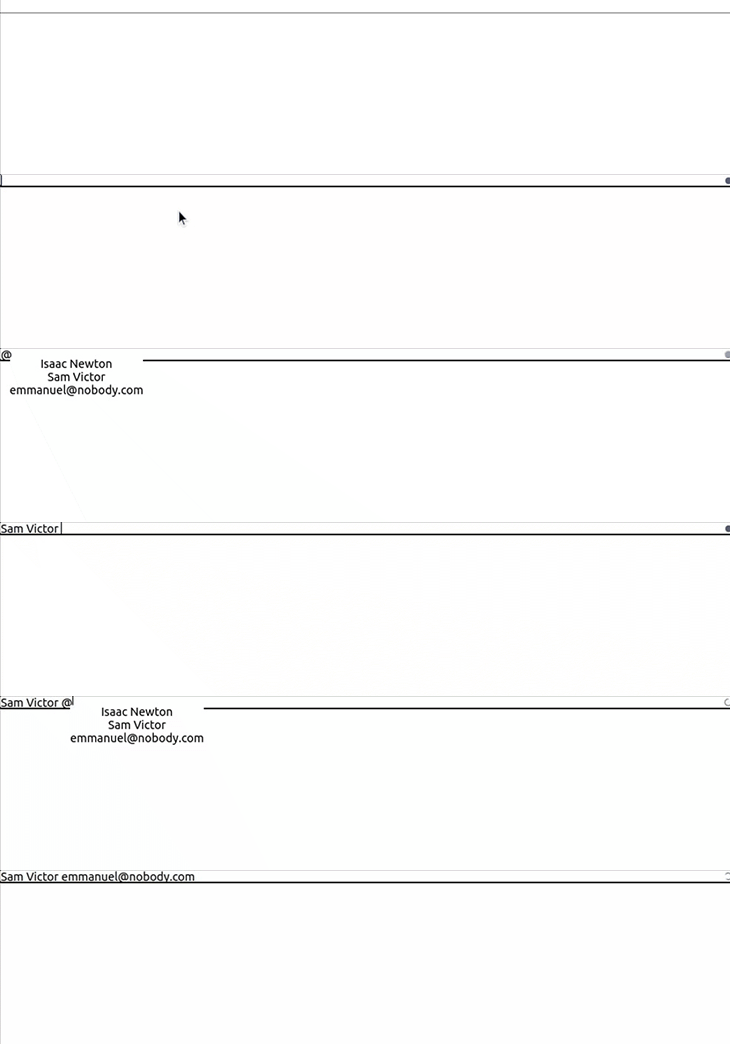
为react-mentions 组件设置样式
看看我们上面的进展,你可能会注意到,我们的组件看起来有点不对劲。我们可以通过使用样式进行定制来解决这个问题。
在src 文件夹中创建一个mentionStyles.js 文件并粘贴下面的代码:
export default {
  backgroundColor: "#cee4e5",
};
在src 文件夹中也创建一个mentionsInputStyles.js 文件,并将下面的代码块粘贴到其中:
export default {
  control: {
    backgroundColor: '#fff',
    fontSize: 16,
    // fontWeight: 'normal',
  },
  '&multiLine': {
    control: {
      fontFamily: 'monospace',
      minHeight: 63,
    },
    highlighter: {
      padding: 9,
      border: '1px solid transparent',
    },
    input: {
      padding: 9,
      border: '1px solid silver',
    },
  },
  '&singleLine': {
    display: 'inline-block',
    width: 180,
    highlighter: {
      padding: 1,
      border: '2px inset transparent',
    },
    input: {
      padding: 1,
      border: '2px inset',
    },
  },
  suggestions: {
    list: {
      backgroundColor: 'white',
      border: '1px solid rgba(0,0,0,0.15)',
      fontSize: 16,
    },
    item: {
      padding: '5px 15px',
      borderBottom: '1px solid rgba(0,0,0,0.15)',
      '&focused': {
        backgroundColor: '#cee4e5',
      },
    },
  },
}
回到App.js ,导入样式:
import mentionStyle from "./mentionStyle";
import mentionsInputStyle from "./mentionsInputStyle";
现在,更新组件:
    <div className="App">
      <MentionsInput
        style={mentionsInputStyle}
        value={value}
        onChange={(e) => setValue(e.target.value)}>

        <Mention
          style={mentionStyle}
          data={users}
        />
      </MentionsInput>
    </div>
我们已经通过添加样式道具并将其设置为导入的样式来更新我们的组件。
到目前为止,我们已经在我们的应用程序中实现了一个漂亮的、自定义的Mention 功能!

探索其他的功能react-mentions
react-mentions 包有许多可定制的功能,所以让我们来看看其中的一些功能
singleLine 输入
singleLine 当我们希望我们的输入是单行文本而不是默认的文本区时,就会调用input。你可以在下面的代码中看到这一点:
return (
 <div className="App">
  ...
  <h2>Using a Single line Input</h2>
      <MentionsInput
        singleLine  //this sets the single line input to true
        style={mentionsInputStyle}
        value={value}
        onChange={(e) => setValue(e.target.value)}
      >

    </div>
  );

多重触发模式
我们还可以决定使用一个以上的触发模式,而不是默认的@ 触发模式。幸运的是,react-mention 包支持这一点。
让我们来启动第二个触发模式。在App.js 文件中导入useCallback 钩子。useCallback 钩子是用来阻止Mention 组件在没有需要的情况下重新渲染:
import { useState, useCallback } from "react";
接下来,创建一个电子邮件验证重码。这将作为一个额外的触发器,检测输入是否是一个电子邮件。然后,它将突出显示它是一个提及:
function App() {
  const [value, setValue] = useState("");
  const emailRegex = /(([^\s@]+@[^\s@]+\.[^\s@]+))$/;

  ...
  return (
    <div className="App">
      <h2>Using Multiple trigger patterns</h2>
      <MentionsInput
        style={mentionsInputStyle}
        value={value}
        onChange={(e) => setValue(e.target.value)}
        >

        <Mention style={mentionStyle} data={users} />

        <Mention
          trigger={emailRegex}
          data={(search) => [{ id: search, display: search }]}
          onAdd={useCallback((...args) => {
            console.log(...args);
          }, [])}
          style={{ backgroundColor: "#d1c4e9" }}
        />
      </MentionsInput>
    </div>
  );

修改显示的内容id
react-mentions 库还允许我们将默认的显示方式id 改为我们喜欢的方式。我们可以通过使用displayTransform 参数来实现这一点:
   <h2>Displaying ID</h2>
      <MentionsInput
        style={mentionsInputStyle}
        value={value}
        onChange={(e) => setValue(e.target.value)}
      >
        <Mention
          displayTransform={(id) => `<!--${id}-->`}
          style={mentionStyle}
          data={users}
        />
      </MentionsInput>
在上面的代码块中,我们从用户对象中返回id ,并渲染它:

可滚动的文本区
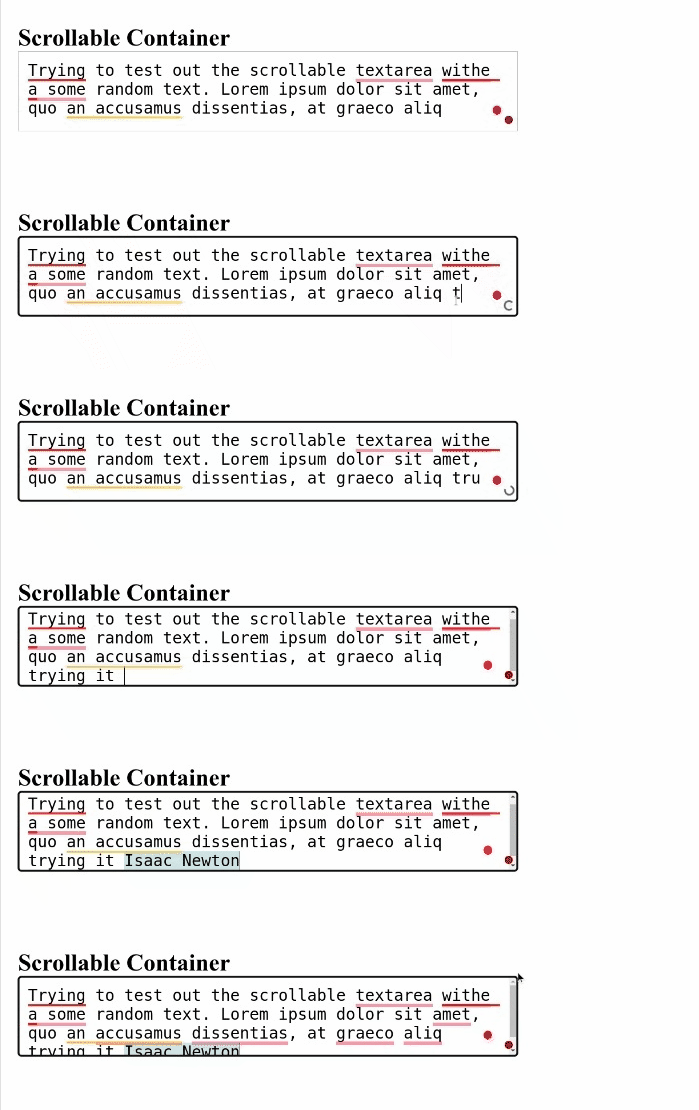
文本区是响应式的输入字段,可以根据用户的多次输入来调整高度。这个功能可以导致扭曲的用户界面,适用于我们的react-mentions 组件。我们将使我们的文本区域可滚动,以避免这种扭曲,并创造一个更好的用户界面。
首先,我们将把lodash 库中的merge 函数导入到App.js 文件中:
import merge from 'lodash/merge';
merge 函数将负责将我们的mentionsInputStyle 与我们新的自定义样式合并:
function App() {
  let customStyle = merge({}, mentionsInputStyle, {
    input: {
      height: 80,
      overflow: "auto",
    },
    highlighter: {
      height: 80,
      overflow: "hidden",
      boxSizing: "border-box",
    },
  });

  ...
  return (
      <MentionsInput
        value={value}
        onChange={(e) => setValue(e.target.value)}
        style={customStyle}
        placeholder={"Mention people using '@'"}
        a11ySuggestionsListLabel={"Suggested mentions"}
      >
        <Mention
          trigger="@"
          data={users}
          style={mentionStyle}
        />
  );
}
在上面的代码块中,我们正在将mentionsInputStyle 与我们新更新的样式合并。我们还将文本区的高度和宽度设置为一个固定值,并自动设置溢出。
完成这些后,我们将有一个更漂亮的UI,有一个可滚动的组件,如下图所示:
从外部来源获取响应
在本节中,我们将看看如何在我们的表单中使用来自API的数据。在许多情况下,我们的数据可能来自外部来源。让我们看看我们如何处理我们的响应并将它们添加到react-mentions 数据属性中。
在这个演示中,我们将使用并从JSON Placeholder API中获取用户。复制并粘贴下面的代码块到App.js 文件中:
  function fetchUsers(query, callback) {
    if (!query) return;
    fetch(`https://jsonplaceholder.typicode.com/users?q=${query}`, {
      json: true,
    })
      .then((res) => res.json())
      // Transform the users to what react-mentions expects
      .then((res) =>
        res.map((user) => ({ display: user.username, id: user.name }))
      )

      .then(callback);
  }
根据上面的代码块,我们正在对jsonplaceholder 服务器进行API调用。我们向fetch 函数传递了两个参数:query 和callback 。
query 参数持有来自mentionInput 的输入,而callback 参数则在我们准备好响应时被调用。
接下来,我们要返回一个用户列表,在其中进行循环,并将用户的名字和用户名作为display 和id 的对象。
最后,我们在MentionsInput 组件的数据属性中调用我们的函数并显示id:
   <MentionsInput
        value={value}
        onChange={(e) => setValue(e.target.value)}
        style={mentionsInputStyle}
        placeholder="Mention any JsonPlaceholder username by typing `@` followed by at least one character"
        a11ySuggestionsListLabel={"Suggested JsonPlaceholder username for mention"}
      >
        <Mention
          displayTransform={(id) => `@${id}`}
          trigger="@"
          data={fetchUsers}
          style={mentionStyle}
        />
      </MentionsInput>

获取emojis
有了react-mentions 包,不仅名字可以被引用和提及,emojis也可以被提及!
让我们来看看如何从外部API获取emojis,并在搜索时在输入框中显示它们:
function App() {
  const [emojiValue, setEmojiValue] = useState([]);
  const notMatchingRegex = /($a)/;

  useEffect(() => {
    fetch(
      "https://gist.githubusercontent.com/oliveratgithub/0bf11a9aff0d6da7b46f1490f86a71eb/raw/d8e4b78cfe66862cf3809443c1dba017f37b61db/emojis.json"
    )
      .then((data) => {
        return data.json();
      })
      .then((jsonData) => {
        setEmojiValue(jsonData.emojis);
      });
  }, []);
  const queryEmojis = (query, callback) => {
    if (query.length === 0) return;
    const filterValue = emojiValue
      .filter((emoji) => {
        return emoji.name.indexOf(query.toLowerCase()) > -1;
      })
      .slice(0, 10);
    return filterValue.map(({ emoji }) => ({ id: emoji }));
  };

  ...
  return (
      <h3>Emoji support</h3>
      <MentionsInput
        value={value}
        onChange={(e) => setValue(e.target.value)}
        style={mentionsInputStyle}
        placeholder={"Press '&' for emojis, mention people using '@'"}
      >
        <Mention
          trigger="@"
          displayTransform={(username) => `@${username}`}
          markup="@__id__"
          data={users}
          regex={/@(\S+)/}
          style={mentionStyle}
          appendSpaceOnAdd
        />
        <Mention
          trigger="&"
          markup="__id__"
          regex={notMatchingRegex}
          data={queryEmojis}
        />
      </MentionsInput>
  );
}
根据上面的代码块,我们在页面加载时立即从API中获取并将表情符号存储在我们的emojiValue 。我们使用useEffect 钩子来做这件事,并在用户搜索特定关键词时显示表情符号。
在这里,我们使用双触发模式,用& 符号表示表情符号,用@ 符号表示用户数组。notMatchingRegex 作为一个过滤器,用于过滤不匹配的emojis。

创建一个具有@mention 功能的自定义表单
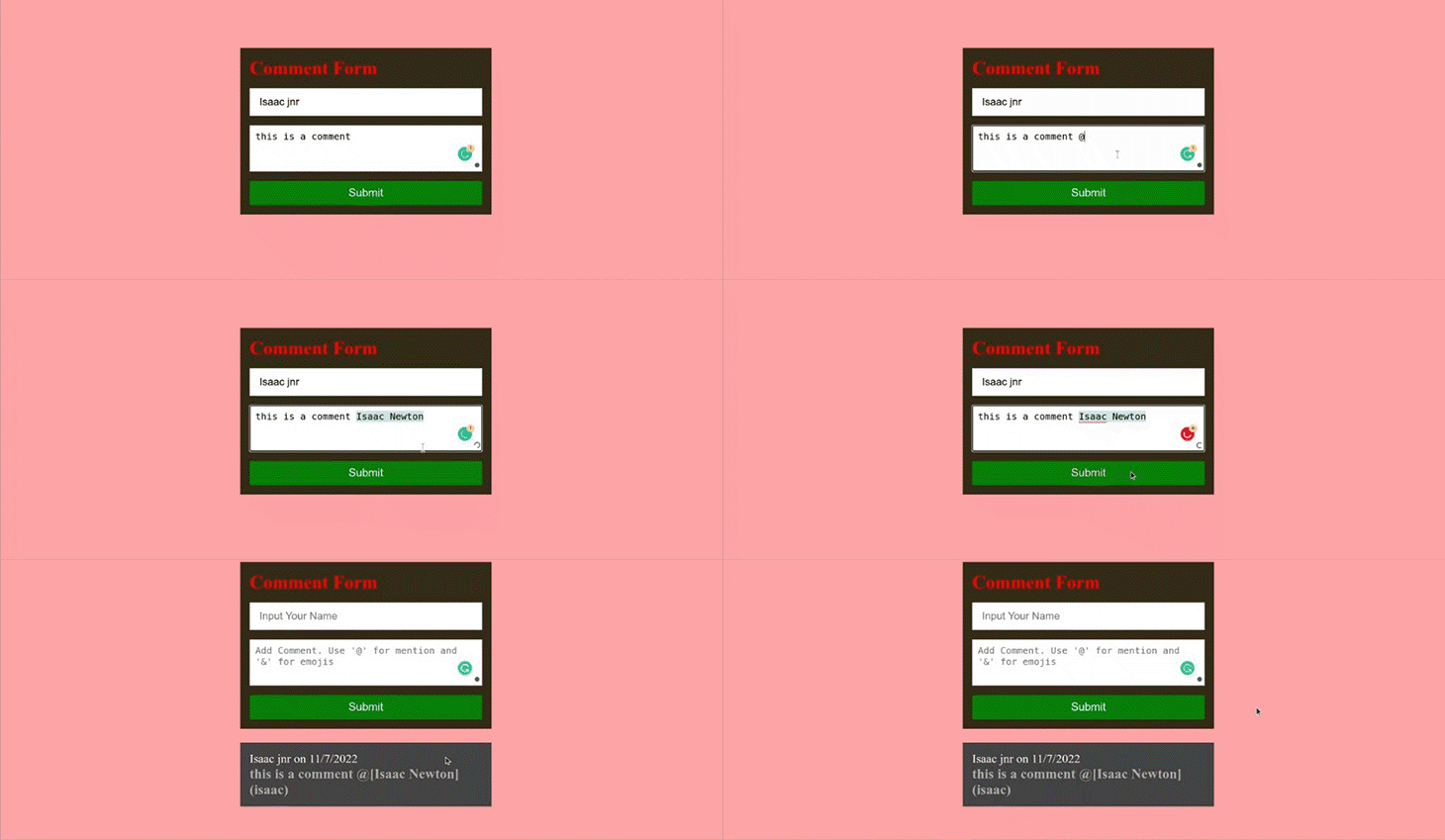
在这一节中,我们将把我们所学到的关于react-mentions 库的所有内容放在一起,建立一个评论表单。
首先,在src 目录中创建一个CustomForm.jsx 文件,并粘贴以下代码:
// CustomForm.jsx

import { useState } from 'react';
import { Mention, MentionsInput } from 'react-mentions';
import styles from './FormInputStyle.module.css';
import mentionsInputStyle from './mentionsInputStyle';
import mentionStyle from './mentionStyle';
const CustomForm = () => {
  const [formState, setFormState] = useState({
    username: '',
    comment: '',
  });
  const [comments, setComments] = useState([]);
  const users = [
    {
      id: 'isaac',
      display: 'Isaac Newton',
    },
    {
      id: 'sam',
      display: 'Sam Victor',
    },
    {
      id: 'emma',
      display: 'emmanuel@nobody.com',
    },
  ];
  const submit = () => {
    if (formState.username === '' || formState.comment === '') {
      alert('Please fill in all fields');
      return;
    }
    setComments((comments) => [
      ...comments,
      {
        username: formState.username,
        comment: formState.comment,
      },
    ]);
    setFormState({
      username: '',
      comment: '',
    });
  };
  const current = new Date();
  const date = `${current.getDate()}/${
    current.getMonth() + 1
  }/${current.getFullYear()}`;
在上面的代码中,我们正在导入我们将从react-mentions 中使用的包,以及用于处理表单的评论和状态的useState 挂钩。
表单和评论的状态也已经设置好了,并且为应用程序提供了假数据。我们的submit 函数检查字段是否被填写,并设置评论状态。我们现在有一个date 变量,获得评论的日期。
现在,用下面的代码更新返回值:
return (
    <div className={styles.form}>
      <section className={styles.formCard}>
        <h2 className={styles.formTitle}>Comment Form</h2>
        <input
          type="text"
          value={formState.username}
          onChange={(e) =>
            setFormState({ ...formState, username: e.target.value })
          }
          placeholder="Input Your Name"
        />
        <MentionsInput
          placeholder="Add Comment. Use '@' for mention"
          value={formState.comment}
          onChange={(e) =>
            setFormState({ ...formState, comment: e.target.value })
          }
          style={mentionsInputStyle}
        >
          <Mention style={mentionStyle} data={users} />
        </MentionsInput>
        <button onClick={submit}>Submit</button>
      </section>
      {comments.length === 0 ? (
        null
      ) : (
        <section>
          {comments.map((comment, i) => (
            <div className={styles.commentCard} key={i}>
              <p className={styles.username}>
                {comment.username} on {date}
              </p>
              <h2>{comment.comment}</h2>
            </div>
          ))}
        </section>
      )}
    </div>
  );
};
export default CustomForm;
我们正在将适当的道具传递给Mention 和MentionInput 组件,并在表单下面显示评论(如果有的话)。
很好!接下来,创建一个FormInputStyle.module.css ,用于样式设计,并将以下代码粘贴到其中:
* {
  margin: 0;
  padding: 0;
  box-sizing: border-box;
}
.form {
  display: flex;
  flex-direction: column;
  align-items: center;
  justify-content: center;
  width: 100%;
  height: 100vh;
  background-color: #ffa5a5;
}
.formTitle {
  font-size: 2rem;
  color: red;
  margin-bottom: 1rem;
}
input {
  height: 3rem;
  width: 25rem;
  margin-bottom: 1rem;
  padding: 1rem;
  font-size: 18px;
  border: 1px solid silver;
}
.formCard {
  width: 27rem;
  display: flex;
  flex-direction: column;
  background-color: rgb(54, 44, 24);
  padding: 1rem;
}
button {
  border: none;
  border-radius: 3px;
  color: white;
  background-color: green;
  font-size: 1.2rem;
  padding: 10px;
  margin-top: 1rem;
}
.commentCard {
  margin: 1.5rem;
  color: rgb(173, 173, 173);
  font-size: 1rem;
  background-color: #444;
  padding: 1rem;
  width: 27rem;
}
.username {
  color: white;
  font-size: 1.3rem;
}
这样,我们就完成了创建表单的工作你应该看到像这样的东西:
结论
在这篇文章中,我们已经了解了react-mentions ,这是一个易于使用的库,用于建立具有@mention 功能的表单。我们还研究了react-mentions 包的不同功能以及如何使用它们。我们还使用react-mention 包建立了一个具有@mention 功能的评论表单。
谢谢你的阅读!
