

在这篇文章中,我们将详细讨论线程优先级和Java中不同类型的线程优先级,以及线程调度器如何根据其优先级执行各种线程。我们还将看到我们如何能够 设置一个线程的优先级以及我们如何能够 获取一个现有线程的优先级.
1.线程优先级简介
java中的每个线程都有一个优先级。它可能是由JVM分配的默认优先级,也可能是由程序员明确提供的自定义优先级。线程优先级的有效范围在1到10之间,其中1是最小的,10是最大的优先级。默认的优先级是5。
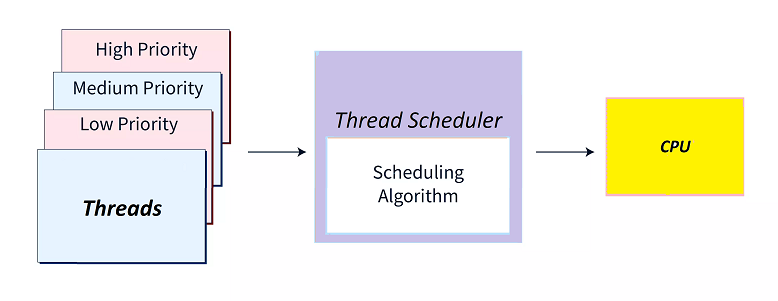
在多线程环境中,线程调度器在分配处理器给线程执行时使用优先级。
- 具有最高优先级的线程 将首先被执行,然后是其他等待执行的低优先级线程。这意味着调度器会优先考虑高优先级的线程。
- 如果多个线程具有相同的优先级,那么线程的执行顺序将由线程调度器根据一些内部算法决定,可以是轮回、抢占式调度或FCFS*(先来后到*)算法。
- 线程调度器是JVM的一部分,在不同的JVM中会有所不同,因此我们不能指望调度器使用的确切算法。
另见。线程生命周期
2.线程优先级的类型
线程类包含3个常量来定义线程优先级。
- MIN_PRIORITY:这是最小的优先级,值为1。
- NORM_PRIORITY:这是默认的正常优先级,值为5。
- MAX_PRIORITY:这是最大的优先级,值为10。
public static int MIN_PRIORITY

public static int NORM_PRIORITY

public static int MAX_PRIORITY
3.使用线程优先级
现在让我们看看如何在我们的代码中使用线程优先级,以及如何根据需求改变线程的优先级。
3.1.获取和设置线程优先级
我们可以使用以下方法来获取和设置线程的优先级。
int getPriority(): 返回给定线程的优先级。void setPriority(int newPriority):为线程设置一个新的优先级。作为该方法的参数,传递新的优先级值的有效范围是1到10。如果我们传递一个超出这个范围的值,那么这个方法会抛出 "IllegalArgumentException"。
3.2.线程优先级实例
现在让我们来看看一个解释线程优先级使用的例子。在这个例子中,我们通过扩展Thread 类来创建一个新的线程,然后对线程优先级进行获取和设置操作。
// Creating 3 Threads
Thread thread1 = new Thread();
Thread thread2 = new Thread();
Thread thread3 = new Thread();

// Getting Priorities of above threads
System.out.println("Thread1 priority : " + thread1.getPriority());   // Print ‘5’ as default priority
System.out.println("Thread2 priority : " + thread2.getPriority());   // Print ‘5’ as default priority
System.out.println("Thread3 priority : " + thread3.getPriority());     // Print ‘5’ as default priority

// Setting priority for above threads
thread1.setPriority(4);

// Setting Priority of 1 using Thread constant for minimum priority
thread2.setPriority(Thread.MIN_PRIORITY);

// thread3.setPriority(15);  // This will throw IllegalArgumentException

// Again getting Priorities for above Threads
System.out.println("Thread1 new priority : " + thread1.getPriority());   // Print ‘4’ as new priority
System.out.println("Thread2 new priority : " + thread2.getPriority());   // Print ‘1’ as new priority
3.3.主线程的优先级
主线程的默认优先级为 "5"。我们可以通过使用setPriority() 类来改变主线程的优先级。
class MainThreadDemo extends Thread
{
	public static void main(String[] args)
	{
		// Getting priority for main thread
		System.out.println(Thread.currentThread().getPriority());

		 // Print ‘5’ as default priority
		// Setting priority for main thread
		Thread.currentThread().setPriority(Thread.MAX_PRIORITY);

		// Getting priority for main thread again
		System.out.println(Thread.currentThread().getPriority());  // Print ‘10’ as new priority
	}
}
4.线程优先级与父子关系的关系
当我们没有为一个线程提供任何优先级时,主线程的默认优先级是5。而对于所有其余的线程,默认的优先级从父线程继承到子线程。
这意味着,无论父线程有什么优先级,子线程也会继承同样的优先级。
class ThreadDemo extends Thread
{
	public void run()
	{
		System.out.println(“Inside run method”);
	}

	public static void main(String[] args)
	{
		// Setting priority for main thread
		Thread.currentThread().setPriority(7);

		// Printing main thread priority
		System.out.println("Main thread priority: " + Thread.currentThread().getPriority());

		// Creating child thread
		ThreadDemo childThread = new ThreadDemo();

		// Printing child thread priority
		System.out.println("Child thread priority: " + childThread.getPriority());	//7
	}
}
注意程序的输出。我们可以看到,父线程(main)和子线程(childThread)都有相同的优先级。即使我们没有设置子线程的优先级,它也在挑选与它的父线程(本例中为主线程 )相同的优先级。
5.执行具有相同优先级的线程
我们知道,线程调度器通常先执行高优先级的线程,然后再执行低优先级的线程。我们可能会遇到这样的情况:两个线程具有相同的优先级,所以在这种情况下,我们无法猜测哪个线程会先执行。这完全取决于线程调度器用于调度这些线程的内部算法。
让我们也来介绍一下这种情况的例子。
public class ThreadPriorityDemo {
  public static void main(String[] args) {
    // Creating child tasks
    ChildTask childTask1 = new ChildTask();
    ChildTask childTask2 = new ChildTask();

    // Start Child Threads
    new Thread(childTask1).start();
    new Thread(childTask2).start();

    System.out.println(Thread.currentThread().getName() + " executed by main thread");
  }
}

class ChildTask implements Runnable {
  public void run()
  {
    System.out.println(Thread.currentThread().getName() + " executed by child thread");
  }
}
在这个例子中,父线程(主线程)和子线程(线程1)的优先级都是 "5"。注意下面的程序输出。我们可以看到这种情况下有两种可能的输出,因为调度器因系统而异,可以先执行任何线程(主线程或子线程),因为两者的优先级相同。
main executed by main thread
Thread-1 executed by child thread
Thread-0 executed by child thread
6.总结
我们已经介绍了java中的线程优先级和它们的类型,以及我们如何通过实际例子为各种线程获得和设置线程优先级。
我们还研究了多个线程具有相同优先级的情况,以及线程优先级在父子线程关系中是如何表现的。
