效果
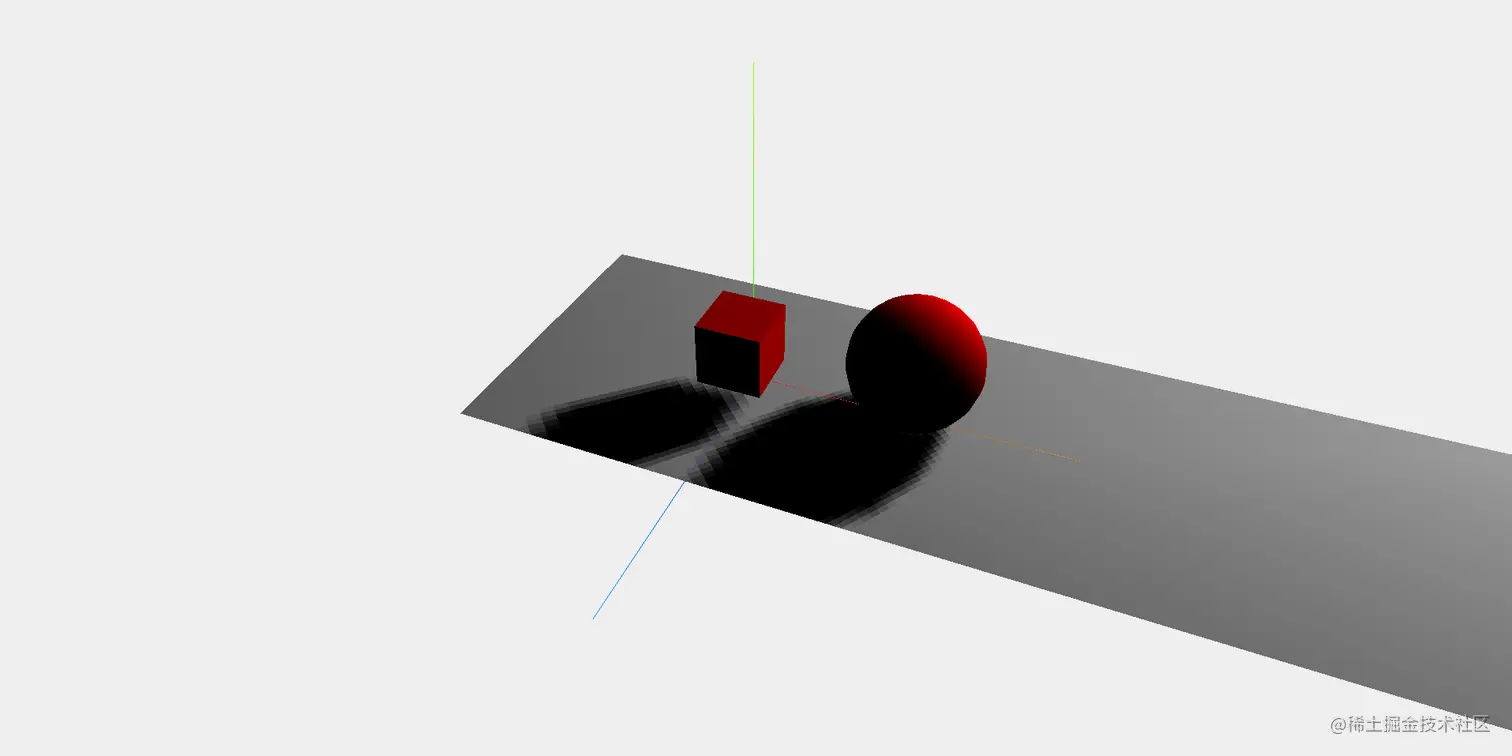
<html lang="en">

<head>
    <meta charset="UTF-8">
    <title>第一个three.js文件_WebGL三维场景</title>
    <style>
        body {
            margin: 0;
            overflow: hidden;
            /* 隐藏body窗口区域滚动条 */
        }
    </style>
    <!--引入three.js三维引擎-->
    <script src="http://www.yanhuangxueyuan.com/versions/threejsR92/build/three.js"></script>
    <script src="./OrbitControls.js"></script>
</head>

<body>
    <div id="main">
    </div>
    <script>
        function init() {
            //创建场景
            const scene = new THREE.Scene();
            //创建相机 PerspectiveCamera透视相机
            const camera = new THREE.PerspectiveCamera(45, window.innerWidth / window.innerHeight, 0.1, 2000);
            //创建渲染器
            const renderer = new THREE.WebGLRenderer();
            //设置渲染器初始颜色
            renderer.setClearColor(new THREE.Color(0xEEEEEE));
            //设置输出canvas画布的大小  全屏输出
            renderer.setSize(window.innerWidth, window.innerHeight);
            //设置渲染物体阴影
            renderer.shadowMap.enabled = true;
            //显示三维坐标系
            const axes = new THREE.AxesHelper(20);

            //添加坐标系到场景中
            scene.add(axes);
            //生成一个平面几何体
            const planeGeometry = new THREE.PlaneGeometry(60, 20);
            //给平面几何体上色 材质
            const planeMaterial = new THREE.MeshLambertMaterial({ color: 0xcccccc });
            //使用平面几何体和材质生成地面
            const plane = new THREE.Mesh(planeGeometry, planeMaterial);
            //地面移动位置
            plane.rotation.x = -0.5 * Math.PI;
            plane.position.x = 15;
            plane.position.y = 0;
            plane.position.z = 0;
            plane.castShadow = true;

            //接收阴影
            plane.receiveShadow = true;

            //将地面添加到场景中
            scene.add(plane);

            //添加立方体
            const cubeGeometry = new THREE.BoxGeometry(4, 4, 4);
            //添加材质
            const cubeMaterial = new THREE.MeshLambertMaterial({ color: 0xff0000 });
            //生成立法体
            const cube = new THREE.Mesh(cubeGeometry, cubeMaterial);

            //立法体移动位置
            cube.position.x = 0;
            cube.position.y = 4;
            cube.position.z = 2;

            //对象是否渲染到阴影贴图中
            cube.castShadow = true;
            //将立法体添加到场景中
            scene.add(cube);

            //创建球
            const sphereGeometry = new THREE.SphereGeometry(4,20,20);
            const sphereMaterial = new THREE.MeshLambertMaterial({ color: 0xff0000 });
            const sphere = new THREE.Mesh(sphereGeometry,sphereMaterial);

            //球移动位置
            sphere.position.x = 10;
            sphere.position.y = 4;
            sphere.position.z = 0;

            //对象是否渲染到阴影贴图中
            sphere.castShadow = true;
            //球添加到场景中
            scene.add(sphere);

            //创建光源 聚光灯
            const spotLight = new THREE.SpotLight(0xFFFFFF);
            spotLight.position.set(30,30,-30);
            spotLight.castShadow = true;
            scene.add(spotLight);

            //定位相机,并指向场景中心
            camera.position.x = -30;
            camera.position.y = 40;
            camera.position.z = 30;
            camera.lookAt(scene.position);

            //将渲染器添加到div元素中
            document.getElementById("main").appendChild(renderer.domElement);
            function render() {
                renderer.render(scene, camera);//执行渲染操作
                // mesh.rotateY(0.01);//每次绕y轴旋转0.01弧度
                requestAnimationFrame(render);//请求再次执行渲染函数render
            }
            render();
            //创建控件对象 使用鼠标操作视角
            var controls = new THREE.OrbitControls(camera, renderer.domElement);
        }
        window.onload = init;
    </script>
</body>

</html>



