

React、Angular和Vue都是很好的框架,可以让网络应用以一致的结构快速启动和运行。不过它们都是建立在JavaScript之上的,所以让我们来看看我们如何只用普通的JavaScript就能完成这些大框架所做的漂亮事情。
这篇文章可能会引起那些过去使用过这些框架,但从未完全理解它们在引擎盖下做什么的开发者的兴趣。我们将通过演示如何仅使用vanilla JavaScript构建一个有状态的Web应用,来探索这些框架的不同方面。
状态管理
管理状态是React、Angular和Vue内部或通过Redux或Zustand等库进行的。然而,状态可以是一个简单的JavaScript对象,包含所有你的应用程序感兴趣的属性-价值键对。
如果你正在构建经典的待办事项列表应用,你的状态可能会包含一个类似currentTodoItemID 的属性,如果它的值是null ,你的应用可能会显示所有待办事项的完整列表。
如果currentTodoItemID 被设置为某个特定的todoItem 的ID,应用程序可能会显示该todoItem's 的详细信息。如果你正在构建一个游戏,你的状态可能包含属性和值,如playerHealth = 47.5 和currentLevel = 2.
其实状态的形状或大小并不重要;重要的是你的应用程序的组件如何改变它的属性,以及其他组件如何对这些变化做出反应。
这就给我们带来了第一个神奇的东西:代理对象。
代理对象是JavaScript从ES6开始的原生对象,可以用来监视一个对象的变化。为了了解如何利用JavaScript中的代理对象,让我们看看下面index.js file 中的一些示例代码,其中使用了一个名为on-change的npm模块:
import onChange from 'on-change';

class App = {
  constructor() {
    // create the initial state object
    const state = {
      currentTodoItemID: null
    }
    // listen for changes to the state object
    this.state = onChange(state, this.update);
  }
  // react to state changes
  update(path, current, previous) {
    console.log(`${path} changed from ${previous} to ${current}`);
  }
}

// create a new instance of the App
const app = new App();

// this should log "currentTodoItemID changed from null to 1"
app.state.currentTodoItemID = 1;
注意: 代理对象不能在Internet Explorer中工作,所以如果这是你的项目的一个要求,你应该考虑到这个警告。没有办法对代理对象进行聚填,所以你需要使用轮询,每秒钟检查几次状态对象,看看它是否有变化,这既不优雅也不高效。
构建组件
React中的组件只是结构的HTML、逻辑的JavaScript和造型的CSS的模块化部分。有些是要单独显示的,有些是要依次显示的,有些可能只是用HTML来容纳一些完全不同的东西,比如可更新的SVG图片或WebGL画布。
无论你构建的是什么类型的组件,它都应该能够访问你的应用程序的状态,或者至少是与之有关的状态部分。下面的代码来自src/index.js ):
import onChange from 'on-change';
import TodoItemList from 'components/TodoItemList';

class App = {
  constructor() {
    const state = {
      currentTodoItemID: null,
      todoItems: [] // *see note below
    }
    this.state = onChange(state, this.update);

    // create a container for the app
    this.el = document.createElement('div');
    this.el.className = 'todo';

    // create a TodoItemList, pass it the state object, and add it to the DOM
    this.todoItemList = new TodoItemList(this.state);
    this.el.appendChild(this.todoItemList.el);
  }

  update(path, current, previous) {
    console.log(`${path} changed from ${previous} to ${current}`);
  }
}

const app = new App();
document.body.appendChild(app.el);
当你的应用程序规模扩大时,将像state.todoItems ,可能会增长得相当大的东西从你的状态对象中移出,转移到像数据库这样的持久性存储方法中,是一个很好的做法。
在状态中保持对这些组件的引用,就像下面的src/components/TodoItemList.js 和src/components/TodoItem.js 所示,这样做更好:
import TodoItem from 'components/TodoItem';

export default class TodoItemList {
  constructor(state) {
    this.el = document.createElement('div');
    this.el.className = 'todo-list';

    for(let i = 0; i < state.todoItems.length; i += 1) {
      const todoItem = new TodoItem(state, i);
      this.el.appendChild(todoItem);
    }
  }
}
export default class TodoItem {
  constructor(state, id) {
    this.el = document.createElement('div');
    this.el.className = 'todo-list-item';
    this.title = document.createElement('h1');
    this.button = document.createElement('button');

    this.title.innerText = state.todoItems[id].title;
    this.button.innerText = 'Open';
    this.button.addEventListener('click', () => { state.currentTodoItemID = id });

    this.el.appendChild(this.title);
    this.el.appendChild(this.button);
  }
}
React也有视图的概念,它类似于组件,但不需要任何逻辑。我们可以使用这种虚无缥缈的模式建立类似的容器。我不会包括任何具体的例子,但它们可以被认为是框架性的组件,只是将应用程序的状态传递给其中的功能组件。
DOM操作
DOM操作是像React这样的框架真正闪耀的领域。因此,虽然我们通过在vanilla JavaScript中自己处理标记获得了一点灵活性,但我们失去了与这些框架更新方式相关的很多便利。
让我们在我们的待办事项应用的例子中试一下,看看我在说什么。下面的代码来自src/index.js 和src/components/TodoItemList.js:
import onChange from 'on-change';
import TodoItemList from 'components/TodoItemList';

class App = {
  constructor() {
    const state = {
      currentTodoItemID: null,
      todoItems: [
        { title: 'Buy Milk', due: '3/11/23' },
        { title: 'Wash Car', due: '4/13/23' },
        { title: 'Pay Rent', due: '5/15/23' },
      ]
    }
    this.state = onChange(state, this.update);

    this.el = document.createElement('div');
    this.el.className = 'todo';

    this.todoItemList = new TodoItemList(this.state);
    this.el.appendChild(this.todoItemList.el);
  }

  update(path, current, previous) {
    if(path === 'todoItems') {
      this.todoItemList.render();
    }
  }
}

const app = new App();
document.body.appendChild(app.el);

app.state.todoItems.splice(1, 1); // remove the second todoListItem
app.state.todoItems.push({ title: 'Eat Pizza', due: '6/17/23'); // add a new one
import TodoItem from 'components/TodoItem';

export default class TodoItemList {
  constructor(state) {
    this.state = state;
    this.el = document.createElement('div');
    this.el.className = 'todo-list';
    this.render();
  }

  // render the list of todoItems to the DOM
  render() {
    // empty the list
    this.el.innerHTML = '';
    // fill the list with todoItems
    for (let i = 0; i < this.state.todoItems.length; i += 1) {
      const todoItem = new TodoItem(state, i);
      this.el.appendChild(todoItem);
    }
  }
}
在上面的例子中,我们创建了一个TodoItemList ,在我们的状态中预装了三个todoListItems 。然后,我们删除中间的TodoItem ,并添加一个新的。
虽然这个策略可以正常工作并正常显示,但它的效率很低,因为它涉及到删除所有现有的DOM节点并在每次渲染时创建新节点。
React在这方面比JavaScript更聪明;它将每个DOM节点的引用保留在内存中。你可能已经注意到React标记中奇怪的标识符,比如下面显示的那些:
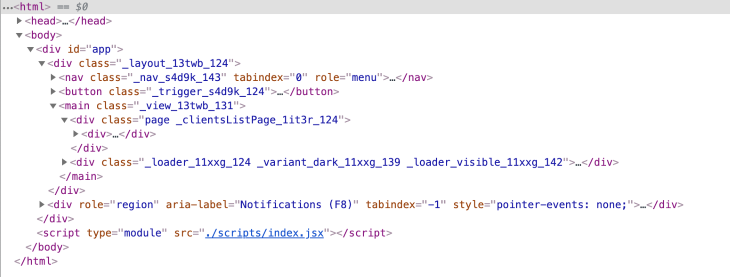
我们也可以通过存储每个节点的引用来进行类似的DOM操作。对于todoListItems ,它可能看起来像这样:
 for(let i = 0; i < this.state.todoItems.length; i += 1) {
   // instead of making anonymous elements, attach them to state
   this.state.todoItems[i].el = new TodoItem(this.state, i);
   this.el.appendChild(this.state.todoItems[i].el);
 }
虽然这些操作会起作用,但在向你的状态添加DOM元素时,你应该小心。它们不仅仅是对它们在DOM树中的位置的引用;它们包含自己的属性和方法,在你的应用程序的生命周期中可能会发生变化。
如果你走这条路,最好使用ignoreKeys 参数来告诉on-change模块忽略添加的DOM元素。
生命周期钩子
React有一套一致的生命周期Hooks,使得开发者可以很容易地开始在一个新项目上工作,并迅速了解应用程序运行时将发生什么。两个最引人注目的Hooks是ComponentDidMount() 和ComponentWillUnmount() 。
让我们举一个非常基本的例子,在src/index.js 文件中,简单地称它们为show() 和hide():
import onChange from 'on-change';
import Menu from 'components/Menu';

class App = {
  constructor() {
    const state = {
      showMenu: false
    }
    this.state = onChange(state, this.update);

    this.el = document.createElement('div');
    this.el.className = 'todo';
    // create an instance of the Menu
    this.menu = new Menu(this.state);

    // create a button to show or hide the menu
    this.toggle = document.createElement('button');
    this.toggle.innerText = 'show or hide the menu';

    this.el.appendChild(this.menu.el);
    this.el.appendChild(this.toggle);

    // change the showMenu property of our state object when clicked
    this.toggle.addEventListener('click', () => { this.state.showMenu = !this.state.showMenu; })
  }

  update(path, current, previous) {
    if(path === 'showMenu') {
      // show or hide menu depending on state
      this.menu[current ? 'show' : 'hide']();
    }
  }
}

const app = new App();
document.body.appendChild(app.el);
现在,这里有一个例子(来自src/components/menu.js ),说明我们如何在JavaScript中编写自定义Hooks:
export default class Menu = {
  constructor(state) {
    this.el = document.createElement('div');
    this.title = document.createElement('h1');
    this.text = document.createElement('p');

    this.title.innerText = 'Menu';
    this.text.innerText = 'menu content here';

    this.el.appendChild(this.title);
    this.el.appendChild(this.text);

    this.el.className = `menu ${!state.showMenu ? 'hidden' : ''}`;
  }

  show() {
    this.el.classList.remove('hidden');
  }

  hide() {
    this.el.classList.add('hidden');
  }
}
这种策略允许我们编写任何我们喜欢的内部方法。例如,你可能想根据菜单是由用户关闭的,还是因为应用程序中发生了其他事情而关闭的,来改变菜单的动画方式。
React通过使用一套标准的Hooks来实现一致性,但我们可以在vanilla JavaScript中为我们的组件编写自定义的Hooks,从而拥有更大的灵活性。
路由
现代网络应用的一个重要方面是能够跟踪当前的位置,并通过使用应用的用户界面或浏览器的后退和前进按钮,在历史上向前和向后移动。当你的应用程序尊重 "深层链接"(如todoapp.com/currentTodo…)时,这也很好。
React Router在这方面做得很好,我们可以用一些技术做类似的事情。一个是JavaScript的本地历史API。通过向其数组推送和弹出,我们可以跟踪我们想要保存在页面历史中的状态变化。我们还可以监听它的变化,并将这些变化应用到我们的状态对象中(以下代码来自index.js:
import onChange from 'on-change';

class App = {
  constructor() {
    // create the initial state object
    const state = {
      currentTodoItemID: null
    }
    // listen for changes to the state object
    this.state = onChange(state, this.update);

    // listen for changes to the page location
    window.addEventListener('popstate', () => {
      this.state.currentTodoItemID = window.location.pathname.split('/')[2];
    });

    // on first load, check for a deep link
    if(window.location.pathname.split('/')[2]) {
      this.state.currentTodoItemID = window.location.pathname.split('/')[2];
    }
  }
  // react to state changes
  update(path, current, previous) {
    console.log(`${path} changed from ${previous} to ${current}`);
    if(path === 'currentTodoItemID') {
      history.pushState({ currentTodoItemID: current }, null, `/currentTodoItemID/${current}`);
    }
  }
}

// create a new instance of the App
const app = new App();
你可以随心所欲地扩展它;对于复杂的应用程序,你可能有10个或更多不同的属性来影响它应该显示的内容。这种技术比React Router需要更多的设置,但使用vanilla JavaScript也能达到同样的效果。
文件组织
React的另一个很好的副产品是它鼓励你组织你的目录和文件,从一个入口点开始,通常命名为 index.js 或app.js ,靠近项目文件夹的根。
接下来,你通常会在同一位置找到/views 和/components 文件夹,里面装满了应用程序要利用的各种视图和组件,以及一些/subviews 或/subcomponents 。
这种清晰的划分使原作者或加入项目的新开发者更容易进行更新。
下面是一个待办事项列表应用程序的样本文件夹结构:
src
├── assets
│   ├── images
│   ├── videos
│   └── fonts
├── components
│   ├── TodoItem.js
│   ├── TodoItem.scss
│   ├── TodoItemList.js
│   └── TodoItemList.scss
├── views
│   ├── nav.js
│   ├── header.js
│   ├── main.js
│   └── footer.js
├── index.js
└── index.scss
在我的应用程序中,我通常通过JavaScript来创建标记,这样我就有一个参考,但你也可以使用你最喜欢的模板引擎,甚至包括.html 文件来构建每个组件。
调试
React有一套调试工具,可以在Chrome的开发者控制台中运行。
通过这种香草式的JavaScript方法,你可以在onChange's listener里面创建一些中间件,你可以设置为做很多类似的事情。就我个人而言,我喜欢在应用程序看到它在本地运行时,只在控制台对状态进行所有的改变(window.location.hostname === 'localhost')。
有时,你想只关注特定的变化或组件,这也很容易。
结束语
显然,学习和使用大的框架有巨大的优势,但请记住,它们都是用JavaScript编写的。重要的是,我们不要对它们产生依赖。
有一大批React、Angular或Vue的开发者设法放弃学习JavaScript的基础,如果他们只想在React、Angular或Vue项目上工作,那也没关系。对于我们其他人来说,了解底层语言、它的能力和它的不足之处是很好的。
我希望这篇文章能让你对这些大型框架的工作方式有一点了解,并给你一些想法,在它们不工作时如何调试它们。
请使用下面的评论,对如何改进这个系统提出建议,或者指出我所犯的任何错误。我发现这个设置是一个直观而薄的脚手架层,支持各种规模和功能的应用程序,但我在每个项目中都会继续发展它。
经常有其他开发者看到我的应用程序,认为我在使用某个大框架。当他们问起 "这是用什么构建的?"时,能够回答 "JavaScript "就很好了。
