实现效果

接口分析
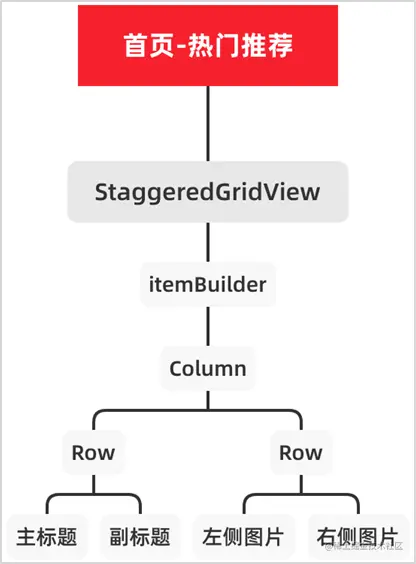
完整代码
import 'package:erabbit_app/models/home_model.dart';
import 'package:flutter/material.dart';
import 'package:flutter_staggered_grid_view/flutter_staggered_grid_view.dart';
class HotRecommendWidget extends StatelessWidget {
HotRecommendWidget({
this.hotRecommends,
});
final List<HotRecommendsModel>? hotRecommends;
double _imageWidth = 0.0;
Widget _buildItem(HotRecommendsModel hotRecommendsModel) {
return Container(
padding: EdgeInsets.all(10.0),
decoration: BoxDecoration(color: Colors.white),
child: Column(
children: [
Row(
children: [
Text(
hotRecommendsModel.title!,
style: TextStyle(
color: Color(0xFF262626),
fontWeight: FontWeight.w400,
fontSize: 16.0,
),
),
Padding(
padding: EdgeInsets.only(left: 10.0),
child: Text(
hotRecommendsModel.caption!,
style: TextStyle(
color: Color(0xFF7F7F7F),
fontWeight: FontWeight.w400,
fontSize: 12.0,
),
),
),
],
),
Padding(
padding: EdgeInsets.only(top: 15.0),
child: Row(
mainAxisAlignment: MainAxisAlignment.spaceBetween,
children: [
Image.network(
hotRecommendsModel.leftIcon!,
width: _imageWidth,
height: _imageWidth,
),
Image.network(
hotRecommendsModel.rightIcon!,
width: _imageWidth,
height: _imageWidth,
),
],
),
),
],
),
);
}
@override
Widget build(BuildContext context) {
double screenWidth = MediaQuery.of(context).size.width;
_imageWidth = (screenWidth - (8 * 10.0 + 1.0)) * 0.25;
if (hotRecommends != null) {
return StaggeredGridView.countBuilder(
crossAxisCount: 2,
itemCount: hotRecommends!.length,
crossAxisSpacing: 1.0,
mainAxisSpacing: 1.0,
physics: NeverScrollableScrollPhysics(),
shrinkWrap: true,
itemBuilder: (BuildContext context, int index) {
HotRecommendsModel hotRecommendsModel = hotRecommends![index];
return _buildItem(hotRecommendsModel);
},
staggeredTileBuilder: (int index) {
return StaggeredTile.fit(1);
},
);
} else {
return Container();
}
}
}