需求:监听页面滚动事件,当页面到达锚点区域时触发事件,Swiper展示指定的swiper-slide
实现:
- 添加滚动事件,监听页面滚动事件,对相应模块绑定锚点(这里用id)
- 滚动事件结束满足判断条件,拿到**
mv**的swiperTwo()方法
- 执行函数:
vm.swiperThree().slideTo(index, 1000, false);
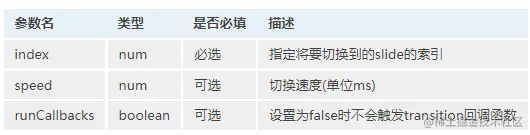
 <!-- Swiper -->
    <div class="swiper-container gallery-thumbs thumb-item1" ref="swiper">
      <div class="swiper-wrapper top_case ">
        <div class="swiper-slide flexcc">
        1
        </div>
        <div class="swiper-slide flexcc">
            2
        </div>
        <div class="swiper-slide flexcc">
            3
        </div>
      </div>
    </div>
    <!-- Swiper -->
    <div class="swiper-container gallery-top loupe-course1" id="8">
      <div class="swiper-wrapper">
            <div class="swiper-slide">
                测试1
             </div>
                <div class="swiper-slide">
                测试2
             </div>
                <div class="swiper-slide">
                测试3
             </div>
        </div>
       </div>
var vm = new Vue({
el: '#app',
mounted() {
var _this = this
window.addEventListener('scroll', this.onScroll, false)
var timer = setInterval(function () {
if (document.readyState === 'complete') {
_this.swiperTwo()
window.clearInterval(timer)
}
}, 2000)
},
beforeDestroy() {
window.removeEventListener("scroll", this.onScroll)
},
methods: {
onScroll() {
const navContents = document.querySelectorAll('.scroll')
const offsetTopArr = []
navContents.forEach(item => {
offsetTopArr.push(item.offsetTop)
})
const scrollTop = document.documentElement.scrollTop || document.body.scrollTop
let navIndex = 0
for (let n = 0; n < offsetTopArr.length; n++) {
if (scrollTop >= offsetTopArr[n]) {
navIndex = n
}
}
this.isActive = navIndex
},
scrollTo(index) {
$('html').animate({
scrollTop: $('#' + idNum).offset().top - scrollHeight
}, 800, function () {
this.isActive = index;
if (index > 4 && index < 11) {
_this.swiperTwo().slideTo(index - 6, 1000, false)
}
if (index > 8) {
_this.swiperThree().slideTo(index - 9, 1000, false)
}
});
},
swiperTwo() {
var galleryThumbs = new Swiper('.thumb-item1', {
slidesPerView: 3,
spaceBetween: 8,
loop: false,
freeMode: true,
watchSlidesVisibility: true,
watchSlidesProgress: true,
on: {
click: (swiper) => {
let slide = swiper.clickedIndex;
if (slide > 1) {
$('.thumb-item1 .swiper-wrapper').css({
'transform': 'translate3d(-1.5rem,0,0)',
'transition-duration': '1s'
});
} else {
$('.thumb-item1 .swiper-wrapper').css({
'transform': 'translate3d(0,0,0)',
'transition-duration': '1s'
});
}
},
}
});
var galleryTop = new Swiper(".loupe-course1", {
spaceBetween: 0,
loop: false,
autoplay: false,
thumbs: {
swiper: galleryThumbs
}
});
return galleryTop;
},
},
})