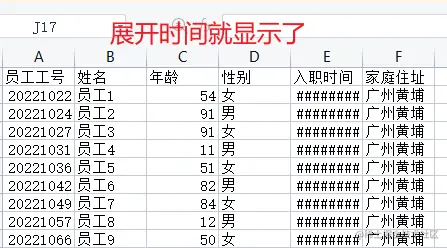
Vue表格导出Excel表格
实现方法(一)
-
使用的前端UI组件库是TDesign;Blob.js 与 Export2Excel.js 文件的代码放在实现方法(一)最后面。
-
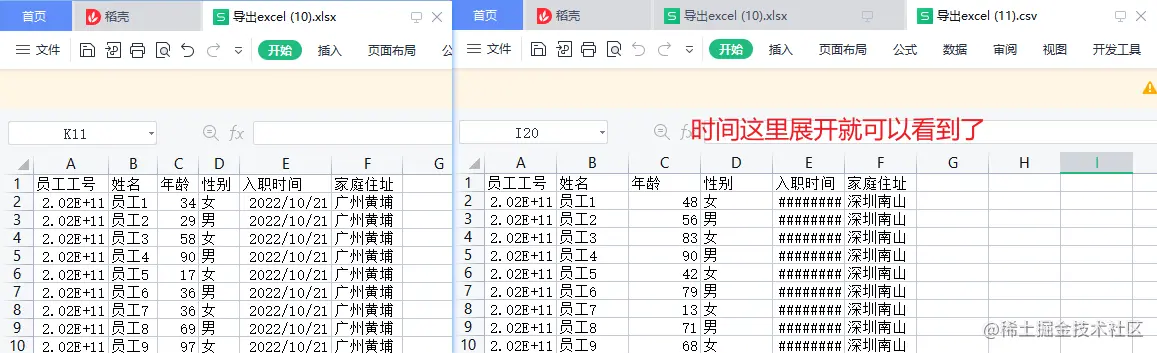
这里列举了两种方式实现导出,第二种实现方式无需安装依赖包。
1. 需要安装3个依赖包
npm install -D script-loader
npm install -S file-saver xlsx
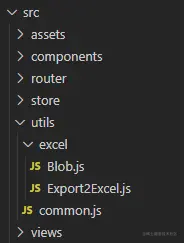
2. 在src的utils目录下新增一个存放excel文件的文件夹,我这里就命名excel;同时在utils目录下新增一个common.js文件用于存放封装的表格导入导出函数。
3. common.js代码如下:
import XLSX from 'xlsx';
import Export2Excel from '@/utils/excel/Export2Excel'
import { MessagePlugin as Message } from '@tencent/wxpay-mis-ui';
export const handleExcel = {
export: ({
tableData,
tableColumns,
fileTitle,
fileType
}) => {
if (!Array.isArray(tableData) || !Array.isArray(tableColumns)) {
return Message.error('表格数据/表头配置 入参必须为Array类型');
}
if (!tableData || tableData.length === 0) {
return Message.error('表格数据为空,无效导出');
}
if (!tableColumns || tableColumns.length === 0) {
return Message.error('缺少表头配置参数,请检查入参');
}
require.ensure([], () => {
const { export_json_to_excel } = Export2Excel;
const excelHeaderKey = tableColumns.map(i => i.colKey);
const excelBody = tableColumns.map(i => i.title);
const data = formatTableData(excelHeaderKey, tableData);
fileTitle = fileTitle || '列表';
fileType = fileType || 'xlsx';
export_json_to_excel({ excelBody, data, fileTitle, fileType });
})
},
};
const formatTableData = (excelHeaderKey, tableData) => {
return tableData.map(i => excelHeaderKey.map(k => i[k]));
};
4. 创建一个页面,例如在views目录下创建一个index.vue页面
<template>
<div>
<h1>excel导出</h1>
<div>
<t-button @click="exportExcel">点击导出excel</t-button>
</div>
<div>
<t-table
id="10086"
:data="tableData"
:columns="tableColumns"
rowKey="colKey"
bordered
hover />
</div>
</div>
</template>
<script>
import { handleExcel } from '@/utils/common'
export default {
data() {
return {
tableColumns: [
{ colKey: 'personId', title: '员工工号', fixed: 'left', width: 160 },
{ colKey: 'fullName', title: '姓名', fixed: 'left', width: 80 },
{ colKey: 'age', title: '年龄', width: 80 },
{ colKey: 'gender', title: '性别', width: 80 },
{ colKey: 'entryDate', title: '入职时间', width: 80 },
{ colKey: 'address', title: '家庭住址', width: 80 },
],
tableData: []
}
},
created() {
let id = 202210211614;
for (let i = 1; i < 10; i++) {
const obj = {};
id += i;
obj.personId = id;
obj.fullName = '员工' + i;
obj.age = Math.round(Math.random() * 89 + 10);
obj.gender = i % 2 === 0 ? '男' : '女';
obj.entryDate = '2022-10-21';
obj.address = '广州黄埔';
this.tableData.push(obj);
}
},
methods: {
exportExcel() {
handleExcel.export({
tableData: this.tableData,
tableColumns: this.tableColumns,
fileTitle: '导出excel',
fileType: 'xlsx'
});
},
},
}
</script>
Export2Excel.js 文件代码
import 'script-loader!file-saver';
import './Blob'
import 'script-loader!xlsx/dist/xlsx.core.min';
function datenum(v, date1904) {
if (date1904) v += 1462;
const epoch = Date.parse(v);
return (epoch - new Date(Date.UTC(1899, 11, 30))) / (24 * 60 * 60 * 1000);
}
function sheet_from_array_of_arrays(data, opts) {
const ws = {};
const range = { s: { c: 10000000, r: 10000000 }, e: { c: 0, r: 0 } };
for (let R = 0; R != data.length; ++R) {
for (let C = 0; C != data[R].length; ++C) {
if (range.s.r > R) range.s.r = R;
if (range.s.c > C) range.s.c = C;
if (range.e.r < R) range.e.r = R;
if (range.e.c < C) range.e.c = C;
const cell = { v: data[R][C] };
if (cell.v == null) continue;
const cell_ref = XLSX.utils.encode_cell({ c: C, r: R });
if (typeof cell.v === 'number') cell.t = 'n';
else if (typeof cell.v === 'boolean') cell.t = 'b';
else if (cell.v instanceof Date) {
cell.t = 'n';
cell.z = XLSX.SSF._table[14];
cell.v = datenum(cell.v);
}
else cell.t = 's';
ws[cell_ref] = cell;
}
}
if (range.s.c < 10000000) ws['!ref'] = XLSX.utils.encode_range(range);
return ws;
}
function Workbook() {
if (!(this instanceof Workbook)) return new Workbook();
this.SheetNames = [];
this.Sheets = {};
}
function s2ab(s) {
const buf = new ArrayBuffer(s.length);
const view = new Uint8Array(buf);
for (let i = 0; i != s.length; ++i) view[i] = s.charCodeAt(i) & 0xFF;
return buf;
}
function export_json_to_excel({ excelBody, data, fileTitle, fileType: bookType }) {
data.unshift(excelBody);
const ws_name = "SheetJS";
const wb = new Workbook(), ws = sheet_from_array_of_arrays(data);
wb.SheetNames.push(ws_name);
wb.Sheets[ws_name] = ws;
const wbout = XLSX.write(wb, { bookType, bookSST: false, type: 'binary' });
const fileName = `${fileTitle}.${bookType}`;
saveAs(new Blob([s2ab(wbout)], { type: "application/octet-stream" }), fileName)
}
export default { export_json_to_excel }
Blob.js 文件代码
(function (view) {
"use strict";
view.URL = view.URL || view.webkitURL;
if (view.Blob && view.URL) {
try {
new Blob;
return;
} catch (e) {}
}
var BlobBuilder = view.BlobBuilder || view.WebKitBlobBuilder || view.MozBlobBuilder || (function(view) {
var
get_class = function(object) {
return Object.prototype.toString.call(object).match(/^\[object\s(.*)\]$/)[1];
}
, FakeBlobBuilder = function BlobBuilder() {
this.data = [];
}
, FakeBlob = function Blob(data, type, encoding) {
this.data = data;
this.size = data.length;
this.type = type;
this.encoding = encoding;
}
, FBB_proto = FakeBlobBuilder.prototype
, FB_proto = FakeBlob.prototype
, FileReaderSync = view.FileReaderSync
, FileException = function(type) {
this.code = this[this.name = type];
}
, file_ex_codes = (
"NOT_FOUND_ERR SECURITY_ERR ABORT_ERR NOT_READABLE_ERR ENCODING_ERR "
+ "NO_MODIFICATION_ALLOWED_ERR INVALID_STATE_ERR SYNTAX_ERR"
).split(" ")
, file_ex_code = file_ex_codes.length
, real_URL = view.URL || view.webkitURL || view
, real_create_object_URL = real_URL.createObjectURL
, real_revoke_object_URL = real_URL.revokeObjectURL
, URL = real_URL
, btoa = view.btoa
, atob = view.atob
, ArrayBuffer = view.ArrayBuffer
, Uint8Array = view.Uint8Array
;
FakeBlob.fake = FB_proto.fake = true;
while (file_ex_code--) {
FileException.prototype[file_ex_codes[file_ex_code]] = file_ex_code + 1;
}
if (!real_URL.createObjectURL) {
URL = view.URL = {};
}
URL.createObjectURL = function(blob) {
var
type = blob.type
, data_URI_header
;
if (type === null) {
type = "application/octet-stream";
}
if (blob instanceof FakeBlob) {
data_URI_header = "data:" + type;
if (blob.encoding === "base64") {
return data_URI_header + ";base64," + blob.data;
} else if (blob.encoding === "URI") {
return data_URI_header + "," + decodeURIComponent(blob.data);
} if (btoa) {
return data_URI_header + ";base64," + btoa(blob.data);
} else {
return data_URI_header + "," + encodeURIComponent(blob.data);
}
} else if (real_create_object_URL) {
return real_create_object_URL.call(real_URL, blob);
}
};
URL.revokeObjectURL = function(object_URL) {
if (object_URL.substring(0, 5) !== "data:" && real_revoke_object_URL) {
real_revoke_object_URL.call(real_URL, object_URL);
}
};
FBB_proto.append = function(data) {
var bb = this.data;
if (Uint8Array && (data instanceof ArrayBuffer || data instanceof Uint8Array)) {
var
str = ""
, buf = new Uint8Array(data)
, i = 0
, buf_len = buf.length
;
for (; i < buf_len; i++) {
str += String.fromCharCode(buf[i]);
}
bb.push(str);
} else if (get_class(data) === "Blob" || get_class(data) === "File") {
if (FileReaderSync) {
var fr = new FileReaderSync;
bb.push(fr.readAsBinaryString(data));
} else {
throw new FileException("NOT_READABLE_ERR");
}
} else if (data instanceof FakeBlob) {
if (data.encoding === "base64" && atob) {
bb.push(atob(data.data));
} else if (data.encoding === "URI") {
bb.push(decodeURIComponent(data.data));
} else if (data.encoding === "raw") {
bb.push(data.data);
}
} else {
if (typeof data !== "string") {
data += "";
}
bb.push(unescape(encodeURIComponent(data)));
}
};
FBB_proto.getBlob = function(type) {
if (!arguments.length) {
type = null;
}
return new FakeBlob(this.data.join(""), type, "raw");
};
FBB_proto.toString = function() {
return "[object BlobBuilder]";
};
FB_proto.slice = function(start, end, type) {
var args = arguments.length;
if (args < 3) {
type = null;
}
return new FakeBlob(
this.data.slice(start, args > 1 ? end : this.data.length)
, type
, this.encoding
);
};
FB_proto.toString = function() {
return "[object Blob]";
};
FB_proto.close = function() {
this.size = this.data.length = 0;
};
return FakeBlobBuilder;
}(view));
view.Blob = function Blob(blobParts, options) {
var type = options ? (options.type || "") : "";
var builder = new BlobBuilder();
if (blobParts) {
for (var i = 0, len = blobParts.length; i < len; i++) {
builder.append(blobParts[i]);
}
}
return builder.getBlob(type);
};
}(typeof self !== "undefined" && self || typeof window !== "undefined" && window || this.content || this));
实现方法(二)
-
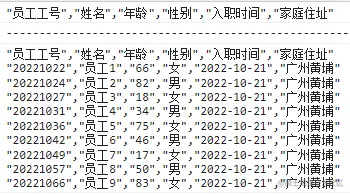
使用该方法即可实现导出csv文件,无需安装依赖包。
<template>
<div>
<h1>csv导出</h1>
<div>
<t-button @click="exportCsv">点击导出csv</t-button>
</div>
<div>
<t-table
id="10086"
:data="tableData"
:columns="tableColumns"
rowKey="colKey"
bordered
hover />
</div>
</div>
</template>
<script>
export default {
data() {
return {
tableColumns: [
{ colKey: 'personId', title: '员工工号', fixed: 'left', width: 160 },
{ colKey: 'fullName', title: '姓名', fixed: 'left', width: 80 },
{ colKey: 'age', title: '年龄', width: 80 },
{ colKey: 'gender', title: '性别', width: 80 },
{ colKey: 'entryDate', title: '入职时间', width: 80 },
{ colKey: 'address', title: '家庭住址', width: 80 },
],
tableData: []
}
},
created() {
let id = 202210211614;
for (let i = 1; i < 10; i++) {
const obj = {};
id += i;
obj.personId = id;
obj.fullName = '员工' + i;
obj.age = Math.round(Math.random() * 89 + 10);
obj.gender = i % 2 === 0 ? '男' : '女';
obj.entryDate = '2022-10-21';
obj.address = '广州黄埔';
this.tableData.push(obj);
}
},
methods: {
exportCsv() {
const colKeys = this.tableColumns.map(item => item.title);
const ret = colKeys.reduce((last, item) => `${last}"${item}",`, '').slice(0, -1);
console.log(ret);
console.log('----------------------------------------------------');
let csvStr = ret;
for (const i of this.tableData) {
csvStr += Object.values(i).reduce((last, item) => `${last}"${item}",`, "\n").slice(0, -1);
}
console.log(csvStr);
const blob = new Blob([csvStr],{
type: 'text/csv,charset=UTF-8'
});
const blobUrl = window.URL.createObjectURL(blob)
const time = new Date().getTime();
const a = document.createElement('a')
const str = '导出表格';
a.download = `${str}-${time}.csv`;
a.href = blobUrl
a.click()
}
},
}
</script>