前言
优雅的代码往往能够让人眼前一亮,原来实现xxx还能这么搞?下面的一些操作,老玩家们已经用得炉火纯青,新手们可不能落下,也得点亮一波小技能!
新增的符号
1. 使用 ** 代替数值的n方函数 Math.pow()
console.log(2 ** 3) // 8 等同于Math.pow(2, 3)
2. 使用 ?. 来避免访问属性出现错误
当左侧的对象为null或者undefined时,?. 将不再继续往下执行
let obj = {}
console.log(obj.user.id) // Cannot read properties of undefined (reading 'id')
// 为了避免报错导致程序无法继续执行,有以下解决方法
// 常规判断
console.log(obj.user&&obj.user.id)
// 使用 ?.
console.log(obj.user?.id)
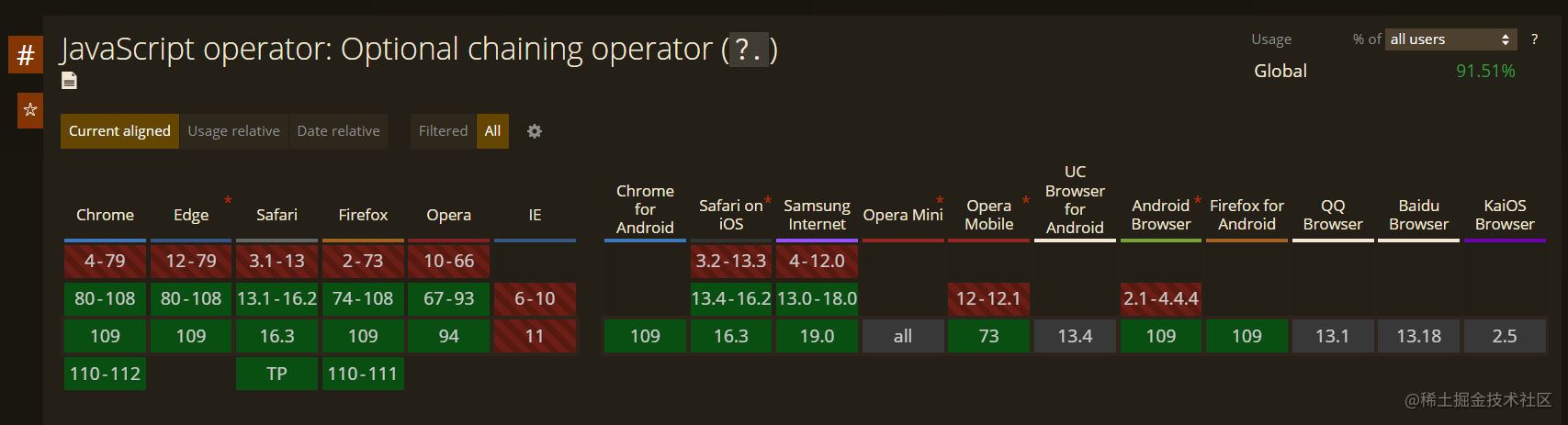
兼容性:
3. 使用 ?? 排除 null 和 undefined,相对于操作符||可以保留 0、false等值
当左侧的对象为null或者undefined时,返回右侧的值,否则返回左侧的值;
 let a1 = 0 || 1
 let a2 = 0 ?? 2
 let a3 = null ?? 3
 let a4 = undefined ?? 4
 console.log(a1,a2,a3,a4)
 // 1, 0, 3, 4
兼容性同 ?.
字符串相关
4. 模板字符串(使用反引号 ` )
反引号便于在字符串中插入变量,相对于以前使用 +号 进行拼接来得更加简洁和方便。
使用 ${} 即可在模板字符串中插入变量,也可以执行一些 js表达式
let name = '小明'
console.log(`你好,${name}`) // 你好,小明
console.log(`1 + 2 = ${1+2}`) // 1 + 2 = 3 (模板字符串中的空格/换行也会原封不动保留)
let age = 18
console.log(`小明${age>=18?'成年了':'未成年'}`) // 在模板字符串中使用三元表达式
5. 字符串includes 方法(es6新增)
与数组的 includes 方法作用类似,返回boolean值。如果只需判断字符串中是否存在另一个字符串,比 indexOf(存在返回索引,不存在返回-1) 更加直观。
let str1 = 'abcd', str2='a'
// 判断str1是否包含str2
console.log(str1.indexOf(str2) > -1) // true
console.log(str1.includes(str2)) // true
6. 使用正则表达式操作字符串
字符串中支持正则表达的方法:replace()、split()、match()、search()、replaceAll()、matchAll()。
🌰eg1: 下面的例子为利用正则表达式 切割字符串中1个及以上的空格。
'space1 space2  space3   space4'.split(/ +/)
// 结果:[space1,space2,space3,space4]
🌰eg2: 下面利用正则表达式配合字符串方法 获取URL上的参数
注: 这里由于正则表达式里面涉及到变量,因此必须要使用到正则表达式的构造函数来构造正则表达式。
function getParam(key, url) {
    let reg = new RegExp(`${key}=(.*?)(&|#|\\?|$)`)
    let value = url.match(reg)?url.match(reg)[1]:''
    return value
}
getParam('code', 'https://juejin.cn/?code=123456&id=2')
// 123456
getParam('id', 'https://juejin.cn/?code=123456&id=2')
// 2
数组
7. 使用...扩展运算符代替canact()
let arr1 = [1,2], arr2 = [3,4], arr3 = [5,6]
console.log(arr1.conact(arr2).conact(arr3)) // [1,2,3,4,5,6]
console.log([...arr1, ...arr2, ...arr3]) // [1,2,3,4,5,6]
8. 使用...扩展运算符解构数组作为入参
Math.max(...[1,2,3]) //3 等同于Math.max(1,2,3)
9. 使用...扩展运算符进行浅拷贝
let arr = [1,2,3];
let newArr = [...arr];
arr !== newArr

let obj1 = {id:1}, obj2 = {name:2}
let newObj = {...obj1, ...obj2} // {id:1, name:2}  对象合并
10. 利用 map() 从数组里的对象中提取某个字段作为数组
如果想要从对象数组中 取到某个字段来进行拼接,那么就可以使用 map() 配合 join() 来处理(通常用于页面dom元素展示多个名称)
let arr = [
            {id:1,name:'小明'},
            {id:2,name:'小红'},
            {id:3,name:'小华'}
          ]
let nameList = arr.map(item => item.name) // ['小明','小红','小华']
// 链式处理
let nameStr = arr.map(item => item.name).join(',') // '小明,小红,小华'
另外,使用 map 会分配空间返回一个新的数组,如果只是单纯循环处理数组不需要返回新数组,请使用 forEach
11. 利用 reduce() 累加数组中的某个字段
reduce 接受一个函数和一个初始值,函数中第一个参数为上一次执行的结果,利用reduce还可以进行数组合并等等
let arr = [
           {id:1,name:'小明'},
           {id:2,name:'小红'},
           {id:3,name:'小华'}
         ]
arr.reduce((a,b)=>a+b.id,0) // 6
12. 数组扁平化 flat() 传入的参数代表扁平化的层数
// 入参为扁平化的层数
[1, 2, [3, [4, [5]]]].flat(1) // [1,2,3,[4,[5]]]
[1, 2, [3, [4, [5]]]].flat(2) // [1,2,3,4,[5]]
[1, 2, [3, [4, [5]]]].flat(Infinity) // [1,2,3,4,5]
对象
13. 利用键值对映射取值,减少大量的 if...else...式代码
let key = 'key2', val
if (key === 'key1') {
    val = 'value1'
} else if(key === 'key2') {
    val = 'value2'
} else if(key === 'key3') {
    ...
}
// 键值对写法
let map = {
    key1:'value1',
    key2:'value2',
    key3:'value3'
}
val = map[key] // value2
同理,以上方法不仅仅用于字符串的赋值,也可以用于对应方法的执行
function fn1() {console.log(1)}
function fn2() {console.log(2)}
...
let key = 'key2', val
if (key === 'key1') {
   fn1()
} else if(key === 'key2') {
   fn2()
} else if(key === 'key3') {
   ...
}
let map = {
    key1:fn1,
    key2:fn2,
    key3:fn3
}
map[key]() // 2
14. 使用变量定义对象键值
如果key值是变量,对对象的属性赋值时,除了使用中括号[], 还可以直接定义在对象中。
let key = 'id'
let obj1 = {}
obj1[key] = 1 // {id:1}

let obj2 = {
    [key]:2
} // {id:2}
15. 获取对象的键数组/值数组
利用es6新增的api可以让我们很容易就拿到对象的键值集合
let obj = {id:1,name:2,age:3}
// 获取keys数组
console.log(Object.keys(obj)) // ['id', 'name', 'age']
// 获取values数组
console.log(Object.values(obj)) // [1, 2, 3]
// 获取键值数组
console.log(Object.entries(obj)) // [['id', 1], ['name', 2], ['age', 3]]
小结
对于ES6新增的一些语法还不熟悉的小伙伴们建议熟读一下阮一峰老师的 《ECMAScript 6 入门》,相信读完之后的你们能对代码编写有更好的见解与技巧。