

在某些情况下,企业需要他们的数据库适应不寻常的生产环境,以满足特定的使用情况。在这篇博客中,我们将挑战极限,测试CockroachDB是否能在新的和不寻常的地方工作和发展,例如:
你们中的大多数人可能都熟悉手机中的ARM CPU,甚至现在的苹果Mac,但是ARM CPU是一个新事物,一些云供应商现在正在提供。
IBM CPU有很多营销名称,如S/390X或z/Architecture,其血统可追溯到IBM System/360大型计算机。一直追溯到1960年代。我们将使用S/390的64位版本,即S/390X,它是当今IBM大型机上默认使用的标准CPU。
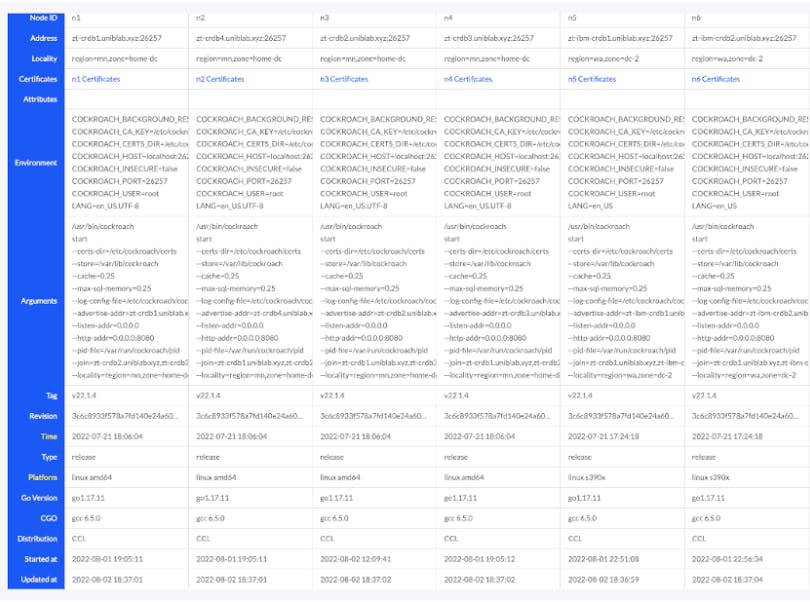
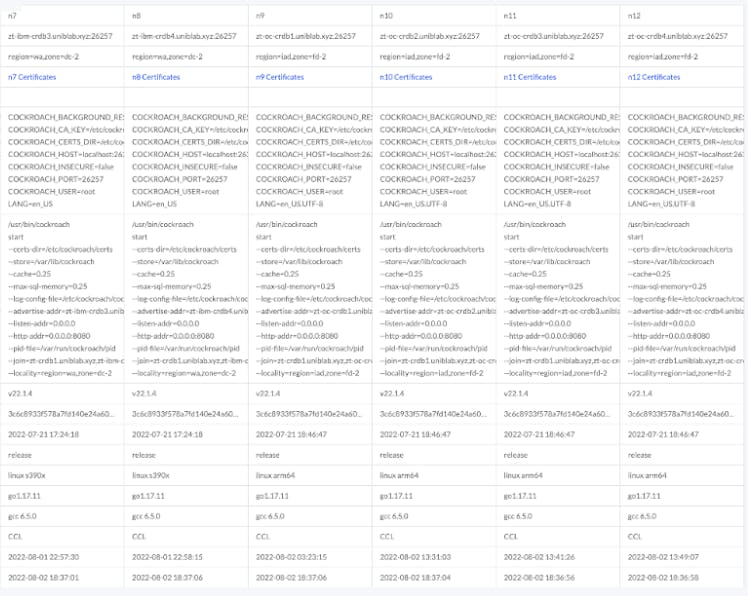
这里的计划是建立一个12个节点的CockroachDB集群,有三个区域。在每个区域,我们将使用不同的CPU架构,不同的云供应商,以及不同的Linux操作系统。我们将用一些有趣的网络胶水将它们连接在一起,使所有12台机器作为一个单一的数据库。这种设计是你可以做的一个极端案例,但不一定是你在生产部署中应该做的。对于一个典型的生产环境,我们希望有一个更均匀的集群,以避免在性能或操作上可能出现的复杂性或怪异性,但在这种情况下,我们要证明它仍然可以工作。
我们也不推崇性能,更推崇互操作性。这种配置的一个用例可能是用于数据迁移或数据管道处理。例如,我们可能在IBM主机上生成数据,但随后想开始将这些记录转移到数据处理流中。
我们需要从源头上编译CockroachDB,以获得ARM64和S/390X的二进制文件。
最简单的方法是在Github上下载CockroachDB的源代码。执行"./dev doctor "来测试我们进行构建的能力。接下来,确保我们已经安装了Docker来进行构建过程。然后执行构建。
Intel/AMD64构建
./build/builder.sh mkrelease linux-gnu

[cockroach@crdb1 ~]$ cockroach version
Build Tag:        v22.1.4
Build Time:       2022/07/21 18:06:04
Distribution:     CCL
Platform:         linux amd64 (x86_64-unknown-linux-gnu)
Go Version:       go1.17.11
C Compiler:       gcc 6.5.0
Build Commit ID:  3c6c8933f578a7fd140e24a603d6ec64c6b7a834
Build Type:       release

[cockroach@crdb1 ~]$ more /proc/cpuinfo
processor       : 0
vendor_id       : GenuineIntel
cpu family      : 15
model           : 6
model name      : Common KVM processor
stepping        : 1
microcode       : 0x1
cpu MHz         : 4007.996
cache size      : 16384 KB
physical id     : 0
siblings        : 4
core id         : 0
cpu cores       : 4
apicid          : 0
initial apicid  : 0
fpu             : yes
fpu_exception   : yes
cpuid level     : 13
wp              : yes
flags           : fpu vme de pse tsc msr pae mce cx8 apic sep mtrr pge mca cmov pat pse36 clflush mmx fxsr sse sse2 ht syscall nx lm constant_tsc nopl xtopology cpu
id tsc_known_freq pni cx16 x2apic hypervisor lahf_lm cpuid_fault pti
bugs            : cpu_meltdown spectre_v1 spectre_v2 spec_store_bypass l1tf mds swapgs itlb_multihit
bogomips        : 8015.99
clflush size    : 64
cache_alignment : 128
address sizes   : 40 bits physical, 48 bits virtual
power management:
IBM S/390X ZLinux构建
./build/builder.sh mkrelease s390x-linux-gnu

cockroach@ibm-crdb1:~$ cockroach version
Build Tag:        v22.1.4
Build Time:       2022/07/21 17:24:18
Distribution:     CCL
Platform:         linux s390x (s390x-ibm-linux-gnu)
Go Version:       go1.17.11
C Compiler:       gcc 6.5.0
Build Commit ID:  3c6c8933f578a7fd140e24a603d6ec64c6b7a834
Build Type:       release

cockroach@ibm-crdb1:~$ more /proc/cpuinfo
vendor_id       : IBM/S390
# processors    : 4
bogomips per cpu: 1167.00
max thread id   : 0
features        : esan3 zarch stfle msa ldisp eimm dfp edat etf3eh highgprs te vx vxd vxe gs vxe2 vxp sort dflt sie
facilities      : 0 1 2 3 4 6 7 8 9 10 12 13 14 15 16 17 18 19 20 21 22 23 24 25 26 27 28 30 31 32 33 34 35 36 37 38 40 41 42 43 44 45 47 48 49 50 51 52 53 54 57 58
 59 60 61 64 65 69 71 73 74 75 76 77 78 80 81 82 129 130 131 133 134 135 138 139 146 147 148 150 151 152 155 156 161
cache0          : level=1 type=Data scope=Private size=128K line_size=256 associativity=8
cache1          : level=1 type=Instruction scope=Private size=128K line_size=256 associativity=8
cache2          : level=2 type=Data scope=Private size=4096K line_size=256 associativity=8
cache3          : level=2 type=Instruction scope=Private size=4096K line_size=256 associativity=8
cache4          : level=3 type=Unified scope=Shared size=262144K line_size=256 associativity=32
cache5          : level=4 type=Unified scope=Shared size=983040K line_size=256 associativity=60
processor 0: version = FF,  identification = 04AB38,  machine = 8562
processor 1: version = FF,  identification = 04AB38,  machine = 8562
processor 2: version = FF,  identification = 04AB38,  machine = 8562
processor 3: version = FF,  identification = 04AB38,  machine = 8562
ARM64 构建
./build/builder.sh mkrelease arm64-linux-gnu

[cockroach@oc-crdb1 ~]$ cockroach version
Build Tag:        v22.1.4
Build Time:       2022/07/21 18:46:47
Distribution:     CCL
Platform:         linux arm64 (aarch64-unknown-linux-gnu)
Go Version:       go1.17.11
C Compiler:       gcc 6.5.0
Build Commit ID:  3c6c8933f578a7fd140e24a603d6ec64c6b7a834
Build Type:       release

[cockroach@oc-crdb1 ~]$ more /proc/cpuinfo
processor       : 0
BogoMIPS        : 50.00
Features        : fp asimd evtstrm aes pmull sha1 sha2 crc32 atomics fphp asimdhp cpuid asimdrdm lrcpc dcpop asimddp ssbs
CPU implementer : 0x41
CPU architecture: 8
CPU variant     : 0x3
CPU part        : 0xd0c
CPU revision    : 1
12个节点的CockroachDB集群
为了开始构建我们的集群,我们首先需要一个平台。我们将从地下室的实验室开始,最初使用英特尔节点。我们将在一个名为Proxmox的开源虚拟化平台上运行这四个实例。Proxmox为我们提供了一些很好的功能,并且为做测试提供了不错的价格。我们将在四个不同的Proxmox物理节点上建立具有四个英特尔核心和16GB分配内存的虚拟机。在每个Proxmox服务器上用1Gbps的以太网交换机和本地的固态硬盘存储连接起来,供虚拟机使用。家庭实验室的操作系统是Centos 8。
家庭实验室的位置在中西部,广域网不太慢,但上行链路不是那么快,这可能会影响地区间的性能。
对于IBM z/Architecture机器,我们将使用IBM云。IBM在IBMLinuxOne平台上托管Linux z/Architecture S390X。从IBM云控制台,我们将启动四台z/Architecture机器,每台机器都有四个CPU(在大型机世界里有时被称为引擎)和16GB的内存。对于这些机器,我们将运行Ubuntu Linux 22.04。(作为附带说明,我们不得不从Ubuntu 18.04开始,并两次升级到20.04,然后再到22.04)。
接下来,我们将在Oracle Cloud中设置四个ARM64虚拟机。同样,每个虚拟机将有四个CPU和16GB的内存。ARM64 CPU是由AmpereComputing制造的。
为了将所有这些节点粘合在一起,我们将使用Zerotier的虚拟软件定义网络。
Zerotier为我们提供了一个相当简单的设置,在所有节点之间的安全和平面网络。它看起来就像它们都在同一个局域网上。虽然节点内的通信通常在CockroachDB中被配置为加密的(就像在这个测试中一样),但我们也将通过Zerotier获得加密的传输。我们还将获得NAT穿越,这是我们的家庭实验室系统所需要的。一旦Zerotier启动并运行,所有的节点都会在一个虚拟以太网接口上看到对方。
将所有12个节点连接在一起,我们就得到了一个CockroachDB集群,在CockroachDB控制台中看起来是这样的(为了清晰起见,图片被分成两半)。
基准测试
接下来,我们在IBM云中设置了一个负载平衡器,并运行一些基准测试。为了运行测试,我们将在IBM云中启动一个X86虚拟机,只是为了针对负载平衡器运行基准测试。如果我们要测试的是性能水平,就需要对存储、网络、CPU和内存进行更多的选型和优化。在我们的案例中,我们只是测试一下所有的东西是否足够好用。
root@crdb-test:~# date; ./cockroach workload run bank --duration=10m 'postgresql://root@crdb.uniblab.xyz:26257?sslcert=certs%2F/client.root.crt&sslkey=certs%2Fclient.root.key&sslmode=verify-full&sslrootcert=certs%2Fca.crt'
Sun Aug 14 19:57:58 UTC 2022
I220814 19:57:58.574983 1 workload/cli/run.go:414  [-] 1  creating load generator...
I220814 19:57:58.591594 1 workload/cli/run.go:445  [-] 2  creating load generator... done (took 16.611008ms)
_elapsed___errors__ops/sec(inst)___ops/sec(cum)__p50(ms)__p95(ms)__p99(ms)_pMax(ms)
    1.0s        0          252.7          256.9     14.7     24.1     32.5     92.3 transfer
    2.0s        0          256.1          256.5     14.7     26.2     30.4     39.8 transfer
    3.0s        0          265.8          259.6     14.7     22.0     31.5     50.3 transfer
    4.0s        0          268.1          261.7     14.7     23.1     31.5     35.7 transfer
    5.0s        0          265.8          262.6     15.2     21.0     26.2     31.5 transfer
    6.0s        0          271.2          264.0     14.7     22.0     25.2     29.4 transfer
    7.0s        0          268.8          264.7     14.2     22.0     27.3     35.7 transfer
    8.0s        0          270.1          265.4     14.2     22.0     29.4     33.6 transfer
    9.0s        0          263.0          265.1     15.2     22.0     25.2     33.6 transfer
   10.0s        0          280.9          266.7     14.2     21.0     25.2     27.3 transfer

….

  593.0s        0          281.9          273.4     14.2     21.0     24.1     30.4 transfer
  594.0s        0          297.2          273.5     13.6     18.9     21.0     25.2 transfer
  595.0s        0          288.0          273.5     13.6     19.9     22.0     25.2 transfer
  596.0s        0          254.0          273.4     13.6     44.0     50.3     56.6 transfer
  597.0s        0          286.0          273.5     13.1     23.1     28.3     39.8 transfer
  598.0s        0          281.0          273.5     14.2     21.0     27.3     35.7 transfer
  599.0s        0          286.8          273.5     14.2     21.0     24.1     29.4 transfer
  600.0s        0          281.0          273.5     13.6     22.0     27.3     31.5 transfer

_elapsed___errors_____ops(total)___ops/sec(cum)__avg(ms)__p50(ms)__p95(ms)__p99(ms)_pMax(ms)__total
  600.0s        0         164111          273.5     14.6     14.2     21.0     29.4    218.1  transfer

_elapsed___errors___**ops(total)___ops/sec(cum)__avg(ms)__p50(ms)__p95(ms)__p99(ms)_pMax(ms)__result
  600.0s        0         164111          273.5     14.6     14.2     21.0     29.4    218.1
我们会看到较低的利用率,因为 CockroachDB中的follow-the-workload模型意味着大部分的工作负载是由IBM Cloud中的节点处理的,这是一组离负载发生器最近的节点。
而接下来,我们将对YCSB基准进行测试:
root@crdb-test:~# ./cockroach workload init ycsb 'postgresql://root@crdb.uniblab.xyz:26257?sslcert=certs%2F/client.root.crt&sslkey=certs%2Fclient.root.key&sslmode=verify-full&sslrootcert=certs%2Fca.crt'
I220814 20:13:56.670291 1 workload/workloadsql/dataload.go:146  [-] 1  imported usertable (4s, 10000 rows)
root@crdb-test:~# ./cockroach workload run ycsb --duration=1m 'postgresql://root@crdb.uniblab.xyz:26257?sslcert=certs%2F/client.root.crt&sslkey=certs%2Fclient.root.key&sslmode=verify-full&sslrootcert=certs%2Fca.crt'
I220814 20:14:17.026607 1 workload/cli/run.go:414  [-] 1  creating load generator...
I220814 20:14:17.067951 1 workload/cli/run.go:445  [-] 2  creating load generator... done (took 41.343524ms)
_elapsed___errors__ops/sec(inst)___ops/sec(cum)__p50(ms)__p95(ms)__p99(ms)_pMax(ms)
    1.0s        0          664.9          692.5      5.0      7.3     11.0     31.5 read
    1.0s        0           33.6           35.0     11.5     16.8     19.9     19.9 update
    2.0s        0          680.1          686.3      5.2      7.6      8.9     15.2 read
    2.0s        0           29.0           32.0     12.1     18.9     19.9     19.9 update
    3.0s        0          627.1          666.6      5.8      8.1     12.1     18.9 read
    3.0s        0           36.0           33.3     12.1     14.2     16.3     16.3 update
    4.0s        0          644.2          661.0      5.2      7.9     21.0     24.1 read
    4.0s        0           39.0           34.7     11.0     15.2     21.0     21.0 update
    5.0s        0          684.6          665.7      5.2      7.6     11.0     19.9 read
    5.0s        0           33.0           34.4     11.0     13.6     19.9     19.9 update
    6.0s        0          711.1          673.3      5.0      7.1      8.9     14.7 read
    6.0s        0           38.0           35.0     10.5     13.6     14.2     14.2 update
    7.0s        0          675.2          673.5      5.5      7.3      8.9     11.5 read
    7.0s        0           32.0           34.6     11.5     13.1     15.7     15.7 update
    8.0s        0          666.9          672.7      5.2      7.6     12.1     22.0 read
    8.0s        0           35.0           34.6     12.1     14.7     18.9     18.9 update
    9.0s        0          674.3          672.9      5.2      7.9     14.2     22.0 read
    9.0s        0           29.0           34.0     11.5     14.2     14.7     14.7 update
   10.0s        0          657.4          671.3      5.2      7.6     16.3     22.0 read
   10.0s        0           40.0           34.6     11.0     13.6     27.3     27.3 update

….

   57.0s        0          676.0          687.6      5.5      7.6      9.4     14.7 read
   57.0s        0           30.0           34.8     11.0     15.2     16.3     16.3 update
   58.0s        0          658.3          687.1      5.2      7.9     14.7     23.1 read
   58.0s        0           38.0           34.8     10.5     18.9     23.1     23.1 update
   59.0s        0          670.9          686.8      5.0      8.4     14.2     30.4 read
   59.0s        0           36.0           34.8     11.5     15.2     15.2     15.2 update
   60.0s        0          662.5          686.4      5.5      8.4     10.5     19.9 read
   60.0s        0           26.0           34.7     10.5     14.7     15.2     15.2 update

_elapsed__errors_____ops(total)___ops/sec(cum)__avg(ms)__p50(ms)__p95(ms)__p99(ms)_pMax(ms)__total
   60.0s        0          41183          686.4      5.3      5.2      7.6     12.1     31.5  read

_elapsed__rrors_____ops(total)___ops/sec(cum)__avg(ms)__p50(ms)__p95(ms)__p99(ms)_pMax(ms)__total
   60.0s        0           2082           34.7     11.3     11.0     15.2     21.0     29.4  update

_elapsed__errors_____ops(total)___ops/sec(cum)__avg(ms)__p50(ms)__p95(ms)__p99(ms)_pMax(ms)__result
   60.0s        0          43265          721.1      5.5      5.2     10.0     14.2     31.5
改变生存目标
现在让我们做一些有趣的事情。让我们把我们之前运行的银行数据库作为基准,并改变其生存能力目标。我们希望该数据库能在区域性故障中生存下来。
root@crdb-test:~# ./cockroach sql --host=crdb.uniblab.xyz
#
# Welcome to the CockroachDB SQL shell.
# All statements must be terminated by a semicolon.
# To exit, type: \q.
#
# Server version: CockroachDB CCL v22.1.4 (s390x-ibm-linux-gnu, built 2022/07/21 17:24:18, go1.17.11) (same version as client)
# Cluster ID: ec960c5b-807b-41c6-924a-bd481f3a6755
# Organization: jeffreyw test
No entry for terminal type "xterm-256color";
using dumb terminal settings.
#
# Enter \? for a brief introduction.
#
root@crdb.uniblab.xyz:26257/defaultdb> show databases;

| database_name | owner | primary_region | regions | survival_goal |
| ------------- | ----- | -------------- | ------- | ------------- |
| bank          | root  | NULL           | {}      | NULL          |
| defaultdb     | root  | NULL           | {}      | NULL          |
| postgres      | root  | NULL           | {}      | NULL          |
| system        | node  | NULL           | {}      | NULL          |
| ycsb          | root  | NULL           | {}      | NULL          |
(5 rows)
现在我们需要告诉CockroachDB bank的主要区域是wa区域,或者是IBM云。然后我们需要将其他两个区域加入到数据库的生存能力目标中。
root@crdb.uniblab.xyz:26257/defaultdb> alter database bank set primary region wa;
ALTER DATABASE PRIMARY REGION

Time: 1.603s total (execution 1.602s / network 0.001s)

root@crdb.uniblab.xyz:26257/defaultdb> alter database bank add region mn;
ALTER DATABASE ADD REGION

Time: 1.531s total (execution 1.530s / network 0.001s)

root@crdb.uniblab.xyz:26257/defaultdb> alter database bank add region iad;
ALTER DATABASE ADD REGION

Time: 1.583s total (execution 1.582s / network 0.001s)

root@crdb.uniblab.xyz:26257/defaultdb> show databases;
  database_name | owner | primary_region |   regions   | survival_goal
----------------+-------+----------------+-------------+----------------
  bank          | root  | wa             | {iad,mn,wa} | zone
  defaultdb     | root  | NULL           | {}          | NULL
  postgres      | root  | NULL           | {}          | NULL
  system        | node  | NULL           | {}          | NULL
  ycsb          | root  | NULL           | {}          | NULL
(5 rows)

Time: 53ms total (execution 52ms / network 1ms)
下一步是神奇的一点。在大多数其他SQL数据库中,这部分并不容易。它可能需要大量的工程和成本来实现。而在CockroachDB中,我们只用一条命令就可以做到。
root@crdb.uniblab.xyz:26257/defaultdb> alter database bank survive region failure;
ALTER DATABASE SURVIVE

Time: 1.207s total (execution 1.206s / network 0.001s)

root@crdb.uniblab.xyz:26257/defaultdb> show databases;
  database_name | owner | primary_region |   regions   | survival_goal
----------------+-------+----------------+-------------+----------------
  bank          | root  | wa             | {iad,mn,wa} | region
  defaultdb     | root  | NULL           | {}          | NULL
  postgres      | root  | NULL           | {}          | NULL
  system        | node  | NULL           | {}          | NULL
  ycsb          | root  | NULL           | {}          | NULL
(5 rows)

Time: 51ms total (execution 50ms / network 1ms)
现在,让我们重新运行我们上面运行的银行基准:
root@crdb-test:~# date; ./cockroach workload run bank --duration=10m 'postgresql://root@crdb.uniblab.xyz:26257?sslcert=certs%2F/client.root.crt&sslkey=certs%2Fclient.root.key&sslmode=verify-full&sslrootcert=certs%2Fca.crt'
Sun Aug 14 20:32:30 UTC 2022
I220814 20:32:30.567191 1 workload/cli/run.go:414  [-] 1  creating load generator...
I220814 20:32:30.581819 1 workload/cli/run.go:445  [-] 2  creating load generator... done (took 14.628169ms)
_elapsed___errors__ops/sec(inst)___ops/sec(cum)__p50(ms)__p95(ms)__p99(ms)_pMax(ms)
    1.0s        0          126.0          127.9     13.6    192.9    469.8    469.8 transfer
    2.0s        0          262.2          195.0     14.7     22.0     37.7     50.3 transfer
    3.0s        0          257.9          216.0     15.2     22.0     29.4     37.7 transfer
    4.0s        0          261.0          227.2     15.2     22.0     26.2     35.7 transfer
    5.0s        0          265.2          234.8     14.7     22.0     26.2     28.3 transfer
    6.0s        0          253.0          237.8     15.2     23.1     26.2     39.8 transfer
    7.0s        0          266.0          241.8     14.7     24.1     29.4     52.4 transfer
    8.0s        0          271.0          245.5     14.7     19.9     24.1     35.7 transfer
    9.0s        0          264.0          247.5     14.7     22.0     26.2     28.3 transfer
   10.0s        0          270.9          249.9     15.2     21.0     25.2     29.4 transfer

….

  593.0s        0          270.2          265.6     14.7     22.0     24.1     27.3 transfer
  594.0s        0          271.0          265.6     14.7     22.0     25.2     35.7 transfer
  595.0s        0          263.9          265.6     14.7     22.0     25.2     30.4 transfer
  596.0s        0          269.2          265.6     14.7     22.0     24.1     26.2 transfer
  597.0s        0          262.9          265.6     14.7     24.1     27.3     31.5 transfer
  598.0s        0          285.0          265.7     13.6     21.0     27.3     30.4 transfer
  599.0s        0          272.0          265.7     14.2     23.1     28.3     31.5 transfer
  600.0s        0          266.8          265.7     14.7     22.0     26.2     32.5 transfer

_elapsed___errors_____ops(total)___ops/sec(cum)__avg(ms)__p50(ms)__p95(ms)__p99(ms)_pMax(ms)__total
  600.0s        0         159412          265.7     15.1     14.7     22.0     29.4    469.8  transfer

_elapsed___errors_____ops(total)___ops/sec(cum)__avg(ms)__p50(ms)__p95(ms)__p99(ms)_pMax(ms)__result
  600.0s        0         159412          265.7     15.1     14.7     22.0     29.4    469.8
基准运行如预期,表明我们能够使一个高度异构的集群正常工作。我们使用三种不同口味的Linux,三种不同的处理器架构,两个不同的云供应商和一个现场实验室,所有这些都通过一个虚拟化的软件定义网络连接在一起。制作一个单一的ACID SQL数据库。
如果这对你有吸引力,或者你想看看CockroachDB如何让你的部署更简单,请联系我们,我们会安排一个演示。
