汇总整理日常开发常用分类集合
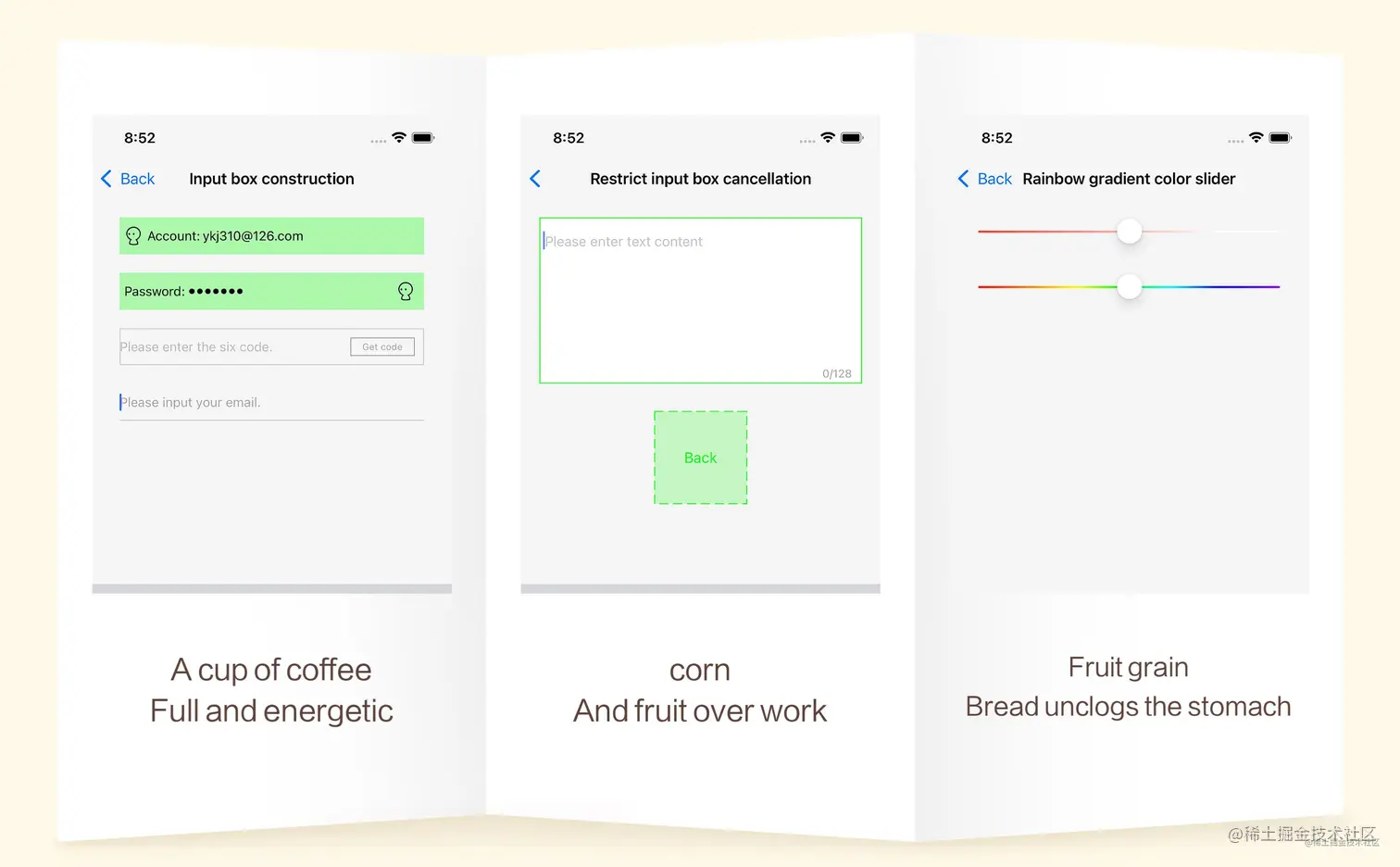
- UIButton:图文混排、事件封装、扩大点击域、时间间隔限制、倒计时、点击粒子效果等;
- UIView:手势封装、半圆角渐变、Xib属性,轻量级布局,动画效果链式封装等;
- UITextView:输入框扩展、占位符、限制字数、撤销处理、获取文本内部超链接等;
- UITextField:占位颜色,线条,图文处理,快捷设计密码框等;
- UILabel:长按复制,富文本,快捷显示文本位置等;
- UISlider:设计渐变色,点击值响应等;
- UIImage:截图和裁剪、图片压缩、蒙版处理,图片拼接、图片尺寸处理,滤镜渲染等;
- UIImage:二维码、条形码生成,动态图播放,水印处理等等;
- Runtime:列表,方法交换,动态继承等;
- Foundation:数组和字典防崩处理,数组高级算法处理,谓词相关,加密解密等等;
- OpenCV:图片处理,霍夫矫正,特征提取,形态学处理,滤镜处理,照片修复等等;
Foundation异常处理崩溃防护 FoggyDemo
目录
Customized 自定义控件
EmitterAnimation 粒子开屏动画效果
| 功能 | 类型 | 方法 & 函数 |
|---|
| 初始化方法 | Class | createWithProvider:emitterImage:complete: |
| 重置 | Instance | restart |
GradientSlider 渐变色滑杆设计
| 功能 | 类型 | 方法 & 函数 |
|---|
| 渐变色 | Property | colors |
| 渐变比例 | Property | locations |
| 颜色高度 | Property | colorHeight |
| 边框大小 | Property | borderWidth |
| 边框颜色 | Property | borderColor |
| 当前进度 | Property | progress |
| 重置UI | Instance | updateUI |
| 移动中 | Instance | movingWithTimeSpan:withBlock: |
| 滑动结束 | Instance | moveEndBlock: |
UIKit
UIView 请点我查看详情
| 功能 | 类型 | 方法 & 函数 |
|---|
| 大小 | Property | size |
| 位置 | Property | origin |
| x坐标 | Property | x |
| y坐标 | Property | y |
| 宽度 | Property | width |
| 高度 | Property | height |
| 中心点x | Property | centerX |
| 中心点y | Property | centerY |
| 左边距离 | Property | left |
| 右边距离 | Property | right |
| 顶部距离 | Property | top |
| 底部距离 | Property | bottom |
| x + width | Property | maxX |
| y + height | Property | maxY |
| 功能 | 类型 | 方法 & 函数 |
|---|
| 贝塞尔圆角 | Property | bezierRadius |
| 阴影偏移量 | Property | shadowOffset |
| 阴影透明度 | Property | shadowOpacity |
| 阴影的宽度 | Property | shadowWidth |
| 阴影的圆角 | Property | shadowRadius |
| 阴影颜色 | Property | shadowColor |
| 圆角半径 | Property | cornerRadius |
| 边框宽度 | Property | borderWidth |
| 边框颜色 | Property | borderColor |
| 图片属性 | Property | viewImage |
| 判断是否有子视图在滚动 | Property | anySubViewScrolling |
| 判断是否有子视图在滚动 | Instance | kj_anySubViewScrolling |
| 判断控件是否显示在主窗口 | Property | showKeyWindow |
| 判断控件是否显示在主窗口 | Instance | kj_isShowingOnKeyWindow |
| 顶部控制器 | Property | topViewController |
| 当前的控制器 | Property | viewController |
| 当前的控制器 | Instance | kj_currentViewController |
| Xib创建的View | Class | kj_viewFromXib |
| Xib创建的View | Class | kj_viewFromXibWithFrame: |
- UIView+KJRectCorner 进阶版圆角和边框扩展
| 功能 | 类型 | 方法 & 函数 |
|---|
| 圆角半径 | Property | kj_radius |
| 圆角方位 | Property | kj_rectCorner |
| 边框颜色 | Property | kj_borderColor |
| 边框宽度 | Property | kj_borderWidth |
| 边框方位 | Property | kj_borderOrientation |
- UIView+KJGestureBlock 手势Block
| 功能 | 类型 | 方法 & 函数 |
|---|
| 单击手势 | Instance | kj_AddTapGestureRecognizerBlock: |
| 手势处理 | Instance | kj_AddGestureRecognizer:block: |
- UIView+KJAnimation 简单动画效果链式封装
| 功能 | 类型 | 方法 & 函数 |
|---|
| 隐式动画 | Instance | kj_animationImplicitDuration:animations: |
| 移动时刻显示阴影效果 | Instance | kj_movingShadow |
| 动画组 | Instance | kj_animationMoreAnimations: |
| 旋转动画效果 | Instance | kj_animationRotateClockwise:makeParameter: |
| 移动动画效果 | Instance | kj_animationMovePoint:makeParameter: |
| 缩放动画效果 | Instance | kj_animationZoomMultiple:makeParameter: |
| 渐隐动画效果 | Instance | kj_animationOpacity:makeParameter: |
UIButton
- UIButton+KJBlock 点击事件ButtonBlock
| 功能 | 类型 | 方法 & 函数 |
|---|
| 是否开启时间间隔的方法交换 | Protocol | kj_openTimeExchangeMethod |
| 添加点击事件 | Instance | kj_addAction: |
| 添加事件,不支持多枚举形式 | Instance | kj_addAction:forControlEvents: |
| 点击事件间隔 | Property | timeInterval |
- UIButton+KJContentLayout 图文混排(支持XIB显示)
| 功能 | 类型 | 方法 & 函数 |
|---|
| 图文样式 | Property | layoutType |
| 图文间距 | Property | padding |
| 图文边界的间距 | Property | periphery |
| 图文样式 | Property | kj_ButtonContentLayoutType |
| 图文间距 | Property | kj_Padding |
| 图文边界的间距 | Property | kj_PaddingInset |
| 功能 | 类型 | 方法 & 函数 |
|---|
| 倒计时结束的回调 | Property | kButtonCountDownStop |
| 设置倒计时的间隔和倒计时文案 | Instance | kj_startTime:CountDownFormat: |
| 取消倒计时 | Instance | kj_cancelTimer |
- UIButton+KJEmitter 按钮粒子效果
| 功能 | 类型 | 方法 & 函数 |
|---|
| 是否开启粒子效果 | Property | openEmitter |
| 粒子 | Property | emitterCell |
| 设置粒子效果 | Instance | kj_buttonSetEmitterImage:OpenEmitter: |
- UIButton+KJEnlarge 改变UIButton的响应区域 - 扩大Button点击域
| 功能 | 类型 | 方法 & 函数 |
|---|
| 设置按钮额外热区 | Property | touchAreaInsets |
| 扩大点击域 | Instance | kj_EnlargeEdgeWithTop:right:bottom:left: |
- UIButton+KJIndicator 指示器(系统自带菊花)
| 功能 | 类型 | 方法 & 函数 |
|---|
| 按钮是否正在提交中 | Property | submitting |
| 指示器和文字间隔 | Property | indicatorSpace |
| 指示器颜色 | Property | indicatorType |
| 开始提交,指示器跟随文字 | Instance | kj_beginSubmitting: |
| 结束提交 | Instance | kj_endSubmitting |
| 显示指示器 | Instance | kj_showIndicator |
| 隐藏指示器 | Instance | kj_hideIndicator |
UITextView
- UITextView+KJBackout 撤销处理,相当于 command + z
| 功能 | 类型 | 方法 & 函数 |
|---|
| 是否开启撤销功能 | Property | kOpenBackout |
| 撤销输入 | Instance | kj_textViewBackout |
| 功能 | 类型 | 方法 & 函数 |
|---|
| 占位符文字 | Property | placeHolder |
| 占位符Label | Property | placeHolderLabel |
- UITextView+KJLimitCounter 限制处理
| 功能 | 类型 | 方法 & 函数 |
|---|
| 限制字数 | Property | limitCount |
| 限制区域右边距 | Property | limitMargin |
| 限制区域高度 | Property | limitHeight |
| 统计限制字数Label | Property | limitLabel |
UITextField
- UITextField+KJExtension 输入框扩展,快速设置账号密码框
| 功能 | 类型 | 方法 & 函数 |
|---|
| 设置底部边框线条颜色 | Property | bottomLineColor |
| 占位placeholder颜色 | Property | placeholderColor |
| 占位文字字体大小 | Property | placeholderFontSize |
| 最大长度 | Property | maxLength |
| 明文暗文切换 | Property | securePasswords |
| 达到最大字符长度 | Property | kMaxLengthBolck |
| 文本编辑时刻回调 | Property | kTextEditingChangedBolck |
| 设置左边视图,类似账号密码标题 | Instance | kj_leftView: |
| 设置右边视图,类似小圆叉 | Instance | kj_rightViewTapBlock:ImageName:Width:Padding: |
UITabBar
| 功能 | 类型 | 方法 & 函数 |
|---|
| 当前的TabBar个数 | Protocol | kj_tabBarCount: |
| 显示小红点 | Instance | kj_showRedBadgeOnItemIndex: |
| 隐藏小红点 | Instance | kj_hideRedBadgeOnItemIndex: |
UISlider
| 功能 | 类型 | 方法 & 函数 |
|---|
| 颜色数组 | Property | colors |
| 每个颜色对应的位置信息 | Property | locations |
| 颜色的高度 | Property | colorHeight |
| 边框宽度 | Property | borderWidth |
| 边框颜色 | Property | borderColor |
| 回调处理时间 | Property | timeSpan |
| 当前进度,用于外界kvo | Property | progress |
| 移动回调处理 | Property | kValueChangeBlock |
| 移动结束回调处理 | Property | kMoveEndBlock |
| 重新设置UI | Instance | kj_setUI |
- UISlider+KJTapValue 滑杆点击改值
| 功能 | 类型 | 方法 & 函数 |
|---|
| 是否开启滑杆点击修改值 | Property | kTapValue |
UIResponder
- UIResponder+KJAdapt 简单的屏幕比例适配
| 功能 | 类型 | 方法 & 函数 |
|---|
| 设计图机型 | Protocol | kj_adaptModelType: |
| 水平比例适配 | Function | KJAdaptScaleLevel |
| 竖直比例适配 | Function | KJAdaptScaleVertical |
| 适配CGpoint | Function | KJAdaptPointMake |
| 适配CGSize | Function | KJAdaptSizeMake |
| 适配CGRect | Function | KJAdaptRectMake |
| 适配UIEdgeInsets | Function | KJAdaptEdgeInsetsMake |
UINavigationBar
- UINavigationBar+KJExtension
| 功能 | 类型 | 方法 & 函数 |
|---|
| 设置navigationBar背景颜色 | Property | kj_BackgroundColor |
| 设置基础的透明度 | Property | kj_Alpha |
| 重置 | Instance | kj_reset |
UILabel
- UILabel+KJCopy UILabel添加长按复制功能
| 功能 | 类型 | 方法 & 函数 |
|---|
| 是否可以拷贝 | Property | copyable |
| 移除拷贝长按手势 | Instance | kj_removeCopyLongPressGestureRecognizer |
- UILabel+KJExtension 文本位置和尺寸获取
| 功能 | 类型 | 方法 & 函数 |
|---|
| 设置文字内容显示位置 | Property | customTextAlignment |
| 获取宽度 | Instance | kj_calculateWidth |
| 获取高度 | Instance | kj_calculateHeightWithWidth: |
| 获取高度,指定行高 | Instance | kj_calculateHeightWithWidth:OneLineHeight: |
- UILabel+KJAttributedString 富文本
| 功能 | 类型 | 方法 & 函数 |
|---|
| Range之间文字行间距 | Instance | kj_AttributedStringTextLineSpace: |
| Range之间文字大小 | Instance | kj_AttributedStringTextFont:Range: |
| Range之间文字颜色 | Instance | kj_AttributedStringTextColor:Range: |
| Range之间文字大小和颜色 | Instance | kj_AttributedStringTextFont:TextColor:Range: |
| Range之间文字相关属性 | Instance | kj_AttributedStringTextAttributes:Range: |
| 富文本文字大小 | Instance | kj_AttributedStringTextFont:Loc:Len: |
| 富文本文字颜色 | Instance | kj_AttributedStringTextColor:Loc:Len: |
| 富文本文字大小和颜色 | Instance | kj_AttributedStringTextFont:TextColor:Loc:Len: |
| 富文本文字相关属性 | Instance | kj_AttributedStringTextAttributes:Loc:Len: |
UIImageView
- UIImageView+KJBlur 模糊处理(高斯模糊、Accelerate模糊、毛玻璃、蒙版)
| 功能 | 类型 | 方法 & 函数 |
|---|
| 模糊处理 | Instance | kj_blurImageViewWithBlurType:BlurImage:BlurRadius: |
- UIImageView+KJLetters 文字头像,首字母缩略头像
| 功能 | 类型 | 方法 & 函数 |
|---|
| 显示文字图片 | Instance | kj_imageViewWithText:LettersInfo: |
| 浏览头像,点击全屏展示 | Instance | kj_headerImageShowScreen |
| 浏览头像,背景颜色 | Instance | kj_headerImageShowScreenWithBackground: |
UIImage
- UIImage+KJQRCode 二维码/条形码生成器,特别备注文字不能是中文汉字
| 功能 | 类型 | 方法 & 函数 |
|---|
| 将字符串转成条形码 | Class | kj_barCodeImageWithContent: |
| 生成二维码 | Class | kj_QRCodeImageWithContent:codeImageSize: |
| 生成指定颜色二维码 | Class | kj_QRCodeImageWithContent:codeImageSize:color: |
| 生成条形码 | Class | kj_barcodeImageWithContent:codeImageSize: |
| 生成指定颜色条形码 | Class | kj_barcodeImageWithContent:codeImageSize:color: |
| 改变图片尺寸,bitmap方式 | Instance | kj_bitmapChangeImageSize: |
| 改变图片内部像素颜色 | Instance | kj_changeImagePixelColor: |
- UIImage+KJURLSize 获取网络图片尺寸
| 功能 | 类型 | 方法 & 函数 |
|---|
| 获取网络图片尺寸 | Class | kj_imageGetSizeWithURL: |
| 异步等待获取网络图片大小,信号量 | Class | kj_imageAsyncGetSizeWithURL: |
| 功能 | 类型 | 方法 & 函数 |
|---|
| 通过比例来缩放图片 | Instance | kj_scaleImage: |
| 以固定宽度缩放图像 | Instance | kj_scaleWithFixedWidth: |
| 以固定高度缩放图像 | Instance | kj_scaleWithFixedHeight: |
| 等比改变图片尺寸 | Instance | kj_cropImageWithAnySize: |
| 等比缩小图片尺寸 | Instance | kj_zoomImageWithMaxSize: |
| 不拉升填充图片 | Instance | kj_fitImageWithSize: |
| 功能 | 类型 | 方法 & 函数 |
|---|
| 获取图片平均颜色 | Instance | kj_getImageAverageColor |
| 获得灰度图 | Instance | kj_getGrayImage |
| 改变图片透明度 | Instance | kj_changeImageAlpha: |
| 改变图片背景颜色 | Instance | kj_changeImageColor: |
| 修改图片线条颜色 | Instance | kj_imageLinellaeColor: |
| 图层混合 | Instance | kj_imageBlendMode:TineColor: |
| 功能 | 类型 | 方法 & 函数 |
|---|
| 文字水印 | Instance | kj_waterText:direction:textColor:font:margin: |
| 图片水印 | Instance | kj_waterImage:direction:waterSize:margin: |
| 图片添加水印 | Instance | kj_waterMark:InRect: |
| 蒙版图片处理 | Instance | kj_maskImage: |
| 圆形图片 | Instance | kj_circleImage |
| 椭圆形图片 | Instance | kj_ellipseImage |
| 图片透明区域点击穿透处理 | Instance | kj_transparentWithPoint: |
| 功能 | 类型 | 方法 & 函数 |
|---|
| 旋转图片和镜像处理 | Instance | kj_rotationImageWithOrientation: |
| 竖直方向拼接随意张图片,固定主图的宽度 | Instance | kj_moreJointVerticalImage: |
| 水平方向拼接随意张图片,固定主图的高度 | Instance | kj_moreJointLevelImage: |
| 图片多次合成处理 | Instance | kj_imageCompoundWithLoopNums:Orientation: |
| 水平方向拼接随意张图片,固定主图的高度 | Instance | kj_moreAccelerateJointLevelImage: |
| 图片拼接艺术 | Instance | kj_jointImageWithJointType:Size:Maxw: |
| 功能 | 类型 | 方法 & 函数 |
|---|
| 本地动态图播放 | Class | kj_gifLocalityImageWithName: |
| 本地动图 | Class | kj_gifImageWithData: |
| 网络动图 | Class | kj_gifImageWithURL: |
- UIImage+CoreImage CoreImage框架整理
| 功能 | 类型 | 方法 & 函数 |
|---|
| Photoshop滤镜 | Instance | kj_coreImagePhotoshopWithType:Value: |
| 通用方法 | Instance | kj_coreImageCustomWithName:Dicts: |
| 高光和阴影 | Instance | kj_coreImageHighlightShadowWithHighlightAmount:ShadowAmount: |
| 将图片黑色变透明 | Instance | kj_coreImageBlackMaskToAlpha |
| 马赛克 | Instance | kj_coreImagePixellateWithCenter:Scale: |
| 图片圆形变形 | Instance | kj_coreImageCircularWrapWithCenter:Radius:Angle: |
| 环形透镜畸变 | Instance | kj_coreImageTorusLensDistortionCenter:Radius:Width:Refraction: |
| 空变形 | Instance | kj_coreImageHoleDistortionCenter:Radius: |
- UIImage+KJCompress 图片压缩处理,提供几种系统API的处理方式
| 功能 | 类型 | 方法 & 函数 |
|---|
| 压缩图片到指定大小 | Instance | kj_compressTargetByte: |
| 压缩图片到指定大小 | Class | kj_compressImage:TargetByte: |
| UIKit方式 | Instance | kj_UIKitChangeImageSize: |
| Quartz 2D | Instance | kj_QuartzChangeImageSize: |
| ImageIO | Instance | kj_ImageIOChangeImageSize: |
| CoreImage | Instance | kj_CoreImageChangeImageSize: |
| Accelerate | Instance | kj_AccelerateChangeImageSize: |
- UIImage+KJCapture 截图和裁剪处理
| 功能 | 类型 | 方法 & 函数 |
|---|
| 当前视图截图 | Class | kj_captureScreen: |
| 指定位置屏幕截图 | Class | kj_captureScreen:Rect: |
| 自定义质量的截图,quality质量倍数 | Class | kj_captureScreen:Rect:Quality: |
| 截取当前屏幕(窗口截图) | Class | kj_captureScreenWindow |
| 截取当前屏幕(根据手机方向旋转) | Class | kj_captureScreenWindowForInterfaceOrientation |
| 截取滚动视图的长图 | Class | kj_captureScreenWithScrollView:ContentOffset: |
| 裁剪掉图片周围的透明部分 | Class | kj_cutImageRoundAlphaZero: |
| 不规则图形切图 | Class | kj_anomalyCaptureImageWithView:BezierPath: |
| 多边形切图 | Class | kj_polygonCaptureImageWithImageView:PointArray: |
| 指定区域裁剪 | Class | kj_cutImageWithImage:Frame: |
| quartz 2d 实现裁剪 | Class | kj_quartzCutImageWithImage:Frame: |
| 图片路径裁剪,裁剪路径 "以外" 部分 | Class | kj_captureOuterImage:BezierPath:Rect: |
| 图片路径裁剪,裁剪路径 "以内" 部分 | Class | kj_captureInnerImage:BezierPath:Rect: |
- UIImage+KJAccelerate Accelerate 框架的图片处理
| 功能 | 类型 | 方法 & 函数 |
|---|
| 图片旋转 | Instance | kj_rotateInRadians: |
| 模糊处理 | Instance | kj_blurImageSoft |
| 模糊处理 | Instance | kj_blurImageLight |
| 模糊处理 | Instance | kj_blurImageExtraLight |
| 模糊处理 | Instance | kj_blurImageDark |
| 指定颜色线性模糊 | Instance | kj_blurImageWithTintColor: |
| 线性模糊,保留透明区域 | Instance | kj_linearBlurryImageBlur: |
| 模糊处理 | Instance | kj_blurImageWithRadius:Color:MaskImage: |
| 均衡运算 | Instance | kj_equalizationImage |
| 侵蚀 | Instance | kj_erodeImage |
| 形态膨胀/扩张 | Instance | kj_dilateImage |
| 多倍侵蚀 | Instance | kj_erodeImageWithIterations: |
| 形态多倍膨胀/扩张 | Instance | kj_dilateImageWithIterations: |
| 梯度 | Instance | kj_gradientImageWithIterations: |
| 顶帽运算 | Instance | kj_tophatImageWithIterations: |
| 黑帽运算 | Instance | kj_blackhatImageWithIterations: |
| 卷积处理 | Instance | kj_convolutionImageWithKernel: |
| 锐化 | Instance | kj_sharpenImage |
| 锐化 | Instance | kj_sharpenImageWithIterations: |
| 浮雕 | Instance | kj_embossImage |
| 高斯 | Instance | kj_gaussianImage |
| 边缘检测 | Instance | kj_marginImage |
| 边缘检测 | Instance | kj_edgeDetection |
UIDevice
- UIDevice+KJSystem 系统相关的操作
| 功能 | 类型 | 方法 & 函数 |
|---|
| App版本号 | Class | appCurrentVersion |
| App名称 | Class | appName |
| 手机UUID | Class | deviceID |
| 获取App图标 | Class | appIcon |
| 判断App是否支持横屏 | Class | supportHorizontalScreen |
| 获取启动页图片 | Class | launchImage |
| 系统启动图缓存路径 | Class | launchImageCachePath |
| 启动图备份文件路径 | Class | launchImageBackupPath |
| 生成启动图 | Class | kj_launchImageWithPortrait:Dark: |
| 生成启动图 | Class | kj_launchImageWithStoryboard:Portrait:Dark: |
| 对比版本号 | Class | kj_comparisonVersion: |
| 获取AppStore版本号和详情信息 | Class | kj_getAppStoreVersionWithAppid:Details: |
| 跳转到指定URL | Class | kj_openURL: |
| 调用AppStore | Class | kj_skipToAppStoreWithAppid: |
| 调用自带浏览器safari | Class | kj_skipToSafari |
| 调用自带Mail | Class | kj_skipToMail |
| 是否切换为扬声器 | Class | kj_changeLoudspeaker: |
| 保存到相册 | Class | kj_savedPhotosAlbumWithImage:Complete: |
| 系统自带分享 | Class | kj_shareActivityWithItems:ViewController:Complete: |
| 切换根视图控制器 | Class | kj_changeRootViewController:Complete: |
UIColor
- UIColor+KJExtension 颜色相关扩展
| 功能 | 类型 | 方法 & 函数 |
|---|
| 渐变颜色 | Class | zj_gradientColorWithColors:GradientType:Size: |
| 竖直渐变颜色 | Instance | kj_gradientVerticalToColor:Height: |
| 横向渐变颜色 | Instance | kj_gradientAcrossToColor:Width: |
| UIColor转16进制字符串 | Class | kj_hexStringFromColor: |
| 16进制字符串转UIColor | Class | kj_colorWithHexString: |
| 获取图片上指定点的颜色 | Class | kj_colorAtImage:Point: |
| 获取ImageView上指定点的图片颜色 | Class | kj_colorAtImageView:Point: |
- UIColor+KJExtension2 颜色相关扩展
| 功能 | 类型 | 方法 & 函数 |
|---|
| 红 | Property | red |
| 绿 | Property | green |
| 蓝 | Property | blue |
| 透明度 | Property | alpha |
| 色相 | Property | hue |
| 饱和度 | Property | saturation |
| 亮度 | Property | light |
UICollectionView
- UICollectionView+KJTouch 获取touch事件处理
| 功能 | 类型 | 方法 & 函数 |
|---|
| 开启方法交换 | Property | kOpenExchange |
| Touch里面移动回调 | Property | moveblock |
Foundation
NSObject
- NSObject+KJKVO 键值监听封装,自动释放
| 功能 | 类型 | 方法 & 函数 |
|---|
| kvo监听 | Instance | kj_observeKey:ObserveResultBlock: |
- NSObject+KJRuntime Runtime轻量级封装
| 功能 | 类型 | 方法 & 函数 |
|---|
| 获取该对象的所有属性,包含父类 | Property | propertyTemps |
| 实例变量列表 | Property | ivarTemps |
| 方法列表 | Property | methodTemps |
| 遵循的协议列表 | Property | protocolTemps |
| 归档封装 | Instance | kj_encodeRuntime: |
| 解档封装 | Instance | kj_initCoderRuntime: |
- NSObject+KJSemaphore 轻量级解耦工具(信号)
| 功能 | 类型 | 方法 & 函数 |
|---|
| 发送消息处理 | Instance | kj_sendSemaphoreWithKey:Message:Parameter: |
| 接收消息处理 | Instance | kj_receivedSemaphoreBlock: |
| 代码执行时间处理 | Class | kj_executeTime: |
NSDictionary
| 功能 | 类型 | 方法 & 函数 |
|---|
| 是否为空 | Property | isEmpty |
| 转换为Josn字符串 | Property | jsonString |
NSString
- NSString+KJExtension 字符串扩展属性
| 功能 | 类型 | 方法 & 函数 |
|---|
| 是否为空 | Property | isEmpty |
| 转换为URL | Property | URL |
| 获取图片 | Property | image |
| 取出HTML | Property | HTMLString |
| Josn字符串转字典 | Property | jsonDict |
| 生成竖直文字 | Property | verticalText |
- NSString+KJChinese 汉字相关处理
| 功能 | 类型 | 方法 & 函数 |
|---|
| 汉字转拼音 | Property | pinYin |
| 随机汉字 | Class | kj_randomCreateChinese: |
| 查找数据 | Instance | kj_searchArray: |
| 字母排序 | Instance | kj_letterSortArray: |
- NSString+KJPredicate 谓词工具
| 功能 | 类型 | 方法 & 函数 |
|---|
| 过滤空格 | Instance | kj_filterSpace |
| 验证数字 | Instance | kj_validateNumber |
| 是否有特殊字符 | Instance | kj_validateHaveSpecialCharacter |
| 过滤特殊字符 | Instance | kj_removeSpecialCharacter: |
| 验证手机号码 | Instance | kj_validateMobileNumber |
| 验证邮箱格式 | Instance | kj_validateEmail |
| 验证身份证 | Instance | kj_validateIDCardNumber |
| 验证银行卡 | Instance | kj_validateBankCardNumber |
- NSString+KJSecurity 加密解密工具,链式处理
| 功能 | 类型 | 方法 & 函数 |
|---|
| 生成key | Instance | kj_createKey |
| 生成token | Instance | kj_createToken |
| RSA公钥加密 | Instance | kj_rsaEncryptPublicKey |
| RSA公钥解密 | Instance | kj_rsaDecryptPublicKey |
| RSA私钥加密 | Instance | kj_rsaEncryptPrivateKey |
| RSA私钥解密 | Instance | kj_rsaDecryptPrivateKey |
| AES加密 | Instance | kj_aesEncryptKey |
| AES解密 | Instance | kj_aesDecryptKey |
| Base64编码 | Instance | kj_base64EncodedString |
| Base64解码 | Instance | kj_base64DecodingString |
NSTimer
| 功能 | 类型 | 方法 & 函数 |
|---|
| 线程计时器 | Class | kj_timerWithTimeInterval:Repeats:Block: |
| 立刻执行 | Instance | kj_immediatelyTimer |
| 暂停 | Instance | kj_pauseTimer |
| 重启计时器 | Instance | kj_resumeTimer |
| 延时执行 | Instance | kj_resumeTimerAfterTimeInterval: |
| 释放计时器 | Class | kj_invalidateTimer: |
NSArray
| 功能 | 类型 | 方法 & 函数 |
|---|
| 对比两个数组删除相同元素并合并 | Instance | kj_mergeArrayAndDelEqualObjWithOtherArray: |
| 过滤数组 | Instance | kj_filtrationDatasWithPredicateBlock: |
| 除去数组当中包含目标数组的数据 | Instance | kj_delEqualDatasWithTargetTemps: |
| 按照某一属性的升序降序排列 | Instance | kj_sortDescriptorWithKey:Ascending: |
| 按照某些属性的升序降序排列 | Instance | kj_sortDescriptorWithKeys:Ascendings: |
| 取出 key 中匹配 value 的元素 | Instance | kj_takeOutDatasWithKey:Value: |
| 字符串比较运算符 | Instance | kj_takeOutDatasWithOperator:Key:Value: |
- NSArray+KJExtension 对数组里面元素的相关处理
| 功能 | 类型 | 方法 & 函数 |
|---|
| 是否为空 | Property | isEmpty |
| 筛选数据 | Instance | kj_detectArray: |
| 多维数组筛选数据 | Instance | kj_detectManyDimensionArray: |
| 查找数据 | Instance | kj_searchObject: |
| 映射 | Instance | kj_mapArray: |
| 插入数据到目的位置 | Instance | kj_insertObject: |
| 数组计算交集 | Instance | kj_arrayIntersectionWithOtherArray: |
| 数组计算差集 | Instance | kj_arrayMinusWithOtherArray: |
| 随机打乱数组 | Instance | kj_disorganizeArray |
| 删除数组当中的相同元素 | Instance | kj_delArrayEquelObj |
| 二分查找 | Instance | kj_binarySearchTarget: |
| 冒泡排序 | Instance | kj_bubbleSort |
| 插入排序 | Instance | kj_insertSort |
| 选择排序 | Instance | kj_selectionSort |
类型说明
Property:属性
Class & Property:类属性
Protocol:协议
Instance:实例方法
Class:类方法
Function:函数
CocoaPods Install
考虑到东西太多,很多可能不会使用到,所以我这边基本已做好分类,您需要什么就导入什么即可~
导入核心模块:
- pod 'KJCategories'

导入UIKit当中贝塞尔模块:
- pod 'KJCategories/KitExtension/UIBezierPath'

导入Foundation当中数组模块:
- pod 'KJCategories/Foundation/NSArray'

导入自定义控件模块:
- pod 'KJCategories/Customized/GradientSlider'
OpenCV模块
- 关于OpenCV模块已单独抽离出去,可选择导入**
pod 'OpencvQueen'**
- 传送链接 OpencvDemo .✌️
这个真的是手都复制粘贴痛了,老板们点个星星鼓励一下 - -
最后
功能介绍就到此完毕,后面有相关再补充,写文章不容易,还请点个小星星传送门