

1.概括
2.Yeoman的基本概念
2.1使用说明
2.2创建项目
以generator-node为例
1.确保node环境已安装
2.全局安装Yeoman  npm i -g yo
3.搭配特定Generator搭建项目,全局安装 npm i -g generator-node
4.运行 yo node 搭建项目
- 新建自定义生成器
1.测试时先执行npm link 挂载到本地
2.执行 yo shsnc (shsnc为新建的生成器项目的后缀)
拷贝一个文件时
//index.js
const Generator = require('yeoman-generator')
module.exports = class extends Generator {
    writing(){
        //this.fs yeoman封装的fs方法
        //this.destinationPath 获取到当前命令行所在的路径
        // this.fs.write(this.destinationPath('temo.txt'),
        // Math.random().toString()
        // )
        //读取模板
        const tmpl = this.templatePath('index.html')
        const output = this.destinationPath('index.html')
        const context = {
            title:'zp项目'
        }
        //拷贝tmpl文件到output下
        this.fs.copyTpl(tmpl,output,context)
    }
}
拷贝多个文件时
const Generator = require('yeoman-generator')
const fs = require('fs')
const path = require('path')
module.exports = class extends Generator {
    prompting(){
        //this.prompt为promise所以直接.then就可以拿到值
        return this.prompt([
            {
                type:'input',//输入
                name:'title',//用户输入内容的键
                message:'you project name',//提示
                default:this.appname//默认名字
            }
        ]).then(answers=>{
            this.answers = answers
            //console.log(answers)//获取输入的内容{ title: 'zpzpzp' }
        })
    }
    writing(){
        const context = {
            title:this.answers.title
        }
        const tmpls = path.join(__dirname,'templates')
        fs.readdir(tmpls,(err,files)=>{
            if(err) throw err
            files.forEach(file => {
                const tmpl = this.templatePath(file)
                const output = this.destinationPath(file)
                //拷贝tmpl文件到output下
                this.fs.copyTpl(tmpl,output,context)
            });
        })
    }
}
2.3Generator基本结构
一个Generator就对应一个类型的项目,我们可以通过自定义的Generator实现一个自己的脚手架工具
高度定制适合自己的脚手架工具
创建Generator实际上就是创建一个npm模块
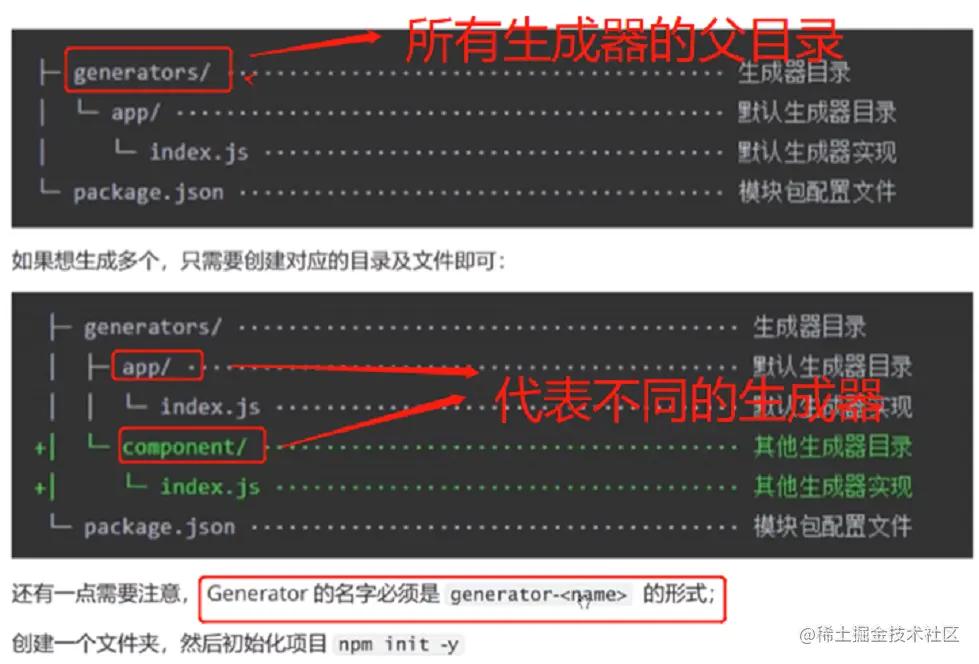
通过上述说明 项目结构固定为以下
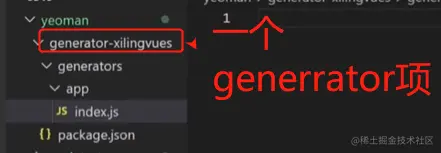
2.4原生node创建脚手架拷贝项目(不使用yeoman)
//安装
npm i ejs
npm install --save inquirer@^8.0.0
目录结构
./bin/index.js中
#!/usr/bin/env node

const fs = require('fs')
const ejs = require('ejs')
const inquirer = require('inquirer')
const path = require('path')

inquirer.prompt([
    {
        type:'input',
        name:'name',
        message:'project name'
    }
]).then(answers=>{
    //console.log(answers)
    const tmpDir = path.join(__dirname,'../templates')//模板路径
    const destDir = process.cwd()//要写入的文件路径
    //读文件
    fs.readdir(tmpDir,(err,files)=>{
        if(err) throw err
        files.forEach(file=>{
            //ejs渲染模板文件内容
            //第一个参数 path.join(tmpDir,file)拿到模板内容
            //第二个参数 answers 用户回答的内容做替换
            //第三个参数 拿到处理完模板的结果
            ejs.renderFile(path.join(tmpDir,file),answers,(err,result)=>{
                if(err) throw err
                fs.writeFileSync(path.join(destDir,file),result)//写入文件
            })
        })
    })
})
packge.json中加上
"bin": {
    "mycreatecli": "./bin/index.js"
  },

 // 在需要拷贝的目录下 执行  mycreatecli

