前言
随着vue3框架逐渐的成熟,有越来越多的前端开始手中的项目更新迭代成vue3版本。我想有不少人更新项目的一个重要的原因是因为vue3对于ts更加强力的支持。而本文则是在拥有强大ts提示的基础上,针对基于vue3开发的Element Plus组件库中table组件进行低代码、数据化的封装。代码难度不高,主要用到的prop、emit、slot三个知识点。
一、封装的table、table-column组件以及相关ts类型的定义
项目中为了方便区分相关模块以及其组件,将index.vue、table-column.vue以及interface.ts三个文件存放在同一个文件夹中
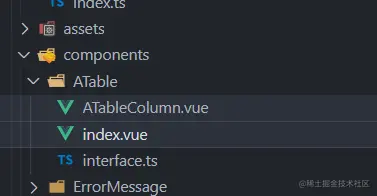
1、ATable组件的封装 - index.ts
<template>
<el-table
v-loading="config.loading"
:element-loading-text="config['element-loading-text']"
:element-loading-spinner="config['element-loading-spinner']"
:element-loading-svg="config['element-loading-svg']"
:element-loading-background="config['element-loading-background']"
ref="ElTableRef"
class="el-table"
:data="dataSource"
:height="config.height"
:max-height="`${config['max-height']}px`"
:stripe="config.stripe"
:border="config.border"
:size="config.size"
:fit="config.fit"
:show-header="config['show-header']"
:current-row-key="config['current-row-key']"
:highlight-current-row="config['highlight-current-row']"
:empty-text="config['empty-text']"
:row-key="config['row-key']"
:row-class-name="config['row-class-name']"
:cell-class-name="config['cell-class-name']"
:default-sort="config['default-sort']"
:tooltip-effect="config['tooltip-effect']"
:show-summary="config['show-summary']"
:sum-text="config['sum-text']"
:summary-method="config['summary-method']"
:span-method="config['span-method']"
:select-on-indeterminate="config['select-on-indeterminate']"
:indent="config.indent"
:lazy="config.lazy"
:load="config.load"
:tree-props="config['tree-props']"
@select="select"
@select-all="selectAll"
@selection-change="selectionChange"
@cell-mouse-enter="cellMouseEnter"
@cell-mouse-leave="cellMouseLeave"
@cell-click="cellClick"
@cell-dblclick="cellDblclick"
@cell-contextmenu="cellContextmenu"
@row-click="rowClick"
@row-contextmenu="rowContextmenu"
@row-dblclick="rowDblclick"
@header-click="headerClick"
@header-contextmenu="headerContextmenu"
@sort-change="sortChange"
@filter-change="filterChange"
@current-change="currentChange"
@header-dragend="headerDragend"
@expand-change="expandChange"
>
<template v-for="item in columns">
<a-table-column :column="item">
<template v-if="item['header-slot']" #header="scope">
<slot :name="item['header-slot']" :column="scope.column" :index="scope.index"></slot>
</template>
<template v-if="item.slot" #default="scope">
<slot :name="item.slot" :row="scope.row" :column="scope.column" :index="scope.index"></slot>
</template>
</a-table-column>
</template>
<template #append>
<slot name="append"></slot>
</template>
</el-table>
</template>
<script lang="ts" setup>
import { PropType, Ref, ref } from 'vue'
import { ElTable } from 'element-plus'
import { columnsTypes } from './interface'
import ATableColumn from './ATableColumn.vue'
defineProps({
config: {
type: Object as unknown as typeof ElTable,
default: {} as typeof ElTable
},
dataSource: {
type: Array
},
columns: {
type: Array as PropType<columnsTypes[]>,
default: () => [] as columnsTypes[]
}
})
const emit = defineEmits([
'select',
'select-all',
'selection-change',
'cell-mouse-enter',
'cell-mouse-leave',
'cell-click',
'cell-dblclick',
'cell-contextmenu',
'row-click',
'row-contextmenu',
'row-dblclick',
'header-click',
'header-contextmenu',
'sort-change',
'filter-change',
'current-change',
'header-dragend',
'expand-change'
])
const select = (selection: any, row: any) => {
emit('select', selection, row)
}
const selectAll = (selection: any) => {
emit('select-all', selection)
}
const selectionChange = (selection: any) => {
emit('selection-change', selection)
}
const cellMouseEnter = (row: any, column: any, cell: any, event: any) => {
emit('cell-mouse-enter', row, column, cell, event)
}
const cellMouseLeave = (row: any, column: any, cell: any, event: any) => {
emit('cell-mouse-leave', row, column, cell, event)
}
const cellClick = (row: any, column: any, cell: any, event: any) => {
emit('cell-click', row, column, cell, event)
}
const cellDblclick = (row: any, column: any, cell: any, event: any) => {
emit('cell-dblclick', row, column, cell, event)
}
const cellContextmenu = (row: any, column: any, cell: any, event: any) => {
emit('cell-contextmenu', row, column, cell, event)
}
const rowClick = (row: any, cell: any, event: any) => {
emit('row-click', row, cell, event)
}
const rowContextmenu = (row: any, cell: any, event: any) => {
emit('row-contextmenu', row, cell, event)
}
const rowDblclick = (row: any, cell: any, event: any) => {
emit('row-dblclick', row, cell, event)
}
const headerClick = (cell: any, event: any) => {
emit('header-click', cell, event)
}
const headerContextmenu = (cell: any, event: any) => {
emit('header-contextmenu', cell, event)
}
const sortChange = ({ column, prop, order }: any) => {
emit('sort-change', { column, prop, order })
}
const filterChange = (filters: any) => {
emit('filter-change', filters)
}
const currentChange = (currentRow: any, oldCurrentRow: any) => {
emit('current-change', currentRow, oldCurrentRow)
}
const headerDragend = (newWidth: any, oldWidth: any, column: any, event: any) => {
emit('header-dragend', newWidth, oldWidth, column, event)
}
const expandChange = (row: any, expanded: any) => {
emit('expand-change', row, expanded)
}
const ElTableRef = ref()
const clearSelection = () => {
ElTableRef.value.clearSelection()
}
const toggleRowSelection = (row: any, selected: any) => {
ElTableRef.value.toggleRowSelection(row, selected)
}
const toggleAllSelection = () => {
ElTableRef.value.toggleAllSelection()
}
const toggleRowExpansion = (row: any, expanded: any) => {
ElTableRef.value.toggleRowExpansion(row, expanded)
}
const setCurrentRow = (row: any) => {
ElTableRef.value.setCurrentRow(row)
}
const clearSort = () => {
ElTableRef.value.clearSort()
}
const clearFilter = (columnKeys: any) => {
ElTableRef.value.clearFilter(columnKeys)
}
const sort = (prop: string, order: string) => {
ElTableRef.value.sort(prop, order)
}
defineExpose({
clearSelection,
toggleRowSelection,
toggleAllSelection,
toggleRowExpansion,
setCurrentRow,
clearSort,
clearFilter,
sort
})
</script>
2、ATableColumn组件的封装 - ATableColumn.ts
<template>
<el-table-column
:type="column.type"
:index="column.index"
:label="column.label"
:column-key="column['column-key']"
:prop="column.prop"
:width="column.width"
:min-width="column['min-width']"
:fixed="column.fixed"
:render-header="column['render-header']"
:sortable="column.sortable"
:sort-method="column['sort-method']"
:sort-by="column['sort-by']"
:sort-orders="column['sort-orders']"
:resizable="column.resizable"
:formatter="column.formatter"
:show-overflow-tooltip="column['show-overflow-tooltip']"
:align="column.align"
:header-align="column['header-align']"
:class-name="column['class-name']"
:label-class-name="column['label-class-name']"
:selectable="column.selectable"
:reserve-selection="column['reserve-selection']"
:filters="column.filters"
:filter-placement="column['filter-placement']"
:filter-multiple="column['filter-multiple']"
:filter-method="column['filter-method']"
:filtered-value="column['filtered-value']"
>
<template v-if="column['header-slot']" #header="scope">
<slot name="header" :row="scope.row"></slot>
</template>
<template v-if="column.slot" #default="scope">
<slot name="default" :row="scope.row"></slot>
</template>
</el-table-column>
</template>
<script lang="ts" setup>
import { PropType } from 'vue'
import { columnsTypes } from '@/interface/ATable'
defineProps({
column: {
type: Object as PropType<columnsTypes>,
default: () => {},
},
})
</script>
3、ATable、ATableColumn类型 - interface.ts
import { TableColumnCtx } from 'element-plus/es/components/table/src/table-column/defaults'
import { RendererElement, RendererNode, VNode } from 'vue'
export interface configTypes {
loading?: boolean
'element-loading-text'?: string
'element-loading-spinner'?: string
'element-loading-svg'?: string
'element-loading-background'?: string
append?: string
height?: string | number
'max-height'?: string | number
stripe?: boolean
border?: boolean
size?: 'large' | 'default' | 'small'
fit?: boolean
'show-header'?: boolean
'current-row-key'?: string | number
'highlight-current-row'?: boolean
'row-class-name'?: string | ((row: any) => string)
'cell-class-name'?: string | ((row: any) => string)
'header-row-class-name'?: string | ((row: any) => string)
'header-cell-class-name'?: string | ((row: any) => string)
'row-key'?: string | ((row: any) => string)
'empty-text'?: string
'default-expand-all'?: boolean
'default-sort'?: {
prop: string
order?: 'ascending' | 'descending'
}
'tooltip-effect'?: 'dark' | 'light'
'show-summary'?: boolean
'sum-text'?: string
'summary-method'?: (row: any) => {}
'span-method'?: (row: any) => {}
'select-on-indeterminate'?: boolean
indent?: number
lazy?: boolean
load?: (row: any, treeNode: any, resolve: any) => {}
'tree-props'?: { hasChildren: string; children: string }
}
export interface columnsTypes {
slot?: string
'header-slot'?: string
type?: 'index' | 'selection' | 'expand'
index?: number | ((index: number) => number)
label?: string
'column-key'?: string
prop?: string
width?: string | number
'min-width'?: string | number
fixed?: 'left' | 'right'
'render-header'?: (data: {
column: TableColumnCtx<any>
$index: number
}) => VNode<RendererNode, RendererElement, { [key: string]: any }>
sortable?: true | false | 'custom'
'sort-method'?: (a: any, b: any) => number
'sort-by'?: ((row: any, index: any) => string) | string | string[]
'sort-orders'?: any[]
resizable?: boolean
formatter?: (row: any, column: any, cellValue: any, index: any) => any
'show-overflow-tooltip'?: boolean
align?: 'left' | 'center' | 'right'
'header-align'?: 'left' | 'center' | 'right'
'class-name'?: string
'label-class-name'?: string
selectable?: (row: any, index: any) => boolean
'reserve-selection'?: boolean
filters?: any[]
'filter-placement'?:
| 'top'
| 'top-start'
| 'top-end'
| 'bottom'
| 'bottom-start'
| 'bottom-end'
| 'left'
| 'left-start'
| 'left-end'
| 'right'
| 'right-start'
| 'right-end'
'filter-multiple'?: boolean
'filter-method'?: (value: any, row: any, column: any) => boolean
'filtered-value'?: any[]
}
二、ATable、ATableColumn组件的使用
<template>
<div class="table_box card">
<el-button class="table_btn" @click="setCurrent()">Clear selection</el-button>
<a-table
class="table_cont"
ref="singleTableRef"
@current-change="handleCurrentChange"
:config="config"
:columns="columns"
:dataSource="luckList"
>
<template #sex="scope">
{{ scope.row.sex == 0 ? '男' : '女' }}
</template>
<template #operation="scope">
<el-button @click="setCurrent(luckList[1])">Select second row</el-button>
</template>
</a-table>
</div>
</template>
<script setup lang="ts">
import { reactive, ref } from 'vue'
import ATable from '@/components/ATable/index.vue'
import { columnsTypes, configTypes } from '@/components/ATable/interface'
const columns: columnsTypes[] = [
{
prop: 'name',
label: '用户',
align: 'center',
width: 100
},
{
slot: 'sex',
label: '性别',
align: 'center'
},
{
slot: 'operation',
label: '操作',
align: 'center',
width: 350
}
]
const config = reactive<configTypes>({
stripe: true,
border: true,
fit: true,
'highlight-current-row': true,
size: 'large',
loading: false
})
const luckList = ref([
{
id: 1,
name: '老李',
sex: 0
},
{
id: 2,
name: '老王',
sex: 1
}
])
const currentRow = ref()
const singleTableRef = ref()
const setCurrent = (row?) => {
singleTableRef.value!.setCurrentRow(row)
}
const handleCurrentChange = (val) => {
currentRow.value = val
}
</script>
<style scoped lang="scss">
.table_box {
display: flex;
flex-direction: column;
margin-top: 10px;
overflow-y: auto;
.table_btn {
margin-bottom: 20px;
width: 200px;
}
.table_cont {
flex: 1;
}
}
.card {
padding: 15px;
background-color: #ffffff;
border-radius: 5px;
box-shadow: 3px 3px 3px #e1e0e0;
}
</style>
三、相关属性、方法的使用以及相关说明
Config Attributes
| 属性 | 说明 | 类型 | 可选值 | 默认值 |
|---|
| height | Table 的高度, 默认为自动高度。 如果 height 为 number 类型,单位 px;如果 height 为 string 类型,则这个高度会设置为 Table 的 style.height 的值,Table 的高度会受控于外部样式。 | string / number | — | — |
| max-height | Table 的最大高度。 合法的值为数字或者单位为 px 的高度。 | string / number | — | — |
| stripe | 是否为斑马纹 table | boolean | — | false |
| border | 是否带有纵向边框 | boolean | — | false |
| size | Table 的尺寸 | string | large / default /small | — |
| fit | 列的宽度是否自撑开 | boolean | — | true |
| show-header | 是否显示表头 | boolean | — | true |
| highlight-current-row | 是否要高亮当前行 | boolean | — | false |
| current-row-key | 当前行的 key,只写属性 | string / number | — | — |
| row-class-name | 行的 className的回调方法,也可以使用字符串为所有行设置一个固定的 className。 | function({ row, rowIndex}) / string | — | — |
| cell-class-name | 单元格的 className的回调方法,也可以使用字符串为所有单元格设置一个固定的 className。 | function({ row, column, rowIndex, columnIndex}) / string | — | — |
| header-row-class-name | 表头行的 className的回调方法,也可以使用字符串为所有表头行设置一个固定的 className。 | function({ row, rowIndex }) / string | — | — |
| header-cell-class-name | 表头单元格的 className 的回调方法,也可以使用字符串为所有表头单元格设置一个固定的 className。 | function({ row, column, rowIndex, columnIndex }) / string | — | — |
| row-key | 行数据的 Key,用来优化 Table 的渲染; 在使用reserve-selection功能与显示树形数据时,该属性是必填的。 类型为 String 时,支持多层访问:user.info.id,但不支持 user.info[0].id,此种情况请使用 Function。 | function(row) / string | — | — |
| empty-text | 空数据时显示的文本内容, 也可以通过 #empty 设置 | string | — | No Data |
| default-expand-all | 是否默认展开所有行,当 Table 包含展开行存在或者为树形表格时有效 | boolean | — | false |
| expand-row-keys | 可以通过该属性设置 Table 目前的展开行,需要设置 row-key 属性才能使用,该属性为展开行的 keys 数组。 | array | — | — |
| default-sort | 默认的排序列的 prop 和顺序。 它的 prop 属性指定默认的排序的列,order 指定默认排序的顺序 | object | order: ascending / descending | 如果只指定了 prop, 没有指定 order, 则默认顺序是 ascending |
| tooltip-effect | tooltip effect 属性 | string | dark / light | dark |
| show-summary | 是否在表尾显示合计行 | boolean | — | false |
| sum-text | 合计行第一列的文本 | string | — | 合计 |
| summary-method | 自定义的合计计算方法 | function({ columns, data }) | — | — |
| span-method | 合并行或列的计算方法 | function({ row, column, rowIndex, columnIndex }) | — | — |
| select-on-indeterminate | 在多选表格中,当仅有部分行被选中时,点击表头的多选框时的行为。 若为 true,则选中所有行;若为 false,则取消选择所有行 | boolean | — | true |
| indent | 展示树形数据时,树节点的缩进 | number | — | 16 |
| lazy | 是否懒加载子节点数据 | boolean | — | — |
| load | 加载子节点数据的函数,lazy 为 true 时生效,函数第二个参数包含了节点的层级信息 | function(row, treeNode, resolve) | — | — |
| tree-props | 渲染嵌套数据的配置选项 | object | — | { hasChildren: 'hasChildren', children: 'children' } |
| table-layout | 设置用于布局表格单元格、行和列的算法 | string | fixed / auto | fixed |
Table-slot
| 插槽名 | 说明 |
|---|
| append | 插入至表格最后一行之后的内容的插槽名称, 如果需要对表格的内容进行无限滚动操作,可能需要用到这个 slot。 若表格有合计行,该 slot 会位于合计行之上。无需声明可以直接使用。 |
Table Events
| 事件名 | 说明 | 回调参数 |
|---|
| select | 当用户手动勾选数据行的 Checkbox 时触发的事件 | selection, row |
| select-all | 当用户手动勾选全选 Checkbox 时触发的事件 | selection |
| selection-change | 当选择项发生变化时会触发该事件 | selection |
| cell-mouse-enter | 当单元格 hover 进入时会触发该事件 | row, column, cell, event |
| cell-mouse-leave | 当单元格 hover 退出时会触发该事件 | row, column, cell, event |
| cell-click | 当某个单元格被点击时会触发该事件 | row, column, cell, event |
| cell-dblclick | 当某个单元格被双击击时会触发该事件 | row, column, cell, event |
| cell-contextmenu | 当某个单元格被鼠标右键点击时会触发该事件 | row, column, cell, event |
| row-click | 当某一行被点击时会触发该事件 | row, column, event |
| row-contextmenu | 当某一行被鼠标右键点击时会触发该事件 | row, column, event |
| row-dblclick | 当某一行被双击时会触发该事件 | row, column, event |
| header-click | 当某一列的表头被点击时会触发该事件 | column, event |
| header-contextmenu | 当某一列的表头被鼠标右键点击时触发该事件 | column, event |
| sort-change | 当表格的排序条件发生变化的时候会触发该事件 | { column, prop, order } |
| filter-change | column 的 key, 如果需要使用 filter-change 事件,则需要此属性标识是哪个 column 的筛选条件 | filters |
| current-change | 当表格的当前行发生变化的时候会触发该事件,如果要高亮当前行,请打开表格的 highlight-current-row 属性 | currentRow, oldCurrentRow |
| header-dragend | 当拖动表头改变了列的宽度的时候会触发该事件 | newWidth, oldWidth, column, event |
| expand-change | 当用户对某一行展开或者关闭的时候会触发该事件(展开行时,回调的第二个参数为 expandedRows;树形表格时第二参数为 expanded) | row, (expandedRows | expanded) |
Table Methods
| 方法名 | 说明 | 参数 |
|---|
| clearSelection | 用于多选表格,清空用户的选择 | — |
| toggleRowSelection | 用于多选表格,切换某一行的选中状态, 如果使用了第二个参数,则是设置这一行选中与否(selected 为 true 则选中) | row, selected |
| toggleAllSelection | 用于多选表格,切换全选和全不选 | — |
| toggleRowExpansion | 用于可扩展的表格或树表格,如果某行被扩展,则切换。 使用第二个参数,您可以直接设置该行应该被扩展或折叠。 | row, expanded |
| setCurrentRow | 用于单选表格,设定某一行为选中行, 如果调用时不加参数,则会取消目前高亮行的选中状态。 | row |
| clearSort | 用于清空排序条件,数据会恢复成未排序的状态 | — |
| clearFilter | 传入由columnKey 组成的数组以清除指定列的过滤条件。 不传入参数时用于清空所有过滤条件,数据会恢复成未过滤的状态 | columnKeys |
| doLayout | 对 Table 进行重新布局。 当 Table 或其祖先元素由隐藏切换为显示时,可能需要调用此方法 | — |
| sort | 手动对 Table 进行排序。 参数 prop 属性指定排序列,order 指定排序顺序。 | prop: string, order: string |
column Attributes
| 属性 | 说明 | 类型 | 可选值 | 默认值 |
|---|
| type | 对应列的类型。 如果设置了selection则显示多选框; 如果设置了index 则显示该行的索引(从 1 开始计算); 如果设置了expand 则显示为一个可展开的按钮 | string | selection / index / expand | — |
| index | 如果设置了 type=index,可以通过传递 index 属性来自定义索引 | number / function(index) | — | — |
| label | 列的表头名 | string | — | — |
| column-key | column 的 key, column 的 key, 如果需要使用 filter-change 事件,则需要此属性标识是哪个 column 的筛选条件 | string | — | — |
| prop | 字段名称 对应列内容的字段名 | string | — | — |
| width | 对应列的宽度 | string / number | — | — |
| min-width | 对应列的最小宽度, 对应列的最小宽度, 与 width 的区别是 width 是固定的,min-width 会把剩余宽度按比例分配给设置了 min-width 的列 | string / number | — | — |
| fixed | 列是否固定在左侧或者右侧 | string | 'left' / 'right' | — |
| render-header | 列标题 Label 区域渲染使用的 Function | function({ column, $index }) | — | — |
| sortable | 对应列是否可以排序, 如果设置为 'custom',则代表用户希望远程排序,需要监听 Table 的 sort-change 事件 | boolean / string | true / false / 'custom' | false |
| sort-method | 指定数据按照哪个属性进行排序,仅当sortable设置为true且没有设置sort-method的时候有效。 如果 sort-by 为数组,则先按照第 1 个属性排序,如果第 1 个相等,再按照第 2 个排序,以此类推 | function(a, b) | — | — |
| sort-by | 指定数据按照哪个属性进行排序,仅当 sortable 设置为 true 且没有设置 sort-method 的时候有效。 如果 sort-by 为数组,则先按照第 1 个属性排序,如果第 1 个相等,再按照第 2 个排序,以此类推 | function(row, index) / string / array | — | — |
| sort-orders | 数据在排序时所使用排序策略的轮转顺序,仅当 sortable 为 true 时有效。 需传入一个数组,随着用户点击表头,该列依次按照数组中元素的顺序进行排序 | array | 数组中的元素需为以下三者之一:ascending 表示升序,descending 表示降序,null 表示还原为原始顺序 | ['ascending', 'descending', null] |
resizable | 对应列是否可以通过拖动改变宽度(需要在 el-table 上设置 border 属性为真) | boolean | — | false |
| formatter | 用来格式化内容 | function(row, column, cellValue, index) | — | — |
showOverflowTooltip | 当内容过长被隐藏时显示 tooltip | boolean | — | false |
| align | 对齐方式 | string | left / center / right | left |
| header-align | 表头对齐方式, 若不设置该项,则使用表格的对齐方式 | string | left / center / right | — |
| class-name | 列的 className | string | — | — |
| label-class-name | 当前列标题的自定义类名 | string | — | — |
| selectable | 仅对 type=selection 的列有效,类型为 Function,Function 的返回值用来决定这一行的 CheckBox 是否可以勾选 | function(row, index) | — | — |
| reserve-selection | 仅对 type=selection 的列有效, 请注意, 需指定 row-key 来让这个功能生效。是否保留上一个分页选中的数据。 | boolean | — | false |
| filters | 数据过滤的选项, 数组格式,数组中的元素需要有 text 和 value 属性。 数组中的每个元素都需要有 text 和 value 属性。 | array[{ text, value }] | — | — |
| filter-placement | 过滤弹出框的定位 | string | top/top-start/top-end/bottom/bottom-start/bottom-end/left/left-start/left-end/right/right-start/right-end | bottom |
| filter-multiple | 数据过滤的选项是否多选 | boolean | — | true |
| filter-method | 数据过滤使用的方法, 如果是多选的筛选项,对每一条数据会执行多次,任意一次返回 true 就会显示。 | function(value, row, column) | — | — |
| filtered-value | 选中的数据过滤项,如果需要自定义表头过滤的渲染方式,可能会需要此属性。 | array | — | — |
Table-column-slot
| 属性 | 说明 |
|---|
| slot | 自定义内容的插槽名,需要先在column里声明插槽名{ row, column, index } |
| header-slot | 自定义头部的插槽名,需要先在column里声明头部插槽名{ column, index } |