安装插件(注意版本)官方文档
"monaco-editor": "^0.28.1",
"monaco-editor-webpack-plugin": "^4.2.0",
对应的版本
monaco-editor-webpack-plugin | monaco-editor |
|---|
7.*.* | >= 0.31.0 |
6.*.* | 0.30.* |
5.*.* | 0.29.* |
4.*.* | 0.25.*, 0.26.*, 0.27.*, 0.28.* |
3.*.* | 0.22.*, 0.23.*, 0.24.* |
2.*.* | 0.21.* |
1.9.* | 0.20.* |
1.8.* | 0.19.* |
1.7.* | 0.18.* |
配置vue.coinfig.js
const MonacoWebpackPlugin = require('monaco-editor-webpack-plugin');
chainWebpack: (config) => {
    config.plugin('monaco').use(new MonacoWebpackPlugin());
  },
简单使用
- id使用动态是因为要动态创建多个对象
- 别使用ref获取dom数组,根据索引确定具体dom,删除时很麻烦.
- 简单实现
<template>
<div ref="container" :id="'container_' + value.index" style="height: 100%; min-height: 560px"></div>
</template>
<script>
import * as monaco from 'monaco-editor';
export default {
name: 'opendir',
data() {
return {
modals: false,
editor: '',
editorIndex: [
{
tab: true,
index: '0',
title: '',
icon: '',
},
],
editorList: [],
indexEditor: 0,
};
},
mounted() {
this.initEditor();
},
computed: {},
methods: {
initEditor() {
let that = this;
that.$nextTick(() => {
that.editor = monaco.editor.create(document.getElementById('container_' + that.indexEditor), {
value: that.code,
language: 'sql',
automaticLayout: true,
theme: 'vs',
foldingStrategy: 'indentation',
overviewRulerBorder: false,
scrollbar: {
verticalScrollbarSize: 4,
horizontalScrollbarSize: 10,
},
autoIndent: true,
tabSize: 4,
autoClosingOvertype: 'always',
});
that.editor.addCommand(monaco.KeyMod.CtrlCmd | monaco.KeyCode.KEY_S, function () {
});
that.editor.onKeyUp(() => {
if (that.editor.getValue() != that.code) {
}
});
that.editorList.push({
editor: that.editor,
oldCode: that.code,
path: '',
isSave: true,
index: that.indexEditor,
});
});
},
changeModel(mode, value) {
var oldModel = this.editorList[this.indexEditor].editor.getModel();
if (!mode) mode = oldModel.getLanguageId();
var newModel = monaco.editor.createModel(value, mode);
if (oldModel) {
oldModel.dispose();
}
this.editorList[this.indexEditor].editor.setModel(newModel);
},
},
};
</script>
支持的语言类型
['plaintext', 'json', 'abap', 'apex', 'azcli', 'bat', 'cameligo', 'clojure', 'coffeescript', 'c', 'cpp', 'csharp', 'csp', 'css', 'dart', 'dockerfile', 'fsharp', 'go', 'graphql', 'handlebars', 'hcl', 'html', 'ini', 'java', 'javascript', 'julia', 'kotlin', 'less', 'lexon', 'lua', 'markdown', 'mips', 'msdax', 'mysql', 'objective-c', 'pascal', 'pascaligo', 'perl', 'pgsql', 'php', 'postiats', 'powerquery', 'powershell', 'pug', 'python', 'r', 'razor', 'redis', 'redshift', 'restructuredtext', 'ruby', 'rust', 'sb', 'scala', 'scheme', 'scss', 'shell', 'sol', 'aes', 'sql', 'st', 'swift', 'systemverilog', 'verilog', 'tcl', 'twig', 'typescript', 'vb', 'xml', 'yaml']
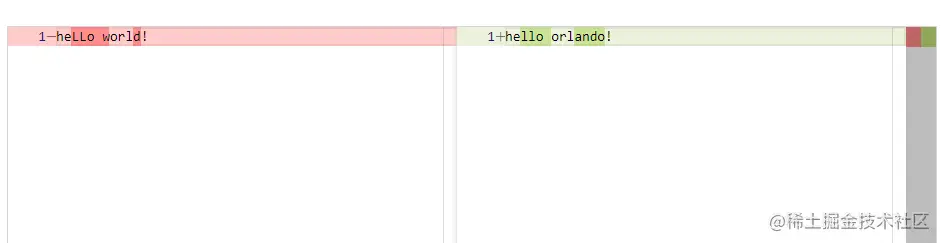
创建差异编辑器
- 简单实现
//html
<div id="container" style="height: 100%"></div>
//js
var originalModel = monaco.editor.createModel('heLLo world!', 'text/plain')
var modifiedModel = monaco.editor.createModel('hello orlando!', 'text/plain')
var diffEditor = monaco.editor.createDiffEditor(document.getElementById('container'))
diffEditor.setModel({
original: originalModel,
modified: modifiedModel
})
- 效果