将plop自动生成代码封装成依赖
- 创建空文件夹
- 添加package.json
- 根据业务需求创建模板生成规则
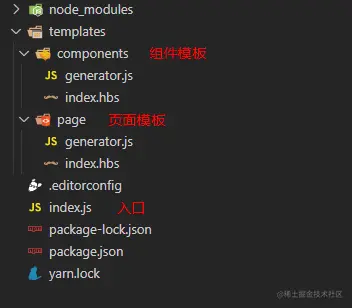
package.json
{
  "name": "plop-plugin-name",
  "version": "1.0.1",
  "description": "",
  "main": "index.js",
  "scripts": {
    "test": "plop --plopfile ./index.js"
  },
  "keywords": [],
  "files": [
    "templates",
    "index.js"
  ],
  "author": "",
  "license": "ISC",
  "devDependencies": {
    "plop": "^2.7.4"
  }
}
规则生成 generator.js
const page = (config) => ({
  description: '生成页面',
  prompts: [
    {
      type: 'input',
      name: 'name',
      message: '请输入文件名称',
      validate: (value) => (!value || !value.trim() ? `请输入${name}` : true),
    },
  ],
  actions: [
    {
      type: 'add',
      path: `${config.basePath}/views/{{name}}.vue`,
      templateFile: 'templates/page/index.hbs',
      data: {
        title: "标题"
      }
    },
  ],
});

module.exports = {
  install: (plop, config) => {
    plop.setGenerator('page', page(config));
  },
};
对应模板内容 index.hbs
<template>
  <header class="page-content" title="{{title}}">
    <div class="page-box">
      <container>
        {{!-- TODO: XXX --}}
      </container>
    </div>
  </header>
</template>

<script>
export default {
};
</script>
入口文件 index.js
const PageGenerator = require('./templates/page/generator');
const ComponentsGenerator = require('./templates/components/generator');
module.exports = (plop, config) => {
const newConfig = {
basePath: 'src',
...config,
};
PageGenerator.install(plop, newConfig);
ComponentsGenerator.install(plop, newConfig);
};
项目中使用
- 在项目最外层添加plopfile.js
- 引入依赖 plop、plop-plugin-name
- 执行 yarn plop
module.exports = (plop) => {
  plop.load('plop-plugin-name', { basePath: 'src' });
};


这是对plop封装成依赖项的方法,也可以使用原始方法,可参考文档
Plop.js