第一步、引入包
dotnet add package Serilog.AspNetCore
第二步、修改Program.cs
using Serilog;
using Serilog.Events;
using Serilog.Formatting.Compact;
Log.Logger = new LoggerConfiguration()
.MinimumLevel.Debug()
.MinimumLevel.Override("Microsoft", LogEventLevel.Warning)
.MinimumLevel.Override("Microsoft.AspNetCore", LogEventLevel.Warning)
.Enrich.FromLogContext()
.WriteTo.Console()
.WriteTo.File(new RenderedCompactJsonFormatter(),"log-.json", rollingInterval: RollingInterval.Day)
.CreateLogger();
Log.Information("日志");
var builder = WebApplication.CreateBuilder(args);
builder.Host.UseSerilog();
builder.Services.AddControllers();
builder.Services.AddEndpointsApiExplorer();
builder.Services.AddSwaggerGen();
var app = builder.Build();
if (app.Environment.IsDevelopment())
{
app.UseSwagger();
app.UseSwaggerUI();
}
app.UseSerilogRequestLogging();
app.UseAuthorization();
app.MapControllers();
app.Run();
第三步、控制器中使用
using Microsoft.AspNetCore.Mvc;

namespace testerilog11.Controllers
{
    [ApiController]
    [Route("[controller]")]
    public class WeatherForecastController : ControllerBase
    {
        private readonly ILogger<WeatherForecastController> _logger;

        public WeatherForecastController(ILogger<WeatherForecastController> logger)
        {
            _logger = logger;
        }

        [HttpGet(Name = "GetWeatherForecast")]
        public void Get()
        {
            _logger.LogInformation("日志信息");
        }
    }
}
Json输出格式为

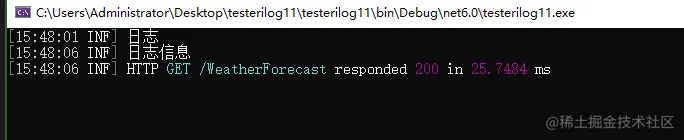
Console输出格式为