- 将dist添加到.gitignore
- 终端运行
yarn build
- 测试该网站是否能用,运行
hs dist -c-1,前提你要安装了http server, 安装npm i -g http-server
- 部署之前请确保你当前的路径是否正确
- cd dist
- git init
- git add .
- 在github上创建新仓库,确保
SSH
- git commit一系列操作
- gitbuh pages选择
一键部署在根目录下创建deploy.sh文件
rm -rf dist &&
yarn build &&
cd dist &&
git init &&
git add . &&
git commit -m "update" &&
git branch -M demo-1 &&
git remote add origin 仓库地址 &&
git push -f -u origin demo-1 &&
cd ..
echo https://niuniu315.github.io/wave-ui-website/index.html
- 运行脚本
sh delpoy.sh
- 注意需要创建
vite.config.ts文件,删除_xxx格式
export default {
base: './',
assetsDir: 'assets'
};
Vue Cli部署
yarn build
之后会出现dist目录

build之后终端会出现教你部署的教程

yarn global add serve  安装这个

serve -s dist  提供本地端口预览项目

手动推送至github pages
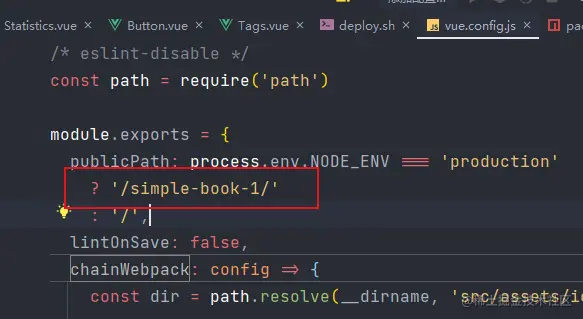
需要在vue.config.js中设置path
sh deploy.sh