calloc 和 realloc
calloc 和malloc 都是在堆区分配内存
与malloc不同的是,calloc会将空间初始化为0

calloc(个数,大小) calloc(10,sizeof(int))
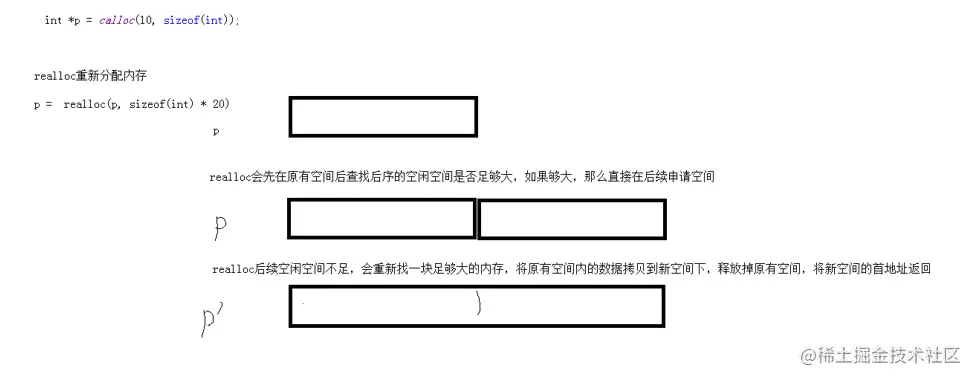
realloc 重新分配内存
如果重新分配的内存比原来大,那么不会初始化新空间为0

先看后续空间,如果足够,那么直接扩展

如果后续空闲空间不足,那么申请足够大的空间,将原有数据拷贝到新空间下,释放掉原有空间,将新空间的首地址返回

如果重新分配的内存比原来小,那么释放后序空间,只有权限操作申请空间
示例
void test01()
{
int* p = calloc(10, sizeof(int));
for (size_t i = 0; i < 10; i++)
{
printf("%d\n", p[i]);
}
if(p!=NULL)
{
free(p);
p = NULL;
}
}
void test02()
{
int* p = malloc(sizeof(int) * 10);
for (size_t i = 0; i < 10; i++)
{
p[i] = i + 100;
}
for (size_t i = 0; i < 10; i++)
{
printf("%d\n", p[i]);
}
printf("%d\n", p);
p=realloc(p, sizeof(int) * 11);
printf("%d\n", p);
for (size_t i = 0; i < 11; i++)
{
printf("%d\n", p[i]);
}
}
int main(void)
{
test02();
system("pause");
return EXIT_SUCCESS;
}
sscanf的使用
| 指令 | 功能 |
|---|
| %*s或%*d | 跳过数据 |
| %[width]s | 读指定宽度的数据 |
| %[a-z] | 匹配a到z中任意字符(尽可能多的匹配) |
| %[aBc] | 匹配a、B、c中一员,贪婪性 |
| %[^a] | 匹配非a的任意字符,贪婪性 |
| %[^a-z] | 表示读取除a-z以外的所有字符 |
将 ip 分别截取到 num1 到 num4中
将 123456#zhangtao@abcde 中截取中间的zhangtao有效数据
示例
//1. %*s huo %*d跳过数据
void test01()
{
char* str = "12345abced"
char buf[1024] = { 0 }
sscanf(str, "%*d%s", buf)
printf("%s", buf)
}
void test02()
{
char* str = "abced12345"
char buf[1024] = { 0 }
//sscanf(str, "%*s%s\n", buf)
sscanf(str, "%*[a-z]%s", buf)
printf("%s", buf)
}
//%[width]s读指定宽度的数据
void test03()
{
char* str = "12345abcde"
char buf[1024] = { 0 }
sscanf(str, "%6s", buf)
printf("%s\n", buf)
}
//%[a-z] 匹配a到z中的任意字符(贪婪性:尽可能多的匹配)
void test04()
{
char* str = "123abcedaaa12345"
char buf[1024] = { 0 }
sscanf(str, "%[a-c]%s", buf)
printf("%s", buf)
}
void test05()
{
char* str = "123abcedaaa12345"
char buf[1024] = { 0 }
sscanf(str, "%[0-9]%s", buf)
printf("%s", buf)
}
//%[a-z] | 匹配a到z中任意字符(贪婪性:尽可能多的匹配)
void test06()
{
char* str = "aBcedaaa12345"
char buf[1024] = { 0 }
sscanf(str, "%[aBC]%s", buf)
printf("%s", buf)
}
//%[^a] | 匹配非a任意字符(贪婪性,尽可能多的匹配)
void test07()
{
char* str = "aBcedaaa12345"
char buf[1024] = { 0 }
sscanf(str, "%[^B]%s", buf)
printf("%s", buf)
}
//%[^a-z] |表示读取除a-z以外的所有字符
void test08()
{
char* str = "123aBcedaaa12345"
char buf[1024] = { 0 }
sscanf(str, "%[^a-z]%s", buf)
printf("%s", buf)
}
//练习1
void test09()
{
char* ip = "127.0.0.1"
int num1 = 0
int num2 = 0
int num3 = 0
int num4 = 0
sscanf(ip, "%d.%d.%d.%d", &num1, &num2, &num3, &num4)
printf("%d.%d.%d.%d\n", num1, num2, num3, num4)
}
//练习2
void test10()
{
char* str = "abce#yolic@12345"
char buf[1024] = { 0 }
sscanf(str, "%*[^#]
printf("%s\n", buf)
}
int main(void)
{
test10()
system("pause")
return EXIT_SUCCESS
}
请实现helloworld和itcast.cn的输出
void test11()
{
char* str = "helloworld@itcast.cn"
char buf1[1024] = { 0 }
char buf2[1024] = { 0 }
sscanf(str, "%[a-z]%*[@]%s", buf1, buf2)
printf("%s\n", buf1)
printf("%s\n", buf2)
}
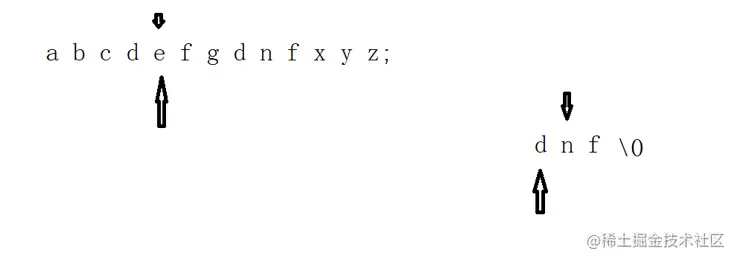
查找子串
实现mystrstr 自己查找子串功能
示例
int myStrstr(char* str, char* substr)
{
int num = 0;
while (*str != '\0')
{
if (*str != *substr)
{
num++;
str++;
continue;
}
char* tmpStr = str;
char* tmpSubstr = substr;
while (*tmpSubstr != '\0')
{
if (*tmpStr != *tmpSubstr)
{
num++;
str++;
break;
}
tmpStr++;
tmpSubstr++;
}
if (*tmpSubstr == '\0')
{
return num;
}
}
return -1;
}
void test01()
{
char* str = "abcedefgchdnfafed";
int ret = myStrstr(str, "dnf");
if (ret != -1)
{
printf("find substr 位置是%d\n", ret);
}
else
{
printf("未找到子串");
}
}
int main(void)
{
test01();
system("pause");
return EXIT_SUCCESS;
}
指针的易错点
越界
buf[3] ="abc";//没有地方存放'\0'了
指针叠加会不断改变指针指向
示例
void test01()
{
char* p = malloc(sizeof(char) * 64);
char* pp = p;
for (size_t i = 0; i < 10; i++)
{
*pp = i + 97;
printf("%c\n", *pp);
pp++;
}
if (p != NULL)
{
free(p);
}
}
int main(void)
{
test01();
system("pause");
return EXIT_SUCCESS;
}
返回局部变量地址
同一块内存释放多次(不可以释放野指针)
const使用场景
const使用 修饰形参 防止误操作
struct Person
{
char name[64];
int age;
int Id;
double score;
};
void showPerson(const struct Person *p)
{
printf("姓名:%s 年龄:%d 学号:%d 分数:%.f\n ", p->name, p->age, p->Id, p->score);
}
void test01()
{
struct Person p = {"Tom",18,1,50};
showPerson(&p);
}
int main(void)
{
test01();
system("pause");
return EXIT_SUCCESS;
}
二级指针做函数参数的输入输出特性
二级指针做函数参数的输入特性
创建在堆区
创建在栈区
示例
void printArray(int** pArray, int len)
{
for (size_t i = 0
{
printf("%d\n", *pArray[i])
}
}
//函数的输入特性,主调函数分配好内存,被调函数去使用
//创建在堆区
void test01()
{
int **pArray=malloc(sizeof(int*) * 5)
//在栈上创建5个数据
int a1 = 10
int a2 = 20
int a3 = 30
int a4 = 40
int a5 = 50
pArray[0] = &a1
pArray[1] = &a2
pArray[2] = &a3
pArray[3] = &a4
pArray[4] = &a5
//打印数组;
printArray(pArray, 5)
//释放堆区数据
if (pArray != NULL)
{
free(pArray)
pArray = NULL
}
}
//二级指针做函数参数的输入特性,创建在栈上
void freeSpace(int** pArray, int len)
{
for (size_t i = 0
{
free(pArray[i])
pArray[i] = NULL
}
}
void test02()
{
//创建在栈区
int* pArray[5]
for (size_t i = 0
{
pArray[i] = malloc(4)
*(pArray[i]) = 10 + i
}
printArray(pArray, 5)
//释放堆区
freeSpace(pArray, 5)
}
int main(void)
{
test02()
system("pause")
return EXIT_SUCCESS
}
二级指针做函数参数的输出特性
被调函数分配内存,主调函数使用
void allocateSpace(int** p)
{
int* temp = malloc(sizeof(int) * 10);
for (int i = 0; i < 10; i++)
{
temp[i] = 100 + i;
}
*p = temp;
}
void printArray(int** p, int len)
{
for (size_t i = 0; i < len; i++)
{
printf("%d\n", ( * p)[i]);
}
}
void freeSpace(int* pArray)
{
if (pArray != NULL)
{
free(pArray);
pArray = NULL;
}
}
void test01()
{
int* p = NULL;
allocateSpace(&p);
printArray(&p, 5);
freeSpace(p);
if (p == NULL)
{
printf("p是空指针");
}
else
{
printf("p是野指针");
}
}
int main(void)
{
test01();
system("pause");
return EXIT_SUCCESS;
}
二级指针练习-文件操作
读取配置文件信息 ,并且将信息存放到 数组中
注意: 释放堆区,关闭文件
示例
void fWrite()
{
FILE* fp = fopen("test.txt", "w");
if (!fp)
{
perror("fopen error");
return;
}
fputs("aaaaaaa\n", fp);
fputs("bbbb\n", fp);
fputs("cccccc\n", fp);
fputs("ddddd\n", fp);
fputs("eeeee\n", fp);
fclose(fp);
}
int getFileLines(FILE *pFile)
{
if (!pFile)
{
return-1;
}
char buf[1024] = {0};
int lines = 0;
while (fgets(buf, 1024,pFile)!=NULL)
{
lines++;
}
fseek(pFile, 0, SEEK_SET);
return lines;
}
void readFileData(FILE* pFile, int len, char** pArray)
{
if (pFile == NULL)
{
return;
}
if (len <=0)
{
return;
}
if (pArray == NULL)
{
return;
}
char buf[1024] = { 0 };
int index = 0;
while (fgets(buf, 1024, pFile) != NULL)
{
int currentLen = strlen(buf) + 1;
char* currentStrP = malloc(sizeof(char) * currentLen);
strcpy(currentStrP, buf);
pArray[index++] = currentStrP;
memset(buf, 0, 1024);
}
}
void showFileData(char** pArray, int len)
{
for (int i = 0; i < len; i++)
{
printf("%d行的数据为%s", i + 1, pArray[i]);
}
}
void test01()
{
FILE* pFile = fopen("test.txt", "r");
if (!pFile)
{
printf("文件打开失败\n");
return;
}
int len = getFileLines(pFile);
printf("文件有效行数:%d\n", len);
char ** pArray=malloc(sizeof(char*) * len);
readFileData(pFile, len, pArray);
showFileData(pArray, len);
free(pArray);
pArray = NULL;
fclose(pFile);
}
int main(void)
{
fWrite();
test01();
return EXIT_SUCCESS;
}
位运算
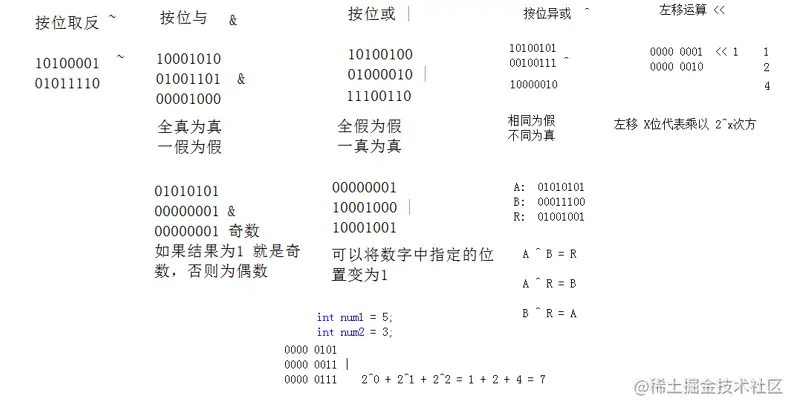
按位取反 ~ 0变1 1 变0
按位与 & 全1为1 一0为0
按位或 | 全0为0 一1为1
按位异或 ^ 相同为0 不同为1
实现两数交换的方法
三杯水法
按位异或
//按位异或 通过位运算实现两个数交换
void test04()
{
int num1 = 5
int num2 = 9
num1 = num1 ^ num2
num2 = num1 ^ num2
num1 = num1 ^ num2
printf("%d,%d\n",num1, num2)
}
加减法
//按位异或 通过位运算实现两个数交换
void test04()
{
int num1 = 5
int num2 = 9
num1 = num1 +num2
num2 = num1 - num2
num1 = num1 -num2
printf("%d,%d\n",num1, num2)
}
位移运算
左移运算 << X 乘以2 ^ X
右移运算 >> X 除以 2 ^X
有些机器用0填充高位

有些机器用1填充高位

如果是无符号,都是用0填充
示例
void test01()
{
int num = 2;
printf("~num:%d\n", ~num);
}
void test02()
{
int num = 123;
if ((num & 1) == 1)
{
printf("num为奇数\n");
}
else
{
printf("num为偶数");
}
}
void test03()
{
int num1 = 5;
int num2 = 3;
printf("num1 | num2 =%d\n", num1 | num2);
}
void test04()
{
int num1 = 5;
int num2 = 9;
num1 = num1 +num2;
num2 = num1 - num2;
num1 = num1 -num2;
printf("%d,%d\n",num1, num2);
}
void test05()
{
int num = 20;
printf("%d\n", num <<= 2);
}
void test06()
{
int num = 20;
printf("%d\n", num >>= 2);
}
int main(void)
{
test01();
test02();
test03();
test04();
test05();
test06();
system("pause");
return EXIT_SUCCESS;
}