v-show-tip
- 参数
width number类型
- 使用指令时传入当前元素展示省略号时的最大宽度
v-show-tip="{ width: 139 }"
- 如果当前元素设置了宽度或者最大宽度 可不传 直接使用
v-show-tip
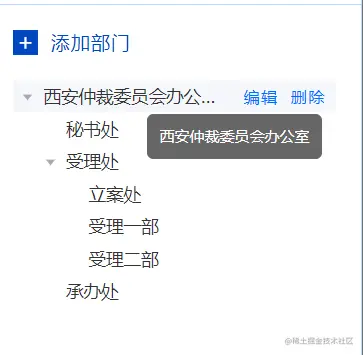
- 效果图
showtip.ts
import type { Directive, DirectiveBinding } from "vue";
const showTip: Directive = {
mounted(el: any, binding: DirectiveBinding) {
let _width = binding.value.width || el.offsetWidth;
el.style.width = _width + "px";
const curStyle = window.getComputedStyle(el, "");
const textSpan = document.createElement("span");
textSpan.innerText = el.innerText;
textSpan.style.fontSize = curStyle.fontSize;
textSpan.style.fontWeight = curStyle.fontWeight;
textSpan.style.fontFamily = curStyle.fontFamily;
document.body.appendChild(textSpan);
console.log(textSpan.offsetWidth, binding.value, el.offsetWidth);
if (textSpan.offsetWidth > _width) {
el.style.overflow = "hidden";
el.style.textOverflow = "ellipsis";
el.style.whiteSpace = "nowrap";
el.onmouseenter = function (e: any) {
const vcTooltipDom = document.createElement("div");
vcTooltipDom.style.cssText = `
max-width:400px;
max-height: 400px;
overflow: auto;
position:absolute;
top:${e.clientY + 5}px;
left:${e.clientX}px;
background: rgba(0, 0 , 0, .6);
color:#fff;
border-radius:5px;
padding:10px;
display:inline-block;
font-size:12px;
z-index:19999
`;
vcTooltipDom.setAttribute("id", "vc-tooltip");
document.body.appendChild(vcTooltipDom);
(document.getElementById("vc-tooltip") as any).innerHTML = el.innerText;
};
el.onmouseleave = function () {
const vcTooltipDom = document.getElementById("vc-tooltip");
vcTooltipDom && document.body.removeChild(vcTooltipDom);
};
}
document.body.removeChild(textSpan);
},
unmounted() {
const vcTooltipDom = document.getElementById("vc-tooltip");
vcTooltipDom && document.body.removeChild(vcTooltipDom);
},
};
export default showTip;