1、命令行
swiftc -o main.out main.swift    : -o(可执行文件)
swiftc main.swift -dump-ast      : AST(抽象语法树)
swiftc main.swift -emit-sil      : SIL(中间语言)
swiftc main.swift -emit-ir       : IR(中间表示层语言)
swiftc main.swift -emit-assembly : Assembly Language(汇编语言)
2、数据类型
2.1、数值类型
- Int8 : 1字节、-128 到 127
- UInt8 : 1字节、0 到 255
- Int32 、UInt32 : 4字节
- Int64 、UInt64 : 8字节
- Int : 根据平台类型字节数不同
- Float : 4字节,浮点数6位
- Double : 8字节,浮点数15位
2.2、Bool类型
- Swift必须使用 Bool 类型做判断(不同于OC可以使用非0表示true)
2.3、类型别名
typealias: 为已存在的类型定义一个可选择的名字,可以使类型更具有表达意义typealias AudioSample = UInt8 let sample:AudioSample = 32
2.4、Tuple类型(元组)
- 元组
把多个值合并成单一复合型的值 - 元组内的 值可以是任何类型,而且可以不必是同一类型
//未命名元组: 通过角标获取内容
let error = (1, "没有权限")
print(error.0)
print(error.1)
//命名元组: 可通过命名获取内容
let error = (errorCode: 1, errorMessage: "没有权限")
print(error.errorCode)
print(error.errorMessage)
//元组修改(指定类型)
var error:(errorCode: Int, errorMessage: Any) = (1, "没有权限")
error.errorCode = 2
print(error)
//元组分解(不想要的可以用下划线 _ 忽略)
let error = (errorCode: 1, errorMessage: "没有权限")
let (_, errorMessage) = error
//print(errorCode)  //因为errorCode在分解时被忽略了,因此不能单独访问到
print(errorMessage)
//元组作为返回值
func writeFile(content: String) -> (errorCode: Int, errorMessage: String) {
    return (1, content)
}
let error = writeFile(content: "没有权限")
print(error)
2.5、Optional
- 表示这里有一个值是x,或者这里根本没有值
- OC中nil是指向不存在对象的指针;Swift中nil不是指针,而是 值缺失的一种特殊类型
2.5.1、展开方式
-
判断展开
- 通过判断是否为空后再执行
let str: String? = "123" if str != nil { let count = str!.count print(count) } -
绑定展开
- 如果包含值则赋给一个临时变量或常量
- 同一 if 语句中包含
多可选项绑定用逗号分隔,并且需要 都不为nil或者false
let str: String? = "123" //如果不为nil则赋值给临时变量 if let actualStr = str { let count = actualStr.count print(count) } -
隐式展开
- 有些可选项被赋值后就一直有值,此时可以去掉检查
- 通常用在初始化过程中,声明类型时对解包赋值
let str: String! = "123" let count = str.count -
强制展开
- 使用 ! 号强制解包
let str: String? = "123" let count = str!.count -
可选链
- 返回可选类型的值,在真正需要具体值的时候再判断
let str: String? = "123"
//得到的count也为可选类型,在后续使用到count的地方需要判断展开或者绑定展开
let count = str?.count
2.5.2、unsafelyUnwrapped 泛型属性
- 理论上Optional的展开都是通过 unsafelyUnwrapped 来获取实际的值的
let str: Optional<String> = "123"
let count = str.unsafelyUnwrapped.count
3、字符串
- 值类型:String值在传递给方法、函数的时候会被
复制过去,赋值给常量或者变量时也一样
3.1、特殊字符
-
转义字符转义字符 作用 \0 空字符 \\ 反斜杠 \t 水平制表符 \n 水平制表符 \r 回车符 \' 或 \" 单引号、双引号 -
Unicode标量- 写作
\u{n},n是一个1-8位的16进制数字,其值是合法 Unicode 值
- 写作
3.2、Raw String(扩展字符串分隔符)
在字符串字面量中放置扩展分隔符来使字符串中包含特殊字符(能够输出转义字符)
- 字符串放在双引号(")内,并由井号(#)包裹(多个 # 也可以):#"字符串"#、###"字符串"###
- 如果需要字符串中某个特殊字符生效,使用匹配包裹 # 数量的 # 号,并在前边写转移符号(\;夹在转义):#"字符串 \#n 字符串"#
- 如果字符串里有
"#,则需要两个 # 包裹:##"字符串 "# 字符串"##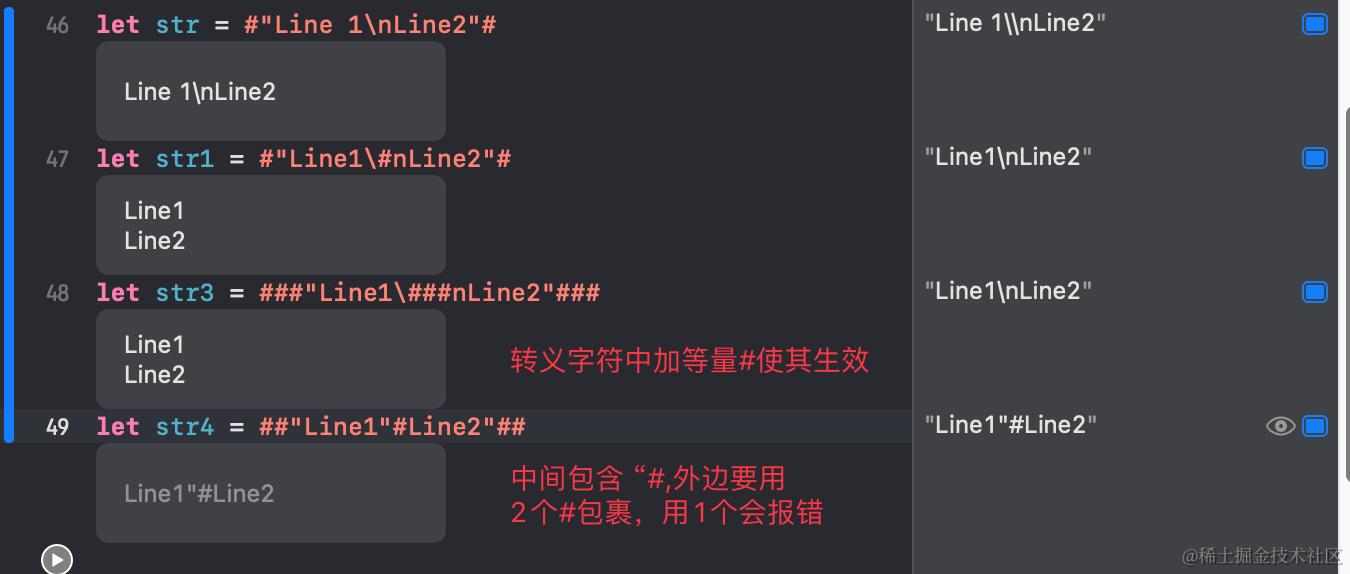
3.3、字符串操作
- append():String末尾追加字符
- for char in String {}:遍历String中的字符
- 子字符串:得到 SubString类型(使用
String[subStr]转换为String类型)var Str = "Hello, playground" let index = Str.firstIndex(of: ",") ?? Str.endIndex let subStr = Str[..<index] print(subStr) // 打印结果 Hello\n
3.4、字符串插值
- 从混合常量、变量、字面量和表达式的字符串字面量构造新的字符串
- "
\(变量)其余字符串" - 类似于 stringWithFormat 方法
let num = 5
let message = "3 的 \(num) 倍是 \(Double(num) * 3)"
print(message)
3.5、字符串索引与增删
- 与OC不同,
不能通过下标直接访问字符(Str[2],这种是不行的) index(before:)、index(after:)、index(_:offsetBy:):获取索引let index = Str.index(Str.startIndex,offsetBy: 8)insert(_:at:)、insert(contentsOf:at:):插入// 插入字符 Str.insert("!", at:Str.endIndex) //插入字符串 Str.insert(contentsOf: "there", at: Str.index(before: Str.endIndex))remove(at:)、removeSubrange(_:):删除var Str = "hello world!!!" // 删除单个字符 Str.remove(at: Str.index(Str.startIndex, offsetBy: 4)) print(Str) // 删除一段字符 let range = Str.index(Str.endIndex, offsetBy: -3)...Str.endIndex Str.removeSubrange(range) print(Str)
3.6、字符串比较
==与!=hasPrefix(_:):前缀相等性hasSuffix(_:):后缀相等性
4、运算符
4.1、溢出运算
&+、&-、&*:超出容量的会溢出去掉,容器进入新的轮回
4.2、合并空值运算符
(a ?? b):若a有值则展开,若a是nil则返回b- 官方要求 a必须是可选值,b须要与a储存类型相同,但实际使用只有警告,并不会报错

4.3、区间运算符
a...b:闭区间a..<b:半开区间- ...b、..<b:单侧区间,区间某方向尽可能的远
.reversed():倒序for i in (5..<10).reversed() { print(i) }
判断区间中是否包含某项
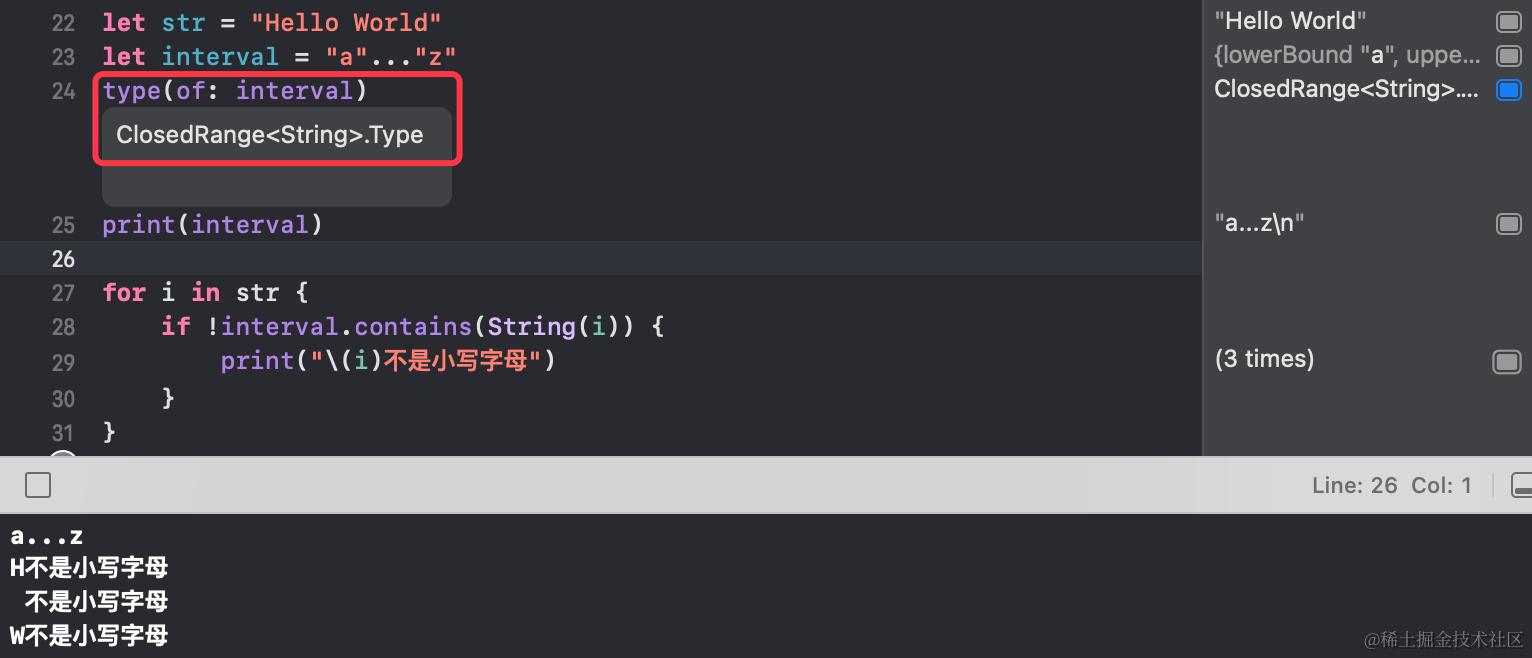
- 以
区间作为类型
4.4、位运算
4.4.1、不使用新变量交换两数
var a = 5
var b = 10

a = a ^ b
b = a ^ b
a = a ^ b
print("a = \(a)\nb = \(b)")

// 打印结果
a = 10
b = 5
4.4.2、输出二进制中包含多少个1
func countOfOne(num: Int) -> Int {
    var count: Int = 0
    var temp = num

    while temp != 0 {
        count += 1
        // 减1运算会改变最右边的1右侧所有内容
        temp = temp & (temp - 1)
    }
    return count
}
print(countOfOne(num: 0x11010001010110))

// 打印结果
7
- 以10100为例,
减1运算会改变最右边的1右侧所有内容,得到(10 | 011), - 再与原数值做 与运算,可以一口气消掉这个 1 右边的所有内容:(10 | 100) & (10 | 011)=(10 | 000)
4.5、自定义运算符
4.5.1、为类与结构体自定义运算符
// 定义一个向量
struct Vector2D {
    var x = 0.0
    var y = 0.0
}

extension Vector2D {
    static func + (left: Vector2D, right:Vector2D) -> Vector2D {
        return Vector2D(x: left.x + right.x, y: left.y + right.y)
    }
}

extension Vector2D {
    static prefix func - (vector: Vector2D) -> Vector2D {
        return Vector2D(x: -vector.x, y: -vector.y)
    }
}

extension Vector2D {
    // 因为对传入的参数进行修改,因此使用 inout 修饰
    static func += (left: inout Vector2D, right: Vector2D) {
        left = left + right
    }
}

var vector1 = Vector2D(x: 3.0, y: 1.0)
var vector2 = Vector2D(x: 5.0, y: 3.5)
let newVector1 = vector1 + vector2
let newVector2 = -vector1
vector2 += vector1

print(newVector1,newVector2,vector2)

// 打印结果
Vector2D(x: 8.0, y: 4.5) Vector2D(x: -3.0, y: -1.0) Vector2D(x: 8.0, y: 4.5)
4.5.2、自定义运算符
参阅 Swift的Enum&Optional&运算符重载 即可
5、流程控制
5.1、for in
- 不使用集合中内容时可用 下划线_ 代替
for _ in 1...5 {
    print("hello")
}
5.1.1、遍历字典
// 字典中内容类型不统一,使用显式指定类型Any
let dic = ["name":"LZ", "age":18, "sex":"男"] as [String : Any]
// key、value拆解到元组中
for (dicKey, dicValue) in dic {
    print("key is \(dicKey), value is \(dicValue)")
}

// 不使用元组,使用 .0、.1 来访问字典的第0个与第1个属性
for t in dic {
    print("key is \(t.0), value is \(t.1)")
    print("key is \(t.key), value is \(t.value)")
}
- 使用 元组 遍历字典
- 使用 .0、.1 获取字典中元素的第0、第1个属性
- 使用 .key、.value 获取字典中元素的 key 与 value
5.1.2、分段区间
stride(from: , to: , by: ):分段开区间stride(from: , through: , by: ):分段闭区间let minuteInterval = 5 // 分段开区间 for tickMark in stride(from: 0, to: 50, by: minuteInterval) { print(tickMark) } // 分段闭区间 for tickMark in stride(from: 0, through: 50, by: minuteInterval) { print(tickMark) }
5.2、while
- Swift 中用
repeat while替换 OC 中的 do whilevar count = 0 repeat { print(count) count += 1 } while count < 5
5.3、Switch
- 无隐式贯穿:与OC不同,匹配到case直接跳出,不需要添加break,如果要保留这种隐式贯穿,需要关键字
fallthrough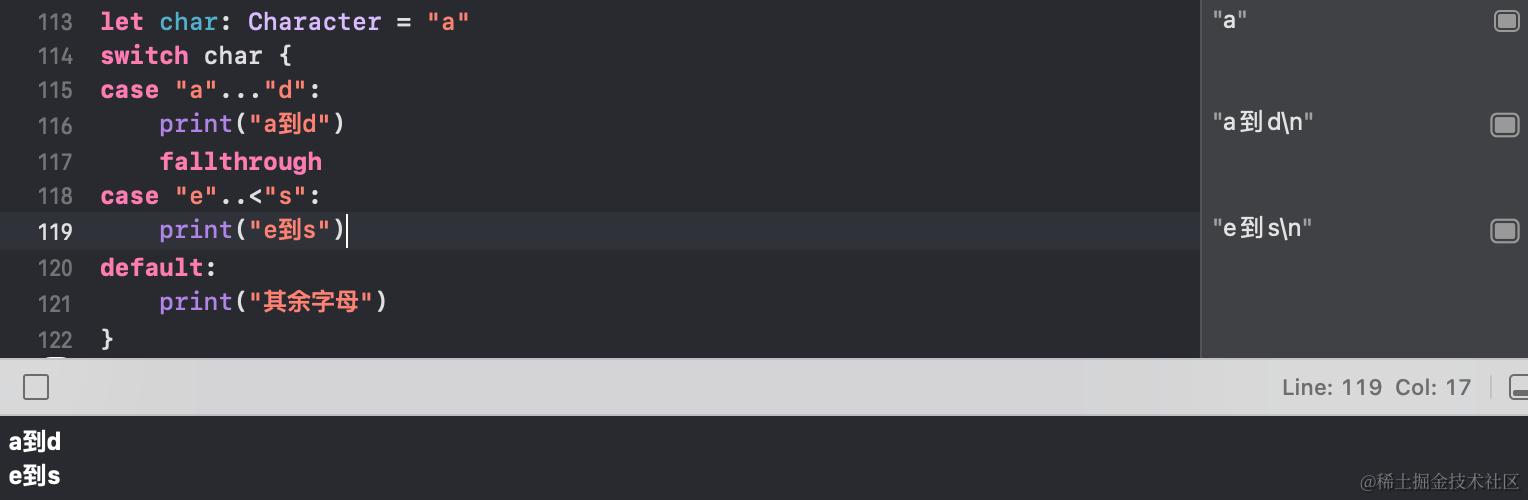
- Swift 中的Switch可以进行:
元组匹配、区间匹配、复合匹配、值绑定、where语句let point = (5, 4) switch point { case (0, 0), (5, 3..<5): print("元组匹配、区间匹配、复合匹配") // 复合匹配-值绑定,需要定义相同形参(由n改成分别为x与y会报错) case (-5...5, let n), (let n, -2..<5): print("复合匹配-值绑定,n = \(n)") case let (x, y) where x == y: print("where语句") default : print("其他") } - 类型转换
// Dog 与 Bird 是2种自定义类型
for animal in animals {
    switch animal {
    // 匹配到Dog类型的数据,将参数转换为Dog类型
    case let dog as Dog:
        print("dog")
    // 匹配到Bird类型
    case is Bird:
        print("bird")
    default:
        print("other")
    }
}
case let dog as Dog
1.匹配到Dog类型的数据,将参数转换为Dog类型
2.数组中元素不都是Dog类型,对animal不能直接调用Dog的方法,因此需要类似(Dog *)animal的强制类型转换 - 表达式模式,只能case用,重载
~=运算符func ~= (names: Range<float>, animal: Dog) -> Bool { return names.contains(animal.name) }
5.4、语句标签
- 给循环语句或条件语句做标记,然后使用 continue 或 break 直接控制结束被标记的语句
var num = 5
whileLoop : while num > 0 {
    switch num {
    case 5:
        var sum = 0
        for i in 0...5 {
            sum += i
            if i == 4 {
                print(sum)
                // 直接跳出了外层的while循环
                break whileLoop
            }
        }
    default :
        break
    }

    num -= 1
}

// 打印结果
10
5.5、guard
- 类似 if (假判断) {},可以美化代码,防止多层缩进
guard 判断语句 else {
    //
    false code
    return
}
true code
5.6、检查API可用性
#available(Platform... , *)if #available(iOS 10, macOS 10.12, *) { // 调用 iOS10 与 macOS 10.12下的API } else { // 调用更早版本的 iOS 与 macOS 的API }
6、数组
6.1、遍历数组
let nums = Array(2...7)
6.1.1、forEach
nums.forEach{(num) in
    print(num)
}
- 不能使用break、continue跳出循环
6.1.2、枚举
for (index, num) in nums.enumerated() {
    print("index = \(index), num = \(num)")
}
- 通过元组同时获得 角标 与 数值
6.1.3、迭代器
var it = nums.makeIterator()
while let num = it.next() {
    print(num)
}
6.1.4、indices
for i in nums.indices {
    print("index = \(i), num = \(nums[i])")
}
.indices:获取数组的索引区间
6.2、查找
6.2.1、contains
.contains(_:):判断数组是否包含给定元素.contains(where:):判断数组是否包含符合给定条件的元素
6.2.2、allSatisfy
let nums = Array(2...7)
// 常规使用
print(nums.allSatisfy { num in
    num > 1
})
// 使用$0
print(nums.allSatisfy({$0 > 5}))
.allSatisfy(_:):判断数据的每一个元素都符合给定的条件
6.2.3、查找元素、索引
// 查找元素
print(nums.first)
print(nums.last)
print(nums.first(where: {$0 > 3}))
print(nums.last(where: {$0 > 4}))
// 给定元素在数组中出现的索引
print(nums.firstIndex(of: 6))
print(nums.lastIndex(of: 7))

// 查找最大、最小元素
print(nums.min())
print(nums.max())
// 条件查找最大、最小元素
var arr = [(20, "a"), (10, "b"), (30, "c")]
print(arr.min(by: { m, n in
    // 比较元组的第0个内容
    m.0 < n.0
}))
6.3、增删
// 追加元素
nums.append(contentsOf: 100..<103)
// 指定位置插入元素
nums.insert(contentsOf: -2..<3, at: 3)

// 删除指定位置元素,并返回被删元素
let removeNum = nums.remove(at: 0)
// 删除前2个元素
nums.removeFirst(2)
// 删除指定范围元素
nums.removeSubrange(2...5)
// 删除所有元素并保持容量不变
nums.removeAll(keepingCapacity: true)
// 删除最后元素并返回(空数组不崩溃)
let popNum = nums.popLast()

print(nums,removeNum,popNum as Any)
// 打印结果
[] 2 nil
6.4、ArraySlice
-
获取数组的子数组,与原数组共享内存,可一旦要修改ArraySlice,其就会copy出来单独的内存,对 原数组和ArraySlice进行的增删互不影响
-
条件获取ArraySlice只到第一个不符合条件的元素结束,后续即使有满足条件的元素也不会筛选
var nums = [4,2,5,15,10,7,20]
// drop获取ArraySlice(2小于筛选条件3,筛选结束,即使后续元素都符合>3的筛选条件)
var slice = nums.drop {$0 > 3}
// Range获取ArraySlice
var slice2 = nums[2..<4]
// prefix获取ArraySlice
var slice3 = nums.prefix { num in
    num < 10
}
// suffix获取ArraySlice
var slice4 = nums.suffix(from: 3)

// 将ArraySlice转成Array
var nums2 = Array(slice2)
print(slice,slice2,slice3,slice4)
// 打印结果
[2, 5, 15, 10, 7, 20]
[5, 15]
[4, 2, 5]
[15, 10, 7, 20]
6.5、重排
var nums = [4,2,5,15,10,7,20]

// 数组随机乱序
nums.shuffle()
let nums2 = nums.shuffled()
print(nums2)

// 数组排序
nums.sort()
let nums3 = nums.sorted()
print(nums3)

// 数组倒序
nums.reverse()
let nums4 = nums.reversed()
print(nums4)

// 以给定条件将数组分组,返回边界角标index
let index = nums.partition(by: {$0 > 10 })
print(index)
let p1 = nums[..<index]
let p2 = nums[index...]
print(p1)
print(p2)

// 交换数组元素位置
nums.swapAt(nums.startIndex, nums.endIndex-1)

print(nums)
shuffle、sort、reverse是改变原有数组,shuffled、sorted、reversed 是新产生一个数组
6.6、拼接
- 字符串数组拼接,数组中字符串会被拼接成一个字符串
let array = ["hello","world"] print(array.joined(separator: ",")) - 元素为Sequence序列数组的拼接
let ranges = [[1,2,3],[4,5,6],[7,8,9]]
let joined = ranges.joined(separator: [0,1])
print(Array(joined))
// 打印结果
[1, 2, 3, 0, 1, 4, 5, 6, 0, 1, 7, 8, 9]
6.7、数组协议结构
Sequence-->Collection--> RangeReplaceableCollection --> Array- Sequence:
序列,一系列具有相同类型的值,可以对这些值进行迭代 - Collection:能被多次遍历且每次遍历结果相同,集合中元素可以通过下标索引获取
7、Set
- Set元素无序、且元素Hash唯一
7.1、Set替换
struct Person {
    var name: String
    var age : Int
}

// 必须指定Hash值
extension Person: Hashable {
    func hash(into hasher: inout Hasher) {
        // 只将name算到Hash中
        hasher.combine(name)
        // hasher.combine(age)
    }
}

extension Person: Equatable {
    static func == (lhs: Self, rhs: Self) -> Bool {
        // 指定Hash值比较规则(此处规定只比较name)
        return lhs.name == rhs.name
    }
}

var personSet: Set = [Person(name: "zhangsan", age: 18), Person(name: "lisi", age: 28)]
// 被指定的name相同,则判断元素相同,进行替换
personSet.update(with: Person(name: "zhangsan", age: 40))
// 筛选
personSet.filter(isIncluded: (Person) throws -> Bool)
print(personSet)
7.2、Set计算、判断
// 交集
aSet.intersection(bSet)
// 并集
aSet.union(bSet)
// 差集
aSet.symmetricDifference(bSet)
// 补集
aSet.subtracting(bSet)
// 是否是另一个Set或Sequence的子集
aSet.isSubset(of: bSet)
// 是否是另一个Set或Sequence的超集
aSet.isSuperset(of: bSet)
// 是否是另一个Set或Sequence的子集,但又不等于另一个Set
aSet.isStrictSubset(of: bSet)
// 两个Set是否有公共元素,有返回false,没有返回true
aSet.isDisjoint(with: bSet)
8、字典
- 可以用结构体做key
var personDict = [Person(name: "zhangsan", age: 18): 180, Person(name: "lisi", age: 28): 175] personDict.updateValue(195, forKey: Person(name: "zhangsan", age: 20)) print(personDict) merge:合并字典var dict = ["a": 1, "b": 2] // 指定key冲突时使用哪个字典的内容 dict.merge(["a": 3, "c": 5]) { current, new in new } print(dict)
9、函数与闭包
9.1、函数参数
- 指定实际参数标签
// 定义first、second为实际参数,外界调用就要使用实际参数 // 有默认值的可以不传参 func addTwoNum(first num1: Int, second num2:Int = 10) -> Int { return num1 + num2 } print(addTwoNum(first: 3)) - 可变形式参数
// ...表示可变形式参数,参数以数组形式在函数内使用 func addTwoNums(nums:Int...) -> Int { var sum = 0 for num in nums { sum += num } return sum } print(addTwoNums(nums: 1,2,3,4,5)) 输入输出形式参数var num1 = 10 var num2 = 20 func swapValue(_ a: inout Int, _ b: inout Int) { let temp = a a = b b = temp } swapValue(&num1, &num2) print(num1, num2)- 不能是可变参数
- 不能有默认值
传参需要取地址符
9.2、闭包
- 闭包是一种可以捕获外面值的函数,可以参阅 Swift闭包
9.3、高阶函数
let nums = [1,2,4,5,10]
print(nums.map { $0 * 10 })
print(nums.filter {$0 > 4})
print(nums.reduce(100) { $0 + $1 })
// 打印结果
[10, 20, 40, 50, 100]
[5, 10]
122

let arrarNumbers = [[1,2,3], [4,5,6], [7,8,9]]
print(arrarNumbers.flatMap { $0.map { $0 * 10 }})
// 打印结果
[10, 20, 30, 40, 50, 60, 70, 80, 90]

let names: [String?] = ["zhangsan", "lisi", nil, "wangwu", nil]
print(names.compactMap { $0 })
print(names.compactMap { $0?.count })
// 打印结果
["zhangsan", "lisi", "wangwu"]
[8, 4, 6]
参阅 Swift高阶函数
10、类、结构体、枚举、协议
参阅 类与结构体上、 类与结构体上下、 Swift属性、 Swift协议
10.1、Extension
- 可以添加 计算实例属性 和
计算类型属性extension Double { var km: Double { return self / 100.0 } } let speed: Double = 1200 print(speed.km) - 可以添加 便捷初始化器,不能添加指定初始化器与反初始化器
- 可以添加实例方法与类型方法
extension Int { func repeatTask(task:() -> ()) { for i in 0..<self { task() } } } 3.repeatTask { print("hello") } - 可以添加异变方法
- 可以添加下标
// 添加下标 extension Int { subscript(digitIndex: Int) -> Int { get { var base = 1 for i in 0..<digitIndex { base *= 10 } return (self / base) % 10 } } } - 可以添加内嵌类型
// 内嵌类型 extension Int { enum Kind { case zero case negative case positive } var kind: Kind { get { switch self { case 0: return .zero case let x where x > 0 : return .positive default: return .negative } } } } print(5.kind) 对协议进行扩展,可以为协议方法提供默认行为(正常协议方法为空,具体实现到遵守协议的对象中实现)
10.2、协议
AnyObject:专指类类型,用在协议上则表示 类专属的协议(结构体、枚举不行)Equatable:遵守该协议的对象 可以直接使用==或!=进行比较IteratorProtocol:迭代器
10.2.1、协议组合
protocol Named {
    var name: String {get}
}

protocol Aged {
    var age: Int {get set}
}

struct Person: Named,Aged {
    var name: String
    var age: Int
}

func wish(peron: Named & Aged) {
    print("name: \(peron.name), age = \(peron.age)")
}

let p = Person(name: "LZ", age: 19)
wish(peron: p)
10.2.2、有条件遵循协议
protocol TextRepresentable {
    var desc: String {get}
}

extension Person: TextRepresentable {
    var desc: String {
        return "name is \(name), age is \(age)"
    }
}
print(p.desc)

// 约束数组中元素要遵守协议
extension Array where Element: TextRepresentable {
    var desc: String {
        let itemDesc = self.map{$0.desc}
        return itemDesc.joined(separator: ",")
    }
}
let arr = [Person(name: "LZ", age: 18), Person(name: "zhangsan", age: 30)]
print(arr.desc)

// 打印结果
name is LZ, age is 18,name is zhangsan, age is 30
10.3、关联类型
- 协议不能使用泛型
protocol Container<T> { mutating func append(_ item: T) var count: Int { get } subscript(i: Int) -> T { get } } // 报错 Protocols do not allow generic parameters; use associated types instead - 用关联类型替代泛型
protocol Container {
    // 关联类型遵守其他协议来增加约束
    associatedtype ItemType: Equatable
    mutating func append(_ item: ItemType)
    var count: Int { get }
    subscript(i: Int) -> ItemType { get }
}
11、多线程
11.1、Thread
- detachNewThread
import PlaygroundSupport PlaygroundPage.current.needsIndefiniteExecution = true for i in 0..<10 { Thread.detachNewThread { print(i) } } Thread(target:,selector:,object:)// 初始化器创建新线程 class MyThread { func threadTest() { let thread = Thread(target: self, selector: #selector(threadWork), object: nil) thread.start() } // 需要加 @objc @objc func threadWork() { print("I'm a thread") } } MyThread().threadTest()- 添加方法要带@objc,且
@objc需要使用在class中,写在Struct中会报错 - 需要手动 start
- 添加方法要带@objc,且
11.2、Operation
- Operation状态
- isReady
- isExecuting
- isFinished
- isCancelled
- OperationQueue参数
maxConcurrentOperationCount:最大并发数- OperationQueue.defaultMaxConcurrentOperationCount:根据当前系统条件动态确定的最大并发数
- 使用示例
class MyOperation {
    func operationTest() {
        // [weak self]弱引用
        let operation = BlockOperation { [weak self] in
            // self可选
            self?.operationWork()
        }
        operation.completionBlock = {() -> Void in
            print("completOperation")
        }

        // 创建队列并添加操作
        let queue = OperationQueue()
        queue.addOperation(operation)
    }

    @objc func operationWork () {
        print("I'm a operation")
    }
}
MyOperation().operationTest()
print("mainThread")

// 打印结果(异步线程,打印顺序不固定)
I'm a operation
mainThread
completOperation
11.3、GCD
11.3.1、常规使用
let queue = DispatchQueue(label: "myQueue", qos: DispatchQoS.default, attributes: DispatchQueue.Attributes.concurrent, autoreleaseFrequency: DispatchQueue.AutoreleaseFrequency.inherit, target: nil)
// 异步执行
queue.async {
    sleep(1)
    print("current queue task")
}
// 延迟异步执行
queue.asyncAfter(deadline: .now() + 2) {
    print("after invoke queue method 2 seconds")
}
print("main queue task")
11.3.2、DispatchGroup
- DispatchGroup:将任务成组,组中任务都完成后整体提供给外界(适合多接口请求数据,整合后再进行渲染处理等情况)
let group = DispatchGroup() let queue = DispatchQueue(label: "myQueue", qos: DispatchQoS.default, attributes: DispatchQueue.Attributes.concurrent, autoreleaseFrequency: DispatchQueue.AutoreleaseFrequency.inherit, target: nil) group.enter() queue.async { sleep(1) print("接口A数据请求完毕") group.leave() } group.enter() queue.async { sleep(1) print("接口B数据请求完毕") group.leave() } // 后续代码可使用 wait() 与 notify() 处理 - 使用
wait()等待组中任务完成,会阻塞后续代码执行group.wait() print("接口A与B数据请求完毕,开始合并数据") - 使用
notify()异步等待组中任务完成,不会阻塞后续代码// group都执行leave后通知调用,异步不阻塞线程 group.notify(queue: queue) { print("接口A与B数据请求完毕,开始合并数据") } print("main thread") // 打印结果 main thread task2 task1 task1 and task2 have finished
11.3.3、DispatchSourse
-
监视某些类型事件的对象,当事件发生时自动将一个task放入一个dispatch queue中执行
-
可以实现 定时器、监测文件变化、外部进程通讯 等
-
定时器
var seconds = 10
let timer = DispatchSource.makeTimerSource(flags: [], queue: DispatchQueue.global())
timer.schedule(deadline: .now(), repeating: 1.0)
timer.setEventHandler {
    seconds -= 1
    if seconds < 0 {
        timer.cancel()
    } else {
        print(seconds)
    }
}
timer.resume()
12、错误处理
// 枚举自动贩卖机报错
enum VendingMachineError: Error {
    case invaliaSelection                    // 没有该商品
    case insufficientFunds(coinsNeeded: Int) // 投币不足
    case outOfStock                          // 商品不足
}

// 商品属性
struct Item {
    var price: Int
    var count: Int
}

class VendingMachine {
    // 贩卖机中商品情况
    var inventory = [
        "Candy Bar": Item(price: 6, count: 8),
        "Chocolate": Item(price: 10, count: 9),
        "Water"    : Item(price: 15, count: 5)
    ]
    // 已投币数
    var coinsDesposited = 0

    func vend(itemName: String) throws {
        // 指定退出清理
        defer {
            print("退出清理")
        }

        guard let item = inventory[itemName] else {
            throw VendingMachineError.invaliaSelection
        }

        guard item.count > 0 else {
            throw VendingMachineError.outOfStock
        }

        guard coinsDesposited >= item.price else {
            throw VendingMachineError.insufficientFunds(coinsNeeded: item.price - coinsDesposited)
        }

        coinsDesposited -= item.price
        var newItem = item
        newItem.count -= 1
        inventory[itemName] = newItem

        print("售卖成功")
    }
}

var machine = VendingMachine()
machine.coinsDesposited = 16

// 捕获异常
do {
    // try调用
    try machine.vend(itemName: "Water")
} catch VendingMachineError.invaliaSelection {
    print("没有该商品")
} catch VendingMachineError.insufficientFunds(let coinsNeeded) {
    print("您还需要投 \(coinsNeeded) 枚币")
} catch VendingMachineError.outOfStock {
    print("商品不足")
} catch {
    print("意外错误")
}
defer
- 无论代码是从哪个分支return的,还是throw的,或是走到最后一行,都会在代码块最后、在return之前执行
- 写在代码块最开始,做汇总操作
13、权限类型
open:公开权限,可被其他模块访问、继承、复写,只能用于类与类成员public:公有访问权限,可被其他模块访问,但 不能继承与复写internal:模块内访问,默认权限filePrivate:文件私有访问权限,不同物理文件即不能访问private:私有访问权限,不同类即不能访问(Extension可以访问)
14、weak、unowned
- 弱引用与无主引用都是表示非强持有实例
- 弱引用只能声明为变量(var)类型,因为可能没有值因此
必须为可选类型 - 无主引用默认始终有值,不能为nil,因此 只能定义非可选类型
占有列表
- 占有列表中的每个元素都由weak或unowned 与实例的引用组成,每对都在中括号中,逗号分隔
- 占有引用可能是nil时使用weak
lazy var someClosure = {
    [unowned self, weak delegate = self.delegate]
    (index: Int, stringToProcess: String) -> String in
    // closure body code
}
15、内存安全注意
inout参数访问冲突
var pageSize = 1

func increment(_ num : inout Int) {
    // 报错
    num += pageSize
}
increment(&pageSize)
- 例中 同时对pageSize进行了
读与写的操作