携手创作,共同成长!这是我参与「掘金日新计划 · 8 月更文挑战」的第19天,点击查看活动详情
嗨,朋友们,这篇文章我将教你如何使用python3创建EventBridge规则,并tigger它到lambda函数
如果你没太多时间看后面的内容,那么直接看代码吧
就像某位大佬说的:别废话,给我看你的代码
import os
import time
import boto3
from botocore.config import Config

lambda_client = boto3.client('lambda',config=Config(region_name=os.environ['AWS_REGION']))
event_client = boto3.client('events',config=Config(region_name=os.environ['AWS_REGION']))

def lambda_handler(event, context):
    rule_name = 'LeifengRule' # 设定一个变量名 rule_name
    cron_sec = 'cron(59 23 * * ? *)' # 设定一个变量名 cron
    lambda_fc_name = 'LeifengFC' # 设定变量名 lambda_fc_name
    lambda_fc_arn = 'arn:aws:lambda:us-east-1:xxxx:function:LeifengFC' # 在这里放你的目标lambda函数的arn
    add_permission_role_arn = 'arn:aws:iam::xxxx:role/add_permission' # 这里放创建的role的arn
    create_rule_resp = event_client.put_rule(
            Name=rule_name, # There put your rule name
            ScheduleExpression=cron_sec, # there put your cron
            State='ENABLED', # there set the rule state ENABLED or DISABLED
            EventBusName='default', # set eventbus ,I use default
            RoleArn=add_permission_role_arn
        )

    put_target_resp = event_client.put_targets(
            Rule=rule_name,
            Targets=[{
                'Id': lambda_fc_name,
                'Arn': lambda_fc_arn
            }]
        )

    # use if to determine the lambda_fc_arn weather '$' exists
    # if the '$' in lambda_fc_arn,just remove from $

    if '$' in lambda_fc_arn:
        lambda_fc_arn = lambda_fc_arn[:-8]
    add_lambda_permission = lambda_client.add_permission(
            FunctionName=lambda_fc_arn,
            StatementId=str(time.time())[-5:]+lambda_fc_name,
            Action='lambda:InvokeFunction',
            Principal='events.amazonaws.com',
            SourceArn=create_rule_resp['RuleArn']
        )
1.创建IAM 策略和角色
1.1 创建 add_permission 角色
1.1.1 打开AWS IAM 控制台
Click here:https://us-east-1.console.aws.amazon.com/iam/home
1.1.2 创建一个角色
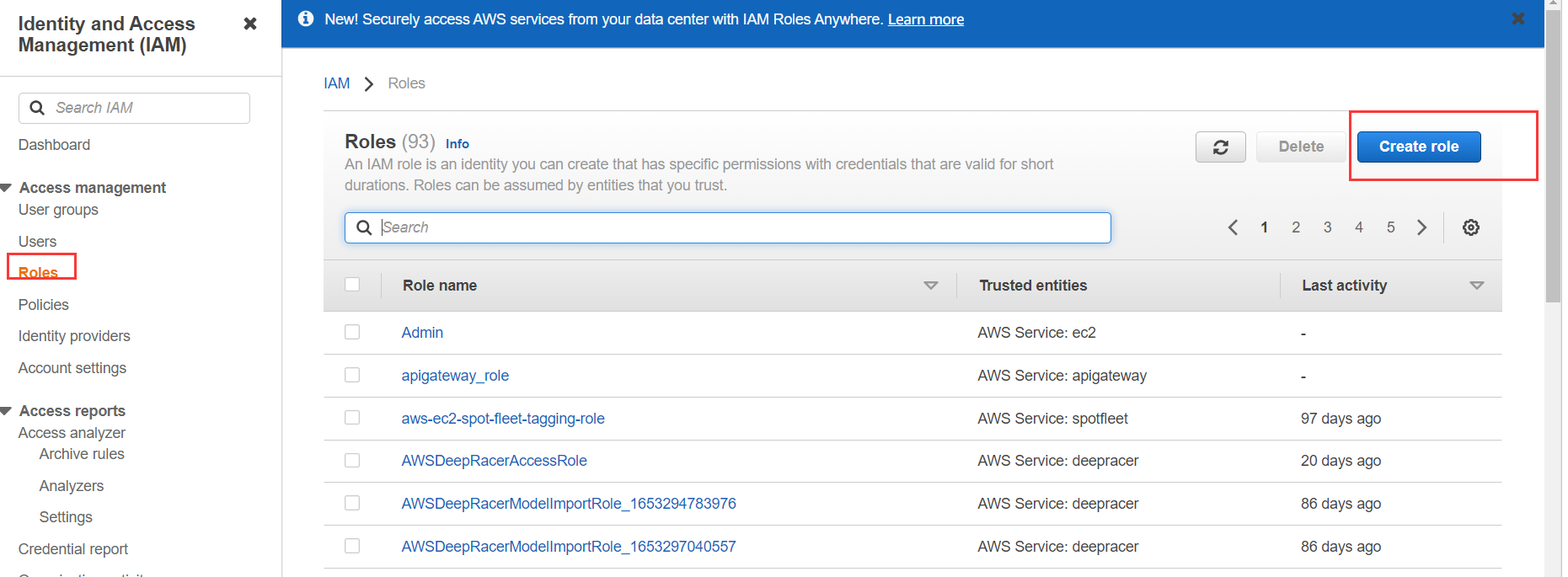
1.1.2.1 使用下面的JSON文件创建
{
  "Version": "2012-10-17",
  "Statement": [
    {
      "Effect": "Allow",
      "Principal": {
        "Service": "lambda.amazonaws.com"
      },
      "Action": "sts:AssumeRole"
    },
    {
      "Effect": "Allow",
      "Principal": {
        "Service": "events.amazonaws.com"
      },
      "Action": "sts:AssumeRole"
    }
  ]
}
1.1.2.2 添加2个策略到这个角色(lambda and event full access)
1.1.2.3 记住 add_permission 角色的 ARN
1.2 创建 lambda 函数的执行角色
1.2.1 打开AWS IAM 控制台
Click here:https://us-east-1.console.aws.amazon.com/iam/home
1.2.2 为LAMBDA服务创建一个角色
1.2.3 命名为 lambda_exec_role
1.2.4 检查role(不附加任何策略)
1.3 为 lambda_exec_role 创建一个策略
{
    "Version": "2012-10-17",
    "Statement": [
        {
            "Effect": "Allow",
            "Action": [
                "events:DeleteRule",
                "events:PutTargets",
                "events:DescribeRule",
                "events:ListRuleNamesByTarget",
                "events:EnableRule",
                "events:PutRule",
                "events:ListRules",
                "events:RemoveTargets",
                "events:ListTargetsByRule",
                "events:DisableRule",
                "lambda:ListFunctions",
                "lambda:AddPermission",
                "iam:PassRole"
            ],
            "Resource": "*"
        }
    ]
}
1.4 附加 lambda_exec_role_policy 到 lambda_exec_role

2.创建一个 lambda function
2.1 创建一个Lambda function使用python3.9
2.2 复制下面的代码到lambda 代码编辑框
请替换下面的值 rule_name cron_sec lambda_fc_name and lambda_fc_arn
这是要复制的代码
import os
import time
import boto3
from botocore.config import Config

lambda_client = boto3.client('lambda',config=Config(region_name=os.environ['AWS_REGION']))
event_client = boto3.client('events',config=Config(region_name=os.environ['AWS_REGION']))

def lambda_handler(event, context):
    rule_name = 'LeifengRule' # Define a var for rule_name
    cron_sec = 'cron(59 23 * * ? *)' # Define a var for cron
    lambda_fc_name = 'LeifengFC' # Define a var for lambda name
    lambda_fc_arn = 'arn:aws:lambda:us-east-1:xxxx:function:LeifengFC' # Here you need copy the lambda_fc_name function arn
    add_permission_role_arn = 'arn:aws:iam::xxxx:role/add_permission' # put create role ARN
    # use boto3 create a rule
    create_rule_resp = event_client.put_rule(
            Name=rule_name, # There put your rule name
            ScheduleExpression=cron_sec, # there put your cron
            State='ENABLED', # there set the rule state ENABLED or DISABLED
            EventBusName='default', # set eventbus ,I use default
            RoleArn=add_permission_role_arn
        )

    put_target_resp = event_client.put_targets(
            Rule=rule_name,
            Targets=[{
                'Id': lambda_fc_name,
                'Arn': lambda_fc_arn
            }]
        )

    # use if to determine the lambda_fc_arn weather '$' exists
    # if the '$' in lambda_fc_arn,just remove from $

    if '$' in lambda_fc_arn:
        lambda_fc_arn = lambda_fc_arn[:-8]
    add_lambda_permission = lambda_client.add_permission(
            FunctionName=lambda_fc_arn,
            StatementId=str(time.time())[-5:]+lambda_fc_name,
            Action='lambda:InvokeFunction',
            Principal='events.amazonaws.com',
            SourceArn=create_rule_resp['RuleArn']
        )