Android简易音乐重构MVVM Java版-LiveData+用户登录+http模块(十)
关于
本篇内容主要是http模块(retrofit+okhttp3)重构,以及登录页面的重构。
效果图
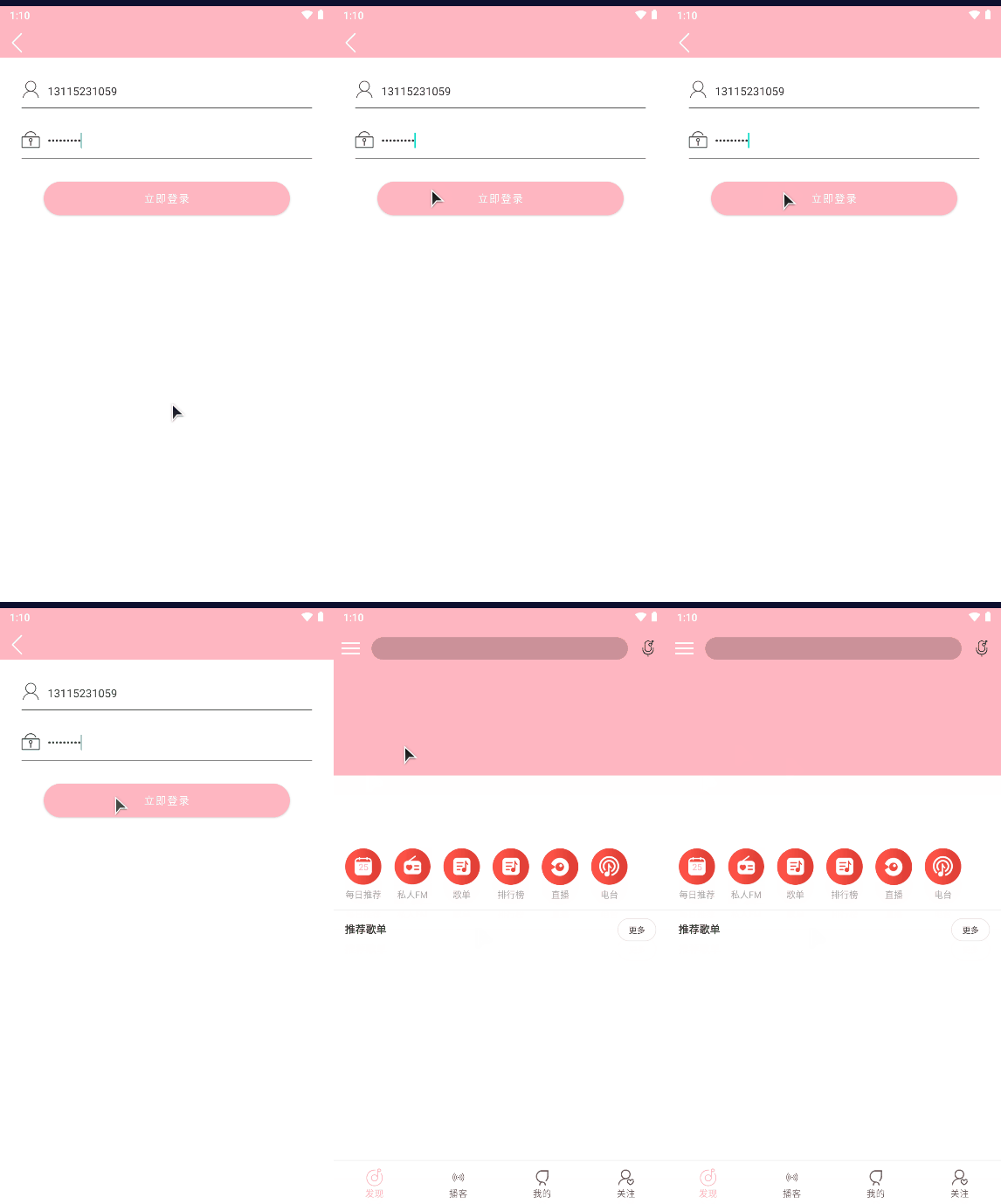
app启动图标在上篇放出的百度网盘链接里面有对应图片。
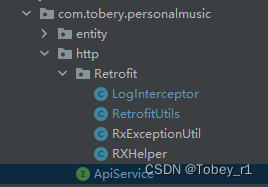
添加http模块
结构图如下:
添加 ApiService
import androidx.lifecycle.LiveData;
import com.tobery.livedata.call.livedatalib.ApiResponse;
import com.tobery.personalmusic.entity.Login_Bean;
import com.tobery.personalmusic.entity.MainRecommendListBean;
import com.tobery.personalmusic.entity.SearchHotDetail_Bean;
import com.tobery.personalmusic.entity.banner_bean;
import io.reactivex.Observable;
import retrofit2.http.GET;
import retrofit2.http.POST;
import retrofit2.http.Query;

public interface  ApiService {
    @GET("banner")
    LiveData<ApiResponse<banner_bean>> getBanner(@Query("type") int type);
    @GET("login/cellphone")
    Observable<Login_Bean> login(@Query("phone") String phone, @Query("password") String password);
}
添加RetrofitUtils请求网络api
public class RetrofitUtils {
    /**
     * 单例模式
     */
    public static ApiService apiService;
    public static ApiService getmApiUrl(){
        if (apiService == null){
            synchronized (RetrofitUtils.class){
                if (apiService == null){
                    apiService = new RetrofitUtils().getRetrofit();
                }
            }
        }
        return apiService;
    }

    private ApiService getRetrofit() {
        //初始化Retrofit
        ApiService apiService = initRetrofit(initOkHttp()).create(ApiService.class);
        return apiService;
    }

    private OkHttpClient initOkHttp() {
        //ClearableCookieJar cookieJar = new PersistentCookieJar(new SetCookieCache(), new SharedPrefsCookiePersistor(MyApplication.getContext()));
        return new OkHttpClient().newBuilder()
                .readTimeout(Constant.DEFAULT_TIME, TimeUnit.SECONDS) //设置读取超时时间
                .connectTimeout(Constant.DEFAULT_TIME,TimeUnit.SECONDS) //设置请求超时时间
                .writeTimeout(Constant.DEFAULT_TIME,TimeUnit.SECONDS) //设置写入超时时间
                .addInterceptor(new LogInterceptor())  //添加打印拦截器
                .retryOnConnectionFailure(true) //设置出错进行重新连接
                //.cookieJar(cookieJar)
                .build();
    }

    /**
     * 初始化Retrofit
     */
    @NonNull
    private Retrofit initRetrofit(OkHttpClient client){
        return new Retrofit.Builder()
                .client(client)
                .baseUrl(Constant.BaseUrl)
                .addCallAdapterFactory(RxJava2CallAdapterFactory.create())
                .addCallAdapterFactory(LiveDataCallAdapterFactory.create())//livedataFactory
                .addConverterFactory(GsonConverterFactory.create())
                .build();
    }


}
添加RXHelper用于线程切换
public class RXHelper {
    public static <T> ObservableTransformer<T, T> observableIO2Main(final Context context) {
        return upstream -> {
            Observable<T> observable = upstream.subscribeOn(Schedulers.io())
                    .observeOn(AndroidSchedulers.mainThread());
            return composeContext(context, observable);
        };
    }

    public static <T> ObservableTransformer<T, T> observableIO2Main(final RxFragment fragment) {
        return upstream -> upstream.subscribeOn(Schedulers.io())
                .observeOn(AndroidSchedulers.mainThread()).compose(fragment.<T>bindToLifecycle());
    }

    public static <T> FlowableTransformer<T, T> flowableIO2Main() {
        return upstream -> upstream
                .subscribeOn(Schedulers.io())
                .observeOn(AndroidSchedulers.mainThread());
    }

    private static <T> ObservableSource<T> composeContext(Context context, Observable<T> observable) {
        if(context instanceof RxActivity) {
            return observable.compose(((RxActivity) context).bindUntilEvent(ActivityEvent.DESTROY));
        } else if(context instanceof RxFragmentActivity){
            return observable.compose(((RxFragmentActivity) context).bindUntilEvent(ActivityEvent.DESTROY));
        }else if(context instanceof RxAppCompatActivity){
            return observable.compose(((RxAppCompatActivity) context).bindUntilEvent(ActivityEvent.DESTROY));
        }else {
            return observable;
        }
    }
}
添加RxExceptionUtil网络异常处理类
public class RxExceptionUtil {
    public static String exceptionHandler(Throwable e){
        String errMsg = "未知错误";
        if (e instanceof UnknownHostException){
            errMsg = "网络不可用";
        }else if (e instanceof SocketTimeoutException){
            errMsg = "请求网络超时";
        }else if (e instanceof HttpException) {
            HttpException httpException = (HttpException) e;
            errMsg = convertStatusCode(httpException);
        }else if (e instanceof ParseException ||  e instanceof JSONException){
            errMsg = "数据解析错误";
        }
        return errMsg;
    }
    private static String convertStatusCode(HttpException httpException) {
        String msg;
        if (httpException.code() >= 500 && httpException.code() < 600) {
            msg = "服务器处理请求出错";
        } else if (httpException.code() >= 400 && httpException.code() < 500) {
            msg = "服务器无法处理请求";
        } else if (httpException.code() >= 300 && httpException.code() < 400) {
            msg = "请求被重定向到其他页面";
        } else {
            msg = httpException.message();
        }
        return msg;
    }
}
拦截器LogInterceptor打印请求和返回日志
public class LogInterceptor implements Interceptor {
    @Override
    public Response intercept(Chain chain) throws IOException {
        Request request = chain.request();
        Log.d("拦截器---->","request:"+request.toString());
        long t1 = System.nanoTime();
        Response response = chain.proceed(chain.request());
        long t2 = System.nanoTime();
        Log.d("拦截器---->",String.format(Locale.getDefault(), "Received response for %s in %.1fms%n%s",
                response.request().url(), (t2 - t1) / 1e6d, response.headers()));
        MediaType mediaType = response.body().contentType();
        String content = response.body().string();
        Log.d("拦截器---->","response body:"+content);
        return response.newBuilder()
                .body(ResponseBody.create(mediaType,content))
                .build();
    }
}
添加GeneratedAppGlideModule
@GlideModule
public class GeneratedAppGlideModule extends AppGlideModule {
    @Override
    public boolean isManifestParsingEnabled() {
        return false;
    }
}
定义LoginUi绑定用户账号密码
public class LoginUi implements Serializable {

    public ObservableField<String> userName;
    public ObservableField<String> password;

    public LoginUi(ObservableField<String> userName, ObservableField<String> password) {
        this.password = password;
        this.userName = userName;
    }
}
新增LoginViewModel
public class LoginViewModel extends ViewModel {
    private SavedStateHandle state;

    public LoginUi ui;


    public LoginViewModel(SavedStateHandle savedStateHandle) {
        this.state = savedStateHandle;
        ui = state.get(KEY_LOGIN_UI) == null?new LoginUi(new ObservableField<>(""),new ObservableField<>("")):state.get(KEY_LOGIN_UI);
    }

    public Observable<Login_Bean> login() {
        return RetrofitUtils.getmApiUrl().login(ui.userName.get(),ui.password.get());
    }

}
新增页面login页面
新增activity_login.xml
<?xml version="1.0" encoding="utf-8"?>
<layout
    xmlns:app="http://schemas.android.com/apk/res-auto"
    xmlns:tools="http://schemas.android.com/tools">

    <data>
        <variable
            name="vm"
            type="com.tobery.personalmusic.ui.login.LoginViewModel" />
    </data>
    <androidx.constraintlayout.widget.ConstraintLayout xmlns:android="http://schemas.android.com/apk/res/android"
        android:layout_width="match_parent"
        android:layout_height="match_parent"
        tools:context=".ui.login.LoginActivity">

        <include
            android:id="@+id/title"
            layout="@layout/ui_common_title" />


        <TextView
            android:id="@+id/im_User"
            android:layout_width="@dimen/dp_25"
            android:layout_height="@dimen/dp_25"
            android:layout_marginStart="@dimen/dp_30"
            android:layout_marginTop="@dimen/dp_30"
            android:background="@drawable/ic_login_user"
            app:layout_constraintStart_toStartOf="parent"
            app:layout_constraintTop_toBottomOf="@id/title"
            />

        <EditText
            android:id="@+id/edit_user"
            android:layout_width="wrap_content"
            android:layout_height="wrap_content"
            android:layout_marginStart="@dimen/dp_35"
            android:layout_marginEnd="@dimen/dp_30"
            android:background="@null"
            android:hint="@string/input_phone"
            android:inputType="phone"
            android:maxLength="20"
            android:maxLines="1"
            android:text="@={vm.ui.userName}"
            android:textColor="@color/tv_black"
            android:textColorHint="@color/tv_hint"
            android:textSize="@dimen/sp_15"
            app:layout_constraintStart_toEndOf="@id/im_User"
            app:layout_constraintStart_toStartOf="@id/im_User"
            app:layout_constraintBottom_toBottomOf="@id/im_User"
            />

        <View
            android:id="@+id/view_user"
            android:layout_width="match_parent"
            android:layout_height="@dimen/dp_1"
            android:layout_marginLeft="@dimen/dp_30"
            android:layout_marginRight="@dimen/dp_30"
            android:layout_marginTop="@dimen/dp_12"
            android:background="@color/color_border"
            app:layout_constraintTop_toBottomOf="@id/im_User"
            />

        <TextView
            android:id="@+id/im_password"
            android:layout_width="@dimen/dp_25"
            android:layout_height="@dimen/dp_25"
            android:layout_marginStart="@dimen/dp_30"
            android:layout_marginTop="@dimen/dp_30"
            android:background="@drawable/ic_login_password"
            app:layout_constraintStart_toStartOf="parent"
            app:layout_constraintTop_toBottomOf="@id/view_user"
            />

        <EditText
            android:id="@+id/edit_password"
            android:layout_width="wrap_content"
            android:layout_height="wrap_content"
            android:layout_marginStart="@dimen/dp_35"
            android:layout_marginEnd="@dimen/dp_30"
            android:background="@null"
            android:hint="@string/input_pwd"
            android:maxLength="20"
            android:maxLines="1"
            android:text="@={vm.ui.password}"
            android:textColor="@color/tv_black"
            android:textColorHint="@color/tv_hint"
            android:textSize="@dimen/sp_15"
            app:layout_constraintStart_toStartOf="@id/im_User"
            app:layout_constraintTop_toTopOf="@id/im_password"
            app:layout_constraintBottom_toBottomOf="@id/im_password"
            />

        <View
            android:id="@+id/view_password"
            android:layout_width="match_parent"
            android:layout_height="@dimen/dp_1"
            android:layout_marginLeft="@dimen/dp_30"
            android:layout_marginRight="@dimen/dp_30"
            android:layout_marginTop="@dimen/dp_12"
            android:background="@color/color_border"
            app:layout_constraintTop_toBottomOf="@id/im_password"
            />

        <Button
            android:id="@+id/btn_login"
            android:layout_width="match_parent"
            android:layout_height="@dimen/dp_45"
            android:layout_marginStart="@dimen/dp_60"
            android:layout_marginTop="@dimen/dp_30"
            android:layout_marginEnd="@dimen/dp_60"
            android:background="@drawable/shape_btn_login_confirm"
            android:text="@string/login"
            android:textColor="@color/tv_white"
            app:layout_constraintTop_toBottomOf="@id/view_password"
            />


    </androidx.constraintlayout.widget.ConstraintLayout>
</layout>
添加通用标题栏
新建ui_common_title.xml
<?xml version="1.0" encoding="utf-8"?>
<androidx.constraintlayout.widget.ConstraintLayout xmlns:android="http://schemas.android.com/apk/res/android"
    xmlns:app="http://schemas.android.com/apk/res-auto"
    xmlns:tools="http://schemas.android.com/tools"
    android:id="@+id/title"
    android:layout_width="match_parent"
    android:background="@color/colorPrimary"
    android:layout_height="@dimen/dp_45">

    <TextView
        android:id="@+id/iv_back"
        android:layout_width="@dimen/dp_30"
        android:layout_height="@dimen/dp_30"
        android:background="@drawable/ic_common_back"
        android:layout_marginStart="@dimen/dp_15"
        android:layout_marginTop="@dimen/dp_5"
        app:layout_constraintStart_toStartOf="parent"
        app:layout_constraintTop_toTopOf="parent"
        app:layout_constraintBottom_toBottomOf="parent"
        />

    <TextView
        android:id="@+id/tv_title"
        android:layout_width="wrap_content"
        android:layout_height="wrap_content"
        android:layout_centerVertical="true"
        android:layout_centerInParent="true"
        android:layout_centerHorizontal="true"
        android:layout_marginStart="@dimen/dp_15"
        android:textColor="@color/tv_black"
        android:textSize="@dimen/sp_18"
        android:typeface="monospace"
        android:visibility="gone"
        app:layout_constraintStart_toStartOf="parent"
        app:layout_constraintEnd_toEndOf="parent"
        app:layout_constraintTop_toTopOf="parent"
        app:layout_constraintBottom_toBottomOf="parent"
       />

</androidx.constraintlayout.widget.ConstraintLayout>
添加登录按钮背景
新增shape_btn_login_confirm.xml:
<?xml version="1.0" encoding="utf-8"?>
<shape android:shape="rectangle" xmlns:android="http://schemas.android.com/apk/res/android">
    <corners android:radius="@dimen/dp_40"/>
    <solid android:color="@color/colorPrimary"/>
</shape>
修改LoginActivity.java
public class LoginActivity extends BaseActivity {

    private ActivityLoginBinding binding;

    private LoginViewModel viewModel;

    private AlertDialog dialog;

    @Override
    protected void onCreate(Bundle savedInstanceState) {
        super.onCreate(savedInstanceState);
        binding = DataBindingUtil.setContentView(this, R.layout.activity_login);
        binding.setLifecycleOwner(this);
        viewModel = new ViewModelProvider(this).get(LoginViewModel.class);
        binding.setVm(viewModel);
        initView();
    }

    private void initView() {
        binding.title.ivBack.setOnClickListener(view -> finish());
        binding.btnLogin.setOnClickListener(view -> {
            if (ClickUtil.enableClick()){
                if (Objects.requireNonNull(viewModel.ui.userName.get()).isEmpty() || viewModel.ui.password.get().isEmpty()){
                    ToastUtils.show(R.string.toast_login);
                    return;
                }
                dialog = AlertDialogUtil.Companion.createLoading(this,"登录中");
                viewModel.login()
                        .compose(RXHelper.observableIO2Main(this))
                        .subscribe(new Observer<Login_Bean>() {
                            @Override
                            public void onSubscribe(Disposable d) {

                            }

                            @Override
                            public void onNext(Login_Bean login_bean) {
                                Log.e("数据",login_bean.toString());
                                AlertDialogUtil.Companion.closeDialog(dialog);
                                if (login_bean.getCode() == 200){
                                    SharePreferencesUtil.getInstance(LoginActivity.this).saveUserInfo(login_bean,viewModel.ui.userName.get());
                                    Intent intent = new Intent(LoginActivity.this, MainActivity.class);
                                    startActivity(intent);
                                    finish();
                                }else if (login_bean.getCode() == 502){
                                    ToastUtils.show(R.string.msg_password_error);
                                }else {
                                    ToastUtils.show(R.string.msg_user_error);
                                }

                            }

                            @Override
                            public void onError(Throwable e) {
                                AlertDialogUtil.Companion.closeDialog(dialog);
                                onFailure(e, RxExceptionUtil.exceptionHandler(e));
                            }

                            @Override
                            public void onComplete() {}
                        });


            }
        });
    }

    private void onFailure(Throwable e, String exceptionHandler) {
        ToastUtils.show(exceptionHandler);
    }

    @Override
    protected void onDestroy() {
        super.onDestroy();
        if (dialog !=null){
            dialog.dismiss();
            dialog = null;
        }
    }
}