WebLoading开源库,支持https访问
关于
因为最近公司项目用到的webview比较多,一方面涉及到了用户体验感(加载进度条可DIY),另一方面,去div样式、加载https网址适配、解决重定向问题、多页面加载问题。所以就有了webLoading1.0.0版本,后续还会有一些丰富的接口方法待完善。开源库地址
引用
第一步,在工程的build下添加如下:
allprojects {
		repositories {
			...
			maven { url 'https://jitpack.io' }
		}
	}
第二步,在项目的build下添加如下:
implementation 'com.github.Tobeyr1:webLoading:1.0.1'
使用
第一步,添加控件
在布局文件中添加如下:
<com.tobery.weblib.WebViewLoading
        android:id="@+id/web"
        android:layout_height="match_parent"
        android:layout_width="match_parent" />
第二步,在活动页面实例化,并使用
WebViewLoading webViewLoading =(WebViewLoading) findViewById(R.id.web);
//webview的基本配置(包括js开启、h5支持、https支持、加载进度条)
webViewLoading.setSettings(this);
//加载的url
webViewLoading.setUrl("https://blog.csdn.net/Tobey_r1");
//页面暂停
webViewLoading.setPause();
//页面恢复
webViewLoading.setResume();
//页面销毁
webViewLoading.setDestory();
当然了,别忘记在配置文件上添加INTERENT权限。
效果图

可以看到是有一个黑色的进度条。简单的使用到这就完成了。
进阶使用
去除类似广告头部或其他元素
 //移除网页元素
 webViewLoading.removeDiv("csdn-toolbar");
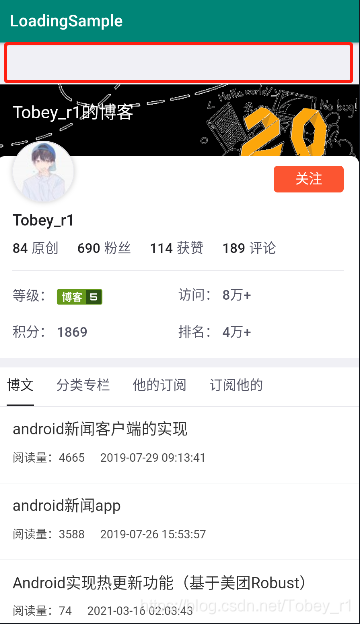
移除效果如下:
移除前:

移除后:
实现页面回退
//实现页面回退
 webViewLoading.goback(MainActivity.this);
效果如下:

可DIY进度条加载样式
如果你只想修改成你喜欢的样式,且每个使用webloading的地方样式一致,只需要在你的项目中的drawable中添加如下pg.xml:
<layer-list xmlns:android="http://schemas.android.com/apk/res/android" >

    <item android:id="@android:id/background">
        <shape>
            <corners android:radius="2dp" />
            <!--背景颜色-->
            <gradient
                android:angle="270"
                android:centerColor="#dcdcdc"
                android:endColor="#dcdcdc"
                android:startColor="#dcdcdc" />
        </shape>
    </item>
    <item android:id="@android:id/progress">
        <clip>
            <shape>
                <corners android:radius="2dp" />
                <!--进度条颜色-->
                <gradient
                    android:centerColor="#FF0000"
                    android:endColor="#B2000000"
                    android:startColor="#02A549" />

            </shape>
        </clip>
    </item>

</layer-list>
修改后,运行效果如下:

//调用样式
webViewLoading.setProgressColor(getResources().getDrawable(R.drawable.pg1));
新增获取网页标题
JAVA获取标题方法:
 webViewLoading.getTitle(title ->{
            Log.e("标题",title);
            return null;
        });
Kotlin获取标题方法:
 webViewLoading.getTitle {
            //获取标题
        }