Android使用SimpleDateFormat实现日期的减法获取天数差 (学习笔记 (五))
效果图
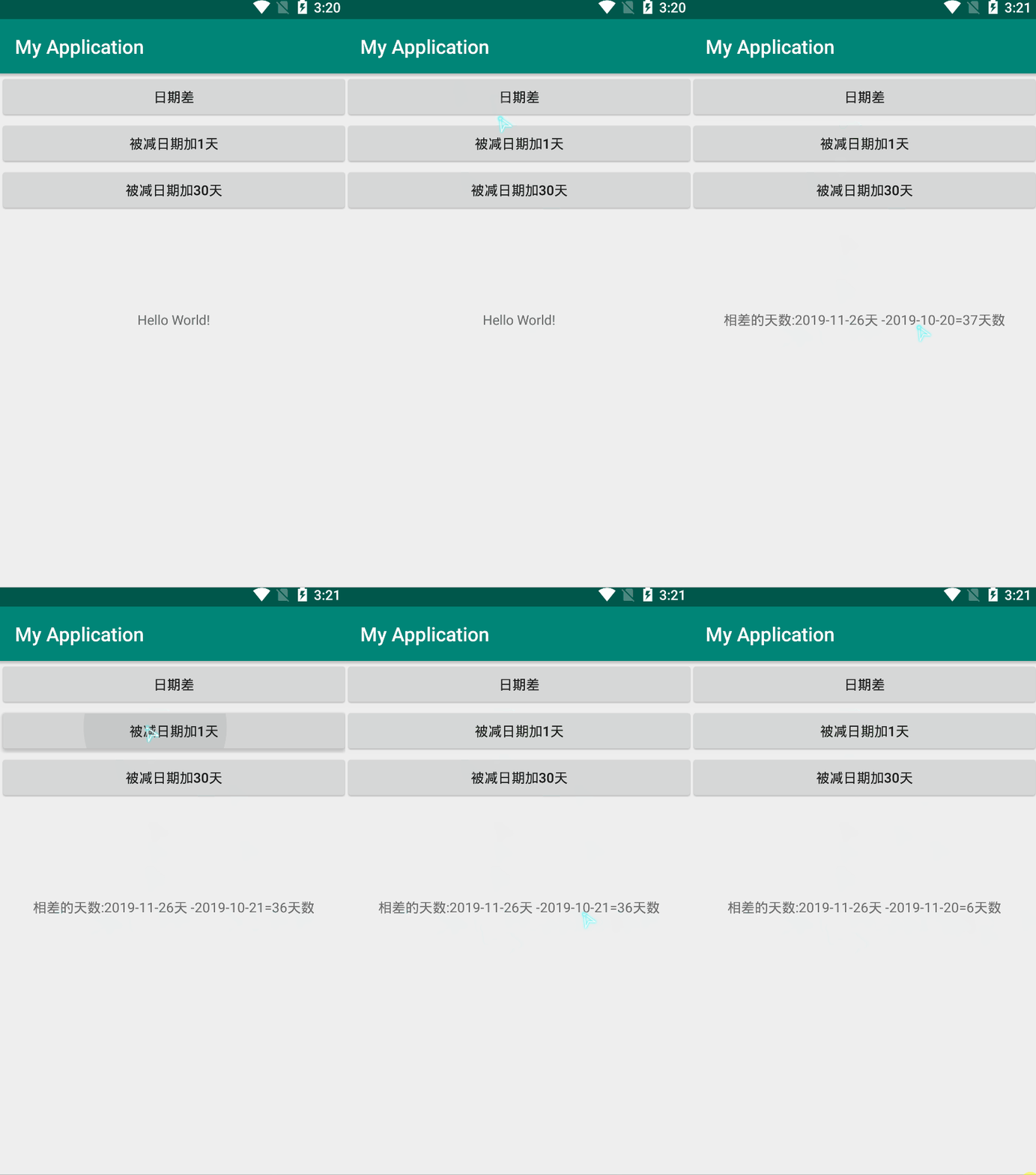
第一步,修改activity_main.xml
<?xml version="1.0" encoding="utf-8"?>
<LinearLayout xmlns:android="http://schemas.android.com/apk/res/android"
    xmlns:app="http://schemas.android.com/apk/res-auto"
    xmlns:tools="http://schemas.android.com/tools"
    android:layout_width="match_parent"
    android:layout_height="match_parent"
    android:orientation="vertical"
    tools:context=".MainActivity">
    <Button
        android:layout_width="match_parent"
        android:id="@+id/btn"
        android:text="日期差"
        android:layout_height="wrap_content" />
    <Button
        android:id="@+id/btn1"
        android:layout_width="match_parent"
        android:text="被减日期加1天"
        android:layout_height="wrap_content" />
    <Button
        android:id="@+id/bt2"
        android:layout_width="match_parent"
        android:text="被减日期加30天"
        android:layout_height="wrap_content" />
    <TextView
        android:id="@+id/tv"
        android:layout_width="wrap_content"
        android:layout_height="wrap_content"
        android:layout_gravity="center_horizontal"
        android:layout_marginTop="100dp"
        android:text="Hello World!"
        app:layout_constraintBottom_toBottomOf="parent"
        app:layout_constraintLeft_toLeftOf="parent"
        app:layout_constraintRight_toRightOf="parent"
        app:layout_constraintTop_toTopOf="parent" />

</LinearLayout>
第二步,修改MainActivity.java
package com.example.myapplication;

import android.support.v7.app.AppCompatActivity;
import android.os.Bundle;
import android.view.View;
import android.widget.Button;
import android.widget.TextView;

import java.text.ParseException;
import java.text.SimpleDateFormat;
import java.util.Date;

public class MainActivity extends AppCompatActivity {
    TextView tv;
    Button bt,bt1,bt2;
    SimpleDateFormat simpleDateFormat;
    String d2;
    @Override
    protected void onCreate(Bundle savedInstanceState) {
        super.onCreate(savedInstanceState);
        setContentView(R.layout.activity_main);
        tv = findViewById(R.id.tv);
        bt = findViewById(R.id.btn);
        bt1 = findViewById(R.id.btn1);
        bt2 = findViewById(R.id.bt2);
        bt1.setOnClickListener(new View.OnClickListener() {
            @Override
            public void onClick(View v) {
                simpleDateFormat=new SimpleDateFormat("yyyy-MM-dd");
                d2 = "2019-10-21";
                String srt =  simpleDateFormat.format(new Date(System.currentTimeMillis()));
                try {
                    long m = simpleDateFormat.parse(srt).getTime() - simpleDateFormat.parse(d2).getTime();
                    long tianshu = m/(1000*60*60*24);
                    tv.setText("相差的天数:"+srt+"天 -"+d2+"="+String.valueOf(tianshu)+"天数");
                } catch (ParseException e) {
                    e.printStackTrace();
                }
            }
        });
        bt2.setOnClickListener(new View.OnClickListener() {
            @Override
            public void onClick(View v) {
                simpleDateFormat=new SimpleDateFormat("yyyy-MM-dd");
                d2 = "2019-11-20";
                String srt =  simpleDateFormat.format(new Date(System.currentTimeMillis()));
                try {
                    long m = simpleDateFormat.parse(srt).getTime() - simpleDateFormat.parse(d2).getTime();
                    long tianshu = m/(1000*60*60*24);
                    tv.setText("相差的天数:"+srt+"天 -"+d2+"="+String.valueOf(tianshu)+"天数");
                } catch (ParseException e) {
                    e.printStackTrace();
                }
            }
        });
        bt.setOnClickListener(new View.OnClickListener() {
            @Override
            public void onClick(View v) {
                simpleDateFormat=new SimpleDateFormat("yyyy-MM-dd");
                String d1 = "2019-10-20";
             String srt =  simpleDateFormat.format(new Date(System.currentTimeMillis()));
                try {
                    long m = simpleDateFormat.parse(srt).getTime() - simpleDateFormat.parse(d1).getTime();
                    long tianshu = m/(1000*60*60*24);
                    tv.setText("相差的天数:"+srt+"天 -"+d1+"="+String.valueOf(tianshu)+"天数");
                } catch (ParseException e) {
                    e.printStackTrace();
                }

            }
        });
    }
}
好啦,本篇要讲的就到这里了。