Android使用第三方弹出框Sweet Alert Dialog实现退出app (简易新闻 (十五))
关于
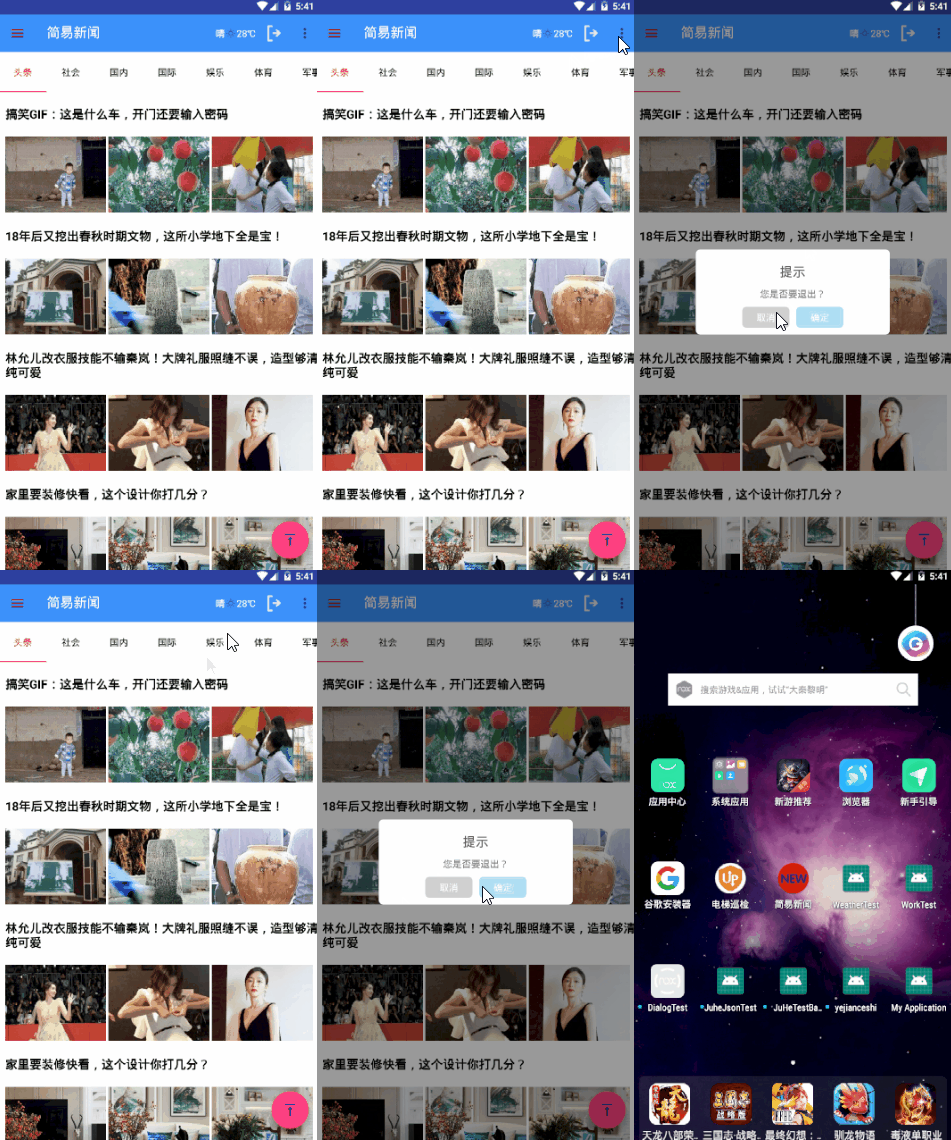
使用第三方SweetAlertDialog实现退出弹出框提示。
看一下效果:
实现过程
第一步,添加引用到build.gradle中
//第三方弹出框
    implementation 'com.github.cazaea:sweet-alert-dialog:1.0.0'
    //关于本文中使用的其他的框架的引用就不写出来了,在系列文章中都有使用
第二步,修改MainAcitivity.java
先讲一下修改的代码,:
  final SweetAlertDialog mDialog = new SweetAlertDialog(MainActivity.this,SweetAlertDialog.NORMAL_TYPE)
                        .setTitleText("提示")
                        .setContentText("您是否要退出?")
                        .setCustomImage(null)
                        .setCancelText("取消")
                        .setConfirmText("确定")
                        .setCancelClickListener(new SweetAlertDialog.OnSweetClickListener() {
                            @Override
                            public void onClick( SweetAlertDialog sweetAlertDialog) {
                                sweetAlertDialog.dismiss();
                            }
                        }).setConfirmClickListener(new SweetAlertDialog.OnSweetClickListener() {
                            @Override
                            public void onClick(SweetAlertDialog sweetAlertDialog) {
                                sweetAlertDialog.dismiss();
                                ActivityCollector.finishAll();
                            }
                        });
                mDialog.show();
然后就是在简易新闻中的使用了,不是系列文章的查看着就不需要继续往下啦,因为到此就已经实现了本文要讲解的东西。有问题欢迎批评指正!
package com.example.frametest;
import android.annotation.SuppressLint;
import android.content.Context;
import android.content.DialogInterface;
import android.content.Intent;
import android.os.Handler;
import android.os.Looper;
import android.os.Message;
import android.provider.MediaStore;
import android.support.annotation.NonNull;
import android.support.annotation.Nullable;
import android.support.design.widget.NavigationView;
import android.support.design.widget.TabLayout;
import android.support.v4.app.Fragment;
import android.support.v4.app.FragmentStatePagerAdapter;
import android.support.v4.view.GravityCompat;
import android.support.v4.view.ViewPager;
import android.support.v4.widget.DrawerLayout;
import android.support.v7.app.ActionBar;
import android.os.Bundle;
import android.text.InputType;
import android.text.TextUtils;
import android.util.Log;
import android.view.Menu;
import android.view.MenuItem;
import android.view.View;
import android.view.ViewGroup;
import android.widget.ImageView;
import android.widget.RelativeLayout;
import android.widget.TextView;
import android.widget.Toast;
import com.afollestad.materialdialogs.MaterialDialog;
import com.amap.api.location.AMapLocation;
import com.amap.api.location.AMapLocationClient;
import com.amap.api.location.AMapLocationClientOption;
import com.amap.api.location.AMapLocationListener;
import com.bumptech.glide.Glide;
import com.bumptech.glide.request.RequestOptions;
import com.cazaea.sweetalert.SweetAlertDialog;
import com.example.frametest.UserMode.LoginActivity;
import com.example.frametest.UserMode.SplashActivity;
import com.example.frametest.UserMode.User;
import com.example.frametest.UserMode.UserFavoriteActivity;
import com.example.frametest.UserMode.User_DataActivity;
import com.example.frametest.tools.ActionSheet;
import com.example.frametest.tools.ActivityCollector;
import com.example.frametest.tools.BasicActivity;
import com.example.frametest.tools.DBOpenHelper;
import com.example.frametest.tools.MyApplication;
import com.example.frametest.tools.ToastUtil;
import com.google.gson.Gson;
import org.json.JSONArray;
import org.json.JSONException;
import org.json.JSONObject;
import java.io.BufferedReader;
import java.io.FileInputStream;
import java.io.FileNotFoundException;
import java.io.IOException;
import java.io.InputStreamReader;
import java.sql.Connection;
import java.sql.PreparedStatement;
import java.sql.ResultSet;
import java.sql.SQLException;
import java.sql.Statement;
import java.util.ArrayList;
import java.util.List;
import java.util.Timer;
import java.util.TimerTask;
import de.hdodenhof.circleimageview.CircleImageView;
import interfaces.heweather.com.interfacesmodule.bean.Lang;
import interfaces.heweather.com.interfacesmodule.bean.Unit;
import interfaces.heweather.com.interfacesmodule.bean.air.now.AirNow;
import interfaces.heweather.com.interfacesmodule.bean.weather.now.Now;
import interfaces.heweather.com.interfacesmodule.view.HeWeather;
import jp.wasabeef.glide.transformations.BlurTransformation;
import okhttp3.OkHttpClient;
import okhttp3.Request;
import okhttp3.Response;
public class MainActivity extends BasicActivity {
private android.support.v7.widget.Toolbar toolbar;
private DrawerLayout mDrawerLayout;
private NavigationView navigationView;
private TabLayout tabLayout;
private ViewPager viewPager;
private List<String> list;
private TextView tvhuoqu,tvName;
String phonenumber,userName;
private static final int USER_LOOK_NAME = 0;
private static final int USER_FEEDBACK = 1;
private static final int USER_ISNULL = 2;
private static boolean mBackKeyPressed = false;//记录是否有首次按键
private TextView tv_tianqi,tv_kongqi,tv_airqlty;
ImageView image_weather,image_exit;
ImageView imageView_beij;
CircleImageView circleImageView;
public AMapLocationClient mLocationClient=null;
//声明定位回调监听器
public AMapLocationClientOption mLocationOption=null;
private ActionSheet actionSheet;
private String CityId;
static Context mContext;
@SuppressLint("HandlerLeak")
private Handler userFeedHandler = new Handler(){
@Override
public void handleMessage(Message msg) {
String admin_title,admin_url,user_name;
switch (msg.what){
case USER_LOOK_NAME:
User user = (User) msg.obj;
user_name =user.getUser_name();
tvName = (TextView) findViewById(R.id.text_username);
tvName.setText(user_name);
break;
case USER_FEEDBACK:
Toast.makeText(MainActivity.this,"反馈成功",Toast.LENGTH_SHORT).show();
break;
case USER_ISNULL:
Toast.makeText(MainActivity.this,"用户未登录!",Toast.LENGTH_SHORT).show();
break;
default:
break;
}
}
};
@Override
protected void onCreate(Bundle savedInstanceState) {
super.onCreate(savedInstanceState);
setContentView(R.layout.activity_main);
mContext =getApplicationContext();
initMap();
toolbar = findViewById(R.id.toolbar);
mDrawerLayout = (DrawerLayout) findViewById(R.id.drawer_layout); //获取抽屉布局
navigationView = (NavigationView) findViewById(R.id.nav_design);//获取菜单控件实例
View v = navigationView.getHeaderView(0);
circleImageView =(CircleImageView) v.findViewById(R.id.icon_image);
//背景图片
imageView_beij = v.findViewById(R.id.image_beij);
tabLayout = (TabLayout) findViewById(R.id.tabLayout);
viewPager = (ViewPager) findViewById(R.id.viewPager);
list = new ArrayList<>();
tvhuoqu = (TextView) findViewById(R.id.text_huoqu);
tv_tianqi =(TextView) findViewById(R.id.tv_tianqi);
tv_kongqi =(TextView) findViewById(R.id.tv_kongqi);
image_weather =(ImageView) findViewById(R.id.img_weather);
tv_airqlty =(TextView) findViewById(R.id.tv_airqlty);
}
RelativeLayout relativeLayout_beijing;
private void initMap() {
//初始化定位
mLocationClient=new AMapLocationClient(MainActivity.this);
//设置定位回调监听
mLocationClient.setLocationListener(mLocationListener);
mLocationOption = new AMapLocationClientOption();
//设置定位模式为高精度模式,AMapLocationMode.Battery_Saving为低功耗模式,AMapLocationMode.Device_Sensors是仅设备模式
mLocationOption.setLocationMode(AMapLocationClientOption.AMapLocationMode.Hight_Accuracy);
mLocationOption.setNeedAddress(true);//设置是否返回地址信息(默认返回地址信息)
mLocationOption.setOnceLocation(false);//设置是否只定位一次,默认为false
mLocationOption.setWifiActiveScan(true);//设置是否强制刷新WIFI,默认为强制刷新
mLocationOption.setMockEnable(false);//设置是否允许模拟位置,默认为false,不允许模拟位置
mLocationOption.setInterval(15000);//设置定位间隔,单位毫秒,默认为2000ms
mLocationOption.setOnceLocation(false);//可选,是否设置单次定位默认为false即持续定位
mLocationOption.setOnceLocationLatest(false); //可选,设置是否等待wifi刷新,默认为false.如果设置为true,会自动变为单次定位,持续定位时不要使用
mLocationOption.setWifiScan(true); //可选,设置是否开启wifi扫描。默认为true,如果设置为false会同时停止主动刷新,停止以后完全依赖于系统刷新,定位位置可能存在误差
mLocationOption.setLocationCacheEnable(true); //可选,设置是否使用缓存定位,默认为true
//给定位客户端对象设置定位参数
mLocationClient.setLocationOption(mLocationOption);
//启动定位
mLocationClient.startLocation();
}
public AMapLocationListener mLocationListener=new AMapLocationListener() {
@Override
public void onLocationChanged(AMapLocation aMapLocation) {
if (aMapLocation != null) {
if (aMapLocation.getErrorCode() == 0) {
//定位成功回调信息,设置相关消息
aMapLocation.getLocationType();//获取当前定位结果来源,如网络定位结果,详见定位类型表
// aMapLocation.getLatitude();//获取纬度
// aMapLocation.getLongitude();//获取经度
aMapLocation.getAccuracy();//获取精度信息
java.text.SimpleDateFormat df = new java.text.SimpleDateFormat("yyyy-MM-dd HH:mm:ss");
// aMapLocation.getAddress();//地址,如果option中设置isNeedAddress为false,则没有此结果,网络定位结果中会有地址信息,GPS定位不返回地址信息。
// aMapLocation.getCountry();//国家信息
// aMapLocation.getProvince();//省信息
// aMapLocation.getCity();//城市信息
// aMapLocation.getDistrict();//城区信息
// aMapLocation.getStreet();//街道信息
// aMapLocation.getStreetNum();//街道门牌号信息
// aMapLocation.getCityCode();//城市编码
// aMapLocation.getAdCode();//地区编码
//获取经纬度
double LongitudeId = aMapLocation.getLongitude();
double LatitudeId = aMapLocation.getLatitude();
//获取定位城市定位的ID
requestCityInfo(LongitudeId,LatitudeId);
mLocationClient.stopLocation();//停止定位
} else {
//显示错误信息ErrCode是错误码,errInfo是错误信息,详见错误码表。
Log.e("info", "location Error, ErrCode:"
+ aMapLocation.getErrorCode() + ", errInfo:"
+ aMapLocation.getErrorInfo());
}
}
}
};
public void requestCityInfo(double longitude,double latitude){
//这里的key是webapi key
String cityUrl = "https://search.heweather.net/find?location="+longitude+","+latitude+"&key=6529091f5dc44fbc94d900dc2ca67e96";
sendRequestWithOkHttp(cityUrl);
}
//解析根据经纬度获取到的含有城市id的json数据
private void sendRequestWithOkHttp(String cityUrl) {
new Thread(new Runnable() {
@Override
public void run() {
OkHttpClient okHttpClient = new OkHttpClient();
Request request = new Request.Builder().url(cityUrl).build();
try {
Response response = okHttpClient.newCall(request).execute();
//返回城市列表json数据
String responseData = response.body().string();
System.out.println("变成json数据的格式:"+responseData);
JSONObject jsonWeather = null;
try {
jsonWeather = new JSONObject(responseData);
JSONArray jsonArray = jsonWeather.getJSONArray("HeWeather6");
JSONObject jsonObject = jsonArray.getJSONObject(0);
String jsonStatus = jsonObject.getString("status");
if (jsonStatus.equals("ok")){
JSONArray jsonBasic = jsonObject.getJSONArray("basic");
JSONObject jsonCityId = jsonBasic.getJSONObject(0);
CityId = jsonCityId.getString("cid");
getWether();
}
} catch (JSONException e) {
e.printStackTrace();
}
} catch (IOException e) {
e.printStackTrace();
}
}
}).start();
}
private void getWether() {
/**
* 实况天气
* 实况天气即为当前时间点的天气状况以及温湿风压等气象指数,具体包含的数据:体感温度、
* 实测温度、天气状况、风力、风速、风向、相对湿度、大气压强、降水量、能见度等。
*
* @param context 上下文
* @param location 地址详解
* @param lang 多语言,默认为简体中文
* @param unit 单位选择,公制(m)或英制(i),默认为公制单位
* @param listener 网络访问回调接口
*/
HeWeather.getWeatherNow(MainActivity.this, CityId, Lang.CHINESE_SIMPLIFIED , Unit.METRIC , new HeWeather.OnResultWeatherNowBeanListener() {
public static final String TAG="he_feng_now";
@Override
public void onError(Throwable e) {
Log.i(TAG, "onError: ", e);
System.out.println("Weather Now Error:"+new Gson());
}
@Override
public void onSuccess(Now dataObject) {
Log.i(TAG, " Weather Now onSuccess: " + new Gson().toJson(dataObject));
String jsonData = new Gson().toJson(dataObject);
System.out.println("返回的数据内容:"+dataObject.getStatus());
String tianqi = null,wendu = null, tianqicode = null;
if (dataObject.getStatus().equals("ok")){
String JsonNow = new Gson().toJson(dataObject.getNow());
JSONObject jsonObject = null;
try {
jsonObject = new JSONObject(JsonNow);
tianqi = jsonObject.getString("cond_txt");
wendu = jsonObject.getString("tmp");
tianqicode = jsonObject.getString("cond_code");
} catch (JSONException e) {
e.printStackTrace();
}
}else {
Toast.makeText(MainActivity.this,"有错误",Toast.LENGTH_SHORT).show();
return;
}
String wendu2 = wendu +"℃";
tv_tianqi.setText(tianqi);
tv_kongqi.setText(wendu2);
String tagurl = "https://cdn.heweather.com/cond_icon/" +tianqicode+".png";
Glide.with(MainActivity.this).load(tagurl).into(image_weather);
}
});
HeWeather.getAirNow(MainActivity.this, CityId, Lang.CHINESE_SIMPLIFIED, Unit.METRIC, new HeWeather.OnResultAirNowBeansListener() {
public static final String TAG2="he_feng_air";
@Override
public void onError(Throwable throwable) {
Log.i(TAG2,"ERROR IS:",throwable);
}
@Override
public void onSuccess(AirNow airNow) {
Log.i(TAG2,"Air Now onSuccess:"+new Gson().toJson(airNow));
String airStatus = airNow.getStatus();
if (airStatus.equals("ok")){
String jsonData = new Gson().toJson(airNow.getAir_now_city());
String aqi = null,qlty = null;
JSONObject objectAir = null;
try {
objectAir = new JSONObject(jsonData);
aqi = objectAir.getString("aqi");
qlty = objectAir.getString("qlty");
tv_airqlty.setText(qlty+"("+aqi+")");
} catch (JSONException e) {
e.printStackTrace();
}
}else {
Toast.makeText(MainActivity.this,"有错误",Toast.LENGTH_SHORT).show();
return;
}
}
});
}
@Override
protected void onStart() {
super.onStart();
/* toolbar.setLogo(R.drawable.icon);//设置图片logo,你可以添加自己的图片*/
toolbar.setTitle("简易新闻");
setSupportActionBar(toolbar);
ActionBar actionBar = getSupportActionBar();
if (actionBar !=null){
//通过HomeAsUp来让导航按钮显示出来
actionBar.setDisplayHomeAsUpEnabled(true);
//设置Indicator来添加一个点击图标
actionBar.setHomeAsUpIndicator(R.drawable.ic_menu_24dp);
}
navigationView.setCheckedItem(R.id.nav_call);//设置第一个默认选中
navigationView.setNavigationItemSelectedListener(new NavigationView.OnNavigationItemSelectedListener() {
//设置菜单项的监听事件
@Override
public boolean onNavigationItemSelected(@NonNull MenuItem menuItem) {
mDrawerLayout.closeDrawers();
switch (menuItem.getItemId()) {
case R.id.nav_call:
phonenumber = MyApplication.getMoublefhoneUser();
//通过判断手机号是否存在,来决定是进入编辑资料页面还是进入登陆页面
if (phonenumber != null){
Intent unIntent = new Intent(MainActivity.this,User_DataActivity.class);
unIntent.setFlags(Intent.FLAG_ACTIVITY_NO_USER_ACTION);
startActivity(unIntent);
} else {
Intent exitIntent = new Intent(MainActivity.this,LoginActivity.class);
exitIntent.setFlags(Intent.FLAG_ACTIVITY_NO_USER_ACTION);
startActivity(exitIntent);
}
break;
case R.id.nav_friends:
break;
case R.id.nav_location:
Toast.makeText(MainActivity.this, "你点击了发布新闻,下步实现", Toast.LENGTH_SHORT).show();
break;
case R.id.nav_favorite:
phonenumber = MyApplication.getMoublefhoneUser();
if (phonenumber != null){
Intent userFavIntent = new Intent(MainActivity.this,UserFavoriteActivity.class);
startActivity(userFavIntent);
} else {
Intent exitIntent = new Intent(MainActivity.this,LoginActivity.class);
startActivity(exitIntent);
}
break;
case R.id.nav_settings:
//调用方法
// Intent logoutIntent = new Intent(MainActivity.this,User_LogoutActivity.class);
// startActivity(logoutIntent);
// Toast.makeText(MainActivity.this,"需要做出注销功能,可扩展夜间模式,离线模式等,检查更新",Toast.LENGTH_LONG).show();
break;
case R.id.nav_exit:
Intent intent = new Intent(MainActivity.this,LoginActivity.class);
intent.setFlags(Intent.FLAG_ACTIVITY_NO_USER_ACTION);
startActivity(intent);
break;
default:
}
return true;
}
});
list.add("头条");
list.add("社会");
list.add("国内");
list.add("国际");
list.add("娱乐");
list.add("体育");
list.add("军事");
list.add("科技");
list.add("财经");
/* viewPager.setOffscreenPageLimit(1);*/
viewPager.setAdapter(new FragmentStatePagerAdapter(getSupportFragmentManager()) {
//得到当前页的标题,也就是设置当前页面显示的标题是tabLayout对应标题
@Nullable
@Override
public CharSequence getPageTitle(int position) {
return list.get(position);
}
@Override
public Fragment getItem(int position) {
NewsFragment newsFragment = new NewsFragment();
//判断所选的标题,进行传值显示
Bundle bundle = new Bundle();
if (list.get(position).equals("头条")){
bundle.putString("name","top");
}else if (list.get(position).equals("社会")){
bundle.putString("name","shehui");
}else if (list.get(position).equals("国内")){
bundle.putString("name","guonei");
}else if (list.get(position).equals("国际")){
bundle.putString("name","guoji");
}else if (list.get(position).equals("娱乐")){
bundle.putString("name","yule");
}else if (list.get(position).equals("体育")){
bundle.putString("name","tiyu");
}else if (list.get(position).equals("军事")){
bundle.putString("name","junshi");
}else if (list.get(position).equals("科技")){
bundle.putString("name","keji");
}else if (list.get(position).equals("财经")){
bundle.putString("name","caijing");
}else if (list.get(position).equals("时尚")){
bundle.putString("name","shishang");
}
newsFragment.setArguments(bundle);
return newsFragment;
}
@NonNull
@Override
public Object instantiateItem(@NonNull ViewGroup container, int position) {
NewsFragment newsFragment = (NewsFragment) super.instantiateItem(container, position);
return newsFragment;
}
@Override
public int getItemPosition(@NonNull Object object) {
return FragmentStatePagerAdapter.POSITION_NONE;
}
@Override
public int getCount() {
return list.size();
}
});
//TabLayout要与ViewPAger关联显示
tabLayout.setupWithViewPager(viewPager);
String inputText = load();
if (!TextUtils.isEmpty(inputText)){
System.out.println("________)))))))");
System.out.println("________)))))))");
System.out.println(phonenumber);
phonenumber =inputText;
MyApplication.setMoublefhoneUser(phonenumber);
}
}
@Override
public boolean onCreateOptionsMenu(Menu menu) {
//获取toolbar菜单项
getMenuInflater().inflate(R.menu.toolbar,menu);
return true;
}
@SuppressLint("ResourceAsColor")
@Override
public boolean onOptionsItemSelected(MenuItem item) {
switch (item.getItemId()){
//R.id.home修改导航按钮的点击事件为打开侧滑栏
case android.R.id.home:
if (MyApplication.getMoublefhoneUser() != null){
phonenumber = MyApplication.getMoublefhoneUser();
}
mDrawerLayout.openDrawer(GravityCompat.START); //打开侧滑栏
tvhuoqu = (TextView) findViewById(R.id.text_huoqu);
tvhuoqu.setText(phonenumber);
//用户开启侧滑栏时,查询数据库对应手机号的用户名,并显示在侧滑栏头部
new Thread(new Runnable() {
@Override
public void run() {
Connection conn = null;
conn = (Connection) DBOpenHelper.getConn();
String sql = "select user_name from user_info where user_phone ='"+phonenumber+"'";
Statement pstmt;
try {
pstmt = (Statement) conn.createStatement();
ResultSet rs = pstmt.executeQuery(sql);
while (rs.next()){
User user = new User();
user.setUser_name(rs.getString(1));
//此处优化方法,去掉以前的new Message()这样会不断地新增一个Handle增加内存空间响应时间
//
Message msg = userFeedHandler.obtainMessage();
msg.what=USER_LOOK_NAME;
msg.obj = user;
userFeedHandler.sendMessage(msg);
}
pstmt.close();
conn.close();
} catch (SQLException e) {
e.printStackTrace();
}
}
}).start();
break;
case R.id.userFeedback:
new MaterialDialog.Builder(MainActivity.this)
.title("意见反馈")
.inputRangeRes(2,20,R.color.danlanse)
.inputType(InputType.TYPE_CLASS_TEXT)
.input("请输入反馈信息", null, new MaterialDialog.InputCallback() {
@Override
public void onInput(@NonNull MaterialDialog dialog, CharSequence input) {
new Thread(new Runnable() {
@Override
public void run() {
String input_text = input.toString();
if ("".equals(MyApplication.getMoublefhoneUser()) || MyApplication.getMoublefhoneUser() == null) {
Message msg = Message.obtain();
msg.what =USER_ISNULL;
userFeedHandler.sendMessage(msg);
} else if ("".equals(input_text) || input_text == null) {
Message msg = Message.obtain();
msg.what =USER_FEEDBACK;
userFeedHandler.sendMessage(msg);
}else {
if (NetworkStateUtil.isNetDisconnected(MyApplication.getContext())){
Message Nomessage = Message.obtain();
Nomessage.what =NO_WORK_CONNECTED;
userFeedHandler.sendMessage(Nomessage);
}else {
Connection conn = null;
conn = (Connection) DBOpenHelper.getConn();
String sql = "insert into user_feedback(user_feed,user_phone) values(?,?)";
int i = 0;
PreparedStatement pstmt;
try {
pstmt = (PreparedStatement) conn.prepareStatement(sql);
pstmt.setString(1, input_text);
pstmt.setString(2,MyApplication.getMoublefhoneUser());
i = pstmt.executeUpdate();
pstmt.close();
conn.close();
} catch (SQLException e) {
e.printStackTrace();
}
Message msg = Message.obtain();
msg.what =USER_FEEDBACK;
userFeedHandler.sendMessage(msg);
}
}
}
}).start();
}
}).positiveText("确定").positiveColor(R.color.danlanse).negativeText("取消").negativeColor(R.color.black).show();
break;
case R.id.userExit:
//这里使用sweetAlertDialog
final SweetAlertDialog mDialog = new SweetAlertDialog(MainActivity.this,SweetAlertDialog.NORMAL_TYPE)
.setTitleText("提示")
.setContentText("您是否要退出?")
.setCustomImage(null)
.setCancelText("取消")
.setConfirmText("确定")
.setCancelClickListener(new SweetAlertDialog.OnSweetClickListener() {
@Override
public void onClick( SweetAlertDialog sweetAlertDialog) {
sweetAlertDialog.dismiss();
}
}).setConfirmClickListener(new SweetAlertDialog.OnSweetClickListener() {
@Override
public void onClick(SweetAlertDialog sweetAlertDialog) {
//当点击确定后使用activityCollector.finishAll()finish掉所有活动
sweetAlertDialog.dismiss();
ActivityCollector.finishAll();
}
});
mDialog.show();
break;
default:
break;
}
return true;
}
public String load() {
FileInputStream in = null;
BufferedReader reader = null;
StringBuilder content = new StringBuilder();
try {
in = openFileInput("data");
System.out.println("是否读到文件内容"+in);
reader = new BufferedReader(new InputStreamReader(in));
String line = "";
while ((line = reader.readLine()) != null){
content.append(line);
}
} catch (FileNotFoundException e) {
e.printStackTrace();
} catch (IOException e) {
e.printStackTrace();
}finally {
if (reader != null){
try {
reader.close();
} catch (IOException e) {
e.printStackTrace();
}
}
}
return content.toString();
}
@Override
public void onBackPressed() {
if(!mBackKeyPressed){
Toast.makeText(this, "再按一次退出程序", Toast.LENGTH_SHORT).show();
mBackKeyPressed = true;
new Timer().schedule(new TimerTask() {//延时两秒,如果超出则擦错第一次按键记录
@Override
public void run() {
mBackKeyPressed = false;
}
}, 2000);
}
else{//退出程序
this.finish();
System.exit(0);
}
}
}