解决因为clone或者push出现的 Failed to connect to 127.0.0.1 port 1080: Connection refused问题
首先上一下错误的界面图:
这个是push的时候出现的问题,但是克隆的时候问题会一致:

这个是克隆出现的错误:

这是因为设置了全球proxy代理,我们在git界面输入:
git config --global http.proxy
git config --global https.proxy
如下图:

发现这个就是罪魁祸首,输入:
git config --global --unset http.proxy
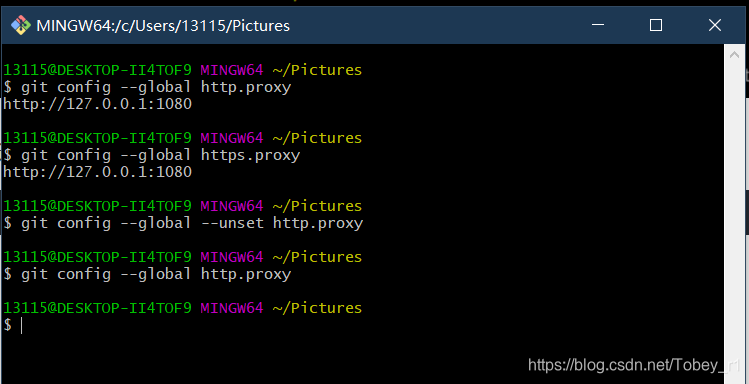
然后再查看一下发现没有这个代理了,当然这只去掉了http.proxy,还有https.proxy没有去掉:
输入
git config --global --unset https.proxy
然后再查看一下:

此时我们输入clone的代码:
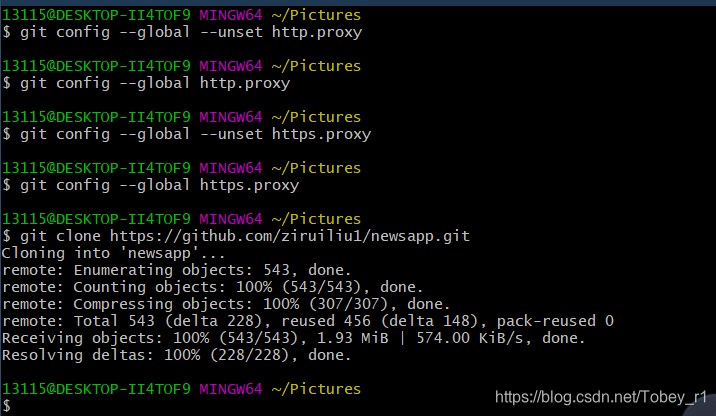
问题已经解决!
觉得我的方法有用的欢迎收藏哦,欢迎讨论!