携手创作,共同成长!这是我参与「掘金日新计划 · 8 月更文挑战」的第13天,点击查看活动详情
切换背景
切换背景的业务代码,我当然不可能也在MainActivity中写,因为现在里面的代码已经够多了,所以就要新建一个页面。在项目的包下新建一个ui包,用于存放除MainActivity之外的所有Activity。这样会比较规范,至于为什么不把MainActivity也放进去,因为目前我还不想放进去。
鼠标右键点击ui → New → Activity → Empty Activity
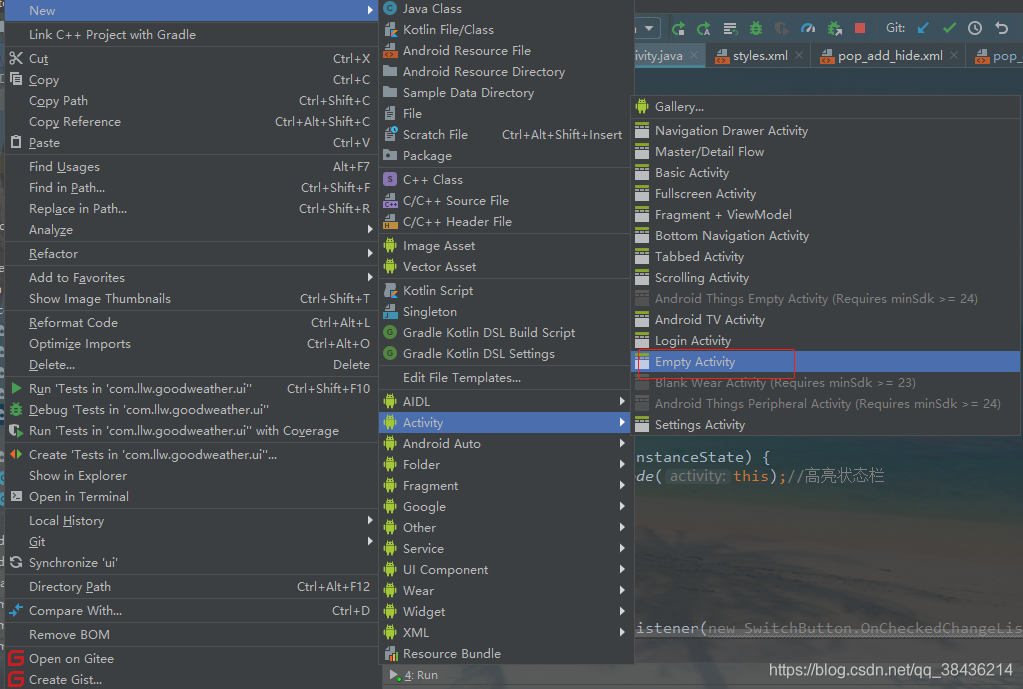
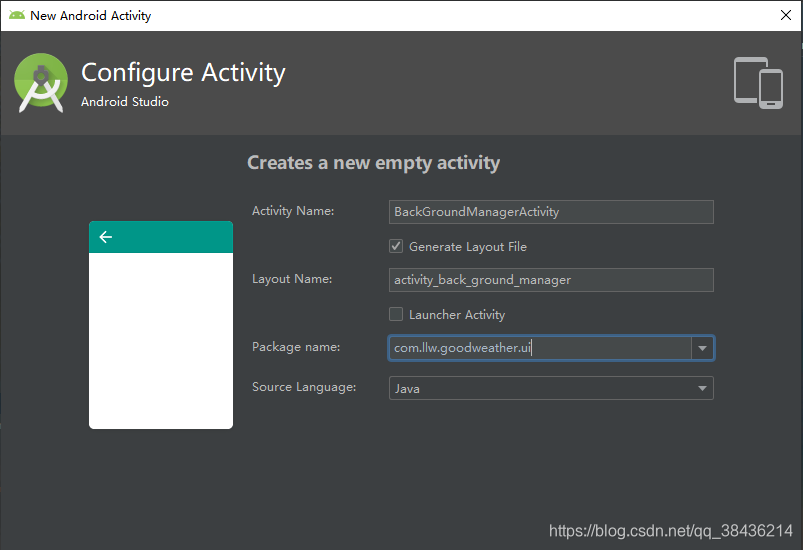 Next即可
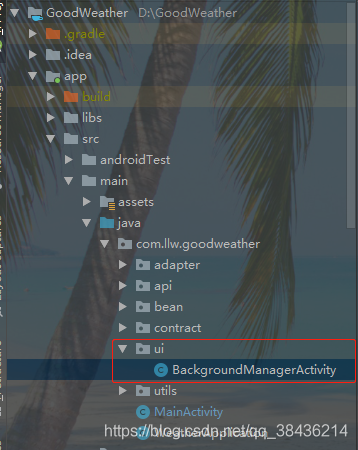 创建好之后修改布局。
修改布局之前,这个要更改一个开关按钮的样式。
创建好之后修改布局。
修改布局之前,这个要更改一个开关按钮的样式。
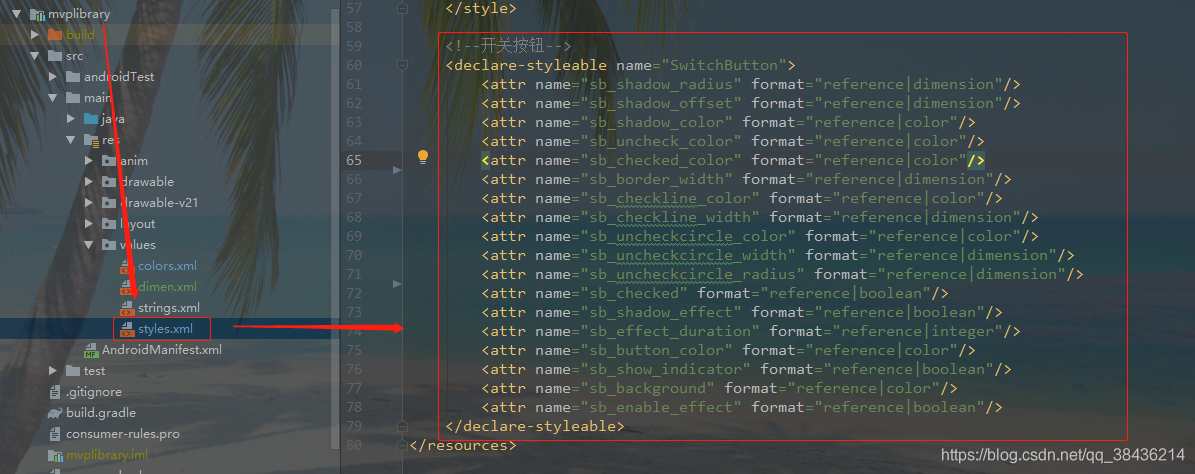 首先是增加样式代码:
	<!--开关按钮-->
    <declare-styleable name="SwitchButton">
        <attr name="sb_shadow_radius" format="reference|dimension"/>
        <attr name="sb_shadow_offset" format="reference|dimension"/>
        <attr name="sb_shadow_color" format="reference|color"/>
        <attr name="sb_uncheck_color" format="reference|color"/>
        <attr name="sb_checked_color" format="reference|color"/>
        <attr name="sb_border_width" format="reference|dimension"/>
        <attr name="sb_checkline_color" format="reference|color"/>
        <attr name="sb_checkline_width" format="reference|dimension"/>
        <attr name="sb_uncheckcircle_color" format="reference|color"/>
        <attr name="sb_uncheckcircle_width" format="reference|dimension"/>
        <attr name="sb_uncheckcircle_radius" format="reference|dimension"/>
        <attr name="sb_checked" format="reference|boolean"/>
        <attr name="sb_shadow_effect" format="reference|boolean"/>
        <attr name="sb_effect_duration" format="reference|integer"/>
        <attr name="sb_button_color" format="reference|color"/>
        <attr name="sb_show_indicator" format="reference|boolean"/>
        <attr name="sb_background" format="reference|color"/>
        <attr name="sb_enable_effect" format="reference|boolean"/>
    </declare-styleable>
然后自定义View
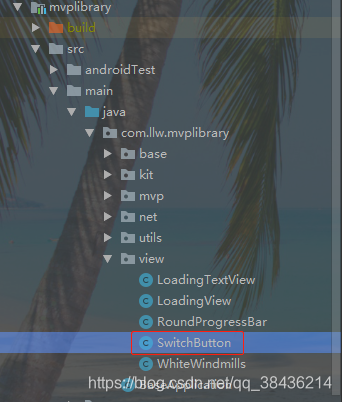 SwitchButton.java代码如下:
package com.llw.mvplibrary.view;
import android.animation.Animator;
import android.animation.ValueAnimator;
import android.annotation.TargetApi;
import android.content.Context;
import android.content.res.Resources;
import android.content.res.TypedArray;
import android.graphics.Canvas;
import android.graphics.Color;
import android.graphics.Paint;
import android.graphics.RectF;
import android.os.Build;
import android.util.AttributeSet;
import android.util.TypedValue;
import android.view.MotionEvent;
import android.view.View;
import android.widget.Checkable;
import com.llw.mvplibrary.R;
/**
* SwitchButton.
*/
public class SwitchButton extends View implements Checkable {
private static final int DEFAULT_WIDTH = dp2pxInt(58);
private static final int DEFAULT_HEIGHT = dp2pxInt(36);
/**
* 动画状态:
* 1.静止
* 2.进入拖动
* 3.处于拖动
* 4.拖动-复位
* 5.拖动-切换
* 6.点击切换
* **/
private final int ANIMATE_STATE_NONE = 0;
private final int ANIMATE_STATE_PENDING_DRAG = 1;
private final int ANIMATE_STATE_DRAGING = 2;
private final int ANIMATE_STATE_PENDING_RESET = 3;
private final int ANIMATE_STATE_PENDING_SETTLE = 4;
private final int ANIMATE_STATE_SWITCH = 5;
public SwitchButton(Context context) {
super(context);
init(context, null);
}
public SwitchButton(Context context, AttributeSet attrs) {
super(context, attrs);
init(context, attrs);
}
public SwitchButton(Context context, AttributeSet attrs, int defStyleAttr) {
super(context, attrs, defStyleAttr);
init(context, attrs);
}
@TargetApi(Build.VERSION_CODES.LOLLIPOP)
public SwitchButton(Context context, AttributeSet attrs, int defStyleAttr, int defStyleRes) {
super(context, attrs, defStyleAttr, defStyleRes);
init(context, attrs);
}
@Override
public final void setPadding(int left, int top, int right, int bottom) {
super.setPadding(0, 0, 0, 0);
}
/**
* 初始化参数
*/
private void init(Context context, AttributeSet attrs) {
TypedArray typedArray = null;
if(attrs != null){
typedArray = context.obtainStyledAttributes(attrs, R.styleable.SwitchButton);
}
shadowEffect = optBoolean(typedArray,
R.styleable.SwitchButton_sb_shadow_effect,
true);
uncheckCircleColor = optColor(typedArray,
R.styleable.SwitchButton_sb_uncheckcircle_color,
0XffAAAAAA);//0XffAAAAAA;
uncheckCircleWidth = optPixelSize(typedArray,
R.styleable.SwitchButton_sb_uncheckcircle_width,
dp2pxInt(1.5f));//dp2pxInt(1.5f);
uncheckCircleOffsetX = dp2px(10);
uncheckCircleRadius = optPixelSize(typedArray,
R.styleable.SwitchButton_sb_uncheckcircle_radius,
dp2px(4));//dp2px(4);
checkedLineOffsetX = dp2px(4);
checkedLineOffsetY = dp2px(4);
shadowRadius = optPixelSize(typedArray,
R.styleable.SwitchButton_sb_shadow_radius,
dp2pxInt(2.5f));//dp2pxInt(2.5f);
shadowOffset = optPixelSize(typedArray,
R.styleable.SwitchButton_sb_shadow_offset,
dp2pxInt(1.5f));//dp2pxInt(1.5f);
shadowColor = optColor(typedArray,
R.styleable.SwitchButton_sb_shadow_color,
0X33000000);//0X33000000;
uncheckColor = optColor(typedArray,
R.styleable.SwitchButton_sb_uncheck_color,
0XffDDDDDD);//0XffDDDDDD;
checkedColor = optColor(typedArray,
R.styleable.SwitchButton_sb_checked_color,
0Xff51d367);//0Xff51d367;
borderWidth = optPixelSize(typedArray,
R.styleable.SwitchButton_sb_border_width,
dp2pxInt(1));//dp2pxInt(1);
checkLineColor = optColor(typedArray,
R.styleable.SwitchButton_sb_checkline_color,
Color.WHITE);//Color.WHITE;
checkLineWidth = optPixelSize(typedArray,
R.styleable.SwitchButton_sb_checkline_width,
dp2pxInt(1f));//dp2pxInt(1.0f);
checkLineLength = dp2px(6);
int buttonColor = optColor(typedArray,
R.styleable.SwitchButton_sb_button_color,
Color.WHITE);//Color.WHITE;
int effectDuration = optInt(typedArray,
R.styleable.SwitchButton_sb_effect_duration,
300);//300;
isChecked = optBoolean(typedArray,
R.styleable.SwitchButton_sb_checked,
false);
showIndicator = optBoolean(typedArray,
R.styleable.SwitchButton_sb_show_indicator,
true);
background = optColor(typedArray,
R.styleable.SwitchButton_sb_background,
Color.WHITE);//Color.WHITE;
enableEffect = optBoolean(typedArray,
R.styleable.SwitchButton_sb_enable_effect,
true);
if(typedArray != null){
typedArray.recycle();
}
paint = new Paint(Paint.ANTI_ALIAS_FLAG);
buttonPaint = new Paint(Paint.ANTI_ALIAS_FLAG);
buttonPaint.setColor(buttonColor);
if(shadowEffect){
buttonPaint.setShadowLayer(
shadowRadius,
0, shadowOffset,
shadowColor);
}
viewState = new ViewState();
beforeState = new ViewState();
afterState = new ViewState();
valueAnimator = ValueAnimator.ofFloat(0f, 1f);
valueAnimator.setDuration(effectDuration);
valueAnimator.setRepeatCount(0);
valueAnimator.addUpdateListener(animatorUpdateListener);
valueAnimator.addListener(animatorListener);
super.setClickable(true);
this.setPadding(0, 0, 0, 0);
if (Build.VERSION.SDK_INT >= Build.VERSION_CODES.HONEYCOMB) {
setLayerType(LAYER_TYPE_SOFTWARE, null);
}
}
@Override
protected void onMeasure(int widthMeasureSpec, int heightMeasureSpec) {
final int widthMode = MeasureSpec.getMode(widthMeasureSpec);
final int heightMode = MeasureSpec.getMode(heightMeasureSpec);
if(widthMode == MeasureSpec.UNSPECIFIED
|| widthMode == MeasureSpec.AT_MOST){
widthMeasureSpec = MeasureSpec.makeMeasureSpec(DEFAULT_WIDTH, MeasureSpec.EXACTLY);
}
if(heightMode == MeasureSpec.UNSPECIFIED
|| heightMode == MeasureSpec.AT_MOST){
heightMeasureSpec = MeasureSpec.makeMeasureSpec(DEFAULT_HEIGHT, MeasureSpec.EXACTLY);
}
super.onMeasure(widthMeasureSpec, heightMeasureSpec);
}
@Override
protected void onSizeChanged(int w, int h, int oldw, int oldh) {
super.onSizeChanged(w, h, oldw, oldh);
float viewPadding = Math.max(shadowRadius + shadowOffset, borderWidth);
height = h - viewPadding - viewPadding;
width = w - viewPadding - viewPadding;
viewRadius = height * .5f;
buttonRadius = viewRadius - borderWidth;
left = viewPadding;
top = viewPadding;
right = w - viewPadding;
bottom = h - viewPadding;
centerX = (left + right) * .5f;
centerY = (top + bottom) * .5f;
buttonMinX = left + viewRadius;
buttonMaxX = right - viewRadius;
if(isChecked()){
setCheckedViewState(viewState);
}else{
setUncheckViewState(viewState);
}
isUiInited = true;
postInvalidate();
}
/**
* @param viewState
*/
private void setUncheckViewState(ViewState viewState){
viewState.radius = 0;
viewState.checkStateColor = uncheckColor;
viewState.checkedLineColor = Color.TRANSPARENT;
viewState.buttonX = buttonMinX;
}
/**
* @param viewState
*/
private void setCheckedViewState(ViewState viewState){
viewState.radius = viewRadius;
viewState.checkStateColor = checkedColor;
viewState.checkedLineColor = checkLineColor;
viewState.buttonX = buttonMaxX;
}
@Override
protected void onDraw(Canvas canvas) {
super.onDraw(canvas);
paint.setStrokeWidth(borderWidth);
paint.setStyle(Paint.Style.FILL);
//绘制白色背景
paint.setColor(background);
drawRoundRect(canvas,
left, top, right, bottom,
viewRadius, paint);
//绘制关闭状态的边框
paint.setStyle(Paint.Style.STROKE);
paint.setColor(uncheckColor);
drawRoundRect(canvas,
left, top, right, bottom,
viewRadius, paint);
//绘制小圆圈
if(showIndicator){
drawUncheckIndicator(canvas);
}
//绘制开启背景色
float des = viewState.radius * .5f;//[0-backgroundRadius*0.5f]
paint.setStyle(Paint.Style.STROKE);
paint.setColor(viewState.checkStateColor);
paint.setStrokeWidth(borderWidth + des * 2f);
drawRoundRect(canvas,
left + des, top + des, right - des, bottom - des,
viewRadius, paint);
//绘制按钮左边绿色长条遮挡
paint.setStyle(Paint.Style.FILL);
paint.setStrokeWidth(1);
drawArc(canvas,
left, top,
left + 2 * viewRadius, top + 2 * viewRadius,
90, 180, paint);
canvas.drawRect(
left + viewRadius, top,
viewState.buttonX, top + 2 * viewRadius,
paint);
//绘制小线条
if(showIndicator){
drawCheckedIndicator(canvas);
}
//绘制按钮
drawButton(canvas, viewState.buttonX, centerY);
}
/**
* 绘制选中状态指示器
* @param canvas
*/
protected void drawCheckedIndicator(Canvas canvas) {
drawCheckedIndicator(canvas,
viewState.checkedLineColor,
checkLineWidth,
left + viewRadius - checkedLineOffsetX, centerY - checkLineLength,
left + viewRadius - checkedLineOffsetY, centerY + checkLineLength,
paint);
}
/**
* 绘制选中状态指示器
* @param canvas
* @param color
* @param lineWidth
* @param sx
* @param sy
* @param ex
* @param ey
* @param paint
*/
protected void drawCheckedIndicator(Canvas canvas,
int color,
float lineWidth,
float sx, float sy, float ex, float ey,
Paint paint) {
paint.setStyle(Paint.Style.STROKE);
paint.setColor(color);
paint.setStrokeWidth(lineWidth);
canvas.drawLine(
sx, sy, ex, ey,
paint);
}
/**
* 绘制关闭状态指示器
* @param canvas
*/
private void drawUncheckIndicator(Canvas canvas) {
drawUncheckIndicator(canvas,
uncheckCircleColor,
uncheckCircleWidth,
right - uncheckCircleOffsetX, centerY,
uncheckCircleRadius,
paint);
}
/**
* 绘制关闭状态指示器
* @param canvas
* @param color
* @param lineWidth
* @param centerX
* @param centerY
* @param radius
* @param paint
*/
protected void drawUncheckIndicator(Canvas canvas,
int color,
float lineWidth,
float centerX, float centerY,
float radius,
Paint paint) {
paint.setStyle(Paint.Style.STROKE);
paint.setColor(color);
paint.setStrokeWidth(lineWidth);
canvas.drawCircle(centerX, centerY, radius, paint);
}
/**
* @param canvas
* @param left
* @param top
* @param right
* @param bottom
* @param startAngle
* @param sweepAngle
* @param paint
*/
private void drawArc(Canvas canvas,
float left, float top,
float right, float bottom,
float startAngle, float sweepAngle,
Paint paint){
if (Build.VERSION.SDK_INT >= Build.VERSION_CODES.LOLLIPOP) {
canvas.drawArc(left, top, right, bottom,
startAngle, sweepAngle, true, paint);
}else{
rect.set(left, top, right, bottom);
canvas.drawArc(rect,
startAngle, sweepAngle, true, paint);
}
}
/**
* @param canvas
* @param left
* @param top
* @param right
* @param bottom
* @param backgroundRadius
* @param paint
*/
private void drawRoundRect(Canvas canvas,
float left, float top,
float right, float bottom,
float backgroundRadius,
Paint paint){
if (Build.VERSION.SDK_INT >= Build.VERSION_CODES.LOLLIPOP) {
canvas.drawRoundRect(left, top, right, bottom,
backgroundRadius, backgroundRadius, paint);
}else{
rect.set(left, top, right, bottom);
canvas.drawRoundRect(rect,
backgroundRadius, backgroundRadius, paint);
}
}
/**
* @param canvas
* @param x px
* @param y px
*/
private void drawButton(Canvas canvas, float x, float y) {
canvas.drawCircle(x, y, buttonRadius, buttonPaint);
paint.setStyle(Paint.Style.STROKE);
paint.setStrokeWidth(1);
paint.setColor(0XffDDDDDD);
canvas.drawCircle(x, y, buttonRadius, paint);
}
@Override
public void setChecked(boolean checked) {
if(checked == isChecked()){
postInvalidate();
return;
}
toggle(enableEffect, false);
}
@Override
public boolean isChecked() {
return isChecked;
}
@Override
public void toggle() {
toggle(true);
}
/**
* 切换状态
* @param animate
*/
public void toggle(boolean animate) {
toggle(animate, true);
}
private void toggle(boolean animate, boolean broadcast) {
if(!isEnabled()){return;}
if(isEventBroadcast){
throw new RuntimeException("should NOT switch the state in method: [onCheckedChanged]!");
}
if(!isUiInited){
isChecked = !isChecked;
if(broadcast){
broadcastEvent();
}
return;
}
if(valueAnimator.isRunning()){
valueAnimator.cancel();
}
if(!enableEffect || !animate){
isChecked = !isChecked;
if(isChecked()){
setCheckedViewState(viewState);
}else{
setUncheckViewState(viewState);
}
postInvalidate();
if(broadcast){
broadcastEvent();
}
return;
}
animateState = ANIMATE_STATE_SWITCH;
beforeState.copy(viewState);
if(isChecked()){
//切换到unchecked
setUncheckViewState(afterState);
}else{
setCheckedViewState(afterState);
}
valueAnimator.start();
}
/**
*
*/
private void broadcastEvent() {
if(onCheckedChangeListener != null){
isEventBroadcast = true;
onCheckedChangeListener.onCheckedChanged(this, isChecked());
}
isEventBroadcast = false;
}
@Override
public boolean onTouchEvent(MotionEvent event) {
if(!isEnabled()){return false;}
int actionMasked = event.getActionMasked();
switch (actionMasked){
case MotionEvent.ACTION_DOWN:{
isTouchingDown = true;
touchDownTime = System.currentTimeMillis();
//取消准备进入拖动状态
removeCallbacks(postPendingDrag);
//预设100ms进入拖动状态
postDelayed(postPendingDrag, 100);
break;
}
case MotionEvent.ACTION_MOVE:{
float eventX = event.getX();
if(isPendingDragState()){
//在准备进入拖动状态过程中,可以拖动按钮位置
float fraction = eventX / getWidth();
fraction = Math.max(0f, Math.min(1f, fraction));
viewState.buttonX = buttonMinX
+ (buttonMaxX - buttonMinX)
* fraction;
}else if(isDragState()){
//拖动按钮位置,同时改变对应的背景颜色
float fraction = eventX / getWidth();
fraction = Math.max(0f, Math.min(1f, fraction));
viewState.buttonX = buttonMinX
+ (buttonMaxX - buttonMinX)
* fraction;
viewState.checkStateColor = (int) argbEvaluator.evaluate(
fraction,
uncheckColor,
checkedColor
);
postInvalidate();
}
break;
}
case MotionEvent.ACTION_UP:{
isTouchingDown = false;
//取消准备进入拖动状态
removeCallbacks(postPendingDrag);
if(System.currentTimeMillis() - touchDownTime <= 300){
//点击时间小于300ms,认为是点击操作
toggle();
}else if(isDragState()){
//在拖动状态,计算按钮位置,设置是否切换状态
float eventX = event.getX();
float fraction = eventX / getWidth();
fraction = Math.max(0f, Math.min(1f, fraction));
boolean newCheck = fraction > .5f;
if(newCheck == isChecked()){
pendingCancelDragState();
}else{
isChecked = newCheck;
pendingSettleState();
}
}else if(isPendingDragState()){
//在准备进入拖动状态过程中,取消之,复位
pendingCancelDragState();
}
break;
}
case MotionEvent.ACTION_CANCEL:{
isTouchingDown = false;
removeCallbacks(postPendingDrag);
if(isPendingDragState()
|| isDragState()){
//复位
pendingCancelDragState();
}
break;
}
}
return true;
}
/**
* 是否在动画状态
* @return
*/
private boolean isInAnimating(){
return animateState != ANIMATE_STATE_NONE;
}
/**
* 是否在进入拖动或离开拖动状态
* @return
*/
private boolean isPendingDragState(){
return animateState == ANIMATE_STATE_PENDING_DRAG
|| animateState == ANIMATE_STATE_PENDING_RESET;
}
/**
* 是否在手指拖动状态
* @return
*/
private boolean isDragState(){
return animateState == ANIMATE_STATE_DRAGING;
}
/**
* 设置是否启用阴影效果
* @param shadowEffect true.启用
*/
public void setShadowEffect(boolean shadowEffect) {
if(this.shadowEffect == shadowEffect){return;}
this.shadowEffect = shadowEffect;
if(this.shadowEffect){
buttonPaint.setShadowLayer(
shadowRadius,
0, shadowOffset,
shadowColor);
}else{
buttonPaint.setShadowLayer(
0,
0, 0,
0);
}
}
public void setEnableEffect(boolean enable){
this.enableEffect = enable;
}
/**
* 开始进入拖动状态
*/
private void pendingDragState() {
if(isInAnimating()){return;}
if(!isTouchingDown){return;}
if(valueAnimator.isRunning()){
valueAnimator.cancel();
}
animateState = ANIMATE_STATE_PENDING_DRAG;
beforeState.copy(viewState);
afterState.copy(viewState);
if(isChecked()){
afterState.checkStateColor = checkedColor;
afterState.buttonX = buttonMaxX;
afterState.checkedLineColor = checkedColor;
}else{
afterState.checkStateColor = uncheckColor;
afterState.buttonX = buttonMinX;
afterState.radius = viewRadius;
}
valueAnimator.start();
}
/**
* 取消拖动状态
*/
private void pendingCancelDragState() {
if(isDragState() || isPendingDragState()){
if(valueAnimator.isRunning()){
valueAnimator.cancel();
}
animateState = ANIMATE_STATE_PENDING_RESET;
beforeState.copy(viewState);
if(isChecked()){
setCheckedViewState(afterState);
}else{
setUncheckViewState(afterState);
}
valueAnimator.start();
}
}
/**
* 动画-设置新的状态
*/
private void pendingSettleState() {
if(valueAnimator.isRunning()){
valueAnimator.cancel();
}
animateState = ANIMATE_STATE_PENDING_SETTLE;
beforeState.copy(viewState);
if(isChecked()){
setCheckedViewState(afterState);
}else{
setUncheckViewState(afterState);
}
valueAnimator.start();
}
@Override
public final void setOnClickListener(OnClickListener l) {}
@Override
public final void setOnLongClickListener(OnLongClickListener l) {}
public void setOnCheckedChangeListener(OnCheckedChangeListener l){
onCheckedChangeListener = l;
}
public interface OnCheckedChangeListener{
void onCheckedChanged(SwitchButton view, boolean isChecked);
}
/*******************************************************/
private static float dp2px(float dp){
Resources r = Resources.getSystem();
return TypedValue.applyDimension(TypedValue.COMPLEX_UNIT_DIP, dp, r.getDisplayMetrics());
}
private static int dp2pxInt(float dp){
return (int) dp2px(dp);
}
private static int optInt(TypedArray typedArray,
int index,
int def) {
if(typedArray == null){return def;}
return typedArray.getInt(index, def);
}
private static float optPixelSize(TypedArray typedArray,
int index,
float def) {
if(typedArray == null){return def;}
return typedArray.getDimension(index, def);
}
private static int optPixelSize(TypedArray typedArray,
int index,
int def) {
if(typedArray == null){return def;}
return typedArray.getDimensionPixelOffset(index, def);
}
private static int optColor(TypedArray typedArray,
int index,
int def) {
if(typedArray == null){return def;}
return typedArray.getColor(index, def);
}
private static boolean optBoolean(TypedArray typedArray,
int index,
boolean def) {
if(typedArray == null){return def;}
return typedArray.getBoolean(index, def);
}
/*******************************************************/
/**
* 阴影半径
*/
private int shadowRadius;
/**
* 阴影Y偏移px
*/
private int shadowOffset;
/**
* 阴影颜色
*/
private int shadowColor ;
/**
* 背景半径
*/
private float viewRadius;
/**
* 按钮半径
*/
private float buttonRadius;
/**
* 背景高
*/
private float height ;
/**
* 背景宽
*/
private float width;
/**
* 背景位置
*/
private float left ;
private float top ;
private float right ;
private float bottom ;
private float centerX;
private float centerY;
/**
* 背景底色
*/
private int background;
/**
* 背景关闭颜色
*/
private int uncheckColor;
/**
* 背景打开颜色
*/
private int checkedColor;
/**
* 边框宽度px
*/
private int borderWidth;
/**
* 打开指示线颜色
*/
private int checkLineColor;
/**
* 打开指示线宽
*/
private int checkLineWidth;
/**
* 打开指示线长
*/
private float checkLineLength;
/**
* 关闭圆圈颜色
*/
private int uncheckCircleColor;
/**
*关闭圆圈线宽
*/
private int uncheckCircleWidth;
/**
*关闭圆圈位移X
*/
private float uncheckCircleOffsetX;
/**
*关闭圆圈半径
*/
private float uncheckCircleRadius;
/**
*打开指示线位移X
*/
private float checkedLineOffsetX;
/**
*打开指示线位移Y
*/
private float checkedLineOffsetY;
/**
* 按钮最左边
*/
private float buttonMinX;
/**
* 按钮最右边
*/
private float buttonMaxX;
/**
* 按钮画笔
*/
private Paint buttonPaint;
/**
* 背景画笔
*/
private Paint paint;
/**
* 当前状态
*/
private ViewState viewState;
private ViewState beforeState;
private ViewState afterState;
private RectF rect = new RectF();
/**
* 动画状态
*/
private int animateState = ANIMATE_STATE_NONE;
/**
*
*/
private ValueAnimator valueAnimator;
private final android.animation.ArgbEvaluator argbEvaluator
= new android.animation.ArgbEvaluator();
/**
*是否选中
*/
private boolean isChecked;
/**
* 是否启用动画
*/
private boolean enableEffect;
/**
* 是否启用阴影效果
*/
private boolean shadowEffect;
/**
* 是否显示指示器
*/
private boolean showIndicator;
/**
* 收拾是否按下
*/
private boolean isTouchingDown = false;
/**
*
*/
private boolean isUiInited = false;
/**
*
*/
private boolean isEventBroadcast = false;
private OnCheckedChangeListener onCheckedChangeListener;
/**
* 手势按下的时刻
*/
private long touchDownTime;
private Runnable postPendingDrag = new Runnable() {
@Override
public void run() {
if(!isInAnimating()){
pendingDragState();
}
}
};
private ValueAnimator.AnimatorUpdateListener animatorUpdateListener
= new ValueAnimator.AnimatorUpdateListener() {
@Override
public void onAnimationUpdate(ValueAnimator animation) {
float value = (Float) animation.getAnimatedValue();
switch (animateState) {
case ANIMATE_STATE_PENDING_SETTLE: {
}
case ANIMATE_STATE_PENDING_RESET: {
}
case ANIMATE_STATE_PENDING_DRAG: {
viewState.checkedLineColor = (int) argbEvaluator.evaluate(
value,
beforeState.checkedLineColor,
afterState.checkedLineColor
);
viewState.radius = beforeState.radius
+ (afterState.radius - beforeState.radius) * value;
if(animateState != ANIMATE_STATE_PENDING_DRAG){
viewState.buttonX = beforeState.buttonX
+ (afterState.buttonX - beforeState.buttonX) * value;
}
viewState.checkStateColor = (int) argbEvaluator.evaluate(
value,
beforeState.checkStateColor,
afterState.checkStateColor
);
break;
}
case ANIMATE_STATE_SWITCH: {
viewState.buttonX = beforeState.buttonX
+ (afterState.buttonX - beforeState.buttonX) * value;
float fraction = (viewState.buttonX - buttonMinX) / (buttonMaxX - buttonMinX);
viewState.checkStateColor = (int) argbEvaluator.evaluate(
fraction,
uncheckColor,
checkedColor
);
viewState.radius = fraction * viewRadius;
viewState.checkedLineColor = (int) argbEvaluator.evaluate(
fraction,
Color.TRANSPARENT,
checkLineColor
);
break;
}
default:
case ANIMATE_STATE_DRAGING: {
}
case ANIMATE_STATE_NONE: {
break;
}
}
postInvalidate();
}
};
private Animator.AnimatorListener animatorListener
= new Animator.AnimatorListener() {
@Override
public void onAnimationStart(Animator animation) {
}
@Override
public void onAnimationEnd(Animator animation) {
switch (animateState) {
case ANIMATE_STATE_DRAGING: {
break;
}
case ANIMATE_STATE_PENDING_DRAG: {
animateState = ANIMATE_STATE_DRAGING;
viewState.checkedLineColor = Color.TRANSPARENT;
viewState.radius = viewRadius;
postInvalidate();
break;
}
case ANIMATE_STATE_PENDING_RESET: {
animateState = ANIMATE_STATE_NONE;
postInvalidate();
break;
}
case ANIMATE_STATE_PENDING_SETTLE: {
animateState = ANIMATE_STATE_NONE;
postInvalidate();
broadcastEvent();
break;
}
case ANIMATE_STATE_SWITCH: {
isChecked = !isChecked;
animateState = ANIMATE_STATE_NONE;
postInvalidate();
broadcastEvent();
break;
}
default:
case ANIMATE_STATE_NONE: {
break;
}
}
}
@Override
public void onAnimationCancel(Animator animation) {
}
@Override
public void onAnimationRepeat(Animator animation) {
}
};
/*******************************************************/
/**
* 保存动画状态
* */
private static class ViewState {
/**
* 按钮x位置[buttonMinX-buttonMaxX]
*/
float buttonX;
/**
* 状态背景颜色
*/
int checkStateColor;
/**
* 选中线的颜色
*/
int checkedLineColor;
/**
* 状态背景的半径
*/
float radius;
ViewState(){}
private void copy(ViewState source){
this.buttonX = source.buttonX;
this.checkStateColor = source.checkStateColor;
this.checkedLineColor = source.checkedLineColor;
this.radius = source.radius;
}
}
}
然后是修改activity_background_manager.xml
<?xml version="1.0" encoding="utf-8"?>
<LinearLayout xmlns:android="http://schemas.android.com/apk/res/android"
    xmlns:app="http://schemas.android.com/apk/res-auto"
    xmlns:tools="http://schemas.android.com/tools"
    android:orientation="vertical"
    android:fitsSystemWindows="true"
    android:layout_width="match_parent"
    android:layout_height="match_parent"
    tools:context=".ui.BackgroundManagerActivity">

    <androidx.appcompat.widget.Toolbar
        android:id="@+id/toolbar"
        android:layout_width="match_parent"
        android:layout_height="?attr/actionBarSize"
        android:background="@color/white"
        app:layout_constraintEnd_toEndOf="parent"
        app:navigationIcon="@mipmap/icon_return"
        app:contentInsetLeft="@dimen/dp_16"
        app:layout_constraintLeft_toLeftOf="parent"
        app:layout_constraintTop_toTopOf="parent"
        app:title=""
        app:popupTheme="@style/AppTheme.PopupOverlay">

        <TextView
            android:layout_width="wrap_content"
            android:layout_height="wrap_content"
            android:layout_gravity="center"
            android:textSize="@dimen/sp_16"
            android:textColor="@color/black"
            android:text="背景管理" />

    </androidx.appcompat.widget.Toolbar>

    <LinearLayout
        android:orientation="vertical"
        android:layout_marginTop="@dimen/dp_8"
        android:layout_width="match_parent"
        android:layout_height="wrap_content">
        <!--每日一图-->
        <LinearLayout
            android:background="@color/white"
            android:paddingLeft="@dimen/dp_16"
            android:paddingRight="@dimen/dp_16"
            android:paddingTop="@dimen/dp_8"
            android:paddingBottom="@dimen/dp_8"
            android:gravity="center_vertical"
            android:orientation="horizontal"
            android:layout_width="match_parent"
            android:layout_height="wrap_content">
            <TextView
                android:text="每日一图"
                android:textColor="@color/black"
                android:textSize="@dimen/sp_16"
                android:layout_width="0dp"
                android:layout_weight="1"
                android:layout_height="wrap_content"/>

            <com.llw.mvplibrary.view.SwitchButton
                android:id="@+id/wb_everyday"
                android:layout_width="wrap_content"
                android:layout_height="wrap_content"/>
        </LinearLayout>
        <!--透明分割线-->
        <View
            android:layout_width="match_parent"
            android:layout_height="@dimen/dp_1"
            android:background="@color/transparent"/>
        <!--图片列表-->
        <LinearLayout
            android:background="@color/white"
            android:paddingLeft="@dimen/dp_16"
            android:paddingRight="@dimen/dp_16"
            android:paddingTop="@dimen/dp_8"
            android:paddingBottom="@dimen/dp_8"
            android:gravity="center_vertical"
            android:orientation="horizontal"
            android:layout_width="match_parent"
            android:layout_height="wrap_content">
            <TextView
                android:text="图片列表"
                android:textColor="@color/black"
                android:textSize="@dimen/sp_16"
                android:layout_width="0dp"
                android:layout_weight="1"
                android:layout_height="wrap_content"/>

            <com.llw.mvplibrary.view.SwitchButton
                android:id="@+id/wb_img_list"
                android:layout_width="wrap_content"
                android:layout_height="wrap_content"/>
        </LinearLayout>
        <View
            android:layout_width="match_parent"
            android:layout_height="@dimen/dp_1"
            android:background="@color/transparent"/>
        <!--手动定义-->
        <LinearLayout
            android:background="@color/white"
            android:paddingLeft="@dimen/dp_16"
            android:paddingRight="@dimen/dp_16"
            android:paddingTop="@dimen/dp_8"
            android:paddingBottom="@dimen/dp_8"
            android:gravity="center_vertical"
            android:orientation="horizontal"
            android:layout_width="match_parent"
            android:layout_height="wrap_content">
            <TextView
                android:text="手动定义"
                android:textColor="@color/black"
                android:textSize="@dimen/sp_16"
                android:layout_width="0dp"
                android:layout_weight="1"
                android:layout_height="wrap_content"/>

            <com.llw.mvplibrary.view.SwitchButton
                android:id="@+id/wb_custom_"
                android:layout_width="wrap_content"
                android:layout_height="wrap_content"/>
        </LinearLayout>
    </LinearLayout>
</LinearLayout>
接下来就是BackgroundManagerActivity.java
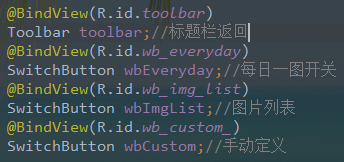
逻辑思路
从布局中可以看出来有三个开关按钮,但是只能开一个,并且开启这个的同时要关闭其他的按钮,所以这个有一个相互的监听事件,并且监听事件里面要对这个按钮的是否开启做一个结果存储,这里会用到缓存,缓存是在项目全局中适用的,所以可以跨页面,比如我在这个页面里面开启了每日一图的按钮,存储值为true,然后在回到MainActivity中时,取出这个缓存里面true,然后根据这个值启用每日一图,达到更换壁纸的目的,这是最简单的操作,至于本地更换背景就比较麻烦一点,会需要先在项目的drawable里面先放几张图片,然后通过弹窗来展示这个图片,点击某一个背景则切换成功,然后弹窗关闭,这时候你的图片列表对应的按钮才会开启,加入你打开弹窗之后并没有选中任何图片,则关闭弹窗的同时也会关闭这个按钮,最后一个手动定义,就是打开手机里面图库,任你选择图片,选择之后立即提交上去,这里要先进行动态权限的申请。同意之后打开相册,好了,目前是这样的。
然后开始写代码吧
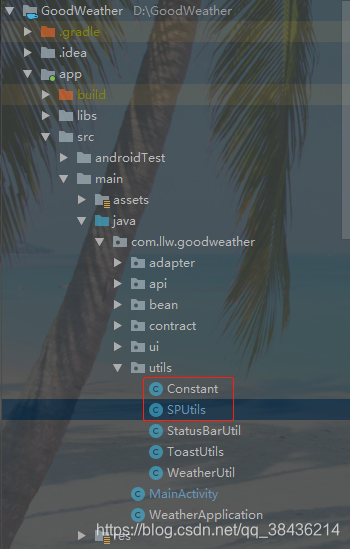 首先创建两个java类
SPUtils.java
首先创建两个java类
SPUtils.java
package com.llw.goodweather.utils;

import android.content.Context;
import android.content.SharedPreferences;

/**
 * sharepref工具类
 */
public class SPUtils {
    private static final String NAME="config";
    public static void putBoolean(String key, boolean value, Context ctx) {
        SharedPreferences sp = ctx.getSharedPreferences(NAME,
                Context.MODE_PRIVATE);
        sp.edit().putBoolean(key, value).commit();
    }

    public static boolean getBoolean(String key, boolean defValue, Context ctx) {
        SharedPreferences sp = ctx.getSharedPreferences(NAME,
                Context.MODE_PRIVATE);
        return sp.getBoolean(key, defValue);
    }

    public static void putString(String key, String value, Context ctx) {
        SharedPreferences sp = ctx.getSharedPreferences(NAME,
                Context.MODE_PRIVATE);
        sp.edit().putString(key, value).commit();
    }

    public static String getString(String key, String defValue, Context ctx) {
        if(ctx!=null){
            SharedPreferences sp = ctx.getSharedPreferences(NAME,
                    Context.MODE_PRIVATE);
            return sp.getString(key, defValue);
        }
        return "";

    }

    public static void putInt(String key, int value, Context ctx) {
        SharedPreferences sp = ctx.getSharedPreferences(NAME,
                Context.MODE_PRIVATE);
        sp.edit().putInt(key, value).commit();
    }


    public static int getInt(String key, int defValue, Context ctx) {
        SharedPreferences sp = ctx.getSharedPreferences(NAME,
                Context.MODE_PRIVATE);
        return sp.getInt(key, defValue);
    }

    public static void remove(String key, Context ctx) {
        SharedPreferences sp = ctx.getSharedPreferences(NAME,
                Context.MODE_PRIVATE);
        sp.edit().remove(key).commit();
    }

}
Constant.java
package com.llw.goodweather.utils;

/**
 * 统一管理缓存中对应的KEY
 */
public class Constant {

    public final static int SUCCESS_CODE = 200;
    public final static String CITY = "city";//市
    public final static String DISTRICT = "district";//区/县
    public final static String EVERYDAY_IMG = "everyday_img";//每日图片开关
    public final static String IMG_LIST = "img_list";//图片列表开关
    public final static String CUSTOM_IMG = "custom_img";//手动定义开关


}
接下来修改mvplibrary中的BaseActivity.java
private static final int FAST_CLICK_DELAY_TIME = 500;
private static long lastClickTime;
//返回
public void Back(Toolbar toolbar){
        toolbar.setNavigationOnClickListener(new View.OnClickListener() {
            @Override
            public void onClick(View v) {
                context.finish();
                if(!isFastClick()) {
                    context.finish();
                }
            }
        });
    }

    // 两次点击间隔不能少于500ms
    public static boolean isFastClick() {
        boolean flag = true;
        long currentClickTime = System.currentTimeMillis();
        if ((currentClickTime - lastClickTime) >= FAST_CLICK_DELAY_TIME ) {
            flag = false;
        }
        lastClickTime = currentClickTime;

        return flag;
    }
在这里写好之后,到时候在Activity中直接调用即可。然后回到BackgroundManagerActivity
 继承BaseActivity之后就可以用它里面的一些方法了。
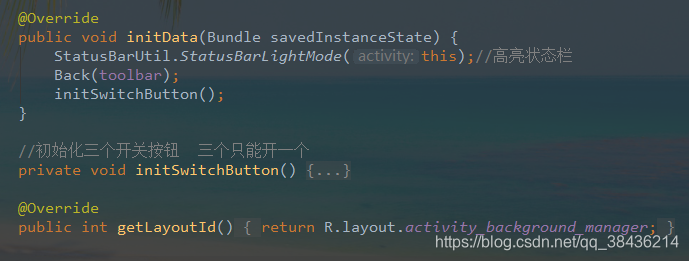 initSwitchButton方法
	//初始化三个开关按钮  三个只能开一个
    private void initSwitchButton() {
        //每日一图按钮开关监听
        wbEveryday.setOnCheckedChangeListener(new SwitchButton.OnCheckedChangeListener() {
            @Override
            public void onCheckedChanged(SwitchButton view, boolean isChecked) {
                if(isChecked){//开
                    SPUtils.putBoolean(Constant.EVERYDAY_IMG,true,context);
                    wbImgList.setChecked(false);
                    wbCustom.setChecked(false);
                }else {//关
                    SPUtils.putBoolean(Constant.EVERYDAY_IMG,false,context);
                }
            }
        });
        //图片列表按钮开关监听
        wbImgList.setOnCheckedChangeListener(new SwitchButton.OnCheckedChangeListener() {
            @Override
            public void onCheckedChanged(SwitchButton view, boolean isChecked) {
                if(isChecked){
                    SPUtils.putBoolean(Constant.IMG_LIST,true,context);
                    wbEveryday.setChecked(false);
                    wbCustom.setChecked(false);
                }else {
                    SPUtils.putBoolean(Constant.IMG_LIST,false,context);
                }
            }
        });
        //手动定义按钮开关监听
        wbCustom.setOnCheckedChangeListener(new SwitchButton.OnCheckedChangeListener() {
            @Override
            public void onCheckedChanged(SwitchButton view, boolean isChecked) {
                if(isChecked){
                    SPUtils.putBoolean(Constant.CUSTOM_IMG,true,context);
                    wbEveryday.setChecked(false);
                    wbImgList.setChecked(false);
                }else {
                    SPUtils.putBoolean(Constant.CUSTOM_IMG,false,context);
                }
            }
        });
    }
然后在MainActivity中指定点击切换背景是页面跳转
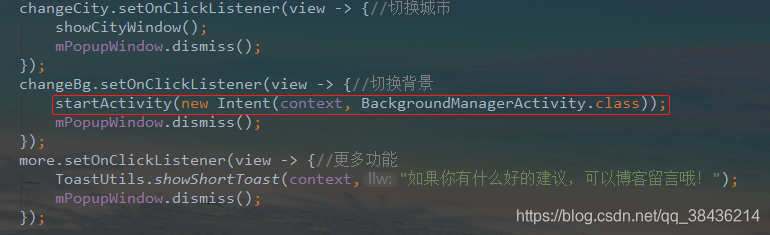 现在你就可以运行一下了,一般情况下是不会报错的,运行出来的结果应该是,三个开关按钮,一开始就是默认都没有打开,但是你也只能开一个,开另一个的时候会关闭这个,你可以试一下。
每日一图的比较简单,只要缓存里面放了这个值就行了。
麻烦的是后面这两个
现在你就可以运行一下了,一般情况下是不会报错的,运行出来的结果应该是,三个开关按钮,一开始就是默认都没有打开,但是你也只能开一个,开另一个的时候会关闭这个,你可以试一下。
每日一图的比较简单,只要缓存里面放了这个值就行了。
麻烦的是后面这两个
图片列表
首先是六张本地壁纸,放在drawable里,这里我还是贴一下这些壁纸吧
img_1.jpg
 img_2.jpg
 img_3.jpg
 img_4.jpg
 img_5.jpg
 img_6.jpg

然后创建一个样式文件,用于图片选中后的样式。
现在colors.xml里面增加两个颜色
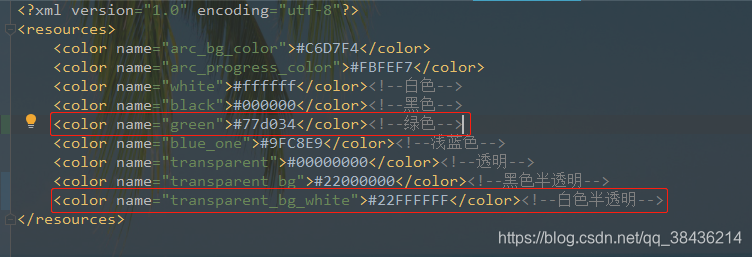
	<color name="green">#77d034</color><!--绿色-->
    <color name="transparent_bg_white">#22FFFFFF</color><!--白色半透明-->
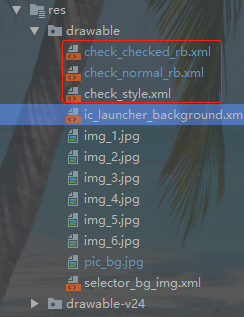 check_style.xml
<?xml version="1.0" encoding="utf-8"?>
<selector xmlns:android="http://schemas.android.com/apk/res/android">
    <item android:drawable="@drawable/check_normal_rb" android:state_checked="false"/>
    <item android:drawable="@drawable/check_checked_rb" android:state_checked="true"/>
</selector>
check_normal_rb.xml
<?xml version="1.0" encoding="utf-8"?>
<shape xmlns:android="http://schemas.android.com/apk/res/android">
    <stroke android:width="1dip" android:color="@color/transparent" />
</shape>
check_checked_rb.xml
<?xml version="1.0" encoding="utf-8"?>
<shape xmlns:android="http://schemas.android.com/apk/res/android">
    <!-- 实心 -->
    <solid android:color="@color/transparent_bg_white" />
    <stroke android:width="2dip" android:color="@color/green" />
</shape>
然后在mvplibrary模块中的build.radle文件中的dependencies{}闭包中增加一个依赖库

	//自由嵌套的RadioGroup
    api 'com.github.fodroid:XRadioGroup:v1.5'
然后Sync一下,否则不会生效的。
然后在app的layout下创建一个新的弹窗布局文件window_img_list.xml
<?xml version="1.0" encoding="utf-8"?>
<LinearLayout xmlns:android="http://schemas.android.com/apk/res/android"
    android:orientation="vertical"
    android:background="@color/white"
    android:layout_width="match_parent"
    android:layout_height="wrap_content">
    <!--自由嵌套的RadioGroup-->
    <me.shihao.library.XRadioGroup
        android:id="@+id/xrg_img"
        android:layout_width="match_parent"
        android:layout_height="wrap_content"
        android:orientation="vertical">
        <!--线性布局 一横排三个 里面以权重自适应宽度-->
        <LinearLayout
            android:padding="8dp"
            android:layout_width="match_parent"
            android:layout_height="wrap_content">
            <RelativeLayout
                android:layout_marginRight="@dimen/dp_4"
                android:layout_width="0dp"
                android:layout_weight="1"
                android:layout_height="200dp">
                <ImageView
                    android:layout_margin="5dp"
                    android:background="@drawable/img_1"
                    android:layout_width="match_parent"
                    android:layout_height="match_parent"/>
                <RadioButton
                    android:id="@+id/rb_img_1"
                    android:button="@null"
                    android:background="@drawable/check_style"
                    android:layout_width="match_parent"
                    android:layout_height="match_parent"/>
            </RelativeLayout>

            <RelativeLayout
                android:layout_marginLeft="@dimen/dp_4"
                android:layout_marginRight="@dimen/dp_4"
                android:layout_width="0dp"
                android:layout_weight="1"
                android:layout_height="200dp">
                <ImageView
                    android:layout_margin="5dp"
                    android:background="@drawable/img_2"
                    android:layout_width="match_parent"
                    android:layout_height="match_parent"/>
                <RadioButton
                    android:id="@+id/rb_img_2"
                    android:button="@null"
                    android:background="@drawable/check_style"
                    android:layout_width="match_parent"
                    android:layout_height="match_parent"/>
            </RelativeLayout>

            <RelativeLayout
                android:layout_marginLeft="@dimen/dp_4"
                android:layout_width="0dp"
                android:layout_weight="1"
                android:layout_height="200dp">
                <ImageView
                    android:layout_margin="5dp"
                    android:background="@drawable/img_3"
                    android:layout_width="match_parent"
                    android:layout_height="match_parent"/>
                <RadioButton
                    android:id="@+id/rb_img_3"
                    android:button="@null"
                    android:background="@drawable/check_style"
                    android:layout_width="match_parent"
                    android:layout_height="match_parent"/>
            </RelativeLayout>
        </LinearLayout>
        <!--线性布局 一横排三个 里面以权重自适应宽度-->
        <LinearLayout
            android:padding="8dp"
            android:layout_width="match_parent"
            android:layout_height="wrap_content">
            <RelativeLayout
                android:layout_marginRight="@dimen/dp_4"
                android:layout_width="0dp"
                android:layout_weight="1"
                android:layout_height="200dp">
                <ImageView
                    android:layout_margin="5dp"
                    android:background="@drawable/img_4"
                    android:layout_width="match_parent"
                    android:layout_height="match_parent"/>
                <RadioButton
                    android:id="@+id/rb_img_4"
                    android:button="@null"
                    android:background="@drawable/check_style"
                    android:layout_width="match_parent"
                    android:layout_height="match_parent"/>
            </RelativeLayout>

            <RelativeLayout
                android:layout_marginLeft="@dimen/dp_4"
                android:layout_marginRight="@dimen/dp_4"
                android:layout_width="0dp"
                android:layout_weight="1"
                android:layout_height="200dp">
                <ImageView
                    android:layout_margin="5dp"
                    android:background="@drawable/img_5"
                    android:layout_width="match_parent"
                    android:layout_height="match_parent"/>
                <RadioButton
                    android:id="@+id/rb_img_5"
                    android:button="@null"
                    android:background="@drawable/check_style"
                    android:layout_width="match_parent"
                    android:layout_height="match_parent"/>
            </RelativeLayout>

            <RelativeLayout
                android:layout_marginLeft="@dimen/dp_4"
                android:layout_width="0dp"
                android:layout_weight="1"
                android:layout_height="200dp">
                <ImageView
                    android:layout_margin="5dp"
                    android:background="@drawable/img_6"
                    android:layout_width="match_parent"
                    android:layout_height="match_parent"/>
                <RadioButton
                    android:id="@+id/rb_img_6"
                    android:button="@null"
                    android:background="@drawable/check_style"
                    android:layout_width="match_parent"
                    android:layout_height="match_parent"/>
            </RelativeLayout>
        </LinearLayout>

    </me.shihao.library.XRadioGroup>
</LinearLayout>
然后在BackgroundManagerActivity.java中用弹窗显示
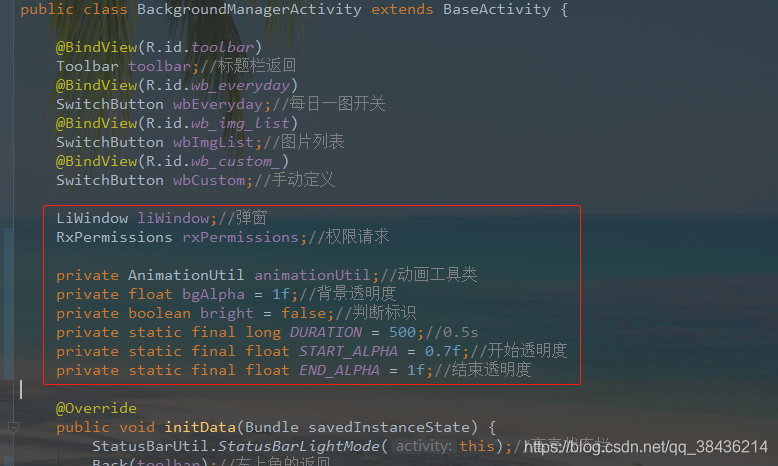
	LiWindow liWindow;//弹窗
    RxPermissions rxPermissions;//权限请求

    private AnimationUtil animationUtil;//动画工具类
    private float bgAlpha = 1f;//背景透明度
    private boolean bright = false;//判断标识
    private static final long DURATION = 500;//0.5s
    private static final float START_ALPHA = 0.7f;//开始透明度
    private static final float END_ALPHA = 1f;//结束透明度
找次的弹窗我打算底部显示出现,里面的动画文件早就已经写好了,在前几篇就有,如果你是一步一步跟著我写过来的,那么就不会有问题,现在主要是修改LiWindow.java中的**showBottomPopupWindow()**方法,修改后的代码如下:
 	/**
     * 底部显示
     * @param mView
     */
    public void showBottomPopupWindow(View mView,PopupWindow.OnDismissListener onDismissListener) {
        mPopupWindow = new PopupWindow(mView,
                ViewGroup.LayoutParams.MATCH_PARENT, ViewGroup.LayoutParams.WRAP_CONTENT, true);
        mPopupWindow.setContentView(mView);
        mPopupWindow.setOutsideTouchable(true);//点击空白处不关闭弹窗  true为关闭
        mPopupWindow.setFocusable(true);
        mPopupWindow.setAnimationStyle(R.style.AnimationBottomFade); //设置动画
        mPopupWindow.showAtLocation(mView, Gravity.BOTTOM, 0, 0);
        mPopupWindow.setOnDismissListener(onDismissListener);
    }
主要是将里面的窗口关闭方法的监听放在里传入参数里,这样既可以在Activity中操作弹窗关闭时的事件了。 接下来是弹窗的使用
 /**
     * 显示图片弹窗
     */
    private void showImgWindow() {
        liWindow = new LiWindow(context);
        final View view = LayoutInflater.from(context).inflate(R.layout.window_img_list, null);
        XRadioGroup xRadioGroup = (XRadioGroup) view.findViewById(R.id.xrg_img);
        //显示弹窗的时候,取缓存,判断里面有没有选中过图片
        int position = SPUtils.getInt(Constant.IMG_POSITION, -1, context);
        RadioButton rbImg1 = (RadioButton) view.findViewById(R.id.rb_img_1);
        RadioButton rbImg2 = (RadioButton) view.findViewById(R.id.rb_img_2);
        RadioButton rbImg3 = (RadioButton) view.findViewById(R.id.rb_img_3);
        RadioButton rbImg4 = (RadioButton) view.findViewById(R.id.rb_img_4);
        RadioButton rbImg5 = (RadioButton) view.findViewById(R.id.rb_img_5);
        RadioButton rbImg6 = (RadioButton) view.findViewById(R.id.rb_img_6);
        switch (position) {
            case 0:
                rbImg1.setChecked(true);
                break;
            case 1:
                rbImg2.setChecked(true);
                break;
            case 2:
                rbImg3.setChecked(true);
                break;
            case 3:
                rbImg4.setChecked(true);
                break;
            case 4:
                rbImg5.setChecked(true);
                break;
            case 5:
                rbImg6.setChecked(true);
                break;
        }
        //xRadioGroup的选中监听
        xRadioGroup.setOnCheckedChangeListener(new XRadioGroup.OnCheckedChangeListener() {
            @Override
            public void onCheckedChanged(XRadioGroup xRadioGroup, int i) {
                //得出选中id对应的RadioButton,从而知道选中的是哪一个,并放入缓存,0~5
                switch (xRadioGroup.getCheckedRadioButtonId()) {
                    case R.id.rb_img_1:
                        SPUtils.putInt(Constant.IMG_POSITION, 0, context);
                        liWindow.closePopupWindow();
                        break;
                    case R.id.rb_img_2:
                        SPUtils.putInt(Constant.IMG_POSITION, 1, context);
                        liWindow.closePopupWindow();
                        break;
                    case R.id.rb_img_3:
                        SPUtils.putInt(Constant.IMG_POSITION, 2, context);
                        liWindow.closePopupWindow();
                        break;
                    case R.id.rb_img_4:
                        SPUtils.putInt(Constant.IMG_POSITION, 3, context);
                        liWindow.closePopupWindow();
                        break;
                    case R.id.rb_img_5:
                        SPUtils.putInt(Constant.IMG_POSITION, 4, context);
                        liWindow.closePopupWindow();
                        break;
                    case R.id.rb_img_6:
                        SPUtils.putInt(Constant.IMG_POSITION, 5, context);
                        liWindow.closePopupWindow();
                        break;
                    default:
                        SPUtils.putInt(Constant.IMG_POSITION, 5, context);
                        break;
                }
                ToastUtils.showShortToast(context,"已更换壁纸");

            }
        });
        //弹窗关闭监听  弹窗关闭时,如果什么都没有选中,则自然不会有缓存中的取会0~5,所以当为-1时,关闭图片列表的开关
        PopupWindow.OnDismissListener onDismissListener = new PopupWindow.OnDismissListener() {
            @Override
            public void onDismiss() {
                toggleBright();
                int position = SPUtils.getInt(Constant.IMG_POSITION, -1, context);
                if (position != -1) {
                    wbImgList.setChecked(true);
                } else {
                    wbImgList.setChecked(false);
                }
            }
        };
        liWindow.showBottomPopupWindow(view, onDismissListener);//显示弹窗 ,传入关闭弹窗监听

    }

    /**
     * 计算动画时间
     */
    private void toggleBright() {
        // 三个参数分别为:起始值 结束值 时长,那么整个动画回调过来的值就是从0.5f--1f的
        animationUtil.setValueAnimator(START_ALPHA, END_ALPHA, DURATION);
        animationUtil.addUpdateListener(new AnimationUtil.UpdateListener() {
            @Override
            public void progress(float progress) {
                // 此处系统会根据上述三个值,计算每次回调的值是多少,我们根据这个值来改变透明度
                bgAlpha = bright ? progress : (START_ALPHA + END_ALPHA - progress);
                backgroundAlpha(bgAlpha);
            }
        });
        animationUtil.addEndListner(new AnimationUtil.EndListener() {
            @Override
            public void endUpdate(Animator animator) {
                // 在一次动画结束的时候,翻转状态
                bright = !bright;
            }
        });
        animationUtil.startAnimator();
    }

    /**
     * 此方法用于改变背景的透明度,从而达到“变暗”的效果
     */
    private void backgroundAlpha(float bgAlpha) {
        WindowManager.LayoutParams lp = getWindow().getAttributes();
        // 0.0-1.0
        lp.alpha = bgAlpha;
        getWindow().setAttributes(lp);
        // everything behind this window will be dimmed.
        // 此方法用来设置浮动层,防止部分手机变暗无效
        getWindow().addFlags(WindowManager.LayoutParams.FLAG_DIM_BEHIND);
    }
注释都写在代码里面了,可能一开始你会看到云里雾里,不过我相信你会明白的,接下来就是这个弹窗的显示调用
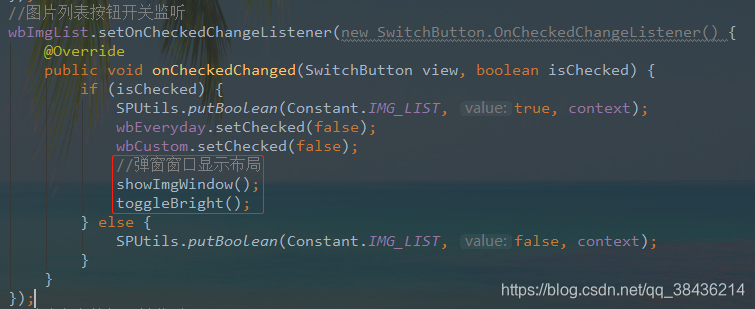 到这里图片列表就写完了。你不妨运行一下
手动定义
在Constant.java
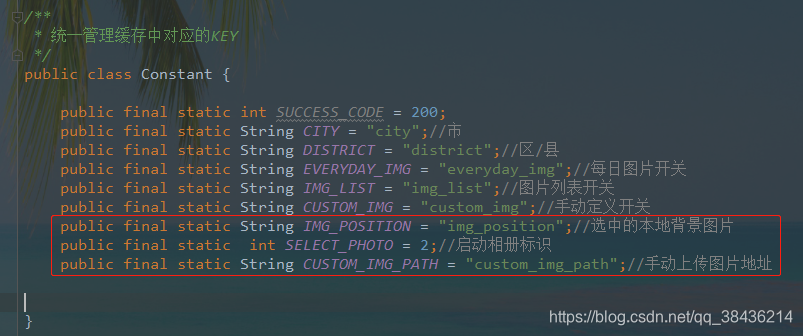 红框中为新增的Key
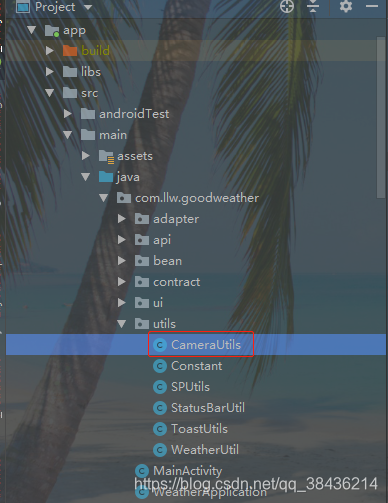 下面的内容会用到一个相机相册的工具类,代码我贴一下:
package com.llw.goodweather.utils;

import android.annotation.TargetApi;
import android.content.ContentUris;
import android.content.ContentValues;
import android.content.Context;
import android.content.Intent;
import android.database.Cursor;
import android.graphics.Bitmap;
import android.graphics.BitmapFactory;
import android.graphics.Matrix;
import android.media.ExifInterface;
import android.net.Uri;
import android.os.Build;
import android.os.Environment;
import android.provider.DocumentsContract;
import android.provider.MediaStore;
import android.util.Log;
import android.widget.ImageView;

import java.io.ByteArrayInputStream;
import java.io.ByteArrayOutputStream;
import java.io.File;
import java.io.IOException;

/**
 * 相机、相册工具类
 */
public class CameraUtils {
    public static Intent getTakePhotoIntent(Context context, File outputImagepath){
        //获取系統版本
        int currentapiVersion = Build.VERSION.SDK_INT;
        // 激活相机
        Intent intent = new Intent(MediaStore.ACTION_IMAGE_CAPTURE);
        // 判断存储卡是否可以用,可用进行存储
        if (hasSdcard()) {
            if (currentapiVersion < 24) {
                // 从文件中创建uri
                Uri uri = Uri.fromFile(outputImagepath);
                intent.putExtra(MediaStore.EXTRA_OUTPUT, uri);
            } else {
                //兼容android7.0 使用共享文件的形式
                ContentValues contentValues = new ContentValues(1);
                contentValues.put(MediaStore.Images.Media.DATA, outputImagepath.getAbsolutePath());
                Uri uri = context.getApplicationContext().getContentResolver().insert(MediaStore.Images.Media.EXTERNAL_CONTENT_URI, contentValues);
                intent.putExtra(MediaStore.EXTRA_OUTPUT, uri);
            }
        }
        return intent;
    }

    public static Intent getSelectPhotoIntent(){
        Intent intent = new Intent("android.intent.action.GET_CONTENT");
        intent.setType("image/*");
        return intent;
    }
    /*
     * 判断sdcard是否被挂载
     */
    public static boolean hasSdcard() {
        return Environment.getExternalStorageState().equals(
                Environment.MEDIA_MOUNTED);
    }

    /**
     * 4.4及以上系统处理图片的方法
     */
    @TargetApi(Build.VERSION_CODES.KITKAT)
    public static String getImgeOnKitKatPath(Intent data, Context context) {
        String imagePath = null;
        Uri uri = data.getData();
        Log.d("uri=intent.getData :", "" + uri);
        if (DocumentsContract.isDocumentUri(context, uri)) {
            String docId = DocumentsContract.getDocumentId(uri);        //数据表里指定的行
            Log.d("getDocumentId(uri) :", "" + docId);
            Log.d("uri.getAuthority() :", "" + uri.getAuthority());
            if ("com.android.providers.media.documents".equals(uri.getAuthority())) {
                String id = docId.split(":")[1];
                String selection = MediaStore.Images.Media._ID + "=" + id;
                imagePath = getImagePath(MediaStore.Images.Media.EXTERNAL_CONTENT_URI, selection,context);
            } else if ("com.android.providers.downloads.documents".equals(uri.getAuthority())) {
                Uri contentUri = ContentUris.withAppendedId(Uri.parse("content://downloads/public_downloads"), Long.valueOf(docId));
                imagePath = getImagePath(contentUri, null,context);
            }

        } else if ("content".equalsIgnoreCase(uri.getScheme())) {
            imagePath = getImagePath(uri, null,context);
        }
        return imagePath;
    }

    /**
     * 通过uri和selection来获取真实的图片路径,从相册获取图片时要用
     */
    public static String getImagePath(Uri uri, String selection, Context context) {
        String path = null;
        Cursor cursor = context.getContentResolver().query(uri, null, selection, null, null);
        if (cursor != null) {
            if (cursor.moveToFirst()) {
                path = cursor.getString(cursor.getColumnIndex(MediaStore.Images.Media.DATA));
            }
            cursor.close();
        }
        return path;
    }
    //改变拍完照后图片方向不正的问题
    public static void ImgUpdateDirection(String filepath, Bitmap orc_bitmap, ImageView iv) {
        int digree = 0;//图片旋转的角度
        //根据图片的URI获取图片的绝对路径
        Log.i("tag", ">>>>>>>>>>>>>开始");
        //String filepath = ImgUriDoString.getRealFilePath(getApplicationContext(), uri);
        Log.i("tag", "》》》》》》》》》》》》》》》" + filepath);
        //根据图片的filepath获取到一个ExifInterface的对象
        ExifInterface exif = null;
        try {
            exif = new ExifInterface(filepath);
            Log.i("tag", "exif》》》》》》》》》》》》》》》" + exif);
            if (exif != null) {

                // 读取图片中相机方向信息
                int ori = exif.getAttributeInt(ExifInterface.TAG_ORIENTATION, ExifInterface.ORIENTATION_UNDEFINED);

                // 计算旋转角度
                switch (ori) {
                    case ExifInterface.ORIENTATION_ROTATE_90:
                        digree = 90;
                        break;
                    case ExifInterface.ORIENTATION_ROTATE_180:
                        digree = 180;
                        break;
                    case ExifInterface.ORIENTATION_ROTATE_270:
                        digree = 270;
                        break;
                    default:
                        digree = 0;
                        break;

                }

            }
            //如果图片不为0
            if (digree != 0) {
                // 旋转图片
                Matrix m = new Matrix();
                m.postRotate(digree);
                orc_bitmap = Bitmap.createBitmap(orc_bitmap, 0, 0, orc_bitmap.getWidth(),
                        orc_bitmap.getHeight(), m, true);
            }
            if (orc_bitmap != null) {
                iv.setImageBitmap(orc_bitmap);
            }
        } catch (IOException e) {
            e.printStackTrace();
            exif = null;
        }
    }

    /**
     * 4.4以下系统处理图片的方法
     */
    public static String getImageBeforeKitKatPath(Intent data, Context context) {
        Uri uri = data.getData();
        String imagePath = getImagePath(uri, null,context);
        return imagePath;
    }

    //比例压缩
    public static Bitmap comp(Bitmap image) {
        ByteArrayOutputStream baos = new ByteArrayOutputStream();
        image.compress(Bitmap.CompressFormat.JPEG, 100, baos);
        if (baos.toByteArray().length / 1024 > 5120) {//判断如果图片大于5M,进行压缩避免在生成图片(BitmapFactory.decodeStream)时溢出
            baos.reset();//重置baos即清空baos
            image.compress(Bitmap.CompressFormat.JPEG, 50, baos);//这里压缩50%,把压缩后的数据存放到baos中
        }
        ByteArrayInputStream isBm = new ByteArrayInputStream(baos.toByteArray());
        BitmapFactory.Options newOpts = new BitmapFactory.Options();
        //开始读入图片,此时把options.inJustDecodeBounds 设回true了
        newOpts.inJustDecodeBounds = true;
        Bitmap bitmap = BitmapFactory.decodeStream(isBm, null, newOpts);
        newOpts.inJustDecodeBounds = false;
        int w = newOpts.outWidth;
        int h = newOpts.outHeight;
        //现在主流手机比较多是800*480分辨率,所以高和宽我们设置为
        float hh = 800f;//这里设置高度为800f
        float ww = 480f;//这里设置宽度为480f
        //缩放比。由于是固定比例缩放,只用高或者宽其中一个数据进行计算即可
        int be = 1;//be=1表示不缩放
        if (w > h && w > ww) {//如果宽度大的话根据宽度固定大小缩放
            be = (int) (newOpts.outWidth / ww);
        } else if (w < h && h > hh) {//如果高度高的话根据宽度固定大小缩放
            be = (int) (newOpts.outHeight / hh);
        }
        if (be <= 0)
            be = 1;
        newOpts.inSampleSize = be;//设置缩放比例
        newOpts.inPreferredConfig = Bitmap.Config.RGB_565;//降低图片从ARGB888到RGB565
        //重新读入图片,注意此时已经把options.inJustDecodeBounds 设回false了
        isBm = new ByteArrayInputStream(baos.toByteArray());
        bitmap = BitmapFactory.decodeStream(isBm, null, newOpts);
        return bitmap;//压缩好比例大小后再进行质量压缩
    }
}
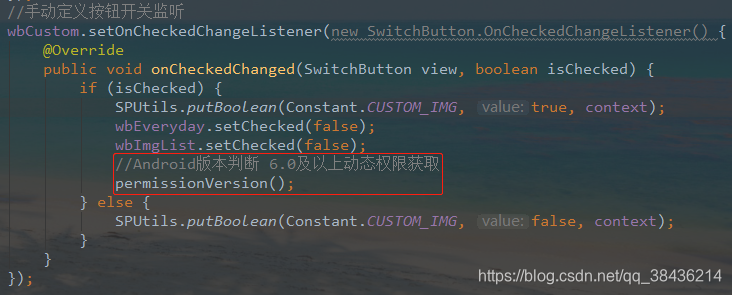
手动定义,顾名思义,就是打开本地相册,所以首先得版本判断,然后是权限请求,打开相册,返回图片的路径。
	//权限判断
    private void permissionVersion() {
        Intent intent = new Intent();
        if (Build.VERSION.SDK_INT >= 23) {//6.0或6.0以上
            //动态权限申请
            permissionsRequest();
        } else {//6.0以下
            //发现只要权限在AndroidManifest.xml中注册过,均会认为该权限granted  提示一下即可
            if (Build.VERSION.SDK_INT <19) {
                intent.setAction(Intent.ACTION_GET_CONTENT);
            }else {
                intent.setAction(Intent.ACTION_OPEN_DOCUMENT);
            }
            startActivityForResult(intent, SELECT_PHOTO);
        }

    }

    //动态权限申请
    private void permissionsRequest() {//使用这个框架需要制定JDK版本,建议用1.8
        rxPermissions = new RxPermissions(context);
        rxPermissions.request(Manifest.permission.WRITE_EXTERNAL_STORAGE)
                .subscribe(granted -> {
                    if (granted) {//申请成功
                        //得到权限之后打开本地相册
                        Intent selectPhotoIntent = CameraUtils.getSelectPhotoIntent();
                        startActivityForResult(selectPhotoIntent, SELECT_PHOTO);
                    } else {//申请失败
                        wbCustom.setChecked(false);
                        ToastUtils.showShortToast(this, "权限未开启");
                    }
                });
    }
返回结果中获取图片地址,然后放入缓存中
	/**
     * Activity返回结果
     * @param requestCode
     * @param resultCode
     * @param data
     */
    @Override
    protected void onActivityResult(int requestCode, int resultCode, Intent data) {
        super.onActivityResult(requestCode, resultCode, data);
        switch (requestCode) {
            //打开相册后返回
            case SELECT_PHOTO:
                if (resultCode == RESULT_OK) {
                    String imagePath = null;
                    //判断手机系统版本号
                    if (Build.VERSION.SDK_INT > 19) {
                        //4.4及以上系统使用这个方法处理图片
                        imagePath = CameraUtils.getImgeOnKitKatPath(data, this);
                    } else {
                        imagePath = CameraUtils.getImageBeforeKitKatPath(data, this);
                    }
                    displayImage(imagePath);
                }
                break;
            default:
                break;
        }
    }

    /**
     * 从相册获取完图片(根据图片路径显示图片)
     */
    private void displayImage(String imagePath) {
        if (!TextUtils.isEmpty(imagePath)) {
            //将本地上传选中的图片地址放入缓存,当手动定义开关打开时,取出缓存中的图片地址,显示为背景
            SPUtils.putString(Constant.CUSTOM_IMG_PATH, imagePath, context);
            ToastUtils.showShortToast(context,"已更换为你选择的壁纸");
        } else {
            wbCustom.setChecked(true);//关闭手动定义开关
            ToastUtils.showShortToast(context,"图片获取失败");
        }
    }
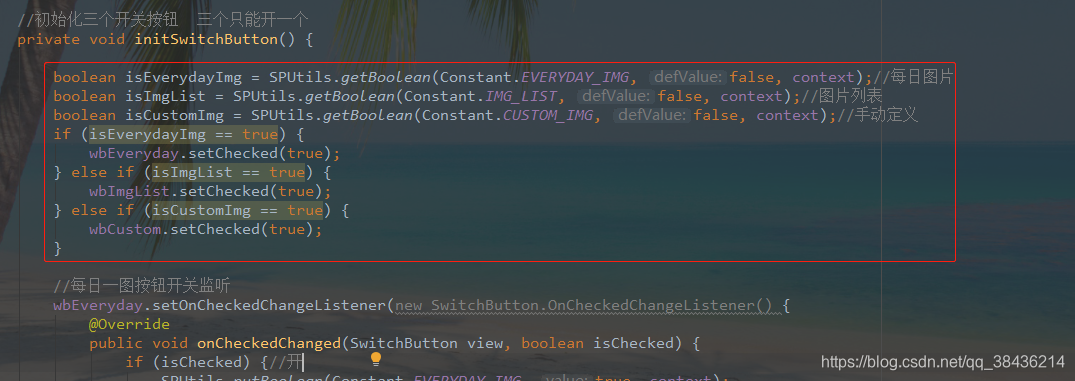
		boolean isEverydayImg = SPUtils.getBoolean(Constant.EVERYDAY_IMG, false, context);//每日图片
        boolean isImgList = SPUtils.getBoolean(Constant.IMG_LIST, false, context);//图片列表
        boolean isCustomImg = SPUtils.getBoolean(Constant.CUSTOM_IMG, false, context);//手动定义
        if (isEverydayImg == true) {
            wbEveryday.setChecked(true);
        } else if (isImgList == true) {
            wbImgList.setChecked(true);
        } else if (isCustomImg == true) {
            wbCustom.setChecked(true);
        }
完成这一步之后,这个BackgroundManagerActivity.java的代码就写完了,但具体的功能还没有完成,因为MainActivity才是显示你这个背景的地方啊。
回来MainActivity.java
这里要聊一下关于Actiivty的生命周期的问题,但是鉴于本篇博客的内容和字数已经够多了,所以我放一个链接Activity生命周期,你可以去看看这个生命周期,否则我后面的内容你就不是很能理解为什么。
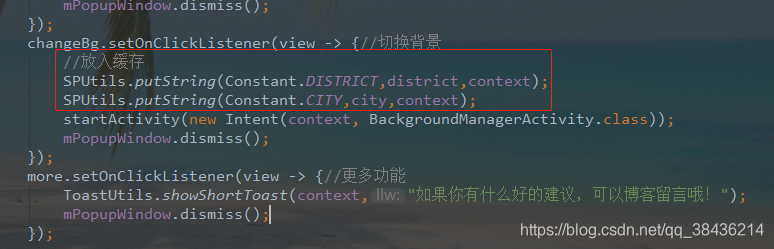
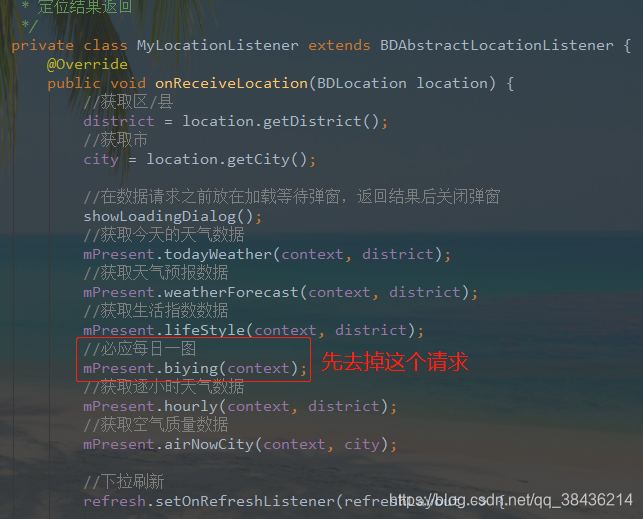 然后在跳转壁纸管理页面的时候增加当前页面区/县、市的缓存,当在回到MainActivity时,取出缓存中的值,然后进行接口请求。
	@Override
    protected void onResume() {
        super.onResume();
        showLoadingDialog();//在数据请求之前放在加载等待弹窗,返回结果后关闭弹窗
        if(district == null){
            //取出缓存
            district = SPUtils.getString(Constant.DISTRICT,"",context);
            city = SPUtils.getString(Constant.CITY,"",context);
        }

        isOpenChangeBg();//是否开启了切换背景

        //获取今天的天气数据
        mPresent.todayWeather(context, district);
        //获取天气预报数据
        mPresent.weatherForecast(context, district);
        //获取生活指数数据
        mPresent.lifeStyle(context, district);
        //获取逐小时天气数据
        mPresent.hourly(context, district);
        //获取空气质量数据
        mPresent.airNowCity(context, city);
    }

    //判断是否开启了切换背景,没有开启则用默认的背景
    private void isOpenChangeBg() {
        boolean isEverydayImg = SPUtils.getBoolean(Constant.EVERYDAY_IMG,false,context);//每日图片
        boolean isImgList = SPUtils.getBoolean(Constant.IMG_LIST,false,context);//图片列表
        boolean isCustomImg = SPUtils.getBoolean(Constant.CUSTOM_IMG,false,context);//手动定义
        //因为只有有一个为true,其他两个就都会是false,所以可以一个一个的判断
        if(isEverydayImg != true && isImgList != true && isCustomImg != true){
            //当所有开关都没有打开的时候用默认的图片
            bg.setBackgroundResource(R.drawable.pic_bg);
        }else {
            if(isEverydayImg!=false){//开启每日一图
                mPresent.biying(context);
            }else if(isImgList!=false){//开启图片列表
                int position = SPUtils.getInt(Constant.IMG_POSITION,-1,context);
                switch (position){
                    case 0:
                        bg.setBackgroundResource(R.drawable.img_1);
                        break;
                    case 1:
                        bg.setBackgroundResource(R.drawable.img_2);
                        break;
                    case 2:
                        bg.setBackgroundResource(R.drawable.img_3);
                        break;
                    case 3:
                        bg.setBackgroundResource(R.drawable.img_4);
                        break;
                    case 4:
                        bg.setBackgroundResource(R.drawable.img_5);
                        break;
                    case 5:
                        bg.setBackgroundResource(R.drawable.img_6);
                        break;
                }
            }else if(isCustomImg != false){
                String imgPath = SPUtils.getString(Constant.CUSTOM_IMG_PATH,"",context);
                Glide.with(context)
                        .asBitmap()
                        .load(imgPath)
                        .into(new SimpleTarget<Bitmap>() {
                            @Override
                            public void onResourceReady(Bitmap resource, Transition<? super Bitmap> transition) {
                                Drawable drawable = new BitmapDrawable(context.getResources(), resource);
                                bg.setBackground(drawable);
                            }
                        });
            }
        }
    }
到这一步,页面就算是真正的写完了。说实话写博客是一个耗费脑力和体力的活,思路很重要啊。
源码地址:GoodWeather 欢迎 Star 和 Fork